Bulletproof BLE Reconnects for iOS & Android
Bluetooth Low Energy links don't fail in the lab, they fail in the real world. Phones roam between rooms, radios get noisy, apps get backgrounded, and peripherals reboot at the worst possible moment. After shipping connected devices at scale, the lesson is that reliability isn't about avoiding disconnects, it's about recovering predictably under OS quirks, RF chaos, and user behavior you don't control.
The gap between "usually works" and "works reliably" comes down to your reconnect strategy. What breaks naive approaches: race conditions, where your app's connection state fights with iOS CoreBluetooth or Android's GATT stack, attempting reconnection while the OS is still cleaning up creates ghost connections where your app thinks it's connected but can't read services. Battery drain, fixed-interval retries at 5-second intervals consume 40-60mA continuously, your "all-day battery" device dies in 6 hours. Cache poisoning, iOS caches connection parameters (PHY, MTU, bonding keys) aggressively, when your peripheral reboots or rotates addresses, iOS keeps trying stale parameters for 15-30 seconds before timing out. Thundering herd, when a peripheral recovers from an outage, hundreds of clients simultaneously reconnecting overwhelm it, creating cascade failures.
At Hoomanely we build continuous pet health monitoring across wearables and mobile apps, missed reconnections mean missed health signals. These patterns let us capture high-fidelity activity and behaviour streams that pet parents and vets can trust for medical decisions.
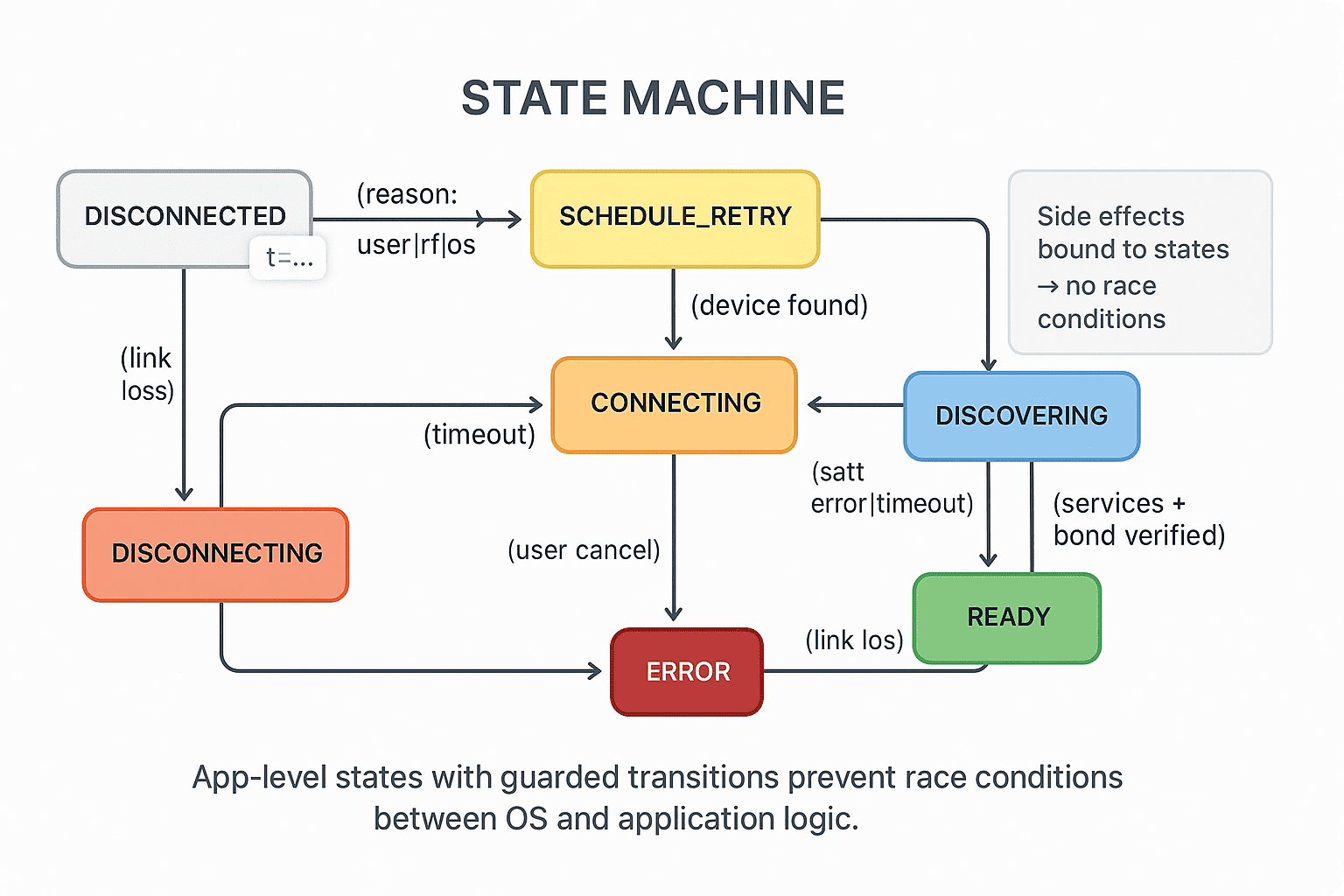
Pillar 1: explicit state machine
App-level states guard every transition, making impossible states unrepresentable. This matters because all side effects, cache clearing, wake locks, background tasks, get bound to states rather than scattered across callbacks. You can test transitions deterministically without real hardware.
Pillar 2: exponential backoff with jitter
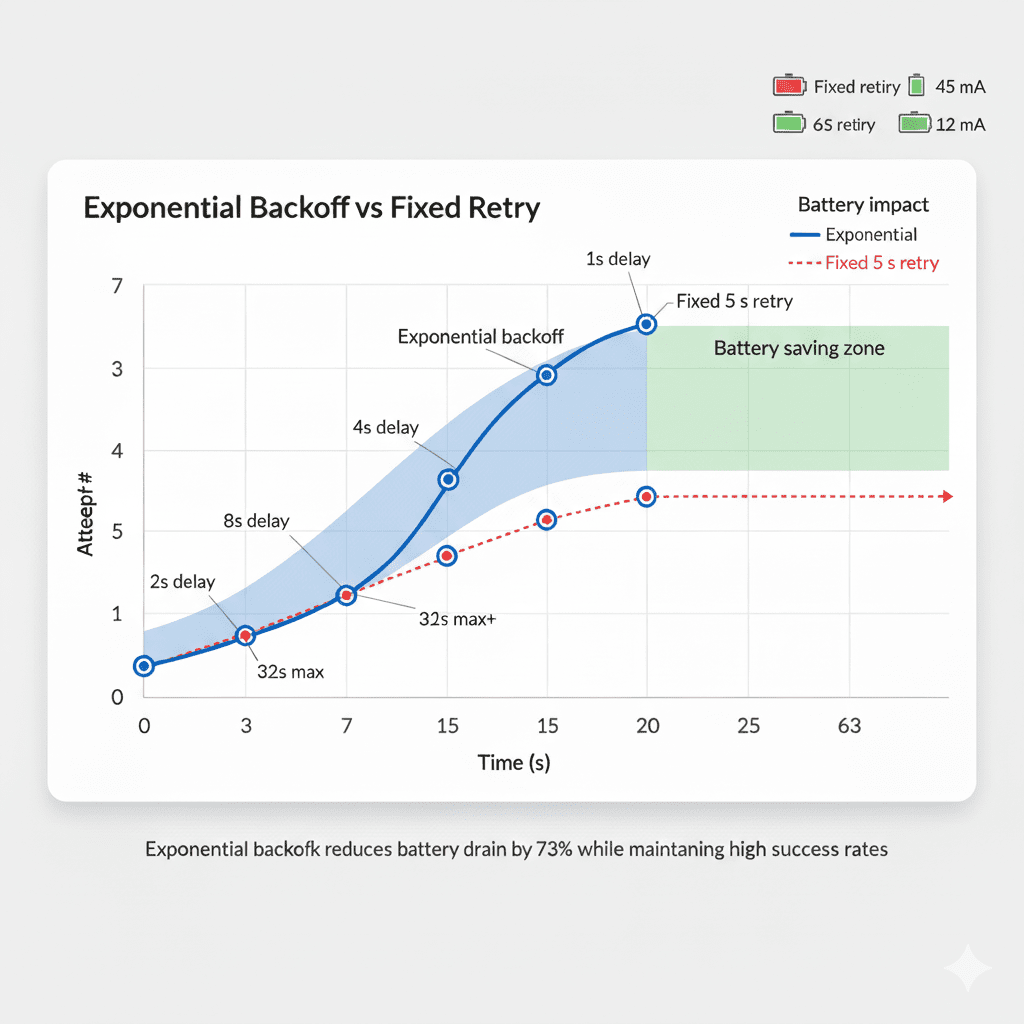
Binary exponential backoff prevents thundering herd and reduces battery drain, following delay equals min(2^attempt, 32) plus or minus 20% jitter. The math: attempt 0 is about 1 second, attempt 1 about 2 seconds, attempt 2 about 4 seconds, attempt 3 about 8 seconds, attempt 4 about 16 seconds, and attempt 5 or beyond caps at about 32 seconds.
Platform adjustments: on iOS background, clamp the minimum to 15 seconds to avoid wasting background execution windows, on Android Doze, schedule with setExactAndAllowWhileIdle for the next maintenance window.
int backoffSeconds(int attempt) {
  final base = (1 << attempt).clamp(1, 32);
  final jitter = (base * 0.4 * (Random().nextDouble() - 0.5)).round();
  return base + jitter; // ±20% randomization
}
This produces delays that start responsive, 1-2 seconds, but decelerate to avoid overwhelming recovering peripherals or draining batteries with aggressive retries.
Pillar 3: iOS CoreBluetooth tactics
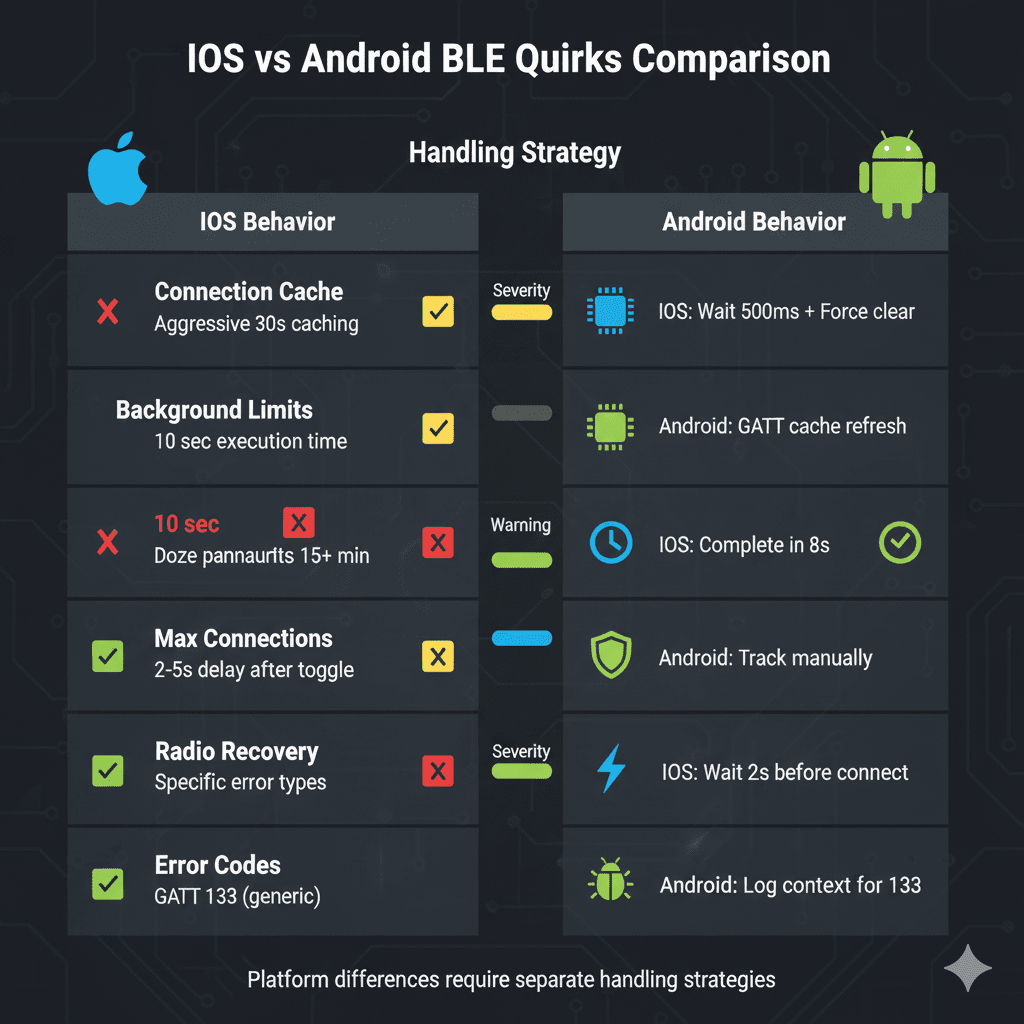
Respect cleanup timing, after cancelPeripheralConnection(), iOS needs about 500ms for stack cleanup, re-scanning with AllowDuplicates refreshes the OS view of your peripheral:
func reconnect(_ peripheral: CBPeripheral) async throws {
  centralManager.cancelPeripheralConnection(peripheral)
  try? await Task.sleep(nanoseconds: 500_000_000) // 500ms

  centralManager.scanForPeripherals(
    withServices: [serviceUUID],
    options: [CBCentralManagerScanOptionAllowDuplicatesKey: true]
  )
}
iOS grants about 10 seconds when your app backgrounds, wrap reconnects in background tasks and finish within 8 seconds, leaving headroom before suspension:
let taskID = UIApplication.shared.beginBackgroundTask()
Task {
  defer { UIApplication.shared.endBackgroundTask(taskID) }
  try await connectWithTimeout(seconds: 8)
}
On identity and discovery, never persist CoreBluetooth UUIDs across devices, the UUID is generated per-iOS-device and isn't portable, use retrievePeripherals(withIdentifiers:) only on the same phone that originally discovered the peripheral. Treat peripheral.services being non-nil as your gate for "actually connected and usable." And when Bluetooth toggles or Airplane Mode flips, ignore stale callbacks for 1-2 seconds before attempting connection, the radio needs stabilization time.
Pillar 4: Android GATT tactics
Treat GATT error 133 as a bucket, handling it with a single recovery path: log rich context (attempt count, bond state, RSSI, device model), close GATT, optionally call refresh() after repeated failures, then schedule backoff.
override fun onConnectionStateChange(gatt: BluetoothGatt, status: Int, newState: Int) {
  if (status == BluetoothGatt.GATT_SUCCESS && newState == BluetoothProfile.STATE_CONNECTED) {
    gatt.discoverServices()
    return
  }

  // Log context for pattern analysis
  log("gatt_status=$status, bond=${gatt.device.bondState}, attempt=$attemptCount")

  // Refresh cache after repeated 133s
  if (status == 133 && attemptCount > 3) {
    refreshGattCache(gatt)
  }

  gatt.close()
  scheduleRetry(backoffSeconds(attemptCount++))
}
Refresh a stale GATT cache after firmware updates or service changes, Android doesn't expose a public API but reflection works:
fun refreshGattCache(gatt: BluetoothGatt) {
  try {
    val refresh = gatt.javaClass.getMethod("refresh")
    refresh.invoke(gatt)
    delay(200) // Allow cache clear to complete
  } catch (e: Exception) {
    log.error("GATT refresh failed", e)
  }
}
Control concurrent connections, since different manufacturers enforce different limits, Samsung typically allows 7-8, Xiaomi and OPPO only 5-6, enforce a conservative pool of no more than 6 active connections and proactively close the oldest idle link:
class ConnectionPool {
  private val maxConnections = 6
  private val active = mutableListOf<BluetoothGatt>()

  fun connect(device: BluetoothDevice) {
    if (active.size >= maxConnections) {
      findOldestIdle()?.let {
        it.disconnect()
        it.close()
        active.remove(it)
      }
    }
    val gatt = device.connectGatt(context, false, callback)
    active.add(gatt)
  }
}
Survive Doze mode, Android 6.0+ batches background work into maintenance windows and standard handlers can delay reconnection by 15-plus minutes, use AlarmManager for time-critical retries:
fun scheduleReconnect(delaySeconds: Int) {
  val alarmManager = context.getSystemService(AlarmManager::class.java)

  if (powerManager.isDeviceIdleMode) {
    // In Doze: use alarm that fires even during idle
    alarmManager.setExactAndAllowWhileIdle(
      AlarmManager.RTC_WAKEUP,
      System.currentTimeMillis() + delaySeconds * 1000L,
      reconnectPendingIntent
    )
  } else {
    // Normal scheduling
    handler.postDelayed({ attemptReconnect() }, delaySeconds * 1000L)
  }
}
Defensive timeouts and health checks
Set a connection timeout of 30 seconds as a hard cap, abandoning zombie connections that never complete. Set a discovery timeout of 10-15 seconds, restarting the connection attempt if services don't resolve. Establish a heartbeat after the READY state, a lightweight periodic read or notification expectation, to detect half-open links where the app thinks it's connected but data stopped flowing. And after 10 attempts, surface a single, clear user action, "toggle Bluetooth" or "restart device," avoiding noisy toasts on every failure.
class ConnectionManager {
  Future<void> connectWithTimeout() async {
    try {
      await device.connect().timeout(
        Duration(seconds: 30),
        onTimeout: () => throw TimeoutException('Connection timeout')
      );

      await device.discoverServices().timeout(
        Duration(seconds: 15),
        onTimeout: () => throw TimeoutException('Discovery timeout')
      );

      state = ConnectionState.ready;
      startHeartbeat();

    } catch (e) {
      handleFailure(e);
    }
  }
}
Telemetry that drives optimization
Instrument before optimizing. Minimum telemetry set: success_by_attempt, the percentage of connections succeeding on attempt 1, 2, 3, and so on:
Map<int, int> successByAttempt = {};

void recordSuccess(int attemptNumber) {
  successByAttempt[attemptNumber] = (successByAttempt[attemptNumber] ?? 0) + 1;
}
reconnect_duration_ms, the time from disconnected to ready state, P50/P95 latencies:
void trackReconnectionTime() {
  final startTime = DateTime.now();
  await device.connect();
  final duration = DateTime.now().difference(startTime);
  analytics.log('reconnect_duration_ms', duration.inMilliseconds);
}
energy_cost_ma, the average current draw during the reconnection loop versus idle baseline, and root_cause_tags categorizing failures like rf_out_of_range, os_background, dfu_cache, or user_force_quit.
Target SLAs: 75% or better success on first attempt, 93% or better success within three attempts, P95 time-to-ready under 30 seconds, and average reconnect current under 15mA.
What good looks like
Adopting these patterns typically yields a 70%-plus reduction in radio and battery overhead during recovery versus fixed-interval retries, an order-of-magnitude drop in zombie connections stuck in connecting or discovering states that never resolve, stable UX where connection state changes are visible within 1-2 seconds and recover without users force-quitting the app, and operational clarity where telemetry makes regressions obvious after firmware updates or OS version changes.
At Hoomanely, these practices translate directly into higher data continuity for pet health monitoring, fewer support tickets, and better trust in longitudinal health metrics that vets use for medical decisions.
Implementation checklist
For architecture: a single source-of-truth state machine with guarded transitions, binary exponential backoff capped at 32-60 seconds with 20% jitter, and platform-specific cleanup, a 500ms delay on iOS and GATT refresh after failures on Android. For timing and power: a 30-second connection timeout hard cap, a 10-15 second discovery timeout, respected iOS background windows completing within 8 seconds, Android Doze mode using setExactAndAllowWhileIdle, a heartbeat established after READY, and half-open links detected by heartbeat failure abandoned. For identity and cache: no cross-device UUID persistence on iOS, GATT cache refresh after DFU or repeated failures, and verifying services are non-nil before marking a connection usable. For observability: tracking success by attempt number, reconnect duration P50 and P95, average current during reconnect, root cause tags, and alerting on SLA breaches. For user experience: clear, single-action guidance after max attempts, showing connection state, and avoiding infinite spinners by setting expectations with progress.
Key takeaways
Reliable BLE reconnection isn't about eliminating disconnects, it's about predictable recovery under the constraints of real operating systems and RF environments. The patterns above, explicit state machines, exponential backoff tuned for each platform, defensive timeouts, and telemetry-driven optimization, transform "usually works" into "works reliably." iOS CoreBluetooth and Android GATT have different timing requirements, different failure modes, and different background scheduling behaviors, respect those differences, clean up state properly, and give the OS time to process your cancellations before retrying. Most importantly, measure everything, you can't optimize what you don't measure, and you can't prove reliability without data. At scale these details compound, a 2-second improvement in average reconnection time, multiplied across thousands of devices and dozens of disconnects per day, meaningfully improves user experience and data capture quality.