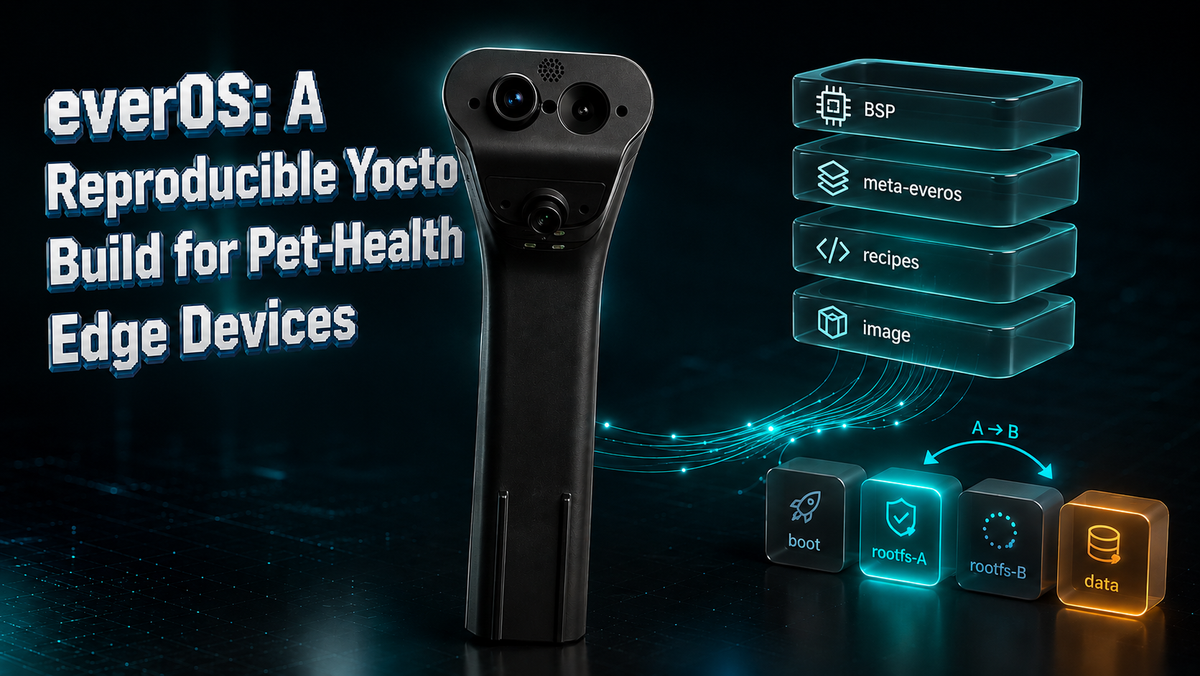
everOS: A Reproducible Yocto Build for Pet-Health Edge Devices
A pet-health monitor doesn't get to reboot when it feels like it. It sits on a kitchen floor, watches a bowl, weighs every meal, listens for chewing, runs computer-vision models on-device, and uploads insights, continuously, for months, unattended. The Linux underneath all of that is not a detail. It is the product's reliability.
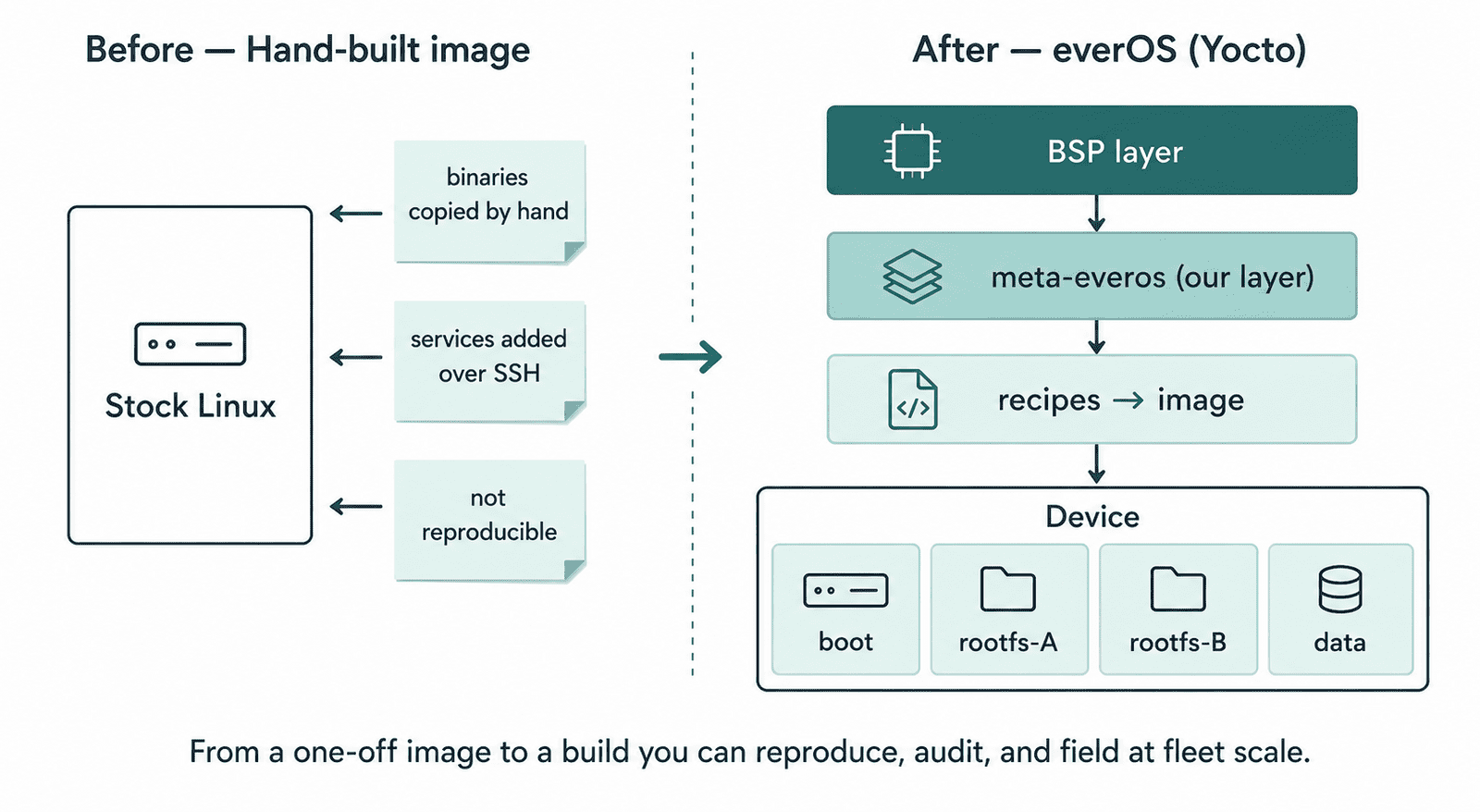
For our first field units, that OS was a hand-assembled image: a stock Linux distribution with binaries copied in by hand and service files dropped into place one SSH session at a time. It worked. It also wasn't something you could rebuild, audit, or ship to a thousand devices the same way twice. This post is about replacing it with everOS, a purpose-built Yocto Linux that is reproducible from source, updates over the air, and recovers itself when a bad update lands.
The problem: a build you can't rebuild
A hand-built image has three quiet failure modes. First, it isn't reproducible, nobody can regenerate the exact same OS six months later, because the recipe lives in someone's memory and shell history. Second, it doesn't scale, every new unit inherits the same manual steps, and every manual step is a chance to ship a slightly different device. Third, it can't update safely in the field, there's no clean way to push a new build and roll back if it bricks.
For a device that lives in a customer's home and makes health observations about their pet, all three are unacceptable. We needed the operating system itself to be an artifact, declared in code, built by a server, and identical on every unit.
The approach: a custom Yocto distro and machine
Yocto builds an entire Linux distribution from source according to recipes, small declarative files that say how to fetch, compile, and package each component. We created our own layer, meta-everos, holding a custom distro definition, a machine definition for our compute module, and recipes for every one of our services.
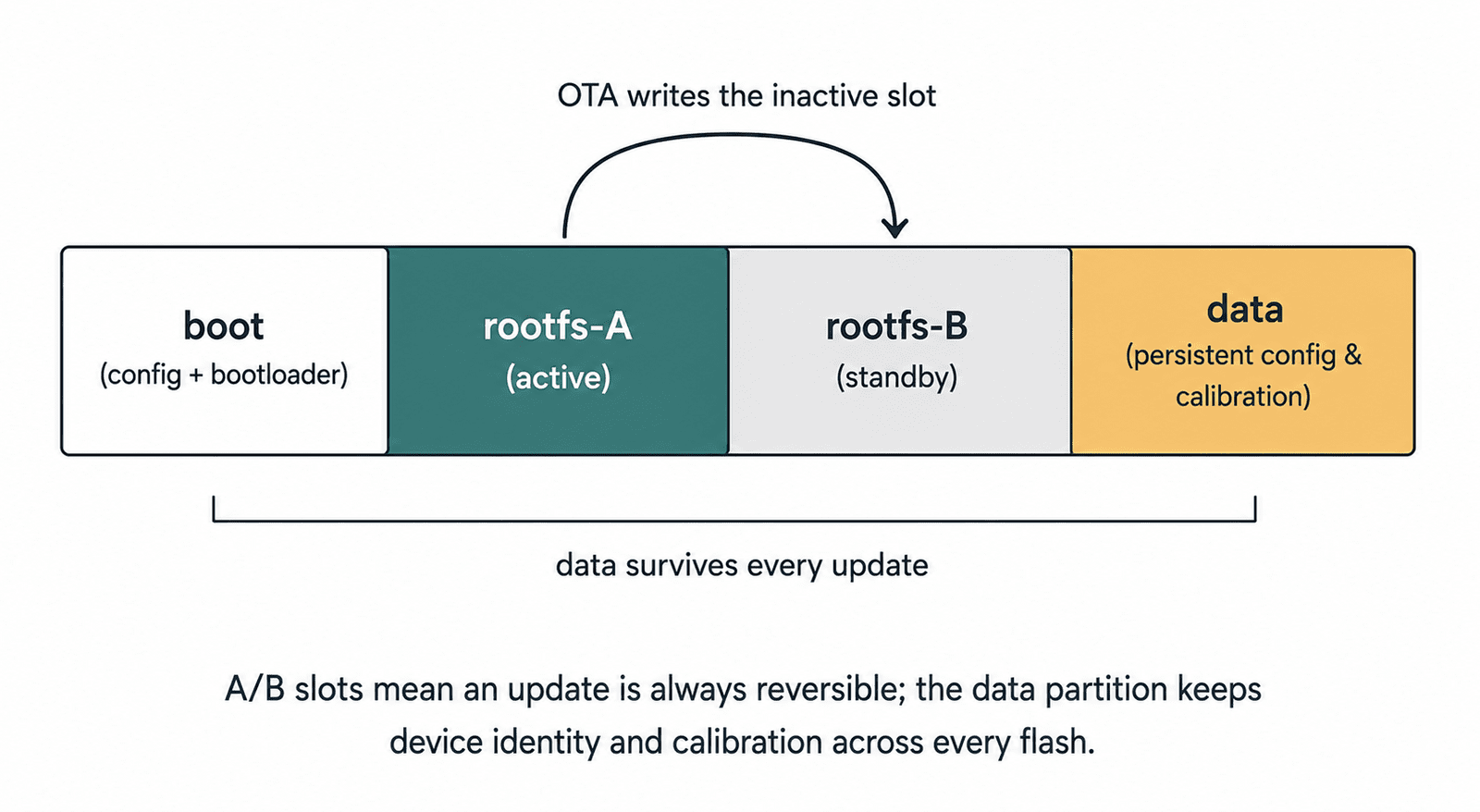
The build emits a single image with an A/B partition layout: a boot partition, two full root-filesystem slots (A and B), and a persistent data partition. Updates flash the inactive slot and switch over on the next boot, so a failed update never touches the system you're currently running on. That structure is the foundation everything else hangs from.
Porting real services to a cross-compiled world
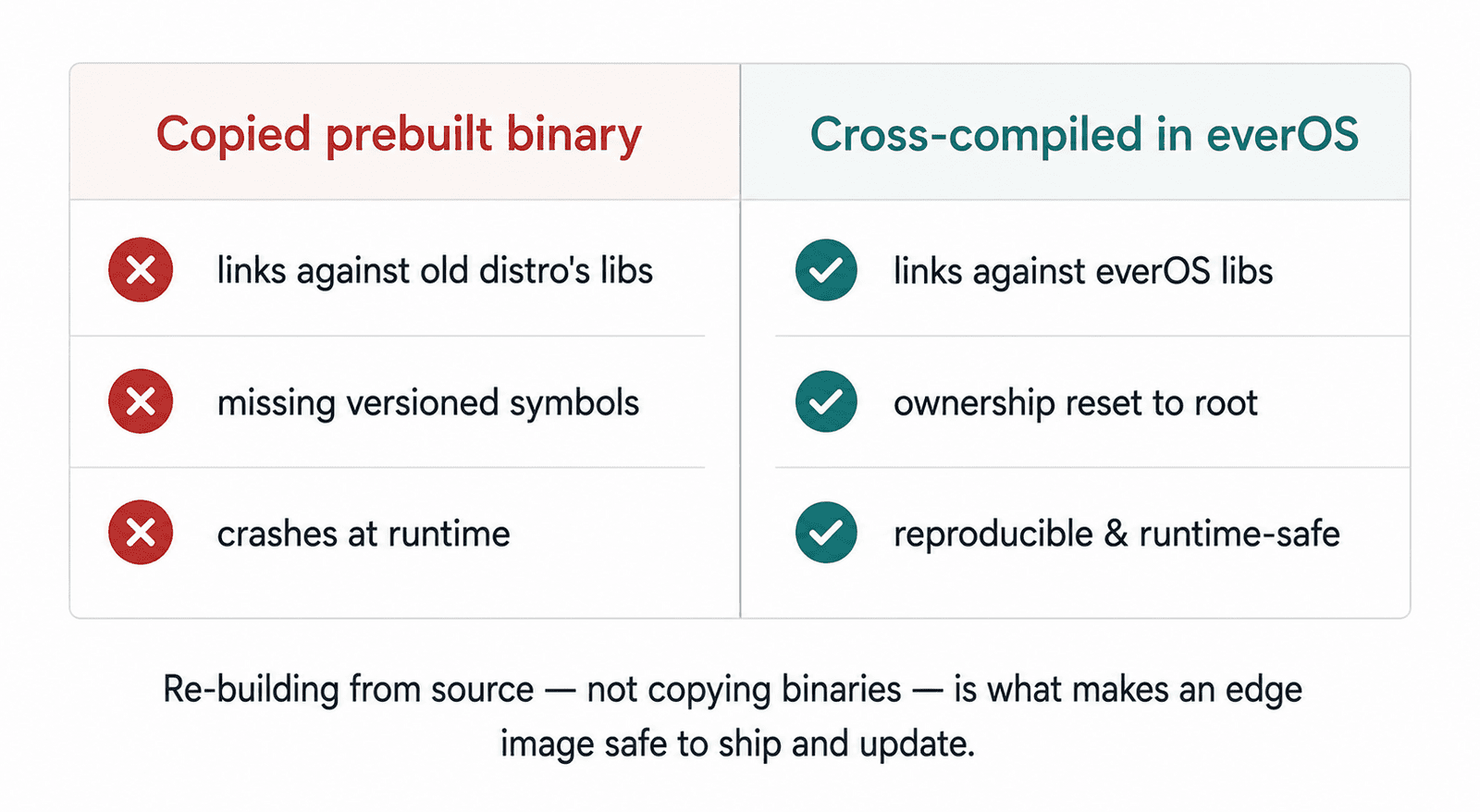
Moving from a hand-installed image to a from-source build surfaces every hidden assumption. The hard part isn't writing recipes, it's the fixes you only discover when something that "just worked" on the old image refuses to build or boot on the new one. Three of those fixes are worth showing in full.
Fix 1: the binary that linked against the wrong world. One of our most important binaries is a single monolithic program that handles the weight, audio, and a sensor-module trigger path. On the old image it was a prebuilt binary copied straight in. Under Yocto it failed immediately: the prebuilt version was linked against the previous distribution's networking library, whose versioned symbols simply don't exist in a from-source build. The right answer was to cross-compile it from source inside the recipe, so it links against everOS's own libraries. That exposed a second, smaller trap: the source includes headers via a ./cm4/... path, but in our build the repository is cm4, so that path didn't resolve. The fix is a one-line self-symlink:
recipes-hoomanely/cm4-firmware/cm4-firmware_git.bb

do_compile:append() {
    cd ${S}
    # weight/80sps_api_auto_tare.c includes "./cm4/<hdr>"; the repo IS cm4,
    # so a self-symlink makes ./cm4/X resolve to ./X.
    ln -sfn . ${S}/cm4
    ${CC} ${CFLAGS} -I${S} -O2 -Wall \
        weight/80sps_api_auto_tare.c vbus.c can_handler.c mpack.c vbus_audio_receiver.c \
        ${LDFLAGS} -lgpiod -lsqlite3 -lpthread -lm -lcurl \
        -o ${S}/weight_continous
}
That self-symlink makes ./cm4/header.h resolve back to ./header.h without touching a single source file.
Fix 2: when the build host's identity leaks into the image. Our on-device machine-learning stack depends on a large C++ tensor runtime, which we package from an official prebuilt distribution. The first builds tripped a packaging quality check complaining about an unknown user ID. The cause: copying the unpacked files preserved the build host's ownership (the developer's user ID, 1000) instead of resetting it to root. The fix lives in the recipe's install step, copy in a way that resets ownership, then explicitly normalize everything to root:
recipes-support/libtorch/libtorch_2.5.1.bb

# Headers (install resets ownership; cp -R would carry host uid 1000).
cp -R ${S}/torch/include/* ${D}${includedir}/
...
# Reset host (uid 1000) ownership from the unpacked wheel to root.
chown -R root:root ${D}
It's two lines of intent, but it's the line between "builds on my machine" and "builds identically anywhere."
Fix 3: the one-line root cause of every OTA failure. The most expensive bug to find was the cheapest to fix. Over-the-air updates kept producing devices that came up "alive but wrong": persistent configuration missing, update scripts editing a phantom empty directory, rollback silently doing nothing. The root cause was the filesystem table. The image-creation tool injects the boot and data mount entries only into the flashed image, but an OTA writes a bare root filesystem into the standby slot, which never had those entries. The fix puts the mounts in the root filesystem itself:
recipes-core/base-files/base-files_%.bbappend

do_install:append() {
    install -d ${D}/boot ${D}/data
    cat >> ${D}${sysconfdir}/fstab <<'FSTAB'
LABEL=boot    /boot    vfat    defaults,nofail              0    2
LABEL=data    /data    ext4    defaults,noatime,nofail      0    2
FSTAB
}
Two lines added to the filesystem table, and the entire A/B update-and-rollback story started working as designed.
Why it matters at Hoomanely
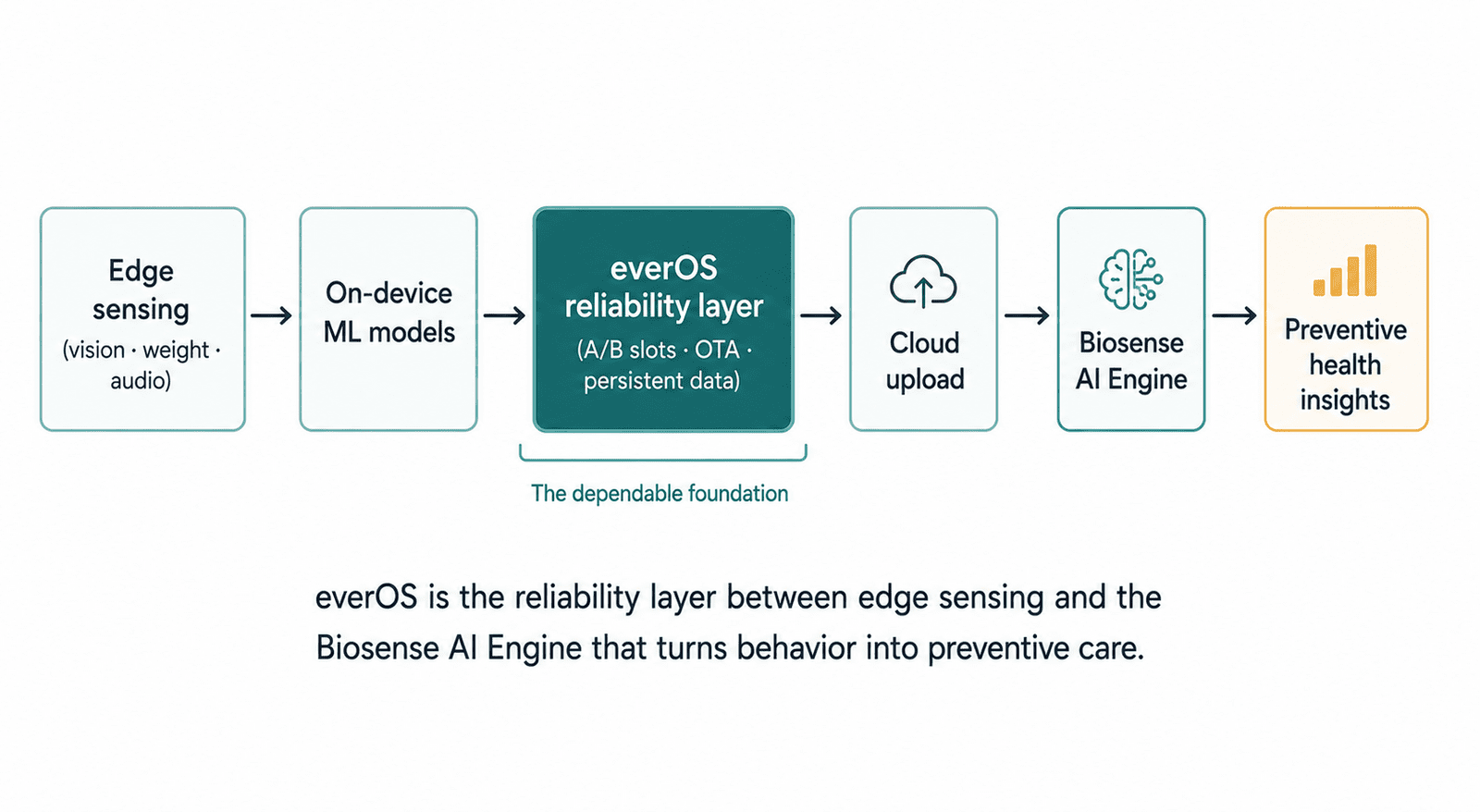
None of the Biosense AI Engine's work matters on an OS you can't trust to run for months and update without bricking. everOS is the platform that earns that trust. The reproducible build means every device in the field is provably the same. The A/B layout with a persistent data partition means a device keeps its identity and calibration through every update and can always fall back to a known-good slot. The cross-compiled service binaries mean the sensing, vision, and audio pipelines link against the exact libraries we shipped, not whatever happened to be on a developer's laptop.
The results
A full image now builds from source on our build server with every service, model, and configuration declared in meta-everos. We flash it to a unit by exposing the module's storage to a laptop and writing the image directly, a few minutes, repeatable, no manual post-install steps. The device boots into slot A with all services up in seconds, mounts its persistent data partition, and reads its identity from a config file there.
We also caught a real provisioning gap in the process: a brand-new flash leaves the data partition empty, so the device boots with no identity until that config is written. Discovering that on the bench, rather than in a customer's home, is exactly what a reproducible, inspectable build is for. It's now tracked as a build step so future flashes are provisioned automatically.
Key takeaways
Treat the OS as an artifact, not a setup procedure. Cross-compile, don't copy, since prebuilt binaries silently depend on the OS they were built on. Reproducibility is in the boring details, a leaked build-host user ID or a missing filesystem-table entry can break an image as thoroughly as a logic bug, and they're invisible until you look. Design updates to be reversible from day one. And find provisioning gaps on the bench before they reach a customer.