How OCR Quality Shapes RAG Accuracy: A Cloud Comparison
Most conversations about Retrieval-Augmented Generation start with embeddings, chunking, or which vector database to use. That's the wrong starting point. If the text coming out of your OCR step is noisy or split in the wrong places, no embedding model can put the meaning back together. RAG quality is limited by OCR quality first, and everything else second.
We learned this directly at Hoomanely, where our RAG systems handle pet health knowledge pulled from vet manuals, books, and long PDFs. Once we started digging into failure cases, it became clear that OCR fidelity was shaping our retrieval precision, our hallucination rate, and the reliability of the whole system.
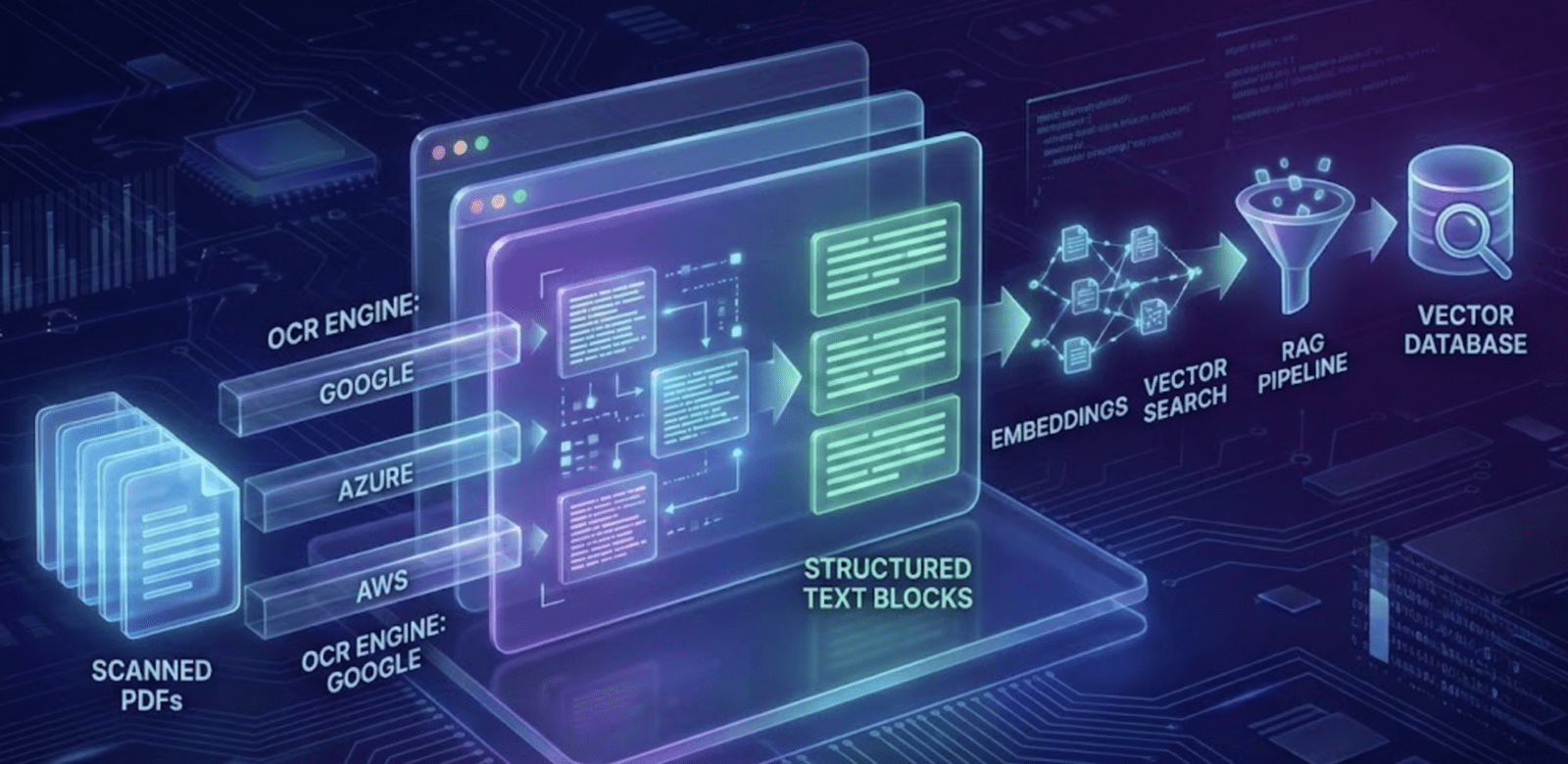
This post covers the engineering behind an OCR-to-RAG pipeline and compares three cloud OCR providers: Google Document AI, Azure Document Intelligence, and AWS Textract. We ended up standardizing on Google's Document AI Bulk OCR API, and here's why.
Why OCR quality makes or breaks RAG
Before any embedding or chunking happens, OCR decides several things: what text exists at all, how cleanly sentences hold together, whether tables and diagrams survive as structured data, how usable your headings are for hierarchical retrieval, and whether a search pulls back real knowledge or noise.
There's a blunt way to put it: garbage OCR produces garbage chunks, which produce garbage embeddings, which produce garbage answers. The more complex the source documents (rotated pages, multi-column layouts, tables, margin notes), the more OCR quality shows up downstream.
The cloud OCR landscape: Google vs Azure vs AWS
Here's a comparison from an engineering seat, not a vendor pitch. All three are capable tools, each built around a different set of priorities.
Google Document AI (OCR + Layout + Bulk Processor)
Strengths: it handles complex PDFs with the best text extraction accuracy we tested, reconstructs layout (hierarchies, blocks, tables) well, its Bulk OCR API is fast at scale, it returns confidence scores at the token, line, and structure level, and it copes reasonably with handwriting.
Weaknesses: some processors cost more, and multi-language OCR isn't as flexible as we'd like.
Where it fits: large RAG systems, long scientific PDFs, anything where layout matters.
Azure Document Intelligence (Form Recognizer)
Strengths: strong form and table extraction, solid pretrained fields for structured documents, reliable on business PDFs.
Weaknesses: struggles with scanned books and older documents; bulk processing isn't as smooth as Google's.
Where it fits: enterprise invoices, forms, business workflows. Less suited to book-style RAG.
AWS Textract
Strengths: solid character-level OCR, native AWS integration, a clean split between DetectText and AnalyzeDocument APIs.
Weaknesses: tends to over-segment complex pages, frequently misorders layout blocks in multi-column PDFs, has no real bulk OCR equivalent.
Where it fits: AWS-first teams and simpler OCR workloads.
Why OCR errors hit RAG accuracy so hard
RAG depends on consistency, and OCR mistakes break that in several ways: sentences fracture into fragments that embed poorly, lost headings weaken retrieval structure, jumbled paragraphs dilute meaning, misordered columns invite hallucination, and missed words feed the wrong answer downstream.
Embedding models are sensitive to sentence coherence. Even a small misread, like "therm*l" instead of "thermal," shifts a vector enough to matter. That's why we treat OCR as a core stage of the model pipeline, not a preprocessing chore.
Architecture: OCR to processing to RAG
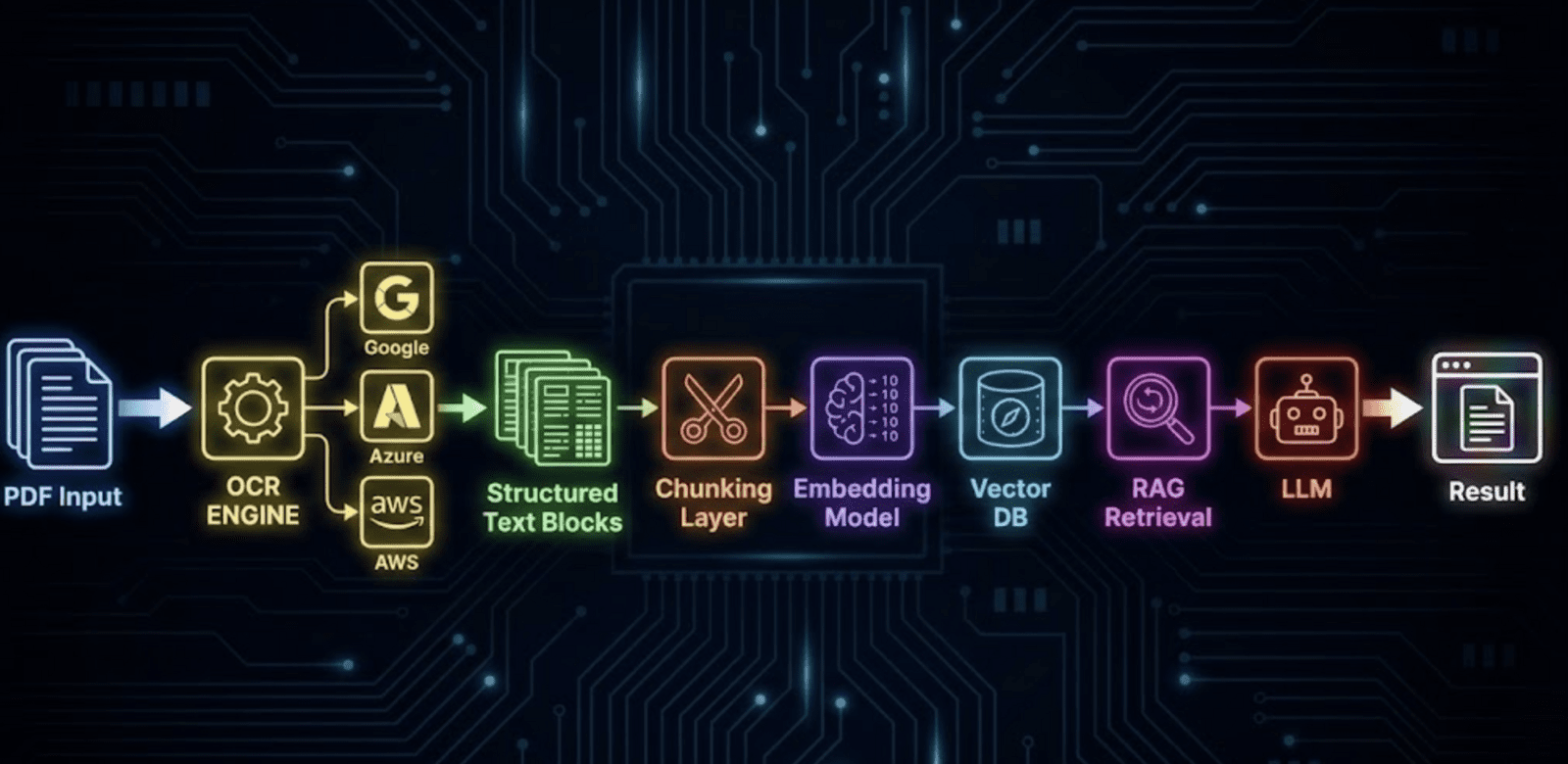
A pipeline we trust looks like this: OCR extraction using a bulk processor for speed, layout parsing from page to block to line to token, chunking that respects sentences or layout, metadata enrichment with section titles and page numbers, embedding generation (we've used BAAI BGE, Titan, and sentence-transformer models), indexing into a vector database such as OpenSearch, Pinecone, or Weaviate, then retrieval, reranking, and LLM synthesis. OCR sits at the front of that chain, but it controls what happens at every stage after it.
Why we picked Google Document AI's bulk OCR
After running thousands of pages of veterinary books and research material through all three, a few things stood out.
- Google had the lowest rate of broken sentences. RAG needs stable sentence boundaries, and Google's layout engine held up consistently.
- Column reconstruction was noticeably better. Azure and AWS often linearized multi-column pages in the wrong order.
- Table extraction came out cleaner, which mattered for dosage tables, ingredient lists, and nutrition charts tied to pet health.
- Bulk OCR processing was a real time-saver. We got through hundreds of pages in minutes.
- Confidence scoring let us filter out weak spans before chunking, which improved retrieval quality on its own.
That combination is why our internal pipeline runs on Google Document AI for OCR, followed by our own layout-aware chunking and multi-level RAG retrieval.
A rough comparison of OCR output
Take a two-column page with headings, a table, and body text. Google returns the correct column order, accurate table cell grouping, and preserved headings. Azure gets roughly 90% of the text right, but headings sometimes break and columns occasionally merge. AWS over-segments into short lines and flattens columns into left-to-right reading order. In our testing, Google's output produced the most coherent embeddings of the three.
How better OCR cuts down hallucinations
LLMs tend to hallucinate when context is missing, ambiguous, fragmented, or noisy. Cleaner OCR leads to clearer chunks, which grounds the model better and produces fewer invented facts. After we moved to Google's Bulk OCR, we saw a measurable drop in fabricated nutritional or medical claims in our outputs.
Cost and throughput
Google's bulk mode is efficient at scale with a reasonable cost-to-performance ratio. Azure costs run a bit higher for form-heavy extraction. AWS pricing is more granular, but throughput slows on large corpora. At the scale of tens of thousands of pages, throughput matters just as much as accuracy.
Key takeaways
- OCR fidelity is the biggest single factor in RAG quality.
- Google Document AI gave us the best balance of accuracy, speed, and layout preservation.
- AWS works fine for simple documents; Azure is strong with forms.
- Multi-column scientific PDFs performed best under Google in our tests.
- Getting OCR right early saves a lot of debugging later.
- Hoomanely's internal pipeline runs on Google's Bulk OCR for these reasons.