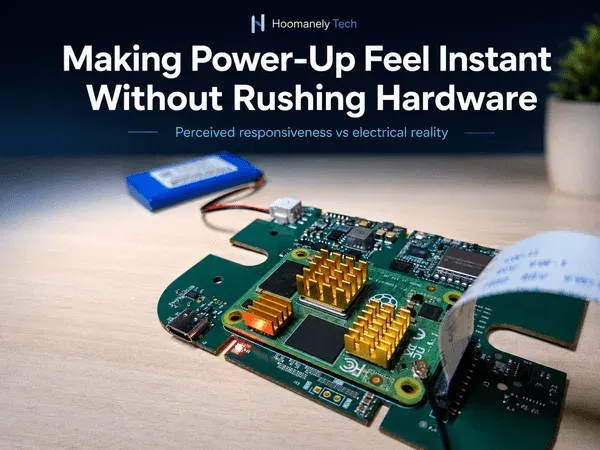
Making Power-Up Feel Instant Without Rushing Hardware
Designing perceived responsiveness while respecting electrical reality
Users rarely judge a product by how fast the hardware actually becomes fully ready. They judge it by how quickly the product appears alive. That difference matters.
A device may need several hundred milliseconds, or even a few seconds, before every rail is stable, every sensor is initialized, every clock is locked, every interface is configured, and every subsystem is ready for real work. But the user doesn't see regulator ramp time, oscillator settling, sensor reset timing, bootloader checks, or bus enumeration. The user sees only one thing: did the product respond?
In embedded hardware, this creates a real design tension. Rush the hardware and you risk unstable startup, random feature failures, corrupted state, and unpredictable resets. Wait until everything is fully initialized before showing any response, and the product feels slow, even if it's electrically correct.
At Hoomanely, we treat power-up responsiveness as a system architecture problem, not just a firmware optimization task. The goal isn't to make every subsystem start faster. It's to make the product feel responsive while letting the hardware come up safely, quietly, and in the right order.
Instant feeling does not mean instant readiness
A common mistake is trying to make the whole system ready immediately after power is applied. That usually leads to fragile startup:
- The MCU configures GPIOs while rails are still settling
- Sensors come out of reset before their supplies are stable
- A camera clock begins before the image sensor is ready
- Communication interfaces start before level shifters are properly biased
- A high-current feature turns on before the upstream regulator has enough margin
The product may boot faster in the lab, but it becomes less predictable across temperature, supply variation, component tolerance, and manufacturing spread.
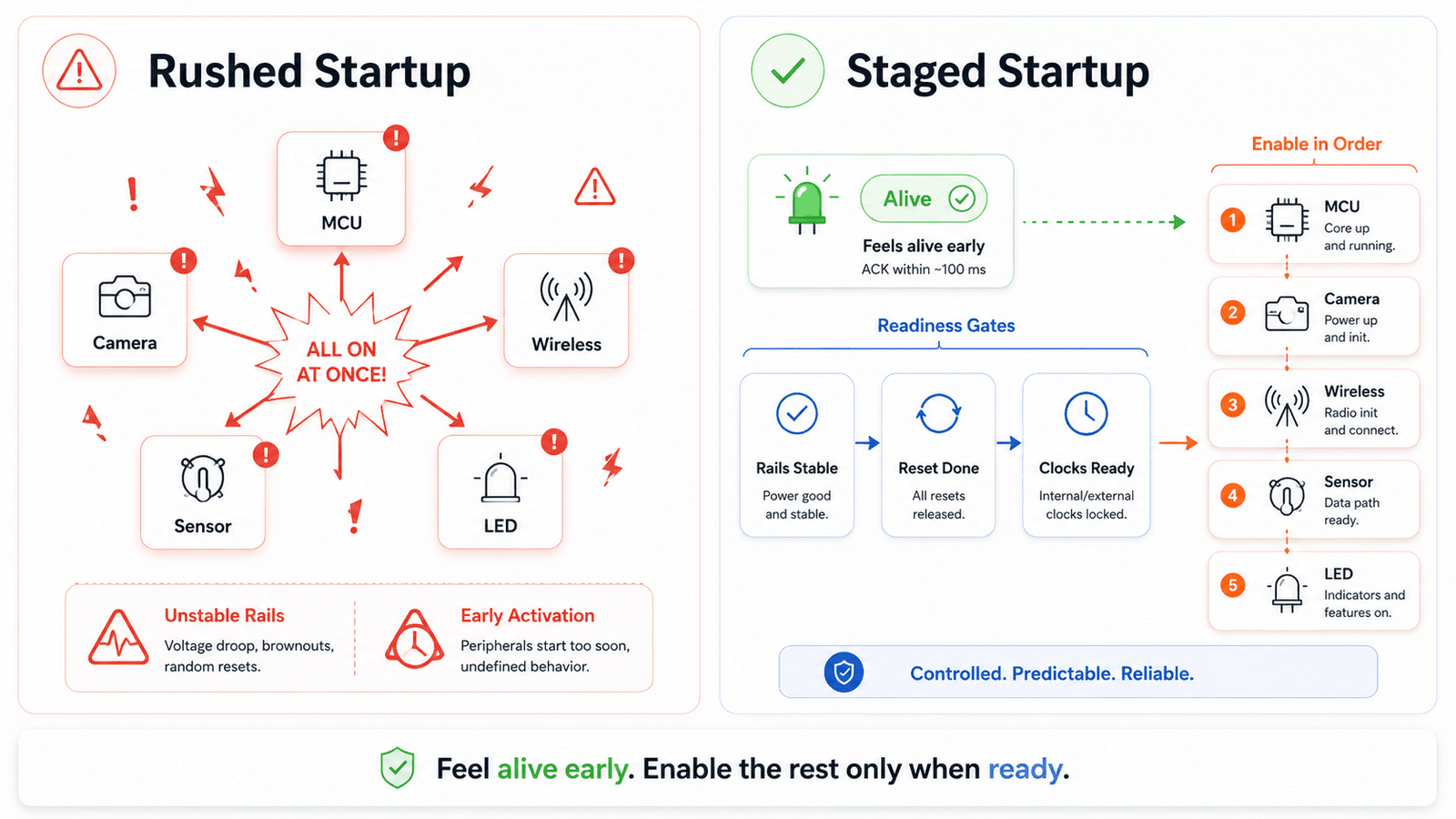
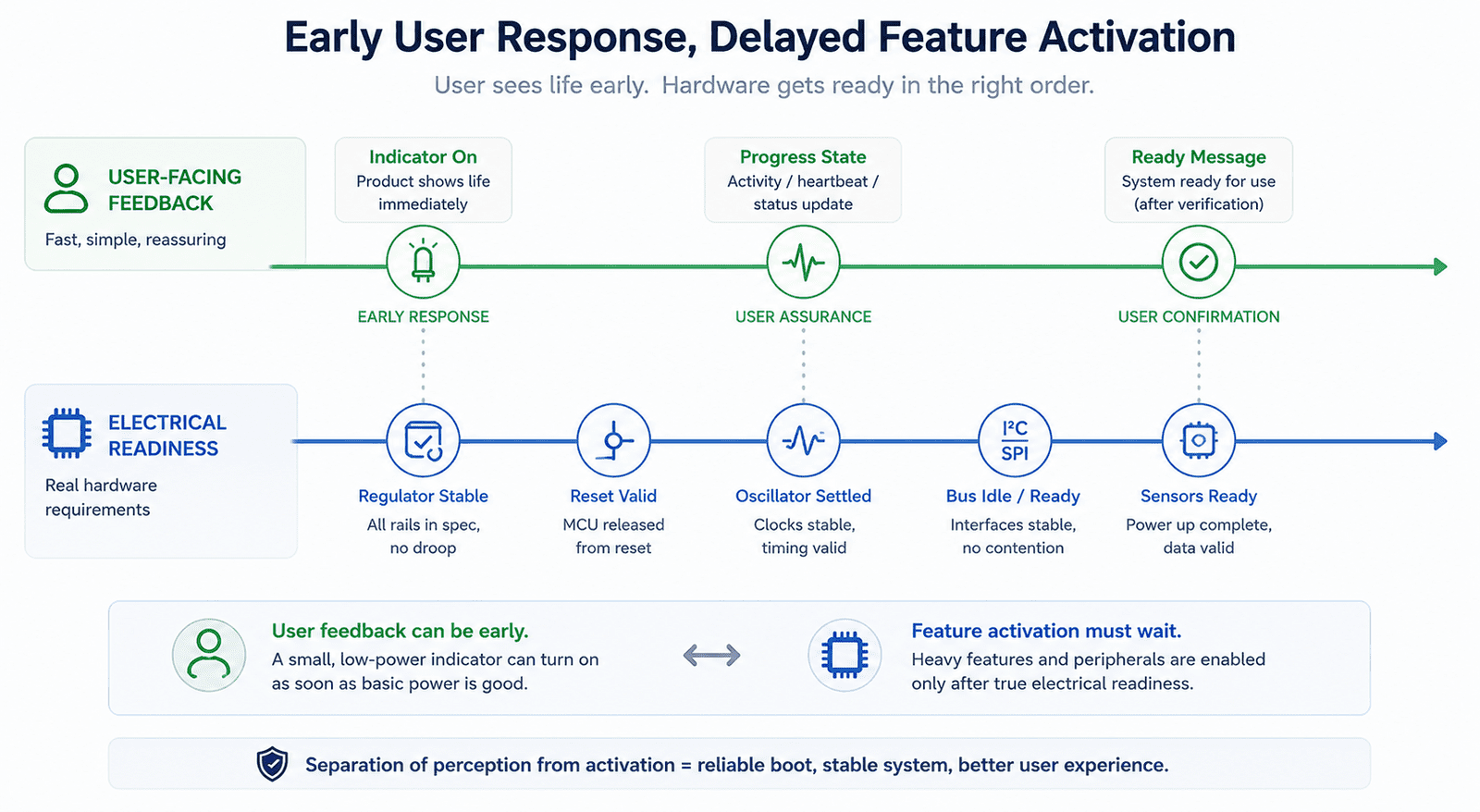
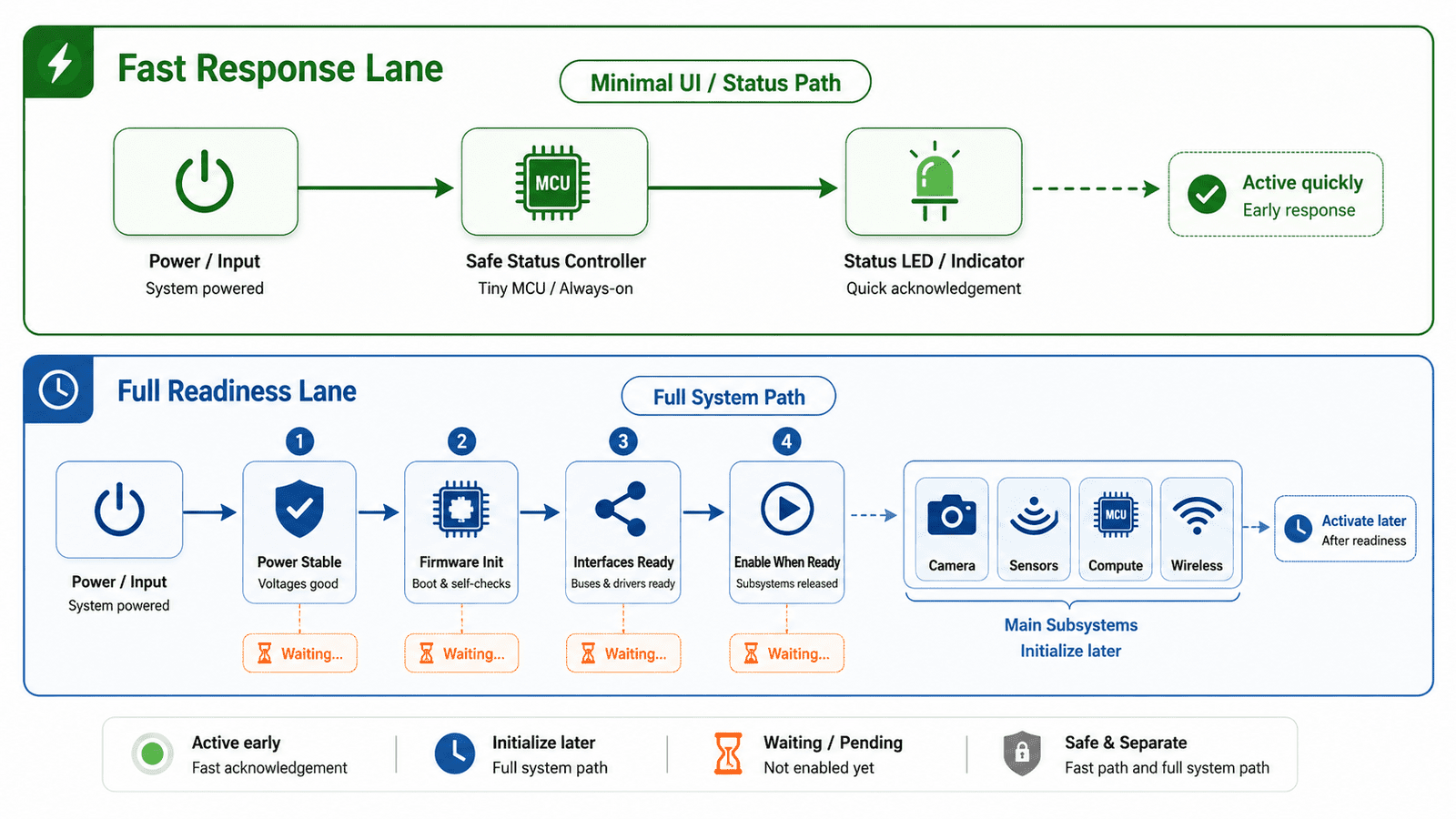
The better approach separates visible responsiveness from functional readiness. A product can show that it's alive before it's fully operational. An early status LED, a short boot tone, a low-power indicator, or a simple wake acknowledgement can happen quickly, while heavier subsystems continue proper initialization in the background. The system doesn't need to perform every function immediately, it only needs to communicate that it has received power and is progressing intentionally.
Power-up has multiple truths
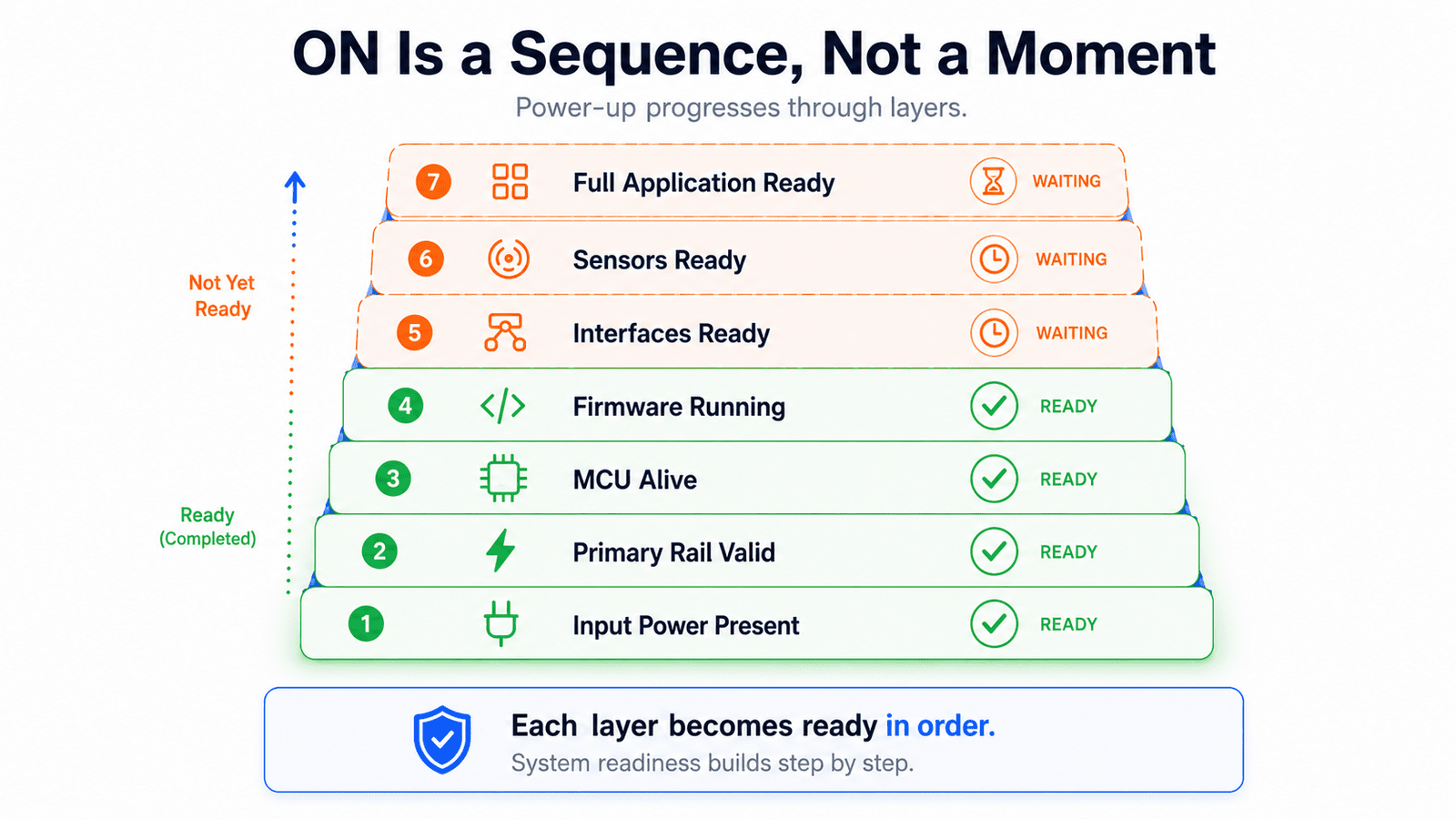
There's no single moment where a device becomes "on." Power-up is a sequence of truths:
- The input supply may be present
- The primary rail may be valid
- The MCU rail may be stable
- Reset may be released
- Firmware may be executing
- The communication path may be alive
- Sensors may be initialized
- The full application may be ready
A weak architecture treats all of these as one event: power on. A mature architecture exposes them as separate states. This matters because different parts of the product can safely respond at different stages. A simple user-visible indication may only need the primary rail and a small controller. A camera capture may need multiple sequenced rails, reset timing, clock validity, and memory availability. Wireless communication may need the main processor, radio calibration, storage readiness, and network state. Trying to align all of these into one "ready" moment either delays the user experience or rushes the hardware.
The first response should be electrically cheap
The first sign of life should be simple and shouldn't depend on the most complex part of the system. If the first user-visible response requires Linux to boot, sensors to enumerate, cloud connectivity to start, or multiple feature rails to activate, the product will feel slow and fragile.
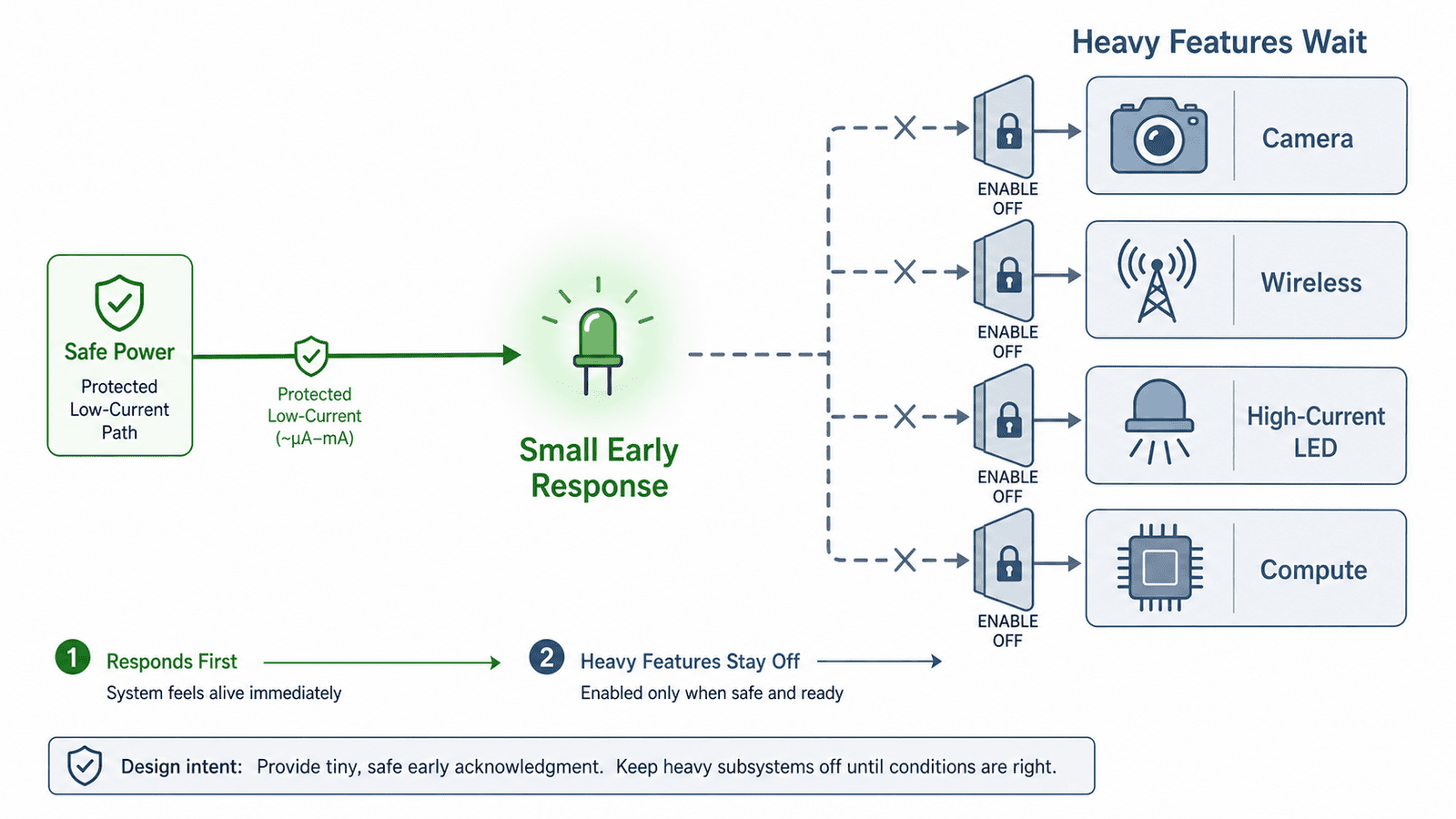
A better first response is electrically cheap and architecturally independent, a low-current status LED, a small MCU-controlled indicator, a simple power-good visual state, a short local acknowledgement, or a minimal always-safe output. It shouldn't pull significant current, require high-speed clocks, depend on sensors, force feature rails on early, or create false confidence that the whole system is ready. Its job isn't to say "everything is ready." Its job is to say "the system is alive, and startup is under control." That distinction improves perceived responsiveness without compromising electrical stability.
Don't use heavy features as boot indicators
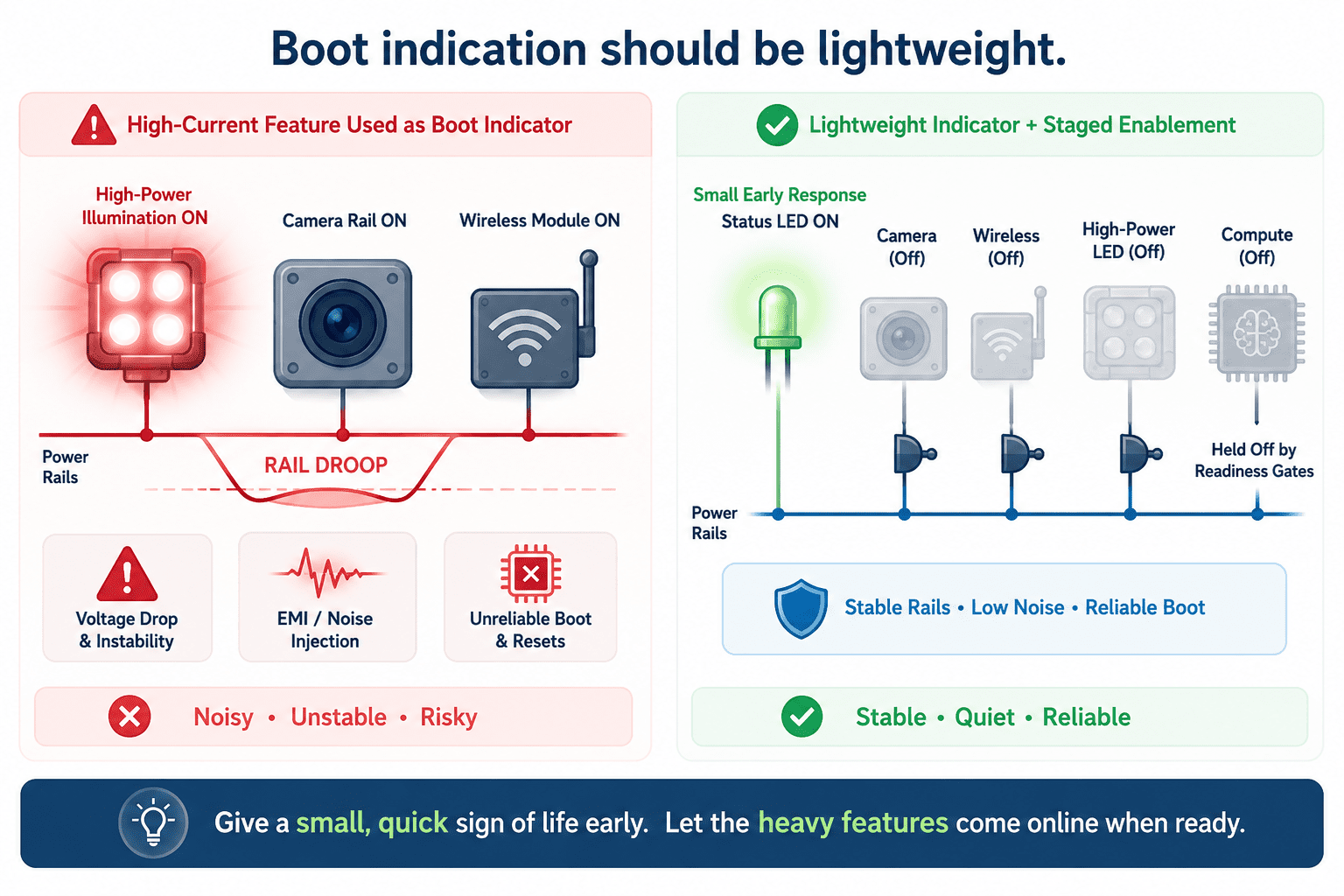
It's tempting to use a major feature as a startup indicator, turning on the camera LED, pulsing an illumination channel, starting the speaker, waking the radio, or spinning up the main processor immediately. These make the product feel active, but they also increase startup risk. Heavy features often introduce inrush current, rail droop, EMI, thermal effects, clock dependencies, and initialization complexity. If they activate too early, they can interfere with the same startup process they're meant to announce.
In compact multi-sensor products, this matters especially. A high-current illumination path, camera rail, wireless module, or compute subsystem shouldn't be used merely to prove the product has powered up. Those features should wait until power budgeting, reset sequencing, and firmware ownership are valid. The first response should come from the safest subsystem, not the most visible one.
Startup should be a pipeline, not a wall
Many products treat startup like a wall: nothing happens visibly until everything is ready, then suddenly the product becomes active. This makes the device feel slower than it actually is.
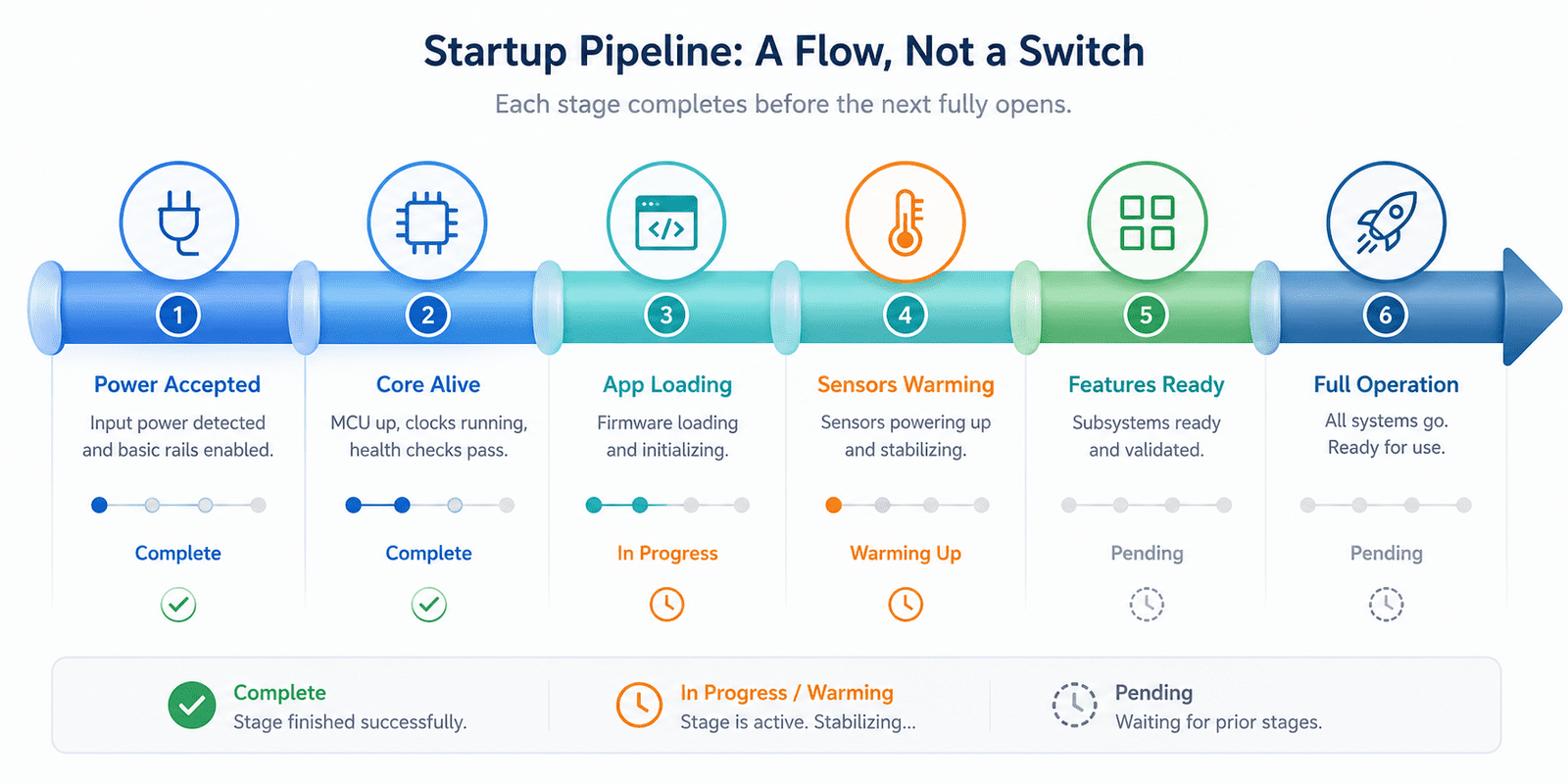
A better startup feels like a pipeline, revealing progress in stages: power accepted, core alive, application loading, sensors warming up, features ready, full operation active. Each stage is honest and reflects a real electrical or firmware milestone. This also helps debugging and manufacturing, if the product always shows the same staged behavior, engineers can identify where failures occur. A device that acknowledges power but never reaches sensor-ready state points to a different issue than one that never reaches core-alive state. Perceived responsiveness and diagnostics can share the same architecture, that's the kind of design choice we value at Hoomanely.
Electrical reality still owns the sequence
No matter how much we care about responsiveness, some things can't be rushed. Regulators need time to stabilize, crystals and oscillators need time to settle, reset supervisors need valid thresholds, camera sensors need correct rail order, level shifters need both sides powered before passing signals safely, buses need defined idle states before traffic begins, and storage needs a known-good state before writes occur.
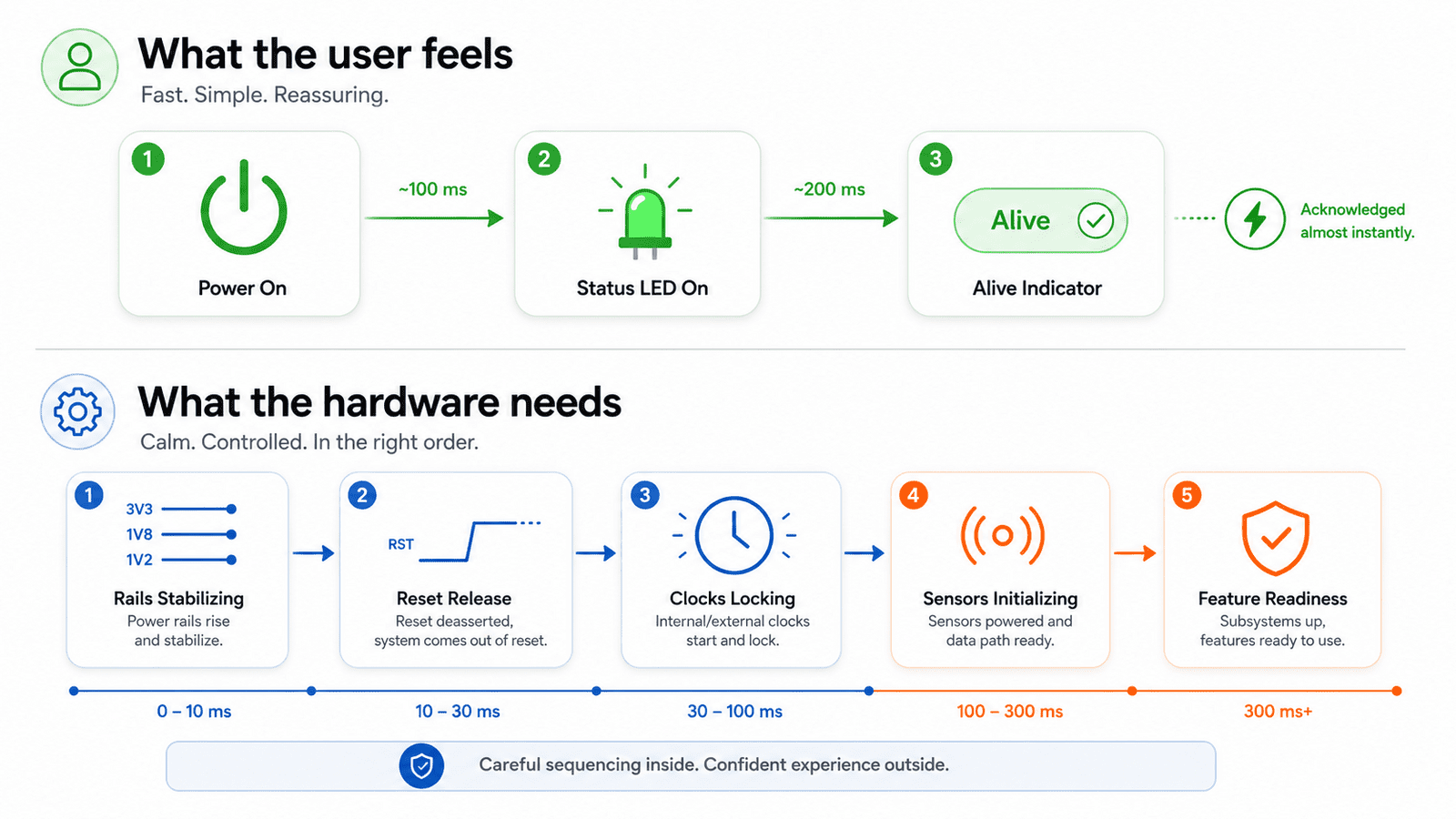
The architecture should therefore define two timelines: the perception timeline shows what the user sees, and the electrical timeline defines what the hardware is allowed to do. These overlap, but they aren't the same. A product may show a soft indicator at 100ms while waiting until 800ms to enable a sensor rail. It may show a wake state immediately while delaying network activity. This isn't fake responsiveness, it's honest staged readiness.
Use readiness gates instead of fixed delays alone
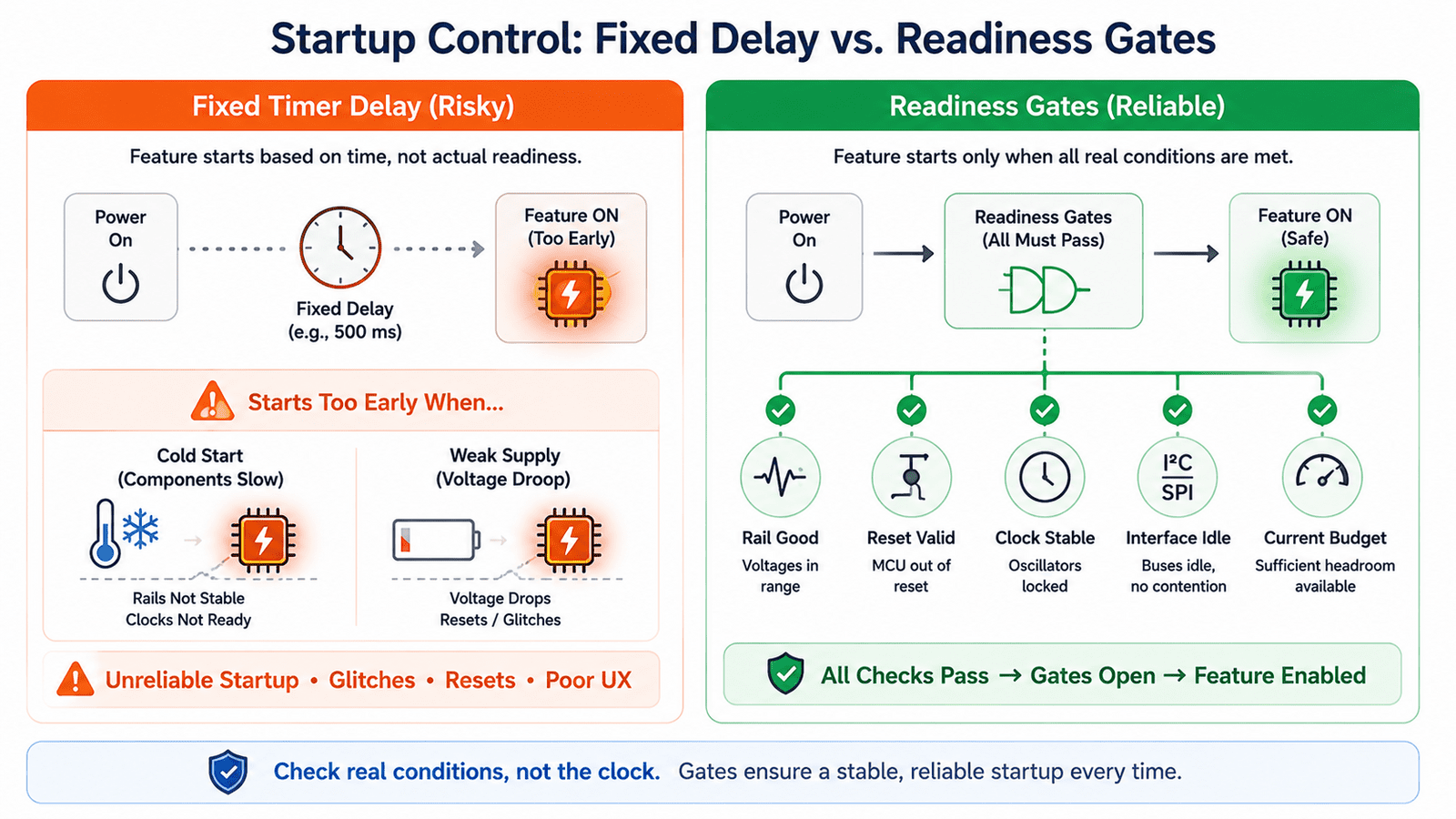
Fixed delays are common in startup code, wait 50ms, wait 100ms, wait 500ms. They're sometimes necessary, but they're a weak substitute for readiness. A system built around fixed delays assumes all boards, temperatures, supplies, and components behave identically. Real products don't.
A better design uses readiness gates, a feature becomes available only when the conditions that matter are actually true: rail-good confirmed, reset released, clock valid, interface idle, firmware state ready, current budget available, subsystem acknowledged. This prevents both early activation and unnecessary waiting. If a rail stabilizes quickly, the system continues. If it takes longer under cold temperature or a weak input supply, the system waits safely. Readiness gates make startup both faster and safer because they remove guesswork.
Keep the user interface decoupled from full system readiness
A product feels more responsive when the user interface doesn't fully depend on the heaviest compute path. This doesn't always require a dedicated UI processor, sometimes it's simply a small early-boot state machine, an MCU-controlled status output, or a hardware-driven indicator. The key is architectural decoupling:
- A minimal response path should survive even when larger subsystems are still waking
- It shouldn't depend on camera initialization
- Cloud connection
- Sensor calibration
- Or storage mounting
This is especially useful during fault conditions. If a sensor fails, the device should still indicate it's alive. If the main application is delayed, the product shouldn't appear completely dead. If the system enters a degraded mode, the user should get some indication rather than silence. The first response path becomes both a UX tool and a recovery signal.
Feature availability should be progressive
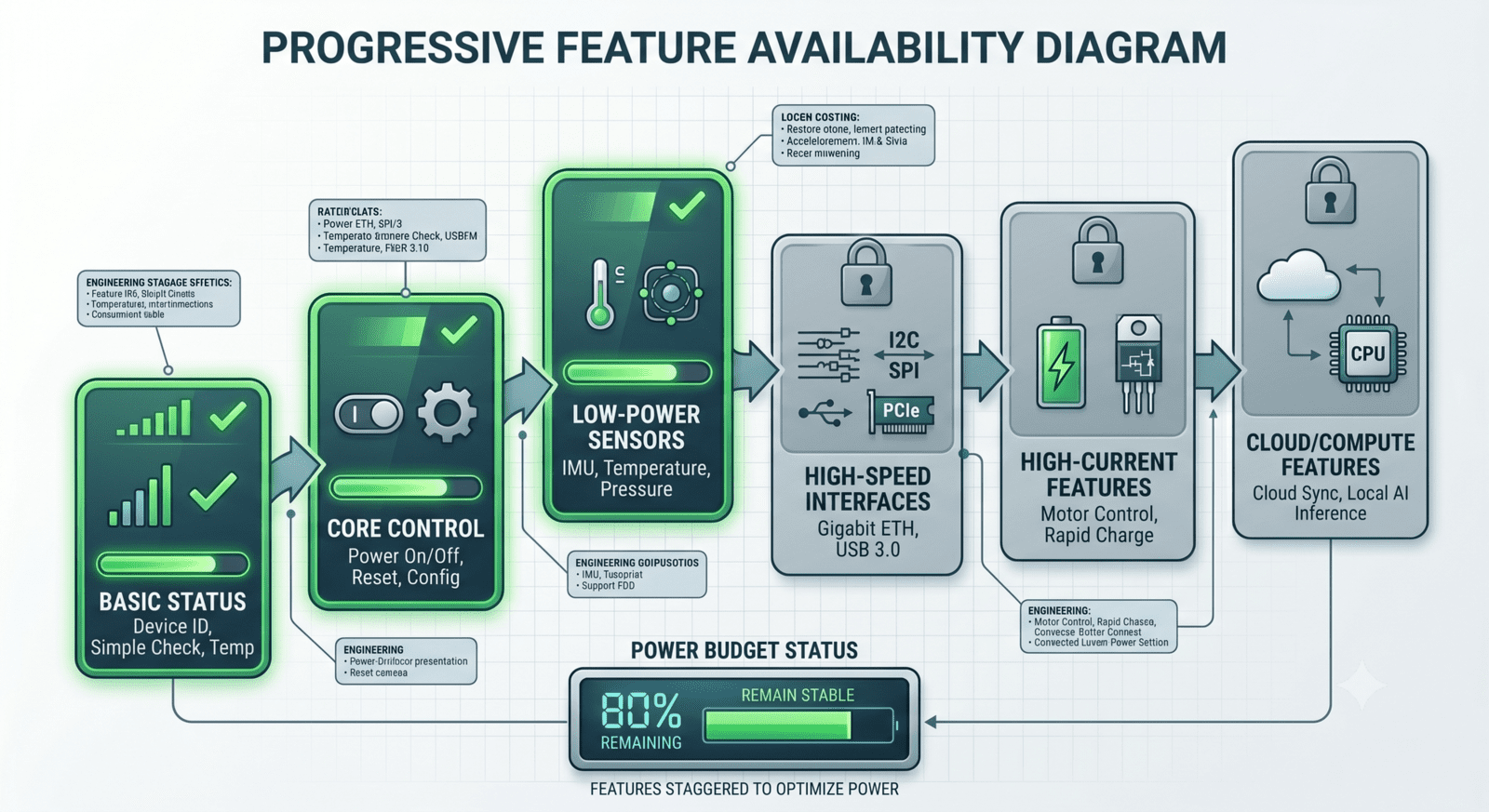
Not every feature needs to become available at the same time, forcing every feature to become ready together often creates worse power and timing behavior. A progressive availability model is cleaner:
- Basic status becomes available first
- Core control next
- Low-power sensors after rail validation
- High-speed interfaces later
- High-current features waiting until the power budget is stable
- Cloud or compute-heavy features following after local readiness
This lets the product respond quickly without pretending all features are immediately ready. It also protects the hardware from concurrency spikes, instead of multiple subsystems turning on at once, the system can stagger activation based on electrical priority and user need. The device feels alive early, but the hardware still gets the time it needs.
Do not hide real startup failures behind animation
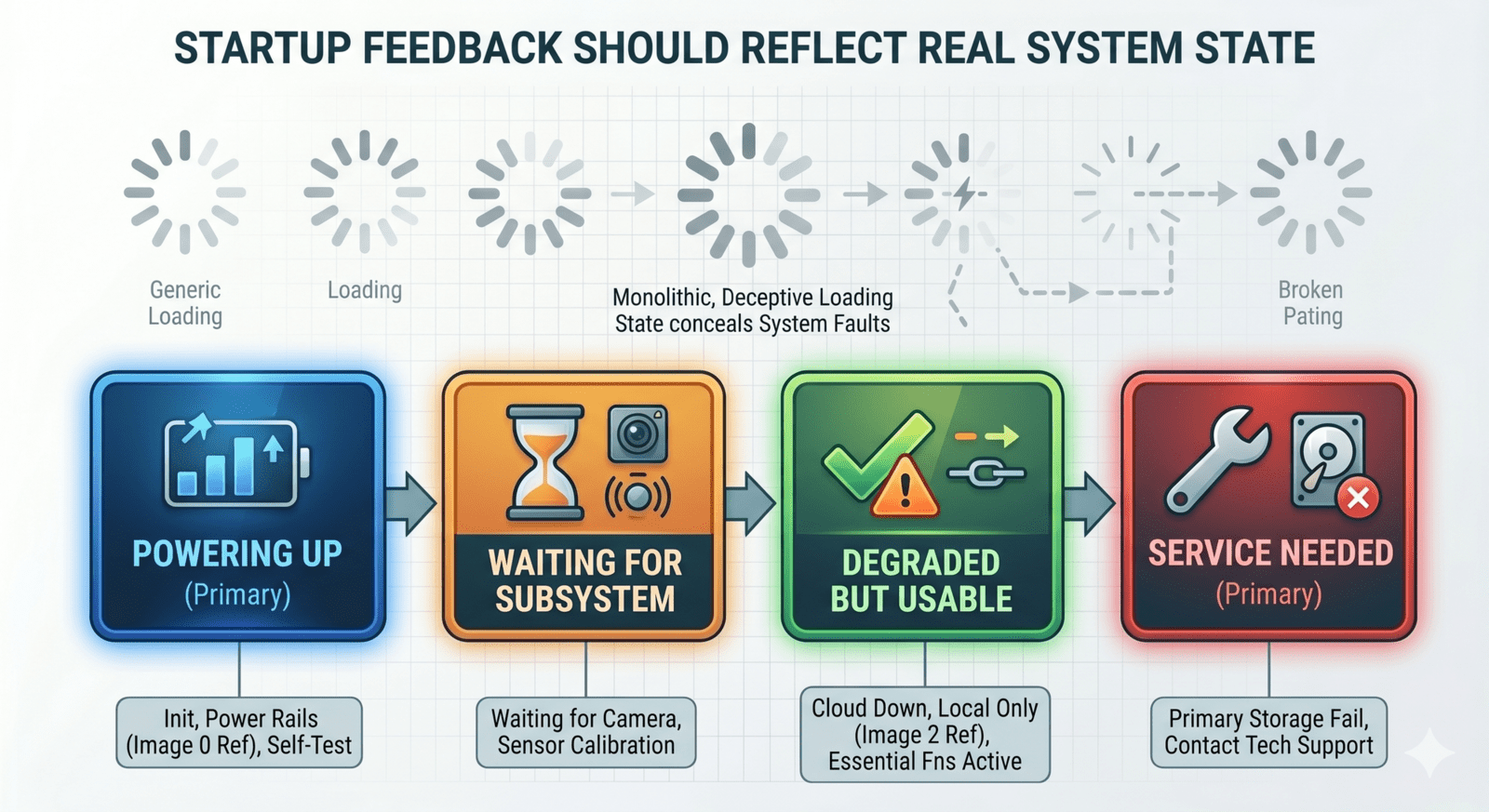
There's one trap in perceived responsiveness: using animation or indicators to hide real startup problems. A blinking LED or loading pattern is only useful if it corresponds to actual system progress. If the product displays the same "starting" behavior during a healthy boot, a sensor failure, a power rail fault, and a firmware hang, the indicator becomes decoration rather than information.
A good startup experience should be informative. The user doesn't need engineering-level detail, but the system should distinguish between powering up, waiting for a subsystem, degraded but usable, and failed and needs service. This is also helpful for support, a simple staged indicator can reduce confusion when diagnosing field units. Responsiveness shouldn't mean pretending everything is fine, it should mean communicating system state early and clearly.
Hoomanely's view: responsiveness is a contract
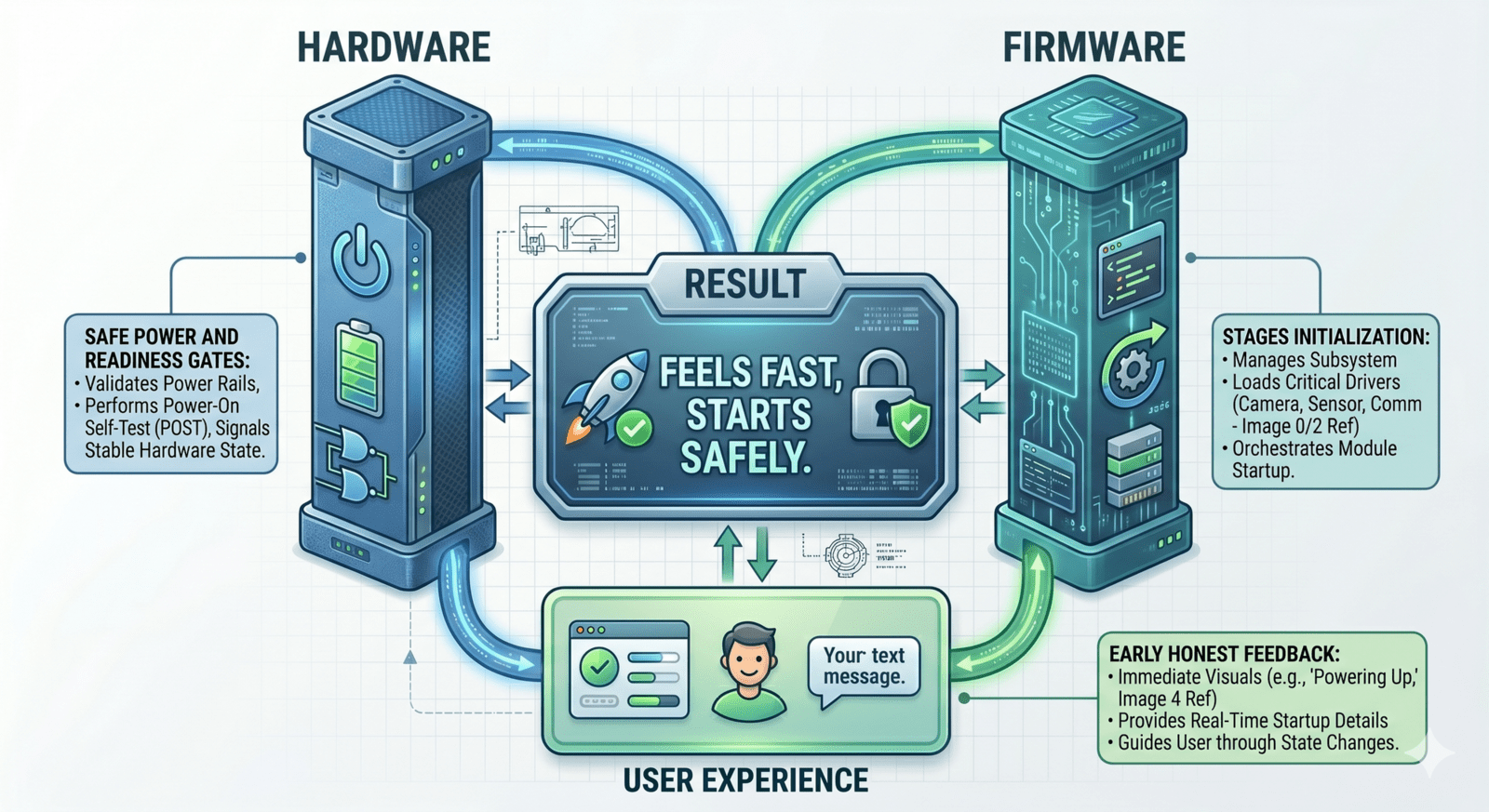
At Hoomanely, we think of power-up responsiveness as a contract between hardware, firmware, and user experience. Hardware promises not to expose unstable features too early. Firmware promises to stage initialization based on readiness, not convenience. The product experience promises to acknowledge the user quickly without lying about full readiness.
This contract matters especially in modular systems where sensor boards, carrier boards, compute modules, power domains, and communication paths may all wake at different speeds. A good architecture doesn't rush them into one artificial "on" event. It lets each subsystem become ready when it's electrically safe, while giving the user confidence that the product is alive and progressing. Fast enough to feel responsive. Disciplined enough to remain reliable.
Final thoughts
Making power-up feel instant isn't about forcing hardware to boot faster than it safely can. It's about designing the startup experience around the real electrical sequence. The product should acknowledge power quickly, but it shouldn't activate heavy features prematurely. It should show progress early, but it shouldn't hide faults. It should feel alive within moments, while still respecting rails, resets, clocks, buses, sensors, storage, and power budgets.
The best embedded products don't make the user wait for every internal detail. They also don't ignore those details. They separate perceived responsiveness from full readiness and connect them through a disciplined architecture. That's how hardware can feel instant without being rushed, and in real product engineering, that's often the difference between a device that feels polished and a device that only works well on the bench.