Preventing Accidental Feature Activation in Hardware
Why gating and physical safeguards matter before firmware ever gets involved
A feature that turns on at the wrong time isn't just a firmware bug. In real embedded products, accidental activation can create electrical stress, false sensor readings, unexpected power draw, startup instability, or confusing factory-test failures. Sometimes the feature itself is harmless during normal operation, but dangerous during boot, reset, brown-out, assembly, or service handling.
This is especially true in compact multi-sensor systems where several hardware blocks share the same power source, control lines, connectors, and physical enclosure. An LED driver, camera rail, wireless interface, actuator, sensor excitation circuit, or communication transceiver may be completely valid when intentionally enabled. But if it turns on before the system is ready, it can disturb everything around it.
At Hoomanely, we treat feature activation as a hardware responsibility first and a firmware responsibility second. Firmware may request a feature. Hardware should decide whether that request is electrically safe. That difference matters, because firmware doesn't exist during the earliest part of boot. It may not run during brown-out. It may crash during development. It may be absent in the factory. It may be replaced during OTA updates. If the only thing preventing a feature from activating is a line of software, the feature isn't truly controlled. A product-grade system needs physical safeguards.
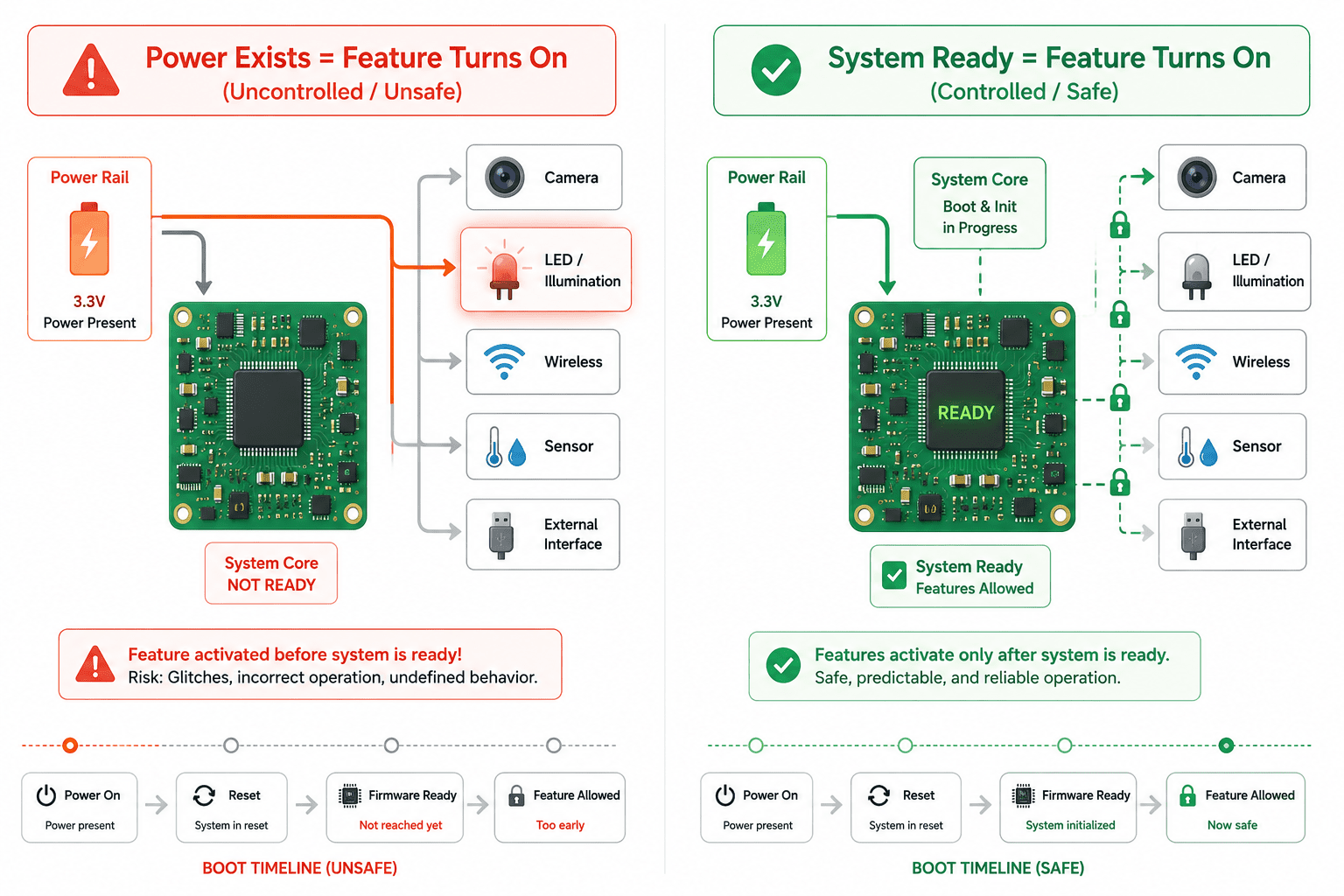
Features should not wake up just because power exists
One of the most common prototype habits is connecting a feature directly to a rail and assuming firmware will manage the rest. The board powers up, the MCU configures GPIOs, the firmware sets enables low or high as needed. In a controlled lab environment, this usually works.
But real hardware has a period before firmware takes ownership. During this time, GPIOs may be high impedance, reset lines may be undefined, level shifters may pass unknown states, and pull resistors may be missing or incorrectly placed. If a feature-enable pin floats into the active state, the feature can turn on without permission.
This is why every significant feature should have a safe hardware default, and for most features that default is OFF. IR illumination should remain off until intentionally enabled. Camera power rails shouldn't start randomly during boot. Wireless modules shouldn't transmit before configuration. LED indicators shouldn't receive false data during reset. External interfaces shouldn't drive a bus before ownership is clear. Sensor shutdown pins should remain in a known state. The principle is simple: power presence should not equal feature permission. A feature should require a valid enable condition, not merely a powered rail.
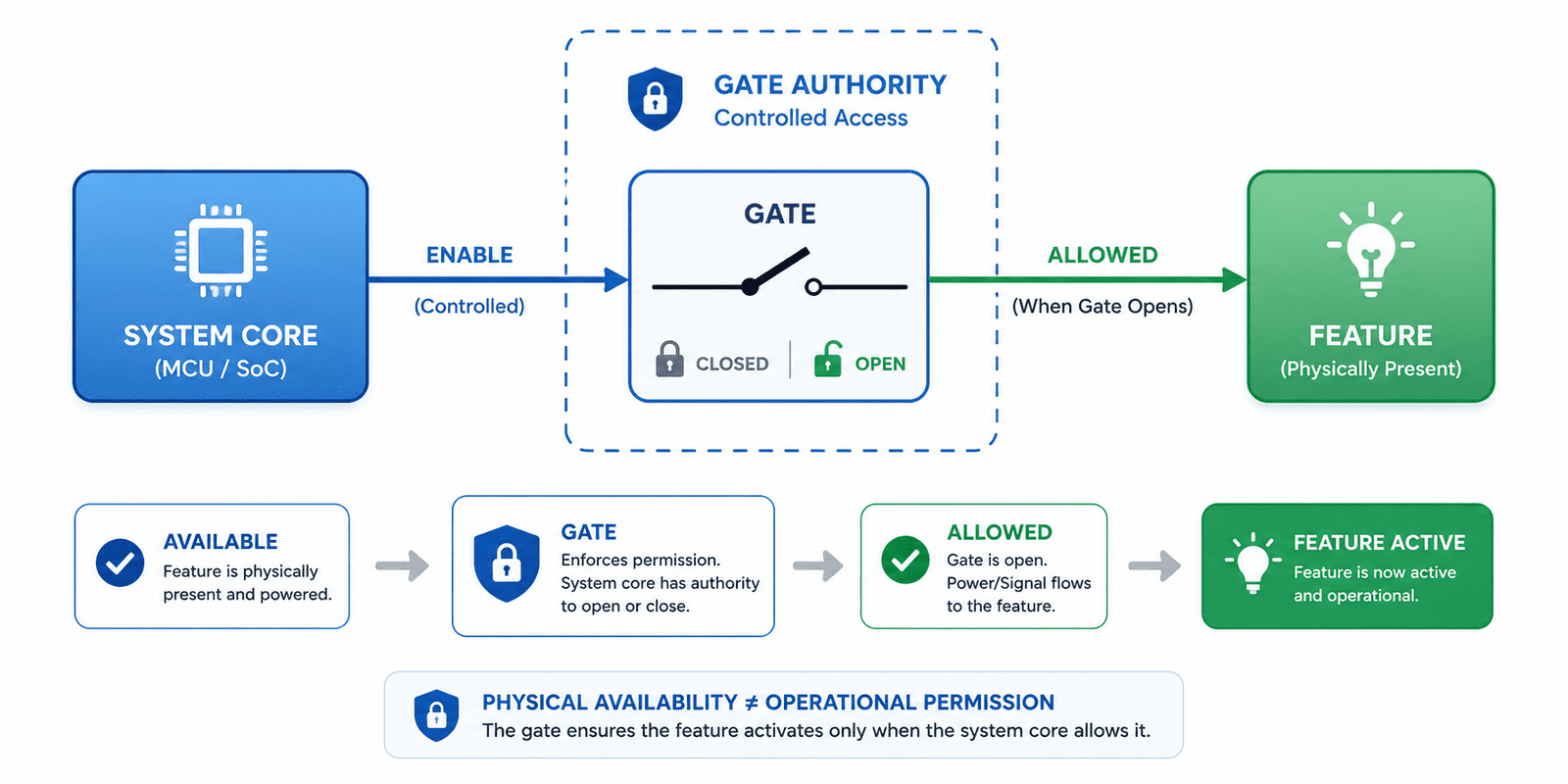
Gating is the boundary between "available" and "allowed"
Gating isn't just about saving power, it's about creating authority. A gated feature is electrically available, but not allowed to operate until a deliberate control condition is satisfied. This control condition can come from a GPIO, supervisor, PMIC, reset signal, latch, load switch, or combination of multiple signals. The gate creates a hard boundary between the system core and the feature.
In a Hoomanely hardware architecture, gating separates features that may disturb startup, measurement, communication, or power stability. A sensor board may contain several controlled sections:
- Imaging power rails
- Proximity sensor enable
- LED and illumination paths
- Level-shifter output enables
- Communication transceiver standby
- Status indicator power
In the EverBowl sensor schematic, this multi-feature structure shows up through separate regulated domains, sensor rails, level translators, reset supervision, CAN transceiver control, and feature enable paths, letting each feature come into the system intentionally rather than all at once.
A good gate answers three questions:
- Who is allowed to activate this feature
- What is the default state before firmware runs
- What happens if the control signal becomes invalid? If the answer to the third question is "the feature may turn on
- " the gate isn't safe enough
Pull resistors are small parts with big responsibility
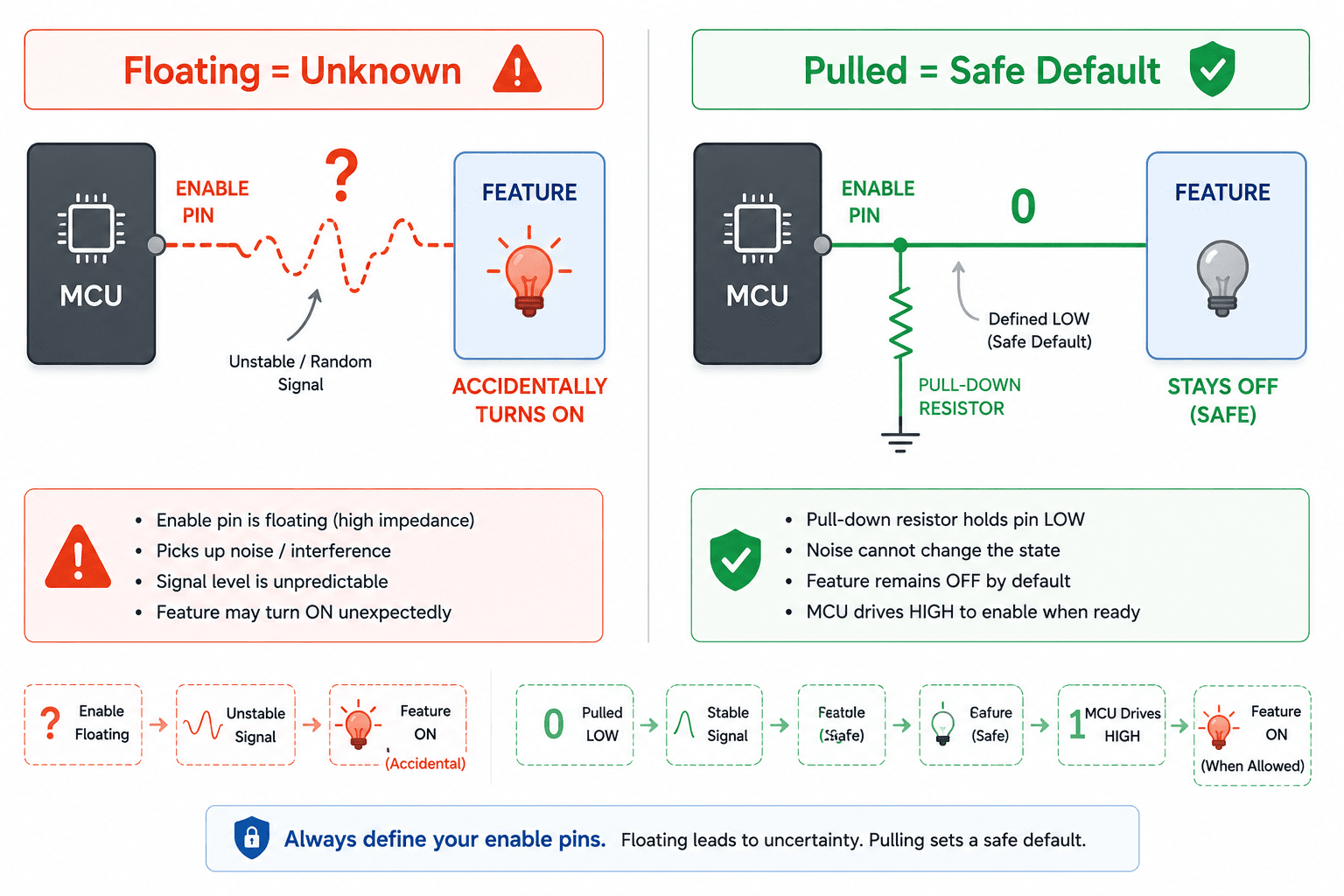
Pull-up and pull-down resistors are often treated as minor components, but in feature-safety design they're one of the most important safeguards. They define what the system does when nobody is actively driving the line, a condition that happens often, during MCU reset, before firmware pin configuration, during programming, during brown-out, when a cable is disconnected, when a board is partially assembled, or when a level shifter is disabled. A floating enable line is an invitation for accidental activation.
For feature enables, shutdown pins, chip selects, output enables, and boot-mode lines, the resistor direction should be chosen based on the safest state, not routing convenience. Active-high enable lines should usually have pull-downs. Active-low reset lines should usually have pull-ups or supervisor control. SPI chip selects should usually be pulled inactive. Level-shifter OE pins should default to disabled. Transceiver standby pins should default to a non-disruptive state. LED or illumination control lines should default off. The goal isn't just to prevent noise, it's to ensure every feature has a physical opinion before the firmware starts speaking.
Two-step activation is better than one GPIO
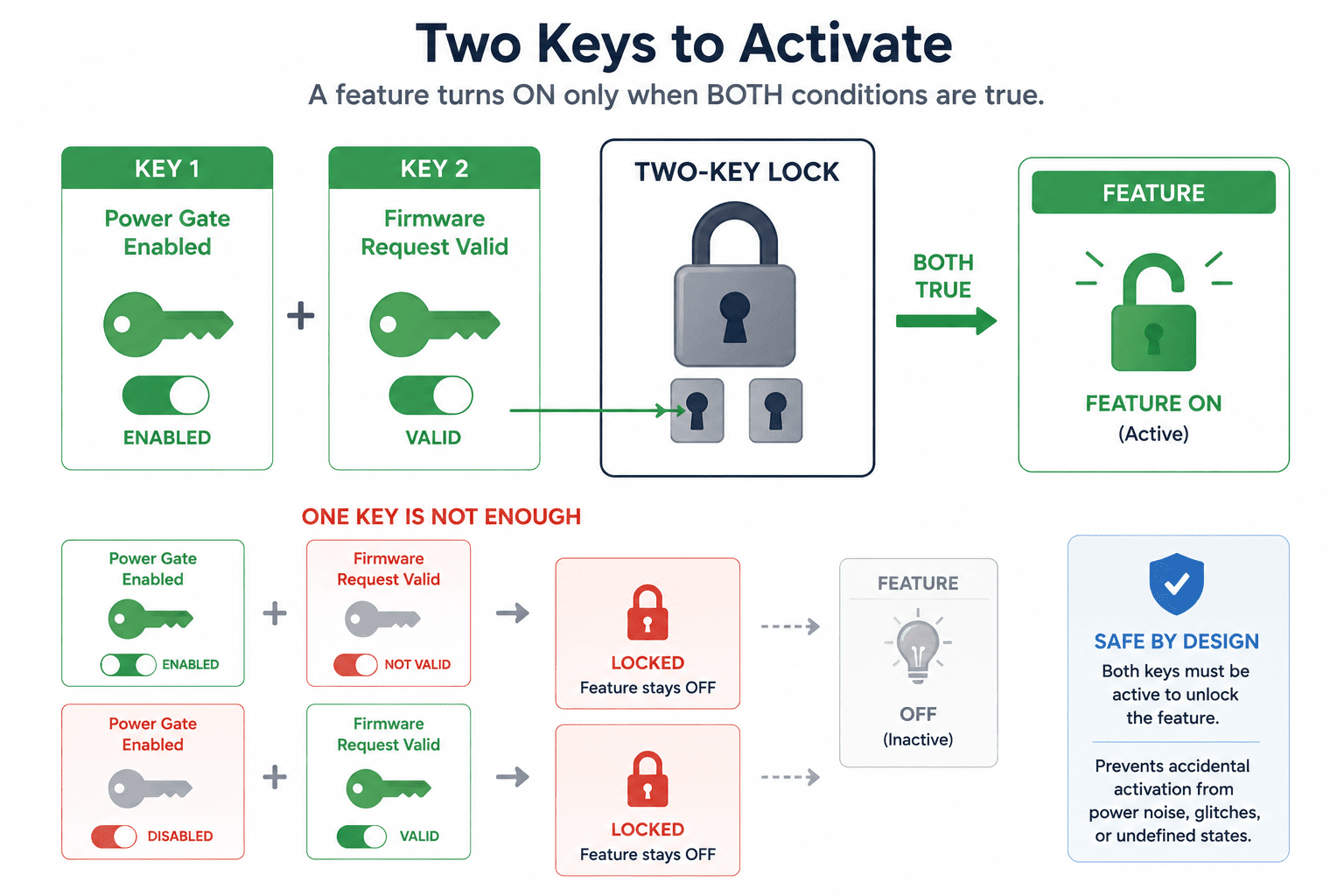
For low-risk features, one enable pin may be enough. For features that can affect power, optics, user-facing behavior, field safety, or measurement reliability, single-signal control is often too weak. A better strategy is two-step activation, where the feature only turns on when two independent conditions are true: a regulator enable must be active and a local feature enable must also be active, or the system must be out of reset and the firmware feature command must be valid, or the PMIC must declare rails stable and the MCU must request activation.
This prevents accidental activation caused by one floating line, one firmware glitch, or one partially powered logic domain. Two-step activation is especially useful for illumination, camera rails, wireless transmitters, external power outputs, or anything that should never activate during reset or factory handling. The design doesn't need to be complicated, sometimes a transistor, load switch enable, or simple logic gate is enough. What matters is that activation requires intent, not coincidence.
Physical safeguards help during manufacturing and service
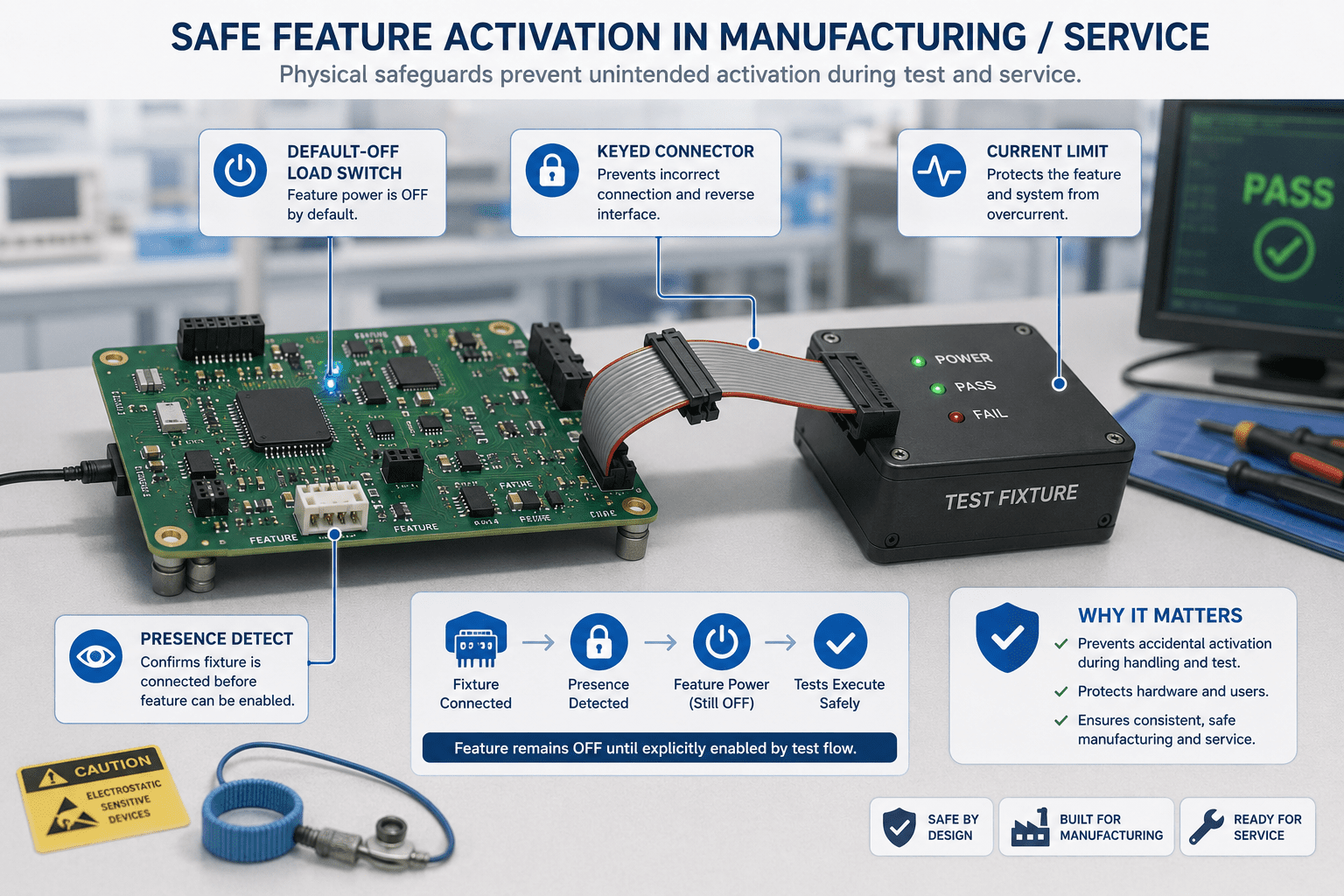
Accidental activation doesn't only happen in normal use. It also happens during assembly, testing, flashing, rework, and field servicing. A technician may connect one board before another. A debug fixture may power only part of the system. A ribbon cable may be inserted while the board is already powered. A test jig may hold the MCU in reset while external rails remain active. In these conditions, firmware may not be available to enforce safety.
Physical safeguards become the first line of defense:
- Default-off load switches
- Current-limited feature rails
- Keyed connectors
- Protected enable pins
- Series resistors on control lines
- Reset-supervised enables
- Connector presence detection
- Local pull networks on detachable modules
These measures reduce dependence on perfect human process, the board becomes more tolerant of real manufacturing behavior. At Hoomanely, this is a recurring design theme: the hardware shouldn't assume the factory, technician, or user follows an ideal sequence every time. It should remain safe even when the sequence is imperfect.
Preventing false activation on shared interfaces
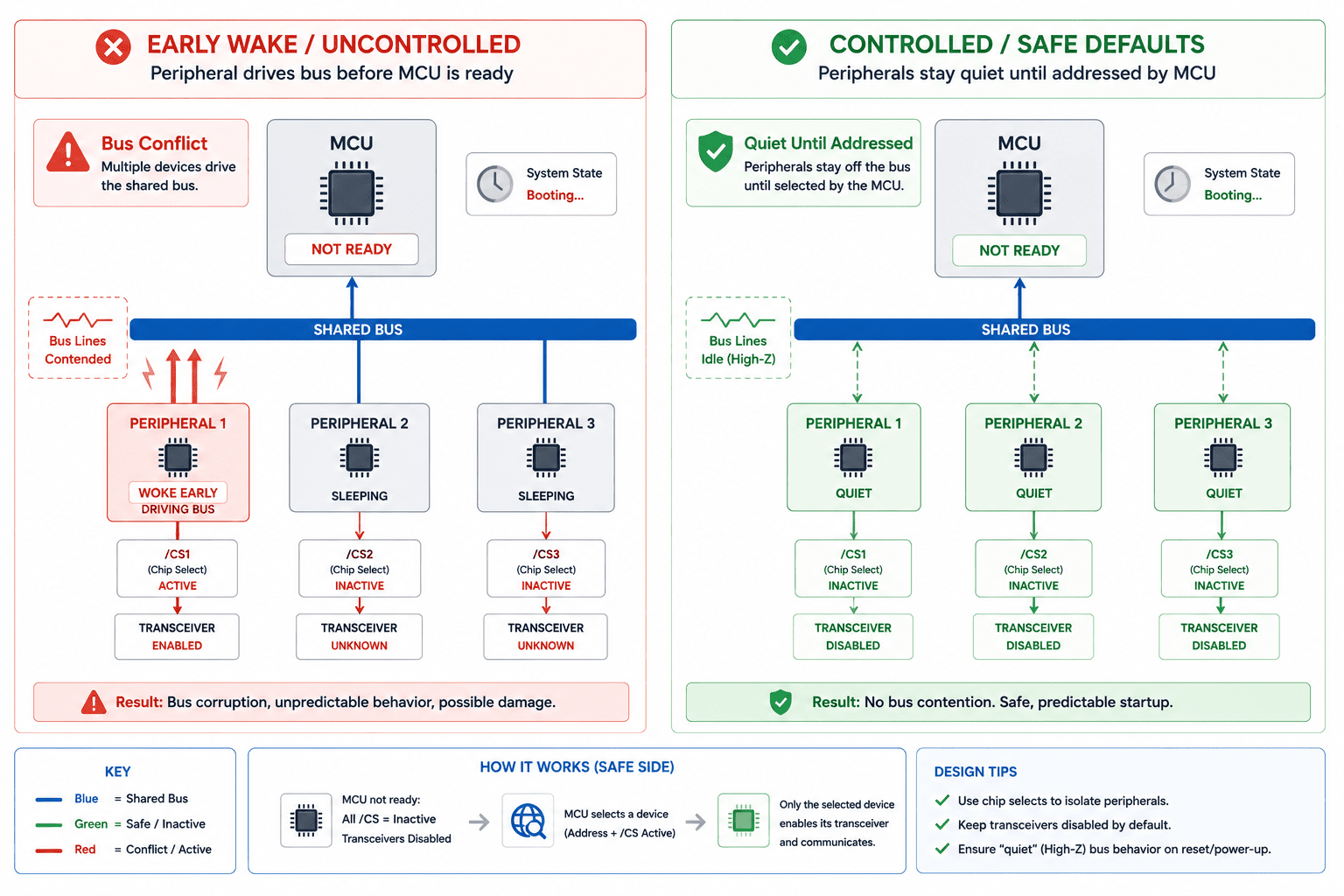
Shared interfaces are common places where accidental feature activation begins. SPI, I2C, UART, CAN, GPIO expanders, and level-translated buses can all create unintended behavior if one device wakes before the bus owner is ready. A floating chip select may wake an SPI device. A UART line may look like a start bit during boot. An I2C device may stretch or hold the bus while the controller is still resetting. A CAN transceiver may disturb the bus if standby control isn't defined.
This is why shared interfaces need inactive defaults. The bus should start quiet, devices should be deselected, transmitters should remain disabled, and transceivers should stay in standby unless explicitly enabled. The controller should gain ownership before peripherals are allowed to drive shared lines. This isn't only a signal-integrity concern, it's a system-authority concern. A device that can talk before it's addressed can create behavior that looks like firmware instability but actually begins in hardware.
Feature activation should follow system readiness
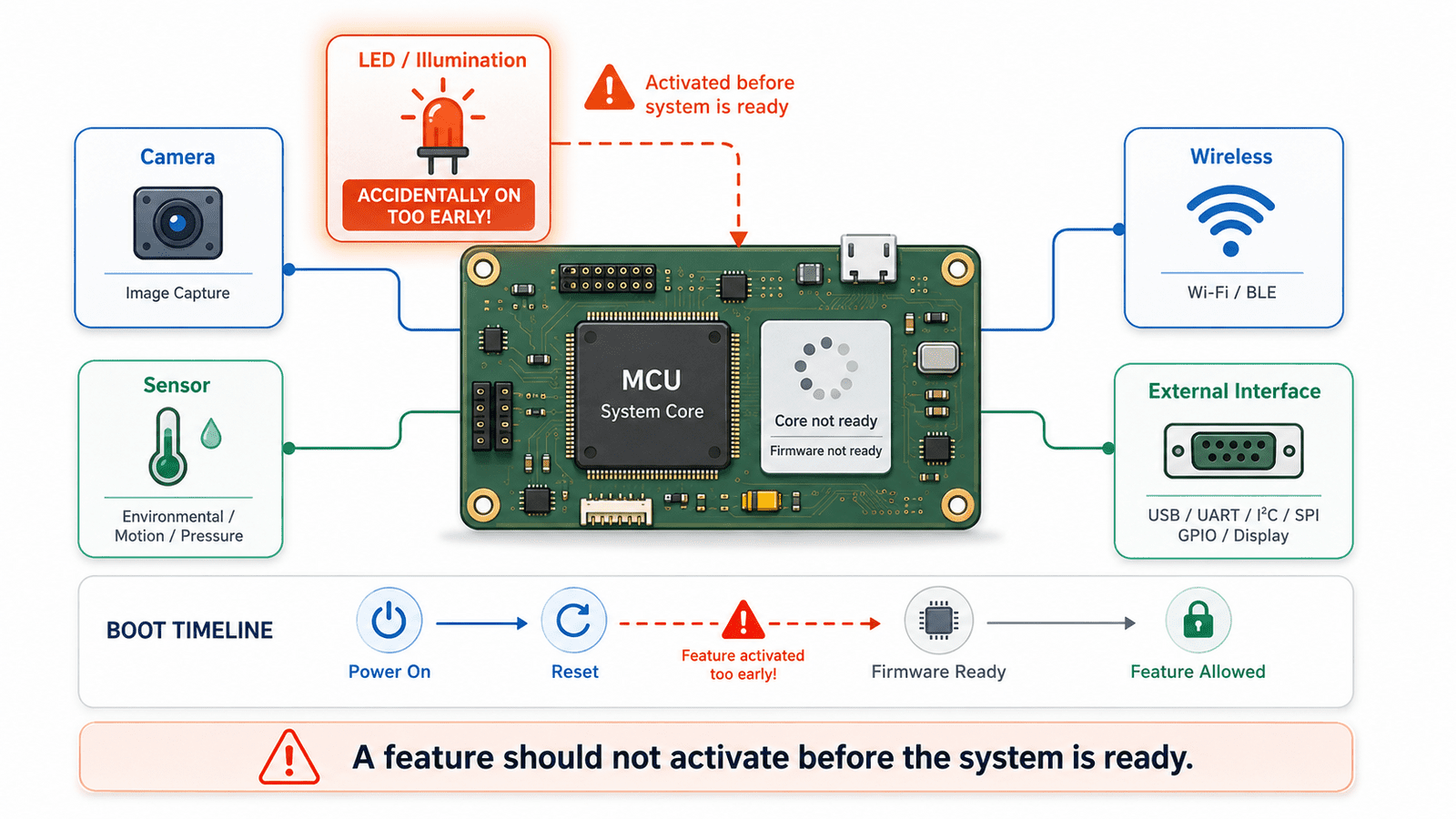
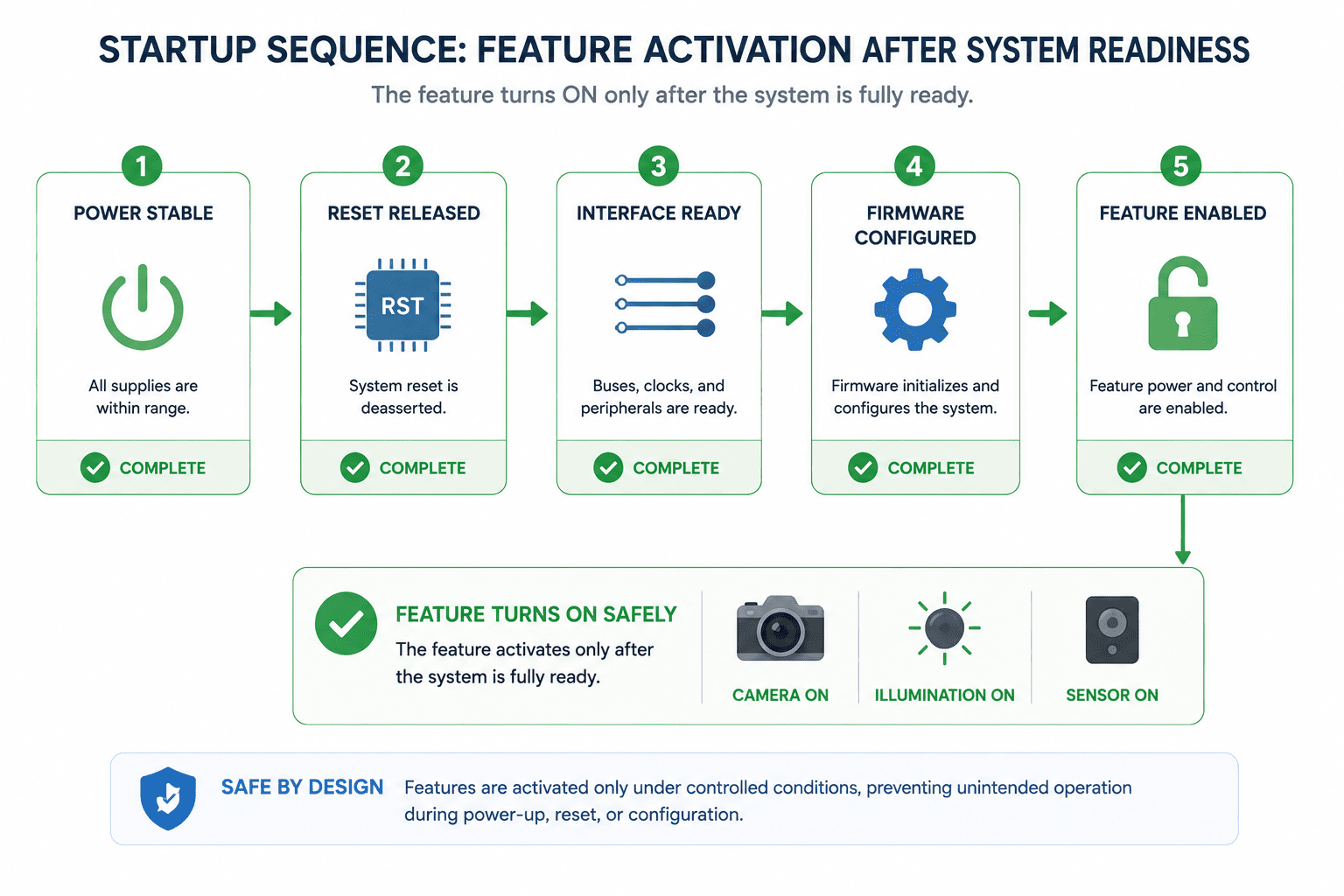
A feature shouldn't activate just because its own rail is stable, it should activate when the system is ready to handle the consequences. Powering a camera rail isn't enough, the clock path, reset line, interface receiver, firmware driver, memory buffer, and power budget all have to be ready too. Enabling an illumination circuit requires more than applying voltage to the LED driver, the exposure pipeline, current budget, thermal behavior, and user-facing state all need to be valid.
This is why feature enables should often be tied to system readiness signals in sequence: power rail valid, reset released, interface quiet, firmware configured, feature command accepted, feature enabled. This may seem slower than simply toggling a GPIO, but the result is a system that behaves consistently. Milliseconds of sequencing are usually cheaper than hours of debugging.
Do not let debug paths bypass safety
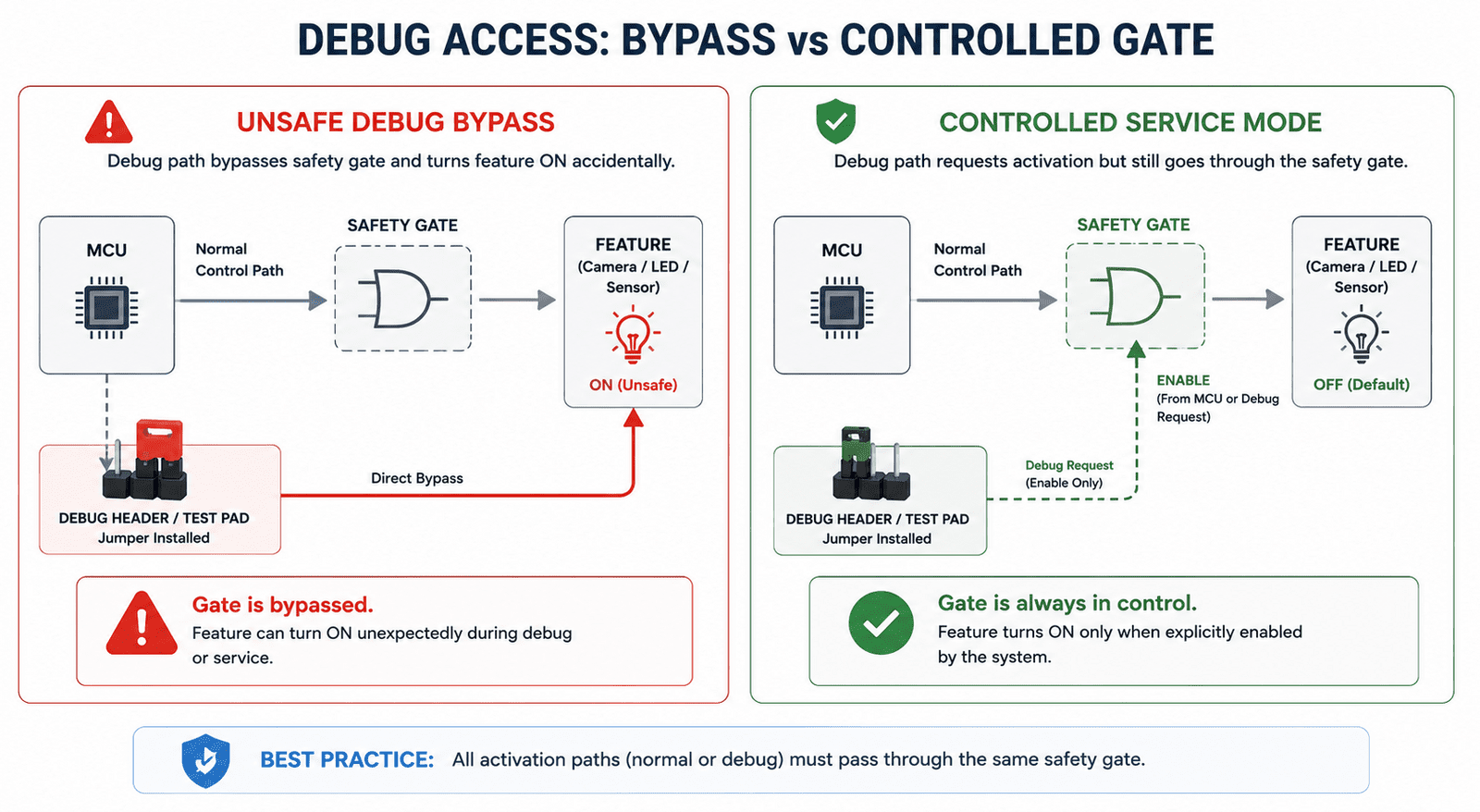
Development boards often include jumpers, headers, debug buttons, direct enables, and factory override lines. These are useful, but they can accidentally bypass the safety architecture. A debug jumper that directly forces a regulator on may be acceptable in early EVT, but dangerous if it survives into production without clear intent. A test pad that can enable illumination without the MCU may create unexpected behavior during fixture testing. A programming mode that leaves feature rails active may produce confusing current measurements.
Debug access should exist, but it shouldn't quietly defeat the same safeguards the product depends on. A good rule: debug paths may observe and request, they should not permanently bypass safety unless explicitly designed as a controlled service mode. That service mode should be documented, labeled, and physically hard to enter accidentally.
Validation must try to activate features at the wrong time
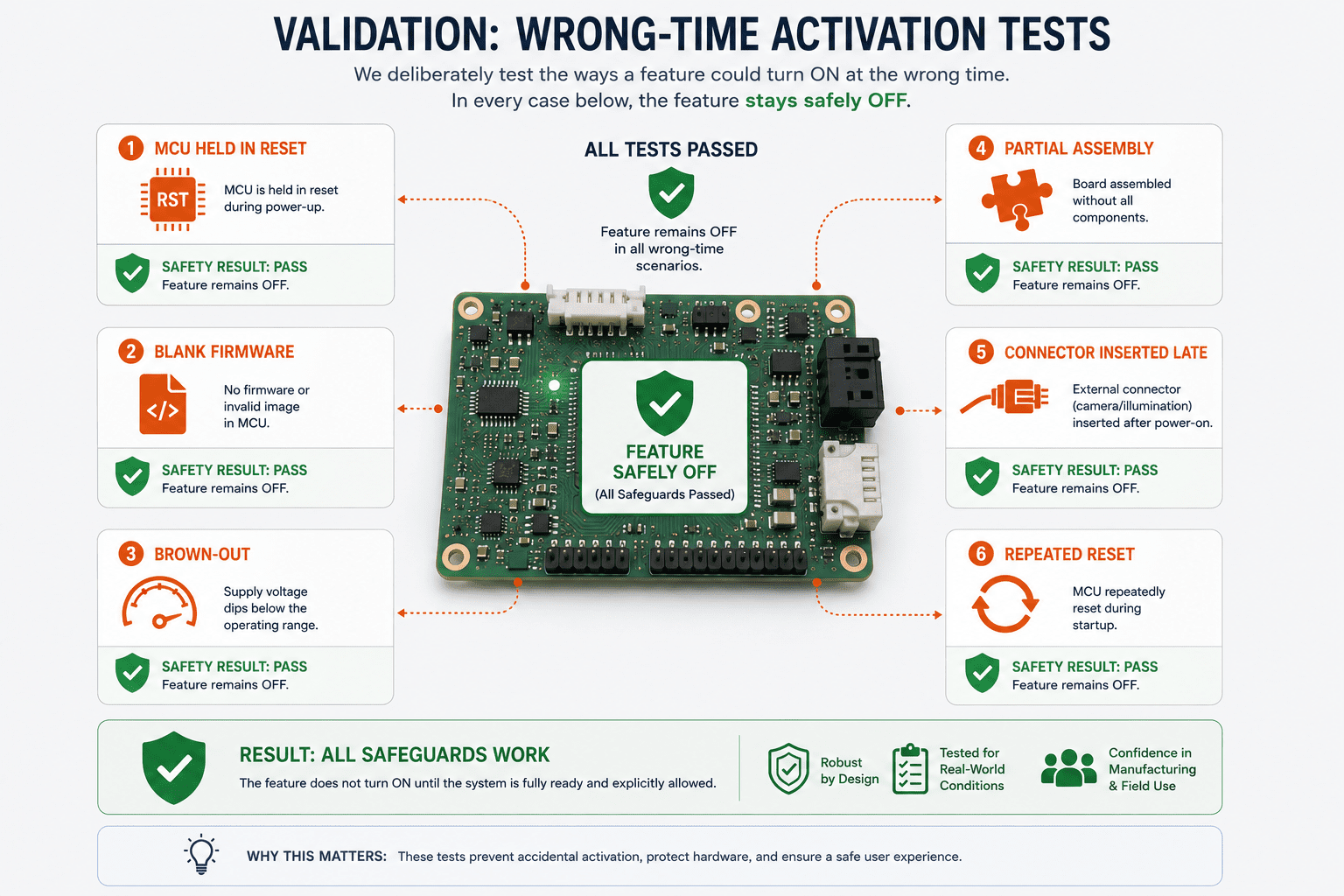
A design isn't proven safe merely because features work when enabled correctly, it has to be tested for what happens when activation is attempted incorrectly. During validation, engineers should intentionally test power-on with the MCU held in reset, firmware absent or blank, brown-out during feature enable, partial board assembly, connector insertion during standby, invalid GPIO states, repeated reset while feature rails are active, and factory fixture mis-sequencing.
The question isn't only "does the feature turn on?" The better question is: can the feature turn on when it should not? If the answer is yes, the design needs stronger gating or better physical safeguards.
Final thoughts
Accidental feature activation is rarely caused by one obvious mistake. It usually appears when hardware assumes firmware will always be present, GPIOs will always be initialized, power rails will always sequence cleanly, and manufacturing will always happen in the expected order. Real products don't live in that ideal world. They boot, reset, brown-out, get serviced, get reprogrammed, and pass through factory fixtures. During those moments, features need physical boundaries.
At Hoomanely, our hardware architecture approach is built around a simple idea: features should be available, but not automatically trusted. A feature should earn permission to activate through stable power, valid reset state, defined control signals, and clear system ownership. That is what gating and physical safeguards provide, they turn feature activation from an assumption into a controlled decision. And in embedded product design, that difference is often what separates a reliable system from a prototype that only behaves when everything happens perfectly.