

Secure File Uploads in Next.js
File uploads are a common attack vector in web applications. A single misconfigured endpoint can expose your infrastructure to malware, shell scripts, or malicious payloads disguised as harmless documents. In Next.js applications, handling file uploads securely requires more than basic form validation, it demands a layered approach that includes proper parsing, content scanning, and storage policies.
This post explores a practical strategy for building secure file upload flows in Next.js using Formidable for parsing, antivirus scanning for content validation, and S3 bucket policies for controlled storage.
The attack surface
File uploads introduce multiple vulnerabilities. An attacker might upload an executable disguised as a PDF, embed malicious scripts in image metadata, or exploit filename parsing to perform directory traversal. Beyond direct code execution, there's the risk of serving malicious content to other users, consuming storage resources, or bypassing application logic through crafted MIME types.
Traditional approaches relying solely on client-side validation or basic extension checks fail immediately when an attacker bypasses the frontend or renames a malicious file. A robust solution requires server-side validation, content inspection, and restrictive storage permissions.
Architecture overview
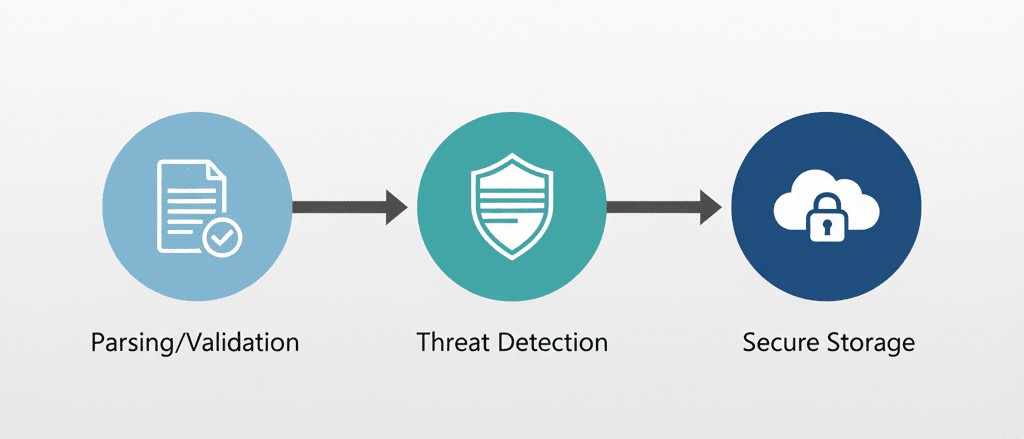
A secure upload flow separates concerns across three layers, parsing and validation, threat detection, and storage isolation. Each layer acts as a checkpoint, reducing the likelihood malicious content reaches production storage or users. Formidable handles multipart form parsing and provides control over file size, type, and storage location during upload. ClamAV handles content scanning. And S3 bucket policies ensure that even if a malicious file reaches storage, it can't be executed or accessed improperly. This creates defence in depth, if one layer fails, others still provide protection.
Parsing with Formidable
Formidable is a Node.js library designed for handling multipart form data, providing granular control over the upload process, including file size limits, allowed MIME types, and temporary storage locations. In Next.js API routes, you need to disable the default body parser since it can't handle multipart data:
export const config = {
  api: {
    bodyParser: false,
  },
};
When initialising Formidable, set maximum file sizes, restrict MIME types, and define where files should be temporarily stored, preventing attackers from uploading arbitrarily large files or bypassing type restrictions. Key configuration points include setting maxFileSize to prevent resource exhaustion, using a filter function to validate MIME types before accepting uploads, storing files in a temporary directory isolated from application code, and generating random filenames to prevent path traversal. Formidable's filter callback runs during upload, letting you reject files immediately, which is more efficient than accepting everything and validating later, especially for large uploads.
Content scanning strategy
File extension and MIME type validation catch obvious threats, but sophisticated attacks embed malicious code within legitimate file formats. A JPEG might contain executable code in its EXIF metadata, a PDF could include embedded JavaScript. Content scanning addresses these threats by inspecting file contents.
ClamAV is an open-source antivirus engine commonly used in server environments, and libraries like clamscan provide an interface to its daemon or command-line scanner. After Formidable writes the uploaded file to temporary storage, scan it before proceeding. Run ClamAV in daemon mode for faster scanning, configure timeouts to prevent slow scans from blocking your API, delete files immediately if they fail scanning, and log scan results for security monitoring.
Scanning introduces latency, so consider the user experience, synchronous scanning works for small files, queued background jobs work better for larger uploads. False positives happen occasionally, establish a manual review process for flagged files, but never automatically whitelist files without human verification.
S3 bucket policies
Even if a malicious file passes validation and scanning, bucket policies provide a final layer of defence by controlling how files can be accessed and executed. Start by disabling public access at the bucket level, using IAM roles and signed URLs for controlled access rather than making objects publicly readable. Configure S3 to set appropriate Content-Type and Content-Disposition headers on upload, forcing Content-Disposition: attachment for user-uploaded content to prevent browsers from rendering files inline.
Use separate buckets for user uploads and static assets, applying different policies to each, user content should never have execute permissions or be served through your CDN without additional validation. Additional hardening includes enabling versioning to recover from ransomware or accidental deletions, configuring lifecycle policies to automatically delete old temporary files, and enabling CloudTrail logging for all bucket operations. Consider using S3 presigned URLs with short expiration times, generated server-side only after verifying user permissions.
Integration flow and monitoring
The complete flow combines these layers: receive the upload through Formidable parsing, validate file type, size, and filename, scan the temporary file, upload to S3 with appropriate metadata if the scan passes, delete the temporary file immediately after S3 upload succeeds, and return a secure access URL to the client. Handle errors at each stage gracefully, if scanning fails due to a timeout, don't default to accepting the file, reject it and notify administrators.
Security isn't a one-time implementation. Monitor upload endpoints for unusual upload volumes or file sizes, repeated scan failures from specific users, and spikes in rejected file types. Maintain audit logs including user identifiers, file hashes, scan results, and S3 keys, essential for incident response and compliance.
Key takeaways
- Secure file uploads require multiple defensive layers.
- Client-side validation improves UX but can't be trusted for security.
- Server-side parsing with libraries like Formidable gives you control before files reach your infrastructure.
- Content scanning catches threats that bypass type validation, at the cost of latency and operational complexity you should balance against user experience.
- S3 bucket policies provide a final safeguard by restricting how files can be accessed even if they enter storage.
- No single technique eliminates all risk, but combining parsing validation, content scanning, and restrictive storage policies significantly reduces your attack surface.



