Stable BLE Sensor Streams: MTU, Connection Interval, and End-to-End Buffer Control
Stable BLE streaming can feel like magic when it works: sensors stay responsive, data arrives smoothly, and the app feels live without burning the battery or stuttering the UI. The good news is that this isn't luck, it's engineering. When you treat BLE as an end-to-end streaming pipeline rather than just a radio link, you can make throughput steady, latency predictable, and jitter boring across different phones, OS versions, and real-world usage.
We'll start from a target sensor rate and turn it into a measurable throughput plus jitter budget, then tune MTU and payload framing to reduce overhead, choose connection interval and latency settings that shape delivery into a stable cadence, and add buffer control so queues never silently grow into lag. We'll also make sure the Flutter side, decoding, isolates, and UI update frequency, stays fast enough that the app never becomes the hidden bottleneck. The end result is a BLE stream you can trust in production: smooth, repeatable, and easy to validate.
Why BLE streams get "bursty" in production
Even if your raw link throughput is "enough," stability fails when timing mismatches stack up across layers. The peripheral sends in bursts due to scheduler tick, sensor batching, or RTOS timing. BLE delivers in connection events, not continuously. Mobile stacks buffer aggressively, then release data to the app in lumps. Flutter decoding competes with UI, and heavy parsing can starve reads. UI refresh cadence and animations create periodic CPU pressure. And with no backpressure policy, queues grow invisibly until you drop.
A stable stream isn't "max throughput," it's controlled throughput with bounded jitter and bounded memory growth.
Approach: engineer to a budget, not to a guess
When BLE streaming feels unstable, the usual instinct is to tweak a couple of knobs, raise MTU, lower connection interval, and hope the stream locks in. That can work in a lab, but it's fragile in production because you're optimizing one layer without defining what the system is actually trying to guarantee.
A better approach treats streaming like any other production pipeline: define an explicit delivery budget, then tune each layer to meet it with margin. The budget is what makes tuning measurable, repeatable, and portable across devices.
Your sensor target isn't just "bytes per second," it's a quality-of-delivery contract. Start with non-negotiables you must deliver: sample size in bytes per sample, the actual payload per logical sensor unit including what the app truly needs; sample rate in samples per second, the stream's truth clock, even if you batch this is the rate the consumer experiences; acceptable end-to-end latency, the maximum age of data when it becomes usable; and acceptable jitter (P95/P99), not the average arrival rate but how uneven delivery is allowed to be at the tail.
From these, define three explicit budgets. Useful throughput budget is the payload your application needs to remain correct and responsive in steady state, surviving all framing and protocol overhead, the true sensor value bandwidth. It should be measured both at ingress, right after the BLE callback, and after decode, since decoding failures or slowdowns effectively reduce throughput.
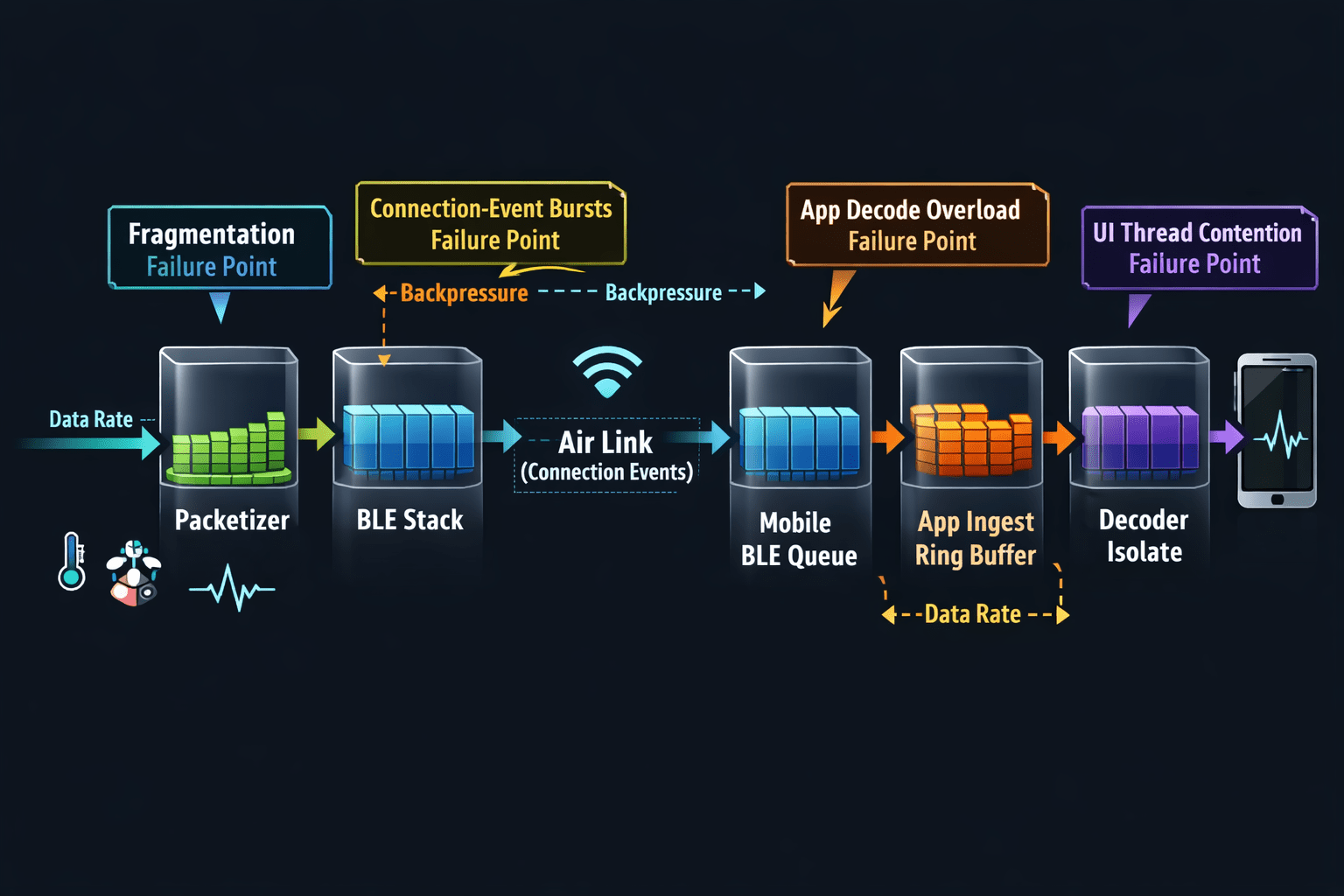
Jitter budget is the shape of delivery. You can have correct average throughput and still get an unusable stream if delivery is lumpy, because lumpiness causes buffer growth, delayed UI updates, and unpredictable control behavior. Define it in terms of inter-frame arrival variability at the app boundary, tail jitter (P95/P99), and burst tolerance, how much the system can absorb without backlog.
End-to-end latency budget is the freshness contract. Latency isn't only BLE, it's everything: time spent waiting for the next connection event, time sitting in OS queues, time waiting for decode scheduling, time waiting for UI cadence. Measure it as sensor time to usable time, with P50 and P95/P99 tracked separately, since tail latency is where streams feel broken.
Naming every overhead source
Once you define useful throughput and jitter budgets, you need to account for the fact that BLE does not deliver "useful bytes." It delivers packets with overheads and constraints that vary by device, OS, and runtime conditions. Instead of guessing, explicitly name each overhead source so you can reason about where the bandwidth and stability actually go.
Framing overhead includes everything you add for correctness and evolvability, sequence numbers, timestamps, message type/version, checksum/CRC. It's not waste, it's what makes the stream debuggable and stable under loss or reorder, but you want it predictable and amortized, not paying heavy per-sample overhead on a high-rate stream.
ATT/GATT overhead is where "set MTU higher" can help, but only if your framing plays along. ATT/GATT introduces per-attribute operation overhead, notification/indication semantics, and fragmentation risk if payload framing doesn't align with negotiated MTU. Fragmentation doesn't just reduce throughput, it increases processing cost, increases burstiness, and increases reassembly complexity, all three of which create jitter and app-side backlog.
BLE link layer overhead determines what happens during connection events: scheduling, retransmissions, packetization. Even if your app thinks in "frames," the link delivers in terms of connection-event opportunities. This shows up as payload versus control traffic ratio, retransmission behavior under interference, and burst delivery tied to connection events. The implication: assume your effective throughput and arrival smoothness will degrade in real environments unless you've engineered headroom and buffering rules.
Encryption overhead, if enabled, can change effective payload per packet, processing time per packet, and retry behavior under poor conditions. And mobile stack buffering effects are the most common blind spot, the phone isn't a passive pipe, it buffers, coalesces, schedules, and sometimes batches delivery depending on OS scheduling pressure, background policies, Bluetooth stack decisions, and CPU contention from UI or other apps.
Metrics that matter
Your goal isn't "meet the rate," it's "meet the rate with resilience." Margin protects you from interference, device differences, UI contention, and periodic OS scheduling effects. Drops aren't just data loss, they're a signal your pipeline lacks control. Drops typically mean the sender is producing faster than the receiver can ingest or decode, buffering is unbounded and you're hitting memory or queue limits, fragmentation and reassembly cost exceeds available CPU budget, or your app's hot path has hidden work like allocations, copies, and parsing. Even if your use case tolerates some loss, keep drop rate as a diagnostic metric because it reveals where the system is failing.
Median latency tells you normal responsiveness, tail latency tells you whether the stream feels stable. A stable stream keeps tail latency bounded over long runs, not just short tests. Jitter is the hidden UX killer, a stream can have correct throughput and latency averages but poor jitter will force bigger buffers, cause decode spikes, increase UI scheduling pressure, and make controls feel inconsistent. If jitter isn't bounded, your only workaround becomes "increase buffering," which trades jitter for lag, and lag is what users notice. Memory growth, or queue drift, is the ultimate stability check, an early warning sign you'll eventually hit delayed UI updates, large GC pauses, dropped frames, or disconnection/reconnect loops.
MTU: pick it for payload framing
Higher MTU reduces overhead per useful byte, if you can fill it efficiently. But MTU only helps when your packets are large enough to benefit and you avoid fragmentation and partial fills that reintroduce overhead.
A practical framing rule: define a frame that contains a batch of samples, sized to be either under (MTU minus header) for single-ATT-write delivery, or a clean multiple your receiver reassembles cheaply. A typical stable pattern is batching N samples per frame so frames arrive at a steady cadence, say 20-50 frames per second, not too frequent to cause overhead, not too big to increase burstiness.
Key anti-patterns: "one sample per notification" at high Hz creates too much overhead and scheduling jitter; "huge frames" exceeding what the phone can decode fast make the app the bottleneck; and MTU maxed but frames half-empty means you're paying overhead anyway. What to measure: negotiated MTU distribution across devices, average payload fill ratio, and frame reassembly CPU time.
Connection interval and slave latency: treat as a shaping tool
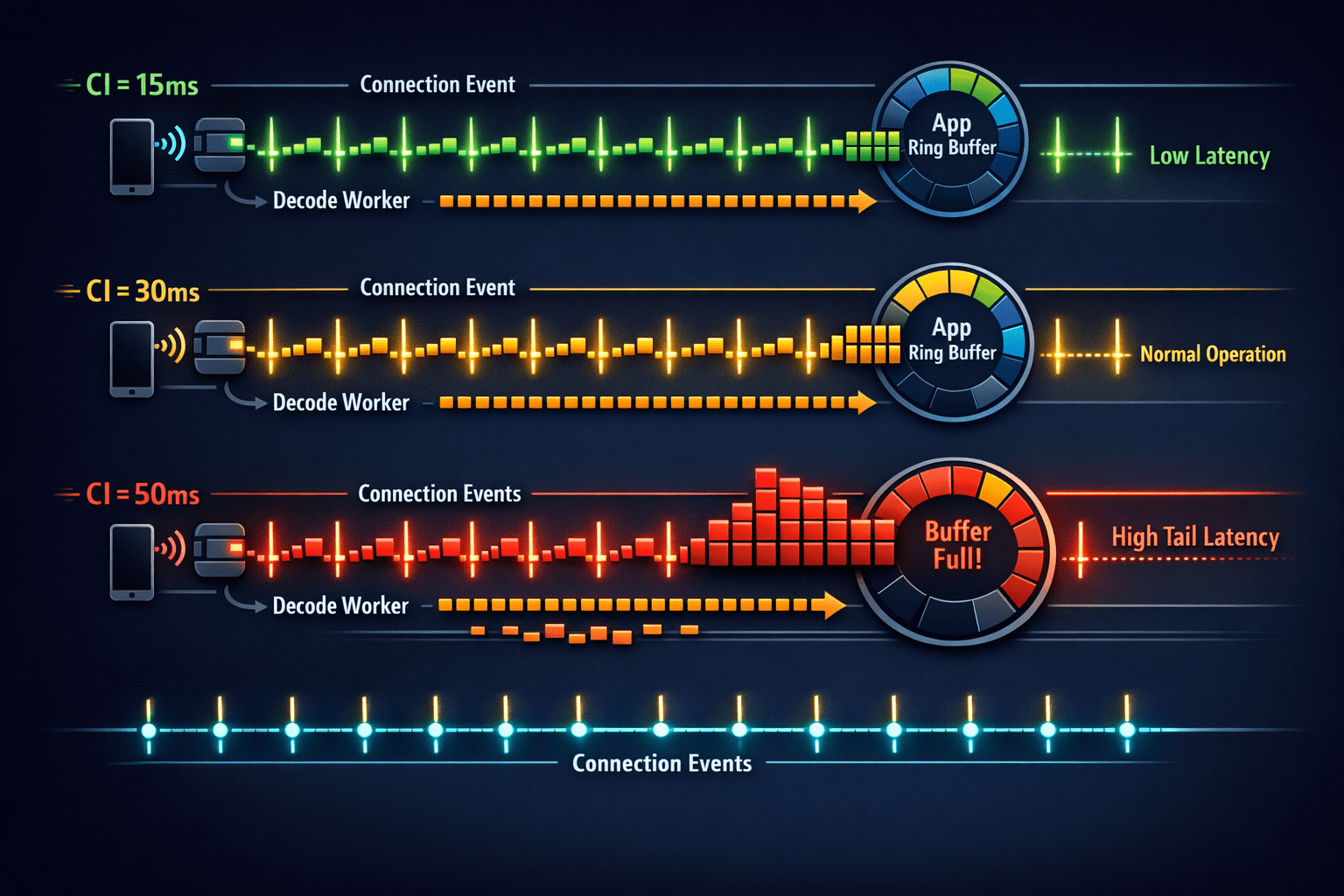
BLE delivers data in connection events, and connection interval sets how often those events occur. A short CI, say 7.5-15ms, means more events, lower latency, higher radio duty. A long CI, 30-50ms, means fewer events, more bursty, better power. Slave latency lets the peripheral skip connection events when it has nothing important to send, saving power, but it can also worsen burstiness if used carelessly.
Stability-first guidance: pick a CI that makes your required throughput achievable without relying on bursts, and keep slave latency low or zero during active streaming, unless you have a clear power reason and a proven buffering model. This "two-profile" strategy, one for idle and one for active streaming, is often what separates a stable product stream from a lab demo.
Peripheral packetization: make the sender predictable
A stable sender has three properties: fixed cadence, frames at consistent intervals like every 40-60ms; bounded burst size, no dumping huge bursts after delays; and deterministic framing so the receiver can reassemble quickly. A packetization checklist: use a sequence number per frame (wrap is fine), add a timestamp in sensor-time to detect lag and jitter correctly, add a frame type/version to evolve formats safely, and optionally include a tiny CRC per frame if corruption detection matters. The golden rule: if you can't explain your framing on a whiteboard in 60 seconds, your future debugging will be painful.
Flutter: make decoding a separate, metered subsystem
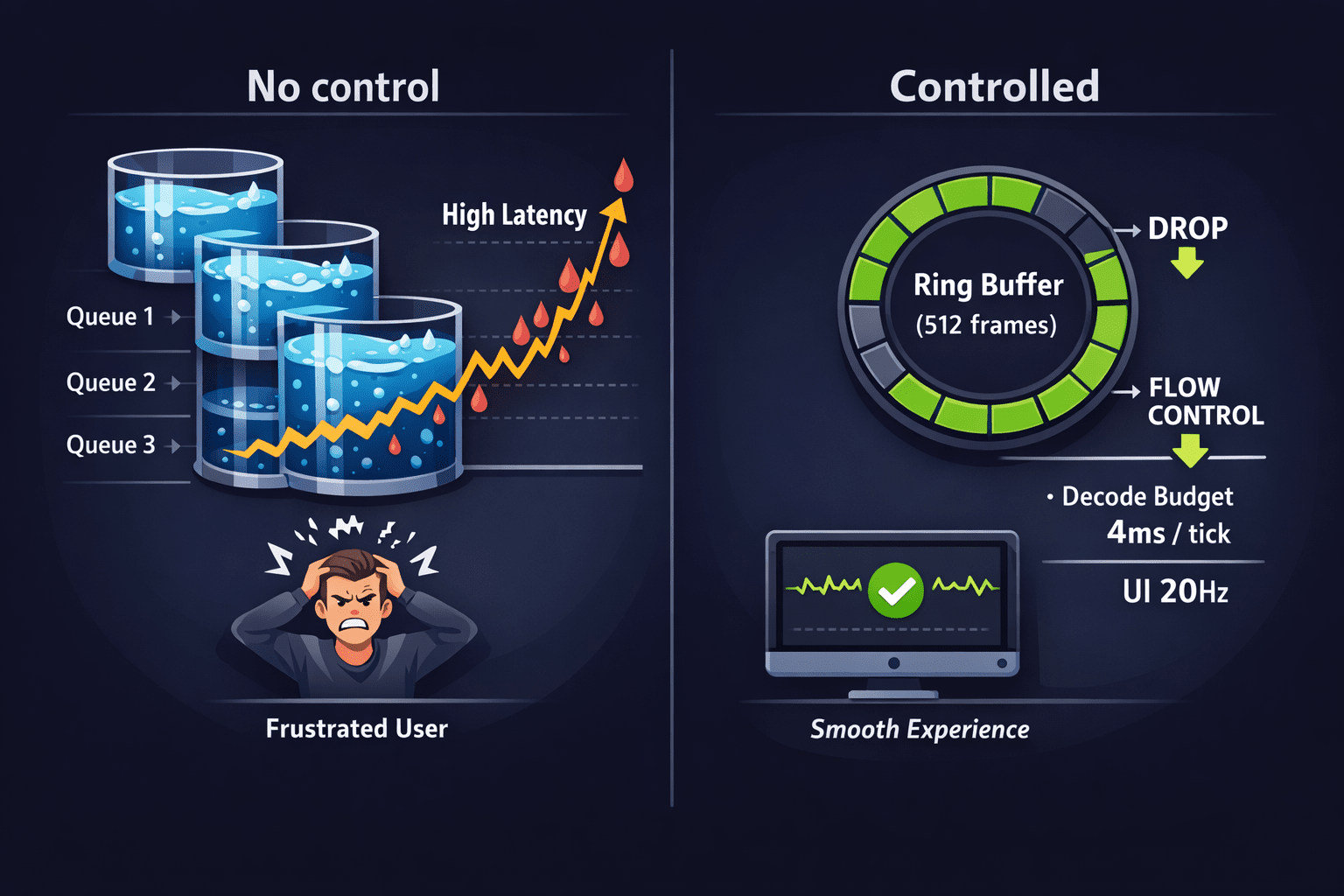
A common failure mode is accidental: decoding on the UI isolate "because it works." Then a slightly older device, or an animation-heavy screen, causes decode delays and the BLE callback can't keep up. A stable Flutter pattern: the BLE callback does minimal work, just copying bytes into a ring buffer or chunk queue; the decoder runs in an isolate or dedicated worker with a fixed max batch size per tick and time budgeting (decode up to X ms then yield); and the UI receives downsampled updates rather than redrawing at sensor Hz.
UI cadence rule: if your sensor is 100-500 Hz, UI updates should often be 10-30 Hz. Let the UI show state, not raw samples. This single decision eliminates a huge class of "mystery jitter."
Buffer control: prevent queue growth by design
Think of each boundary as a queue, the peripheral TX queue, controller/stack queue, OS callback queue, app ingest queue, decode queue, and UI update queue. A stable system has explicit policies at each. If your data can tolerate loss, like a high-rate IMU for smoothed UX, use a ring buffer with fixed capacity, and when full, drop oldest (keeps recent data fresh) or drop newest (preserves continuity), and record drops as metrics.
If you must not lose data, implement a lightweight flow control: the peripheral slows frame rate when app lag increases, or the app sends a window size or ready/not-ready control over a separate characteristic. Keep it simple, 2-3 states, not a complex protocol. And if you detect the phone delivering in bursts, keep frames modest, ensure decode can handle burst peaks, and use a decode budget per tick so you don't starve ingestion.
Measurement loop: make tuning measurable and repeatable
Instrument the pipeline with just enough to see what's happening: useful bytes per second at app ingest and after decode, drop rate (sequence gaps, buffer overwrites), latency from sensor timestamp to UI timestamp (P50/P95), jitter as inter-frame arrival variance (P95), CPU for decode isolate and UI isolate percentages, and memory as queue sizes and peak allocations. Keep it lightweight enough to run always-on in debug builds.
Define three test scenarios: steady state (10 minutes screen-on, normal use), stress UI (active animations and scrolling while streaming), and background or lock (OS constraints as applicable to your product). Tune in a deliberate order: fix framing and batching first (sender behavior), negotiate MTU and choose frame sizes, adjust connection interval and latency for burstiness and power, add buffer bounds and drop or flow-control policy, fix Flutter decode isolation and UI cadence, then re-test across devices and OS versions.
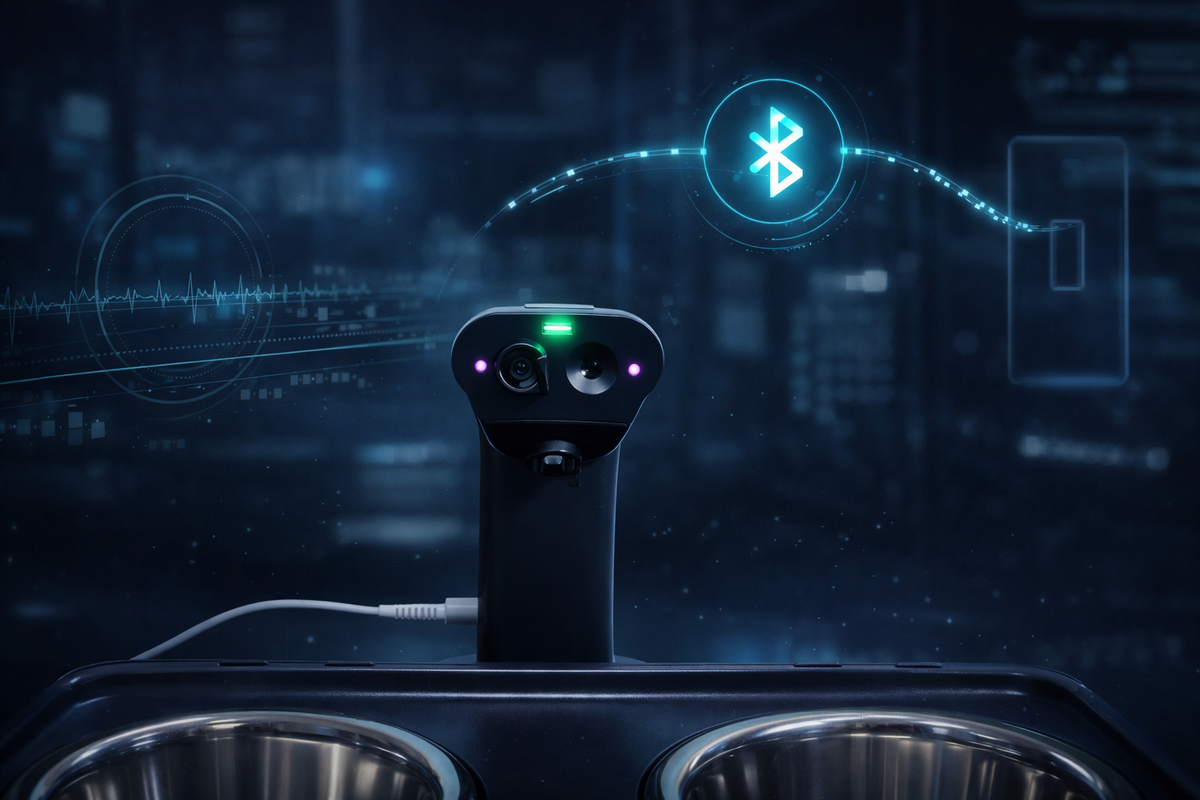
At Hoomanely, streaming stability is treated as a user trust feature, data is only useful if it stays timely and consistent while the user moves around their home, switches screens, and does ordinary phone things. The playbook above maps cleanly to wearable and feeder-class devices, a continuous sensor stream or short high-confidence bursts from a home device like EverBowl when an event occurs. The same principle applies: stable framing plus shaped connection behavior plus bounded buffers plus measured decode. A pragmatic pattern that works well is switching BLE parameters dynamically between idle and active streaming, and keeping Flutter UI updates intentionally slower than the sensor rate, so the experience stays smooth even on mid-range phones.
Results: what "stable" looks like
When this is done well, you'll see a flat latency curve over time with no creeping lag, consistent inter-frame arrivals even when delivery is event-based, no queue drift as buffers oscillate but don't grow, a smooth UI with no decode-induced jank, and behavior that matches across devices, differences become measurable rather than mysterious. The biggest unlock is not any single value, it's the control loop: measure, tune, validate, repeat.
Key takeaways
Treat BLE streaming as a pipeline, not a link setting. Choose MTU and framing to maximize useful payload fill and minimize fragmentation. Use connection interval and latency as traffic shaping, two profiles for idle and active are often best. Make buffering bounded and observable everywhere, with explicit drop or flow-control policies. In Flutter, isolate decoding and throttle UI updates, don't render at sensor Hz. And validate with a measurement loop covering throughput, drop rate, P95 latency and jitter, CPU/memory, and buffer drift.