
Designing Feedback Loops in Connected Device Experiences

TL;DR: Smart device onboarding often fails not because the process is complicated but because it feels unpredictable, making real-time device status visibility essential to reducing user anxiety and building trust. Everbowl's LED indicator system communicates device status through blue blinking for Bluetooth pairing in progress, blue stable for Bluetooth pairing completed and waiting for WiFi connection, green stable for fully connected and functioning normally, and red for error or connection issue detected. This dual-layer communication combining physical LED feedback with digital app onboarding applies the fundamental UX principle of visibility of system status, improving hardware onboarding success rates, strengthening product reliability perception, and reducing customer support dependency.
Introduction
When users set up Everbowl for the first time, they are connecting a physical device to a digital experience. Unlike purely app-based onboarding, smart hardware onboarding introduces uncertainty. Users are often unsure whether the device is pairing correctly, connecting to WiFi, or functioning as expected.
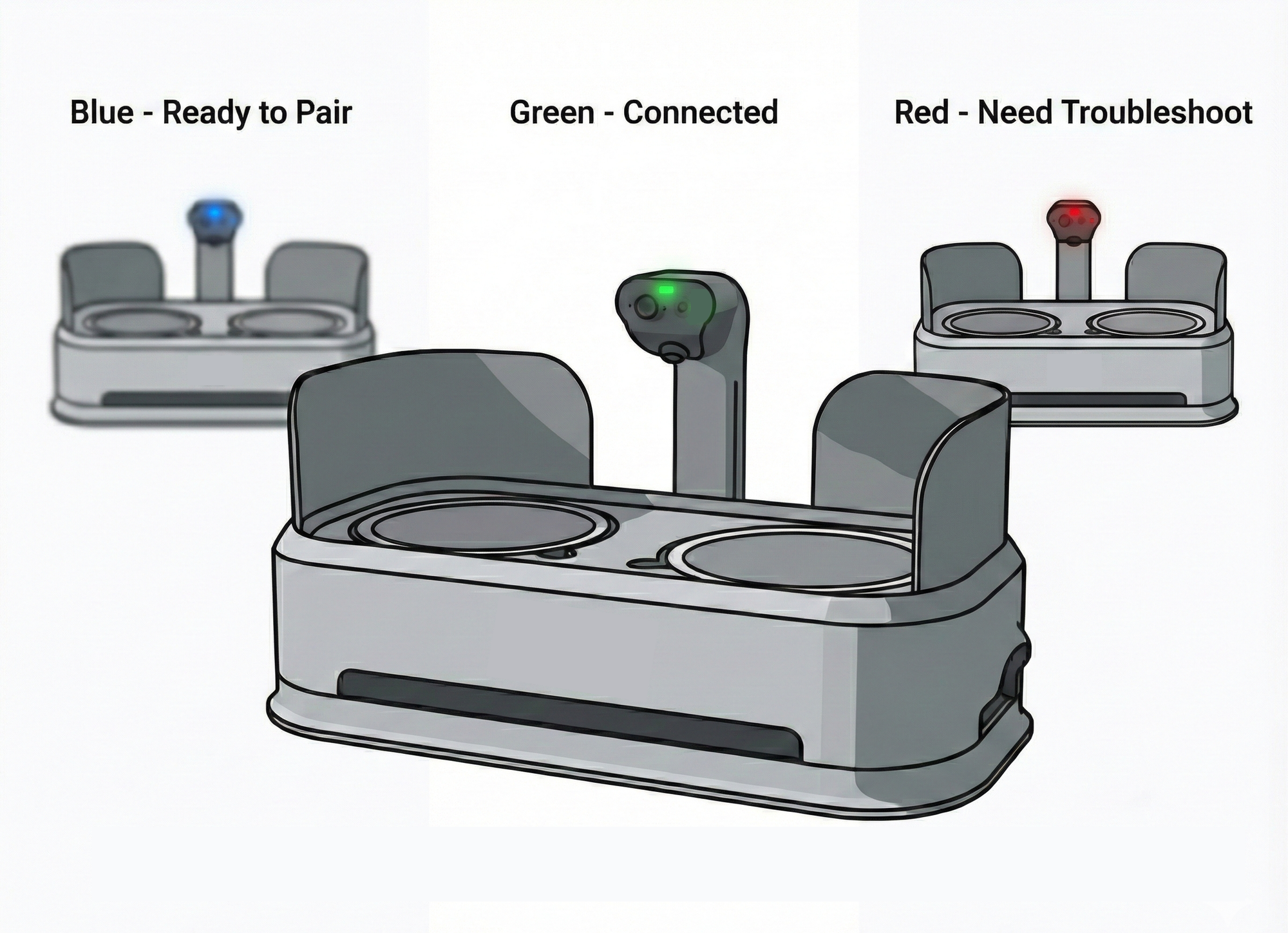
To address this, we designed a visual system language using LED indicators on Everbowl that communicates real-time connectivity and device status. Each LED color represents a specific stage of the setup and operational journey:
- Blue Blinking – Bluetooth pairing is in progress
- Blue Stable – Bluetooth pairing completed, waiting for WiFi connection
- Green Stable – Device is fully connected and functioning normally
- Red – Error or connection issue detected
This LED system works alongside the onboarding experience in the app, helping users understand what is happening with their device at every stage of setup.
This design always keep users informed about what is happening through appropriate and timely feedback.
Why It Matters
Reducing User Anxiety During Device Setup
Smart device onboarding often fails not because the process is complicated, but because it feels unpredictable. When users cannot see what the device is doing, they assume something has gone wrong, even when everything is working correctly.
By showing real-time device status through LED feedback, users gain immediate reassurance. They can visually confirm progress without relying solely on app messages.
Building Trust Between Hardware and Software
Hardware onboarding introduces a dependency between two systems: the physical product and the mobile app. If either system lacks clear communication, users lose confidence quickly.
The LED indicators act as a bridge between the device and the app. Even if users step away from the screen or encounter delays during setup, the device continues communicating its state.
Supporting Faster Troubleshooting
Clear system status reduces support friction. When users can identify whether the issue is Bluetooth pairing, WiFi connection, or a general device error, they are more likely to recover from problems independently. This reduces drop-offs during onboarding and improves overall product reliability perception.
Reinforcing the Principle of System Visibility
One of the most fundamental UX principles is visibility of system status. Users should always know what is happening. In hardware-connected experiences, this principle becomes even more critical because users cannot directly see background processes like connectivity or device authentication.
The LED system ensures that feedback is always present, even outside the app interface.
How It Works
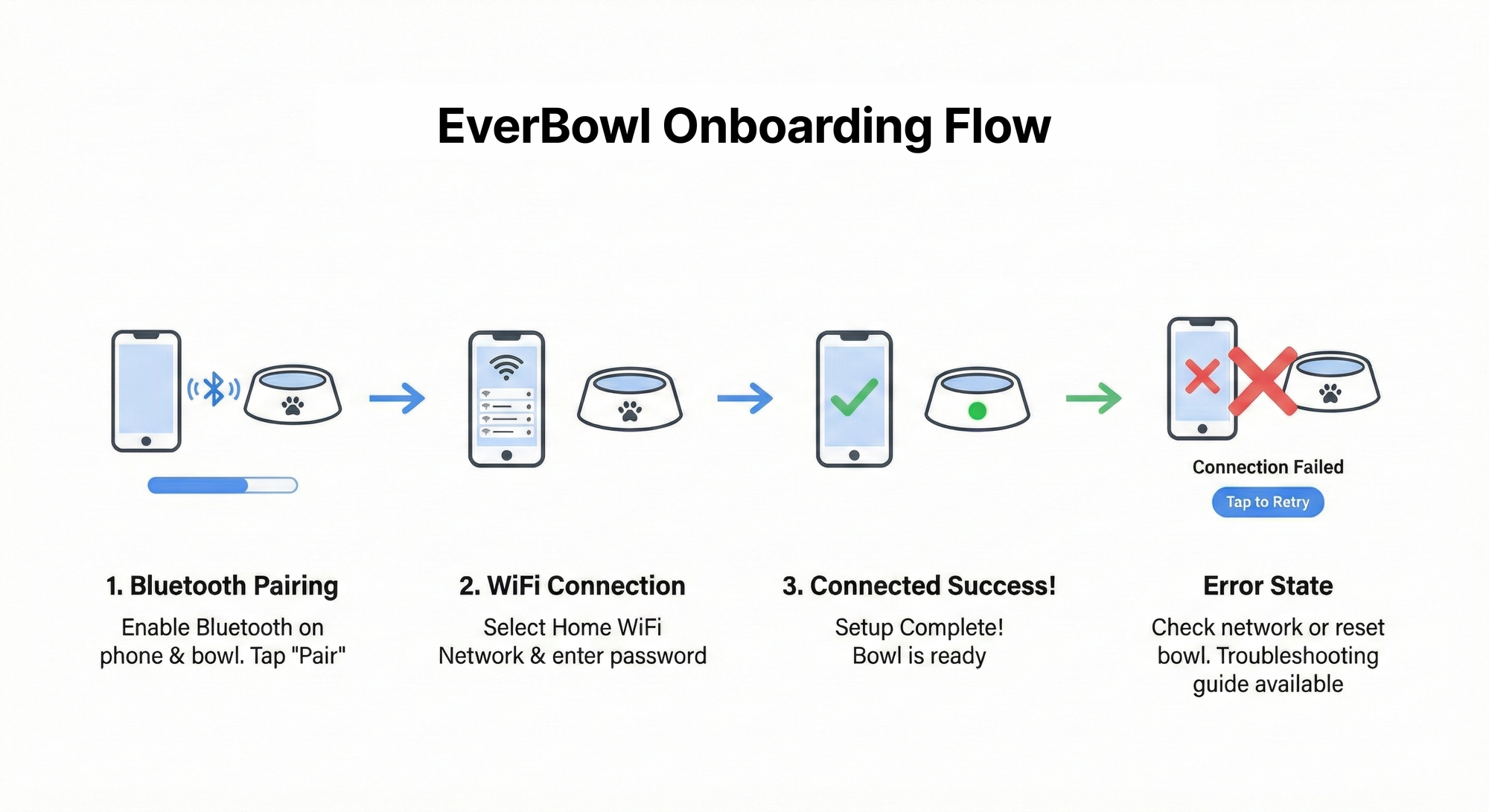
Step 1: Bluetooth Pairing – Blue Blinking
When users begin Everbowl onboarding, Bluetooth pairing is initiated. During this stage, the LED blinks blue continuously, indicating that the device is actively searching and attempting to pair with the app.
From a UX perspective, blinking signals movement and progress. It reassures users that the system is actively working rather than stuck.
Inside the app onboarding flow, this stage is reinforced with instructions guiding users to keep Bluetooth enabled and remain close to the device.
Step 2: WiFi Connection – Blue Stable
Once Bluetooth pairing is successfully completed, the LED shifts from blinking to a stable blue light. This change signals that the device is now ready to connect to WiFi.
The shift from blinking to stable light communicates transition. It helps users understand that the first phase is complete and a new phase has begun.
The app simultaneously prompts users to select and confirm their WiFi connection, aligning physical device feedback with digital onboarding instructions.
Step 3: Fully Connected – Green Stable
After successful WiFi connection, the LED turns green and remains stable. This indicates that Everbowl is fully connected and functioning as expected.
Green was intentionally chosen because it universally signals success and readiness. At this stage, the onboarding flow transitions into confirmation and feature introduction within the app.
The consistency between visual device feedback and app messaging helps reinforce completion and builds confidence in the system.
Step 4: Error Handling – Red Indicator
If the device encounters connection issues, the LED turns red. This communicates that attention or action is required.
Error states are critical moments in onboarding. Without clear feedback, users often abandon setup or assume the device is defective. The red indicator provides immediate clarity that something needs to be resolved.
Within the app, this state triggers contextual guidance such as:
- Rechecking Bluetooth or WiFi settings
- Restarting the device
- Providing step-by-step recovery instructions
By aligning device signals with in-app support, we reduce frustration and improve recovery success.
Applications
1. Improving Hardware Onboarding Success Rates
System status indicators help users confidently move through device setup. When users understand progress clearly, they are more likely to complete onboarding successfully.
2. Creating a Consistent Multi-Channel Feedback Loop
Everbowl combines physical feedback (LED indicators) with digital feedback (app onboarding screens). This dual-layer communication ensures users receive guidance even if they miss instructions in one channel.
3. Reducing Customer Support Dependency
Clear device signals allow users to diagnose and resolve common setup issues independently. This reduces support tickets while improving user satisfaction.
4. Strengthening Product Reliability Perception
When devices visibly communicate their state, users perceive the system as more reliable and transparent. Trust grows when products behave predictably.
5. Educating Users Through Onboarding
The onboarding flow includes simple explanations of LED meanings. Teaching users how to interpret device signals empowers them to use and troubleshoot Everbowl confidently beyond initial setup.
Our mission is to build intelligent pet-care technology that feels intuitive and dependable. Everbowl’s LED system reflects this philosophy by ensuring users always understand what their device is doing.
By combining physical system feedback with thoughtful onboarding design, we reduce uncertainty, build trust, and create more reliable interactions between pets, products, and pet parents.



