

Designing for Scale : The Power of Virtualization
The DOM performance ceiling
When we were architecting our IoT monitoring platform at Hoomanely, we knew device data would scale fast. Our device status dashboard needed to show real-time information across hundreds of connected devices, device IDs, user details, heartbeat status, timestamps, all updating constantly, and we knew from experience with large-scale data apps that a naive implementation would fall over under that load.
The fundamental challenge
The core issue is baked into how browsers work: they weren't built to render thousands of DOM elements at once. Every table row or data card carries event listeners, styling, and nested components, and once you're past 500 devices, that overhead compounds fast into a sluggish interface that frustrates both users and operations teams.
The traditional approach renders everything up front, creating DOM nodes proportional to dataset size, which degrades exponentially as data grows. The browser ends up maintaining, styling, and tracking every element, including the ones nowhere near the visible viewport.
Understanding virtualization
Virtualization changes the underlying approach entirely. Instead of creating a DOM element for every data item, it only creates what's actually visible at a given moment, and as the user scrolls, it recycles existing DOM elements, swapping in new content rather than creating fresh nodes.
Think of it like a theater stage with a moving backdrop: the audience, your viewport, only ever sees a small slice of the story, but the illusion of continuity holds because what appears is carefully orchestrated. The actors, the DOM elements, don't multiply with the length of the story, they get reused across scenes.
Viewport-based rendering means only elements within or near the visible area actually get rendered; everything else stays as data in memory rather than as DOM nodes eating browser resources. Element recycling means DOM elements that scroll out of view don't get destroyed, they get repositioned and updated with new data, cutting the overhead of constant creation and teardown. And because the number of rendered elements stays constant regardless of dataset size, performance becomes predictable, whether you have 100 items or 100,000, the browser is managing roughly the same number of DOM nodes either way.
Why virtualization actually works
The performance gain comes from real browser limitations. Modern browsers handle thousands of plain JavaScript objects in memory just fine, but struggle once those objects become DOM elements needing layout, paint, and composite passes.
On memory: without virtualization, a dashboard showing 1,000 devices might create 50,000-plus DOM nodes once you count nested components, icons, and interactive elements. With virtualization, the same interface holds onto just 500 to 1,000 nodes, whatever's visible plus a small buffer.
On rendering: the browser's rendering pipeline runs several expensive steps, layout calculation, style computation, painting, compositing, and each one scales with DOM complexity. Keeping the DOM minimal keeps all of these light and fast.
On interaction: when a user sorts, filters, or updates data, the browser only needs to touch visible elements, so interactions stay snappy even on huge datasets, because the computational cost stays flat regardless of how much data is behind it.
What this looked like in practice
Our virtualized implementation delivered measurable gains: sub-50ms render times for 1,000-plus device records, a 60% cut in DOM node count versus the traditional approach, smooth 60fps scrolling even past 10,000 rows, and a memory footprint that stayed flat regardless of how much the dataset grew. The real insight is that performance isn't a trade-off against features, it's about architecting a system where both actually coexist.
Production-ready considerations
Getting virtualization right in production means dealing with real complexity beyond basic scrolling.
Dynamic content heights: real data rarely fits into uniform containers. Device descriptions vary in length, status messages expand and contract, nested info shows up conditionally. Virtualization has to estimate content height intelligently and adapt as content varies while keeping scrolling smooth. The tricky part is balancing accuracy against performance, since calculating exact height for every item defeats the purpose of virtualizing in the first place, but a poor estimate causes jarring layout shifts as users scroll.
Accessibility: virtualization can quietly create accessibility barriers if it's not built carefully. Screen readers expect a consistent DOM structure, keyboard navigation needs logical focus management, and assistive-tech users need predictable interaction patterns. A production implementation needs semantic markup that conveys structure to assistive tech, full keyboard navigation across virtual boundaries, focus management that survives scrolling, dynamic announcements for content changes, and proper ARIA labels and roles throughout.
Touch and cross-platform: mobile introduces its own set of problems. Touch gestures feel different from mouse scrolling, momentum scrolling needs hardware acceleration, and varying screen densities affect height calculations. A solid implementation handles hardware-accelerated momentum scrolling, touch gesture recognition for swipe and pull-to-refresh, responsive height calculation across screen densities, and touch event optimization that avoids excessive re-renders.
Advanced virtualization patterns
Overscan and buffer management: rendering a few extra items above and below the visible area avoids blank space during fast scrolling. This overscan buffer trades a small amount of memory for smoother perceived performance, and the buffer size becomes a tuning knob, too small and users see gaps during fast scrolls, too large and you give up the memory benefits virtualization was supposed to bring.
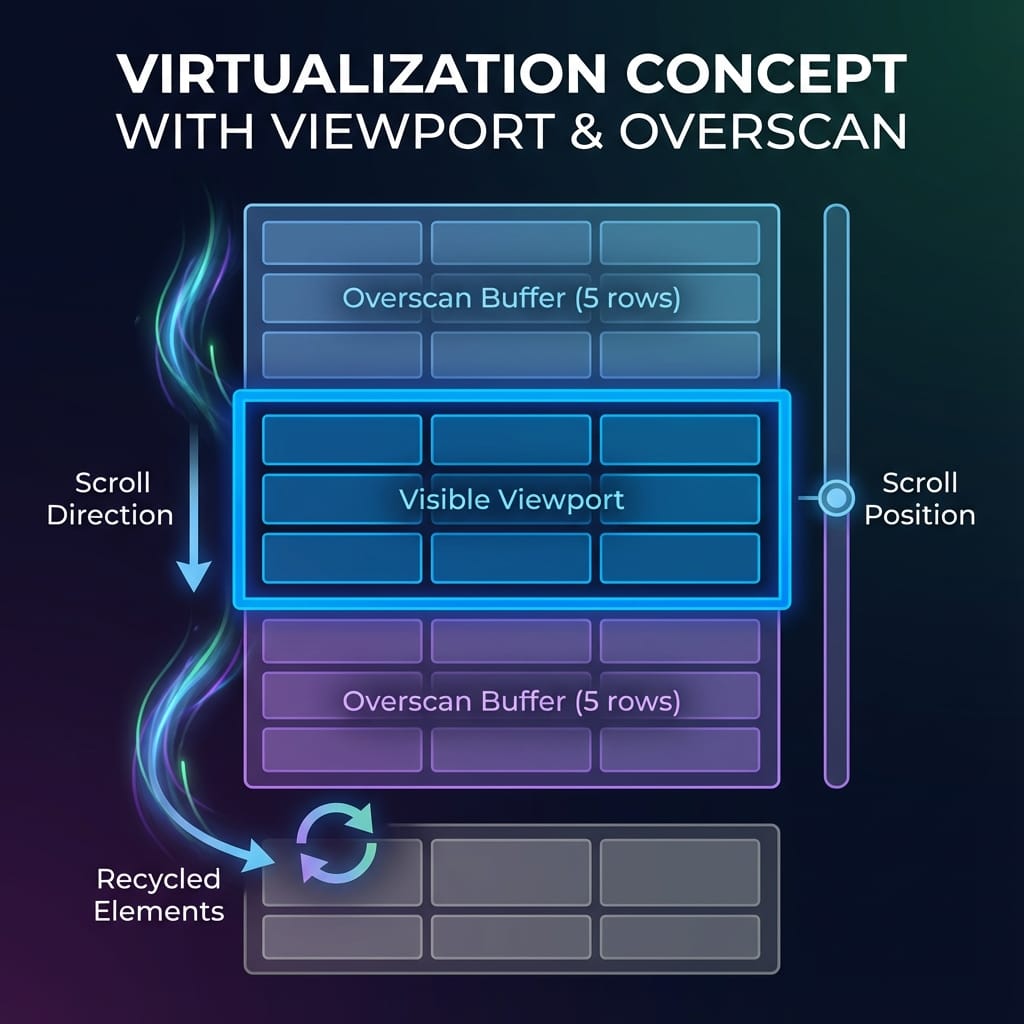
Dynamic sizing with content observation: for content that changes size after the initial render, expanding text, loading images, conditional nested components, the system needs to observe and react to size changes as they happen. Modern browser APIs make it possible to watch element dimensions efficiently, so layouts only get recalculated when they actually need to be, without constant measurement overhead.
Bidirectional virtualization: when you're dealing with many rows and many columns at once, virtualizing a single axis isn't enough. Bidirectional virtualization applies the same idea horizontally and vertically, creating a window that moves in two dimensions, handling genuinely massive datasets, think spreadsheets with thousands of rows and hundreds of columns, while keeping the same performance characteristics as single-axis virtualization.
Progressive data loading: virtualization pairs naturally with loading data progressively. As a user scrolls near the end of what's loaded, the system fetches more, creating an infinite-scroll feel that seems instantaneous. The virtualization layer hides the loading process entirely, users see smooth scrolling while data fetches quietly in the background.
Memory management and optimization
Virtualization isn't just about rendering fewer elements, it's about managing memory intelligently across the whole app lifecycle.
Preventing memory leaks: long-running apps using virtualization can accumulate memory if it's not cleaned up properly. Event listeners, cached measurements, and retained references all need cleanup when components unmount or data changes, so a production build needs real cleanup strategies to keep memory from creeping up over long sessions.
Bundle size: virtualization libraries add to your bundle, so smart implementations use dynamic imports to load virtualization only when it's actually needed, since smaller datasets might not justify the overhead while larger ones benefit a lot. That conditional loading keeps the initial bundle lean while letting performance scale with data complexity.
Performance monitoring and metrics
Keeping virtualization performant over time needs ongoing monitoring of specific numbers.
Core Web Vitals: modern performance measurement centers on user-facing metrics, and for virtualized interfaces, Largest Contentful Paint and Cumulative Layout Shift give real insight into perceived performance. Watching these specifically for data-heavy interfaces confirms virtualization is actually delivering the improvement it's meant to.
Memory usage: tracking DOM node count and JS heap size gives concrete evidence virtualization is working, and comparing these against a non-virtualized baseline in production quantifies the actual benefit.
Scroll performance: smooth scrolling means holding 60 frames per second, and measuring frame timing during scroll operations catches regressions and validates whatever optimization work you've done.
Our implementation philosophy
Based on building production systems at this scale, here's roughly how we approach virtualized data interfaces. Performance first: set baseline performance requirements before adding features, and know your target dataset size and acceptable render times up front. Measure relentlessly: use browser dev tools and real user monitoring to check assumptions, since intuition about performance is often wrong and measurement reveals what's actually happening. Accessibility as core, not an add-on: design for all users from the start, since retrofitting accessibility into an already-virtualized interface is a lot harder than building it in from day one. Scale-ready architecture: build for your largest expected dataset, not your current average, since systems that handle the edge cases gracefully handle the normal cases without even trying. Progressive enhancement: start with solid fundamentals and only add complexity when it's actually needed, since simple virtualization solves most problems and the advanced patterns are for specific edge cases.
Conclusion
Building scalable data platforms keeps reinforcing the same idea: the best interfaces are invisible. They deliver information instantly, handle large datasets gracefully, and never become the bottleneck in the user's experience.
Virtualization is more than a performance trick, it's a genuine rethink of how you render data at scale. By rendering only what users can actually see and managing the rest intelligently, you get dashboards that scale cleanly as data demands grow. Whether you're building IoT dashboards, analytics platforms, or any data-heavy app, virtualization is the foundation that keeps interfaces fast and responsive as the data keeps growing. With data volumes climbing the way they are, it's not really optional anymore, it's a basic requirement for building anything meant to scale from day one.



