Beyond Tenant Isolation: Designing Privacy-First Admin Consoles
Every admin console starts with the same page: a list of all users. A table, a search box, maybe a filter for "signed up this week." In most stacks it's a one-line query and an afternoon of work.
When we sat down to build that page for Doghouse, our operator console, we hit a wall we had built ourselves. Our backend is designed so that no request can ever see more than one household's data. There is no "all users" query. Not for customers, not for staff, not for anyone.
That sounds like a bug in the plan. It's actually the most important property of our data layer, and it forced us to think hard about a question most consoles never ask: what is an operator actually allowed to look at, and where should that view come from? This post is the story of how we answered it without punching a hole in the wall.
THE PROBLEM: "EVERYTHING" IS NOT A QUERY WE CAN RUN
In a multi-tenant system, the scariest bug is the one where customer A sees customer B's data. Most teams guard against it with discipline: remember to add WHERE tenant_id = ? to every query, and review carefully.
We chose to make it structurally impossible instead. Three things are true of every read in our backend:
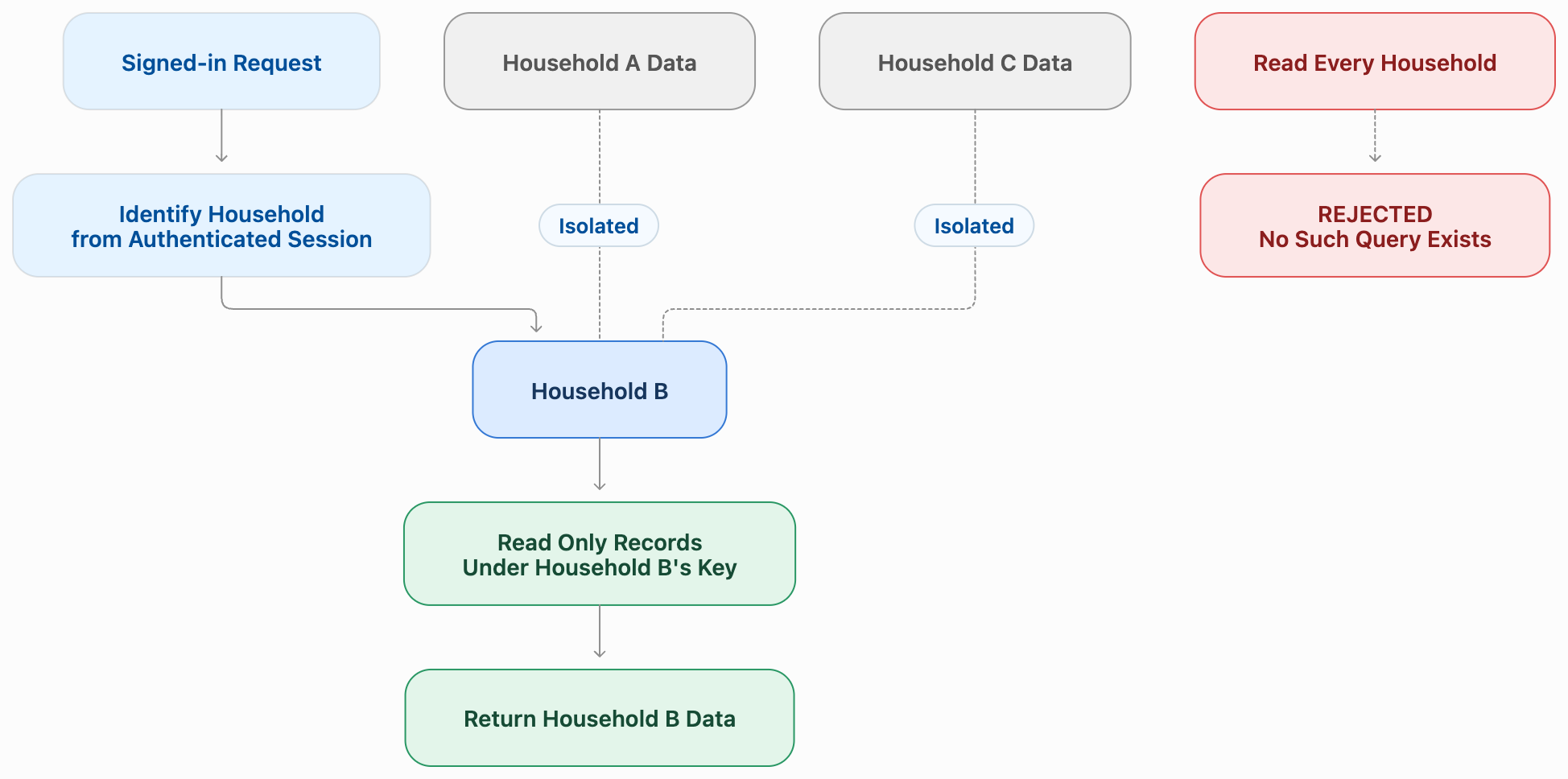
- The household comes from the signed-in session, never from a parameter someone can edit.
- Every record is stored under its household's key, so a read must name a household to find anything at all.
- Bulk "read everything" operations are banned outright. Not discouraged; rejected by automated checks before code can merge.
The result is a data layer where the question "show me every user" doesn't have a wrong answer. It has no answer.
A signed-in request (household B, taken from the session) points down to Household B only. Households A and C sit beside it, untouched. Underneath all three, a dashed red box reads: "Read every household: no such query exists".
Then the operator console arrives, and its first request is exactly that question. Staff members don't belong to a household. They need fleet-wide views to do their jobs: which devices went offline in the last hour, which posts were reported today, who signed up this week.
There were two obvious ways out, and we rejected both:
- A staff bypass in the data layer. One flag that says "this caller may read across households." It works on day one, and on day one hundred it's the most valuable thing an attacker could steal. Every safety property we built would now have an asterisk.
- A one-off export job. Copy everything somewhere queryable every night. Now customer data lives in a second place with weaker rules, and it's always a day stale.
THE APPROACH: TWO DOORS, NEVER ONE
The insight that unlocked it was simple: "show me the fleet" and "show me this household" are different questions, so they should have different answers from different places.
So Doghouse has exactly two ways to read customer-related data, and nothing in between.
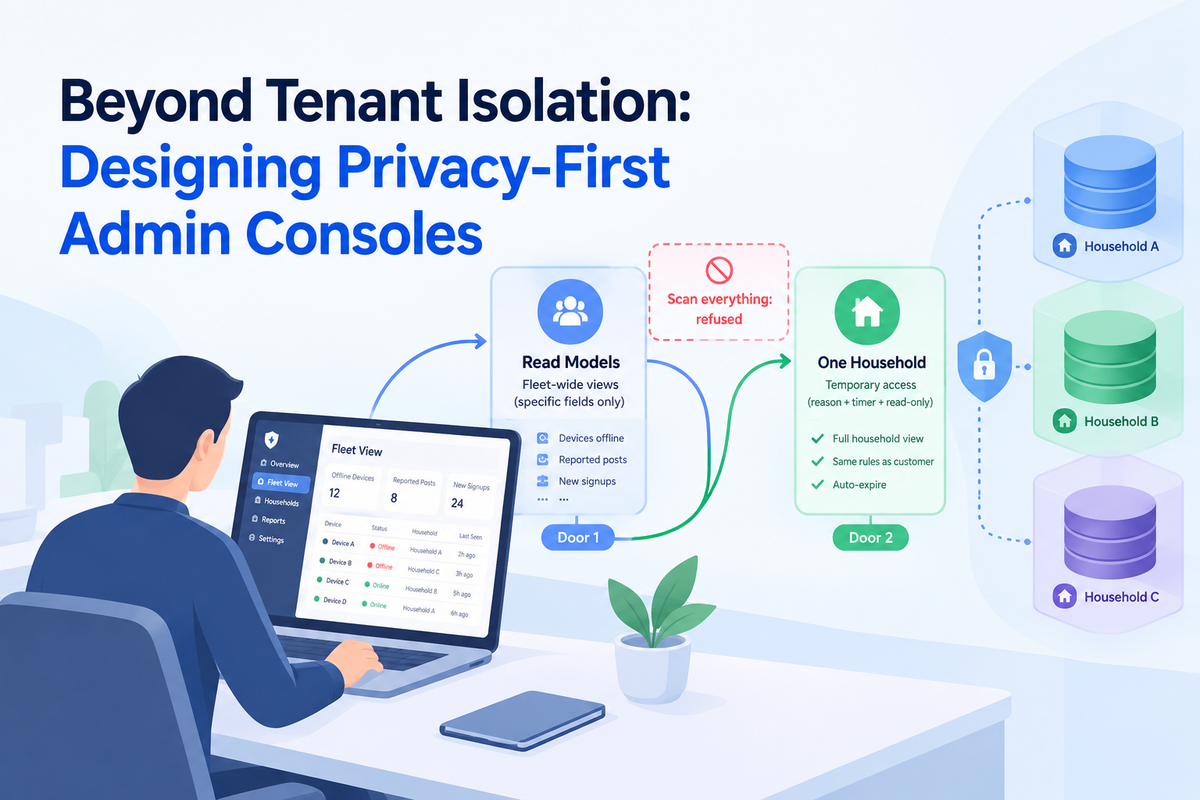
Door 1: fleet views come from read models. A read model is a separate, purpose-built index designed for one operator question, such as devices that are offline or posts awaiting review. It holds only the fields that question needs. It is filled by listening to events the product already emits, not by reading the main database. And it can only be read through an explicit staff permission.
Door 2: one household, only by stepping in. When an operator needs the full picture for one family, they pick that household and give a reason. They get a short-lived, read-only session scoped to that one household, and their requests then go through exactly the same rules a customer's would. Nothing special happens in the data layer; the operator is simply, briefly and visibly, "inside" one household.
The rule that ties it together: a fleet list and a household's detail are always two different pages. You can click from one to the other, but the moment you cross over, you step through Door 2, with a reason and a timer.
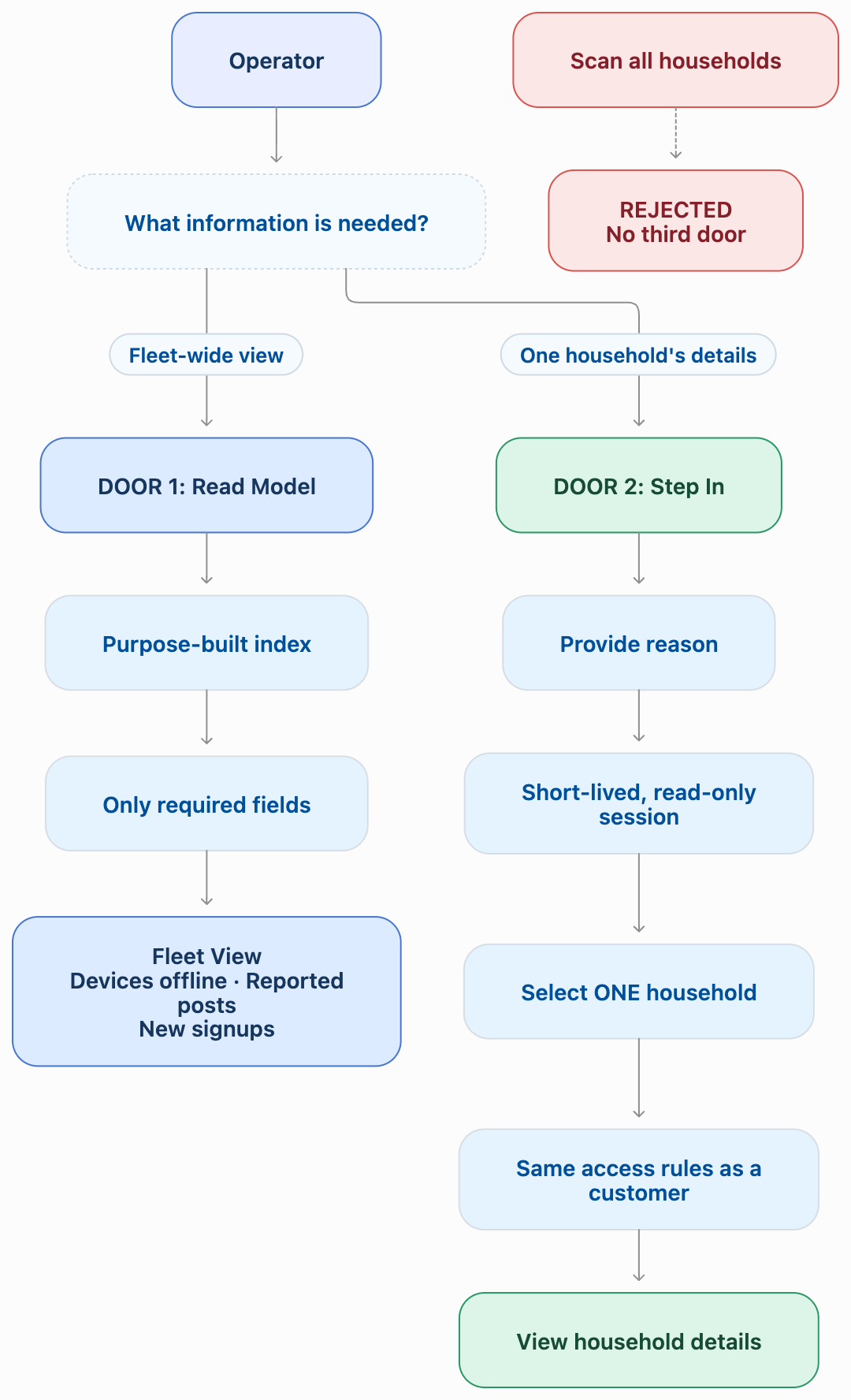
And if an operator question has no read model behind it yet? The page refuses. It never falls back to "just scan it this once."
THE PROCESS: ANATOMY OF A READ MODEL
If you've met CQRS (keeping the write side and the read side separate), read models will look familiar. What's different here is why we use them: not for performance, but as a privacy boundary. That changes what goes into them.
It's fed by events, not by copying tables
The product already announces what happens: a device goes offline, a post is reported, a user signs up. Those events travel on a durable stream that guarantees each one is delivered. A read model is just a subscriber that turns those announcements into rows:
# illustrative only
read_model: devices-offline
listens_to: [device.went_offline, device.came_online]
keeps: [device_id, household_id, last_seen_at, firmware_version]
readable_with: devices.fleet.read
When a device goes offline, a row appears. When it comes back, the row disappears. The operator's "offline devices" page is now a plain read of a small, focused index, and it never touches the main store.

It keeps only what the question needs
This is where privacy shows up in the design. The offline-devices view needs to know which device, which household and since when. It doesn't need the owner's name, address or their pet's health history, so it doesn't store them.
We ask one question for every field: would an operator need this to decide what to do next? If not, it stays in the household, behind Door 2. A read model is deliberately a little too thin to be interesting to an attacker.
It must be safe to replay
Durable streams deliver at least once, so a subscriber will sometimes see the same event twice, or two events in an unexpected order. Every read-model handler is written to be idempotent: applying an event twice leaves the same row as applying it once. Where order matters, the handler compares the event's own timestamp with the row's, so a late-arriving "went offline" can't overwrite a newer "came online."
It's honest about being slightly behind
A read model trails reality by however long the stream takes to deliver an event. For operator questions like what's broken right now, that's fine. For questions like what is this household's exact state, it isn't, which is precisely why those questions go through Door 2 and read the live data.
Until a read model exists, the answer is "not yet"
Not every fleet view has its read model on day one. For a few pages we read from data already migrated from our previous system, as a temporary bridge. What we never do is fill the gap with a scan. A page with no read model behind it returns a clear refusal, and that refusal becomes a backlog item.
KEY TAKEAWAYS
- Make cross-tenant reads impossible, not just discouraged. Then design around the wall instead of adding a door in it.
- Treat "the fleet" and "one customer" as different questions. They deserve different data sources and different permissions.
- Use read models as a privacy boundary. Store only what the operator's next decision needs.
- Feed them from events, and make every handler idempotent. Duplicates and reordering are normal, not edge cases.
- Prefer a clear refusal to a quiet scan. A missing read model is a backlog item, not a reason to bend the rules.
ABOUT HOOMANELY
Hoomanely's mission is to help pet parents give their animals longer, healthier lives by bringing smart devices, health insights and everyday care together in one connected experience. Each household that joins trusts us with something personal: their routines, their home, and the health of an animal they love.