
Server-Driven UI: Changing Layouts Without App Updates

The App Store Release Bottleneck
You've just discovered a critical UX issue in your production app. The fix is simple, reorder two buttons, change a label, maybe adjust a layout constraint. Easy, right?
Not quite. You're looking at a minimum two-week timeline: code the fix, test it, submit to app stores, wait for review, hope users actually update. Meanwhile, your metrics are bleeding and users are frustrated.
What if you could push that fix in under an hour? No app update, no store review, no waiting for user adoption. This is the promise of server-driven UI, and like most powerful patterns, it comes with trade-offs that aren't obvious until you're deep in production.
What Server-Driven UI Actually Means
Server-driven UI inverts the traditional relationship between your app and its interface. Instead of hardcoding screens, your app becomes a rendering engine that interprets layout instructions from a server.
The server sends JSON describing what to display:
{
  "type": "screen",
  "components": [
    {
      "type": "header",
      "text": "Pet Health Dashboard",
      "style": "large_bold"
    },
    {
      "type": "metric_card",
      "title": "Daily Activity",
      "value": "8,432 steps",
      "trend": "up_12_percent"
    }
  ]
}
Your app reads this JSON and renders the corresponding native components. Change the JSON, and every user sees the new layout instantly, no app update required.
This isn't a new idea. Netflix, Airbnb, and Lyft have publicly discussed their implementations. But the devil is in the architectural details, and those details determine whether you achieve sub-500ms render times or create a laggy, fragile experience.
The Architectural Approaches
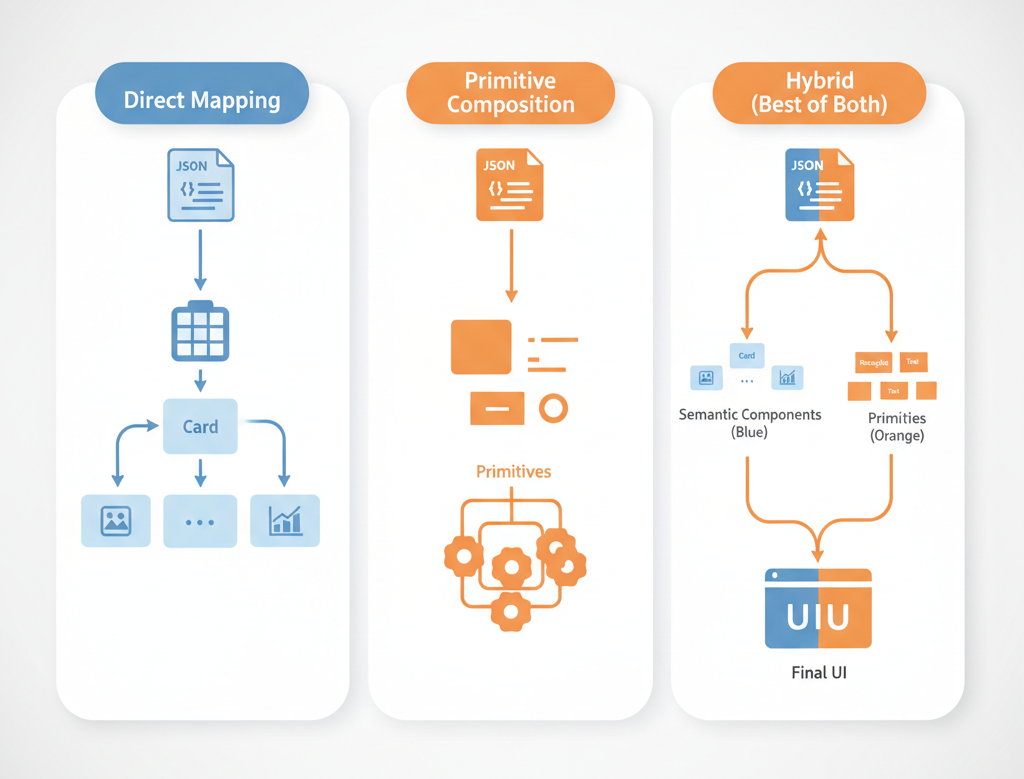
There are three main strategies for implementing server-driven UI, each with distinct trade-offs.
1. Direct JSON-to-Component Mapping
The simplest approach: maintain a registry mapping JSON types to native components.
When the server sends "type": "metric_card", your app looks up the MetricCard component in its registry and renders it with the provided props. This is fast, type-safe at the component level, and easy to reason about.
The upside: Render performance is excellent because you're working with real native components. We consistently hit under 200ms for full screen renders with this approach, well below our 500ms target.
The downside: Every new component type requires an app update. You can change layout order and component props, but you can't introduce entirely new UI patterns without shipping code.
2. Primitive-Based Composition
Instead of shipping semantic components like "metric_card," ship only primitives: containers, text, images, buttons. The server composes these primitives into higher-level patterns.
{
  "type": "vertical_stack",
  "spacing": 16,
  "children": [
    {"type": "text", "content": "Daily Activity", "weight": "bold"},
    {"type": "text", "content": "8,432 steps", "size": 32}
  ]
}
The upside: Maximum flexibility. You can create entirely new layouts server-side without touching app code. This enabled us to A/B test radically different dashboard layouts during our beta.
The downside: Complex screens become deeply nested JSON structures that are hard to validate and debug. We saw some dashboard configs exceed 300 lines of JSON for a single screen, a maintenance headache.
3. Hybrid: Semantic Components + Composition Primitives
The approach we eventually settled on combines both strategies. Ship semantic components for common patterns (cards, lists, charts), but also provide composition primitives for flexibility.
The server can use a pre-built component when it exists, or compose primitives when it needs something custom. This gave us the performance of approach #1 with much of the flexibility of approach #2.
The Validation Problem Nobody Talks About
The hardest part of server-driven UI isn't rendering, it's validation.
When your UI lives in code, the compiler catches type errors. When it lives in JSON, you need runtime validation at multiple levels:
Schema validation: Does this JSON match the expected structure? We use JSON Schema on the backend to catch malformed configs before they reach production.
Semantic validation: Are the values actually valid? A "spacing" of -50 passes schema validation but creates broken layouts. We added semantic validators that understand UI constraints.
Runtime validation: Even valid JSON can fail at render time. Missing image URLs, invalid color codes, components referencing non-existent data sources. Our app includes a fallback system that degrades gracefully rather than crashing.
The validation pipeline adds latency, but it's non-negotiable. We budget 50-100ms for validation in our 500ms render target. Early on, we skipped thorough validation to hit performance goals, and paid for it with production crashes when malformed configs slipped through.
Backward Compatibility: The Real Cost
Here's the scenario that will eventually bite you: you ship a new app version with updated components. Now you have users on v1.0 and v2.0 in the wild. How do you serve UI configs that work for both?
Option 1: Version the entire schema. Maintain separate JSON configs for each app version. This works but scales poorly. We tried this and ended up managing 6 different schema versions within 3 months.
Option 2: Make everything backward compatible. Never break old components, only add new ones. This is cleaner but constrains your evolution. You can't fix design mistakes, you can only add new components alongside old ones.
Option 3: Graceful degradation with fallbacks. Our eventual solution. Each component definition includes a "fallback" field specifying what to render if the component isn't recognized:
{
  "type": "new_fancy_chart",
  "fallback": {
    "type": "simple_bar_chart",
    "data": "..."
  }
}
Older app versions that don't recognize "new_fancy_chart" render the fallback instead. Newer versions render the updated component. This achieved our 100% backward compatibility target without schema version explosion.
The trade-off? Every new component requires thoughtful fallback design. You can't just ship features, you have to think about degraded experiences too.
Performance: Where the 500ms Goes
Our render performance target was 500ms from fetch to fully rendered screen. Here's where that time actually goes:
- Network fetch: 150-250ms (depends on connection, can't really optimize below this)
- JSON parsing: 20-40ms (larger for complex screens)
- Validation: 50-100ms (schema + semantic + runtime checks)
- Component instantiation: 30-60ms (creating native UI objects)
- Layout calculation: 40-80ms (auto-layout solving)
We consistently hit 400-480ms for most screens. The key optimizations were:
Aggressive caching: Identical screens return from cache in under 50ms. We cache aggressively and invalidate conservatively.
Lazy validation: Schema validation happens server-side before configs are published. Client-side validation only checks runtime concerns (data availability, resource URLs).
Incremental rendering: For long screens, we render above-the-fold content first, then stream in the rest. Perceived performance matters more than total time.
The one area we couldn't optimize: initial cold start on slow connections. That 150-250ms network fetch is a hard floor. For critical screens, we ship fallback JSON bundled with the app.
The Type Safety Balancing Act
Type safety and flexibility exist in tension with server-driven UI.
Pure JSON is maximally flexible but totally untyped. Your app has no compile-time guarantees about what it will receive. We've seen apps crash in production because a server config changed a "count" field from integer to string.
Our solution uses code generation to create typed Swift/Kotlin models from JSON Schema definitions. The server and clients share the same schema source of truth. Changes to schemas trigger CI builds that regenerate models.
This gives us:
- Compile-time safety for known component types
- Runtime validation for unknown or versioned components
- Clear breaking change detection (CI fails if schemas become incompatible)
The cost is build complexity. Schema changes require coordinated deployments, backend publishes new schema, CI regenerates models, clients pick up updated code. It's not as simple as "just change the JSON anymore."
But the alternative, debugging why production apps crash on malformed JSON, is far worse.
Key Takeaways
Server-driven UI isn't a binary choice. The spectrum runs from "hardcoded screens" to "everything is JSON." Most production systems live somewhere in the middle, and that middle ground is where practical engineering happens.
Validation is more important than performance. A 600ms render that never crashes beats a 300ms render that breaks on edge cases. Build comprehensive validation early.
Backward compatibility will constrain you. Plan for it from day one. Fallback patterns and schema versioning aren't optional, they're the difference between shipping features and managing version matrix hell.
Type safety and flexibility are negotiable. You can have both with thoughtful architecture, but you'll pay in build complexity. Decide early how much complexity your team can handle.
The real value is personalization, not speed. Rapid iteration is nice, but the ability to show different users different experiences without app forks is transformative.



