
AWS Migration Notes: From Manual Chaos to CLI-Driven Precision

AWS migrations fail not because the technology is inadequate, but because the approach is wrong. Console-clicking through dozens of services, manually copying configurations, and hoping nothing breaks during cutover—this is how organisations rack up unexpected costs and endure hours of downtime.
We at Hoomanely followed a better way: CLI-driven, scripted migrations using dual AWS profiles. This approach transforms migration from a stressful, error-prone manual process into a repeatable, auditable, cost-optimized workflow. Whether you're moving EC2, Lambda, S3, DocumentDB, Amplify, or any other service, the principles remain consistent.
The Problem: Why Manual Migrations Are Expensive
Manual migrations through the AWS Console seem straightforward until reality hits:
Cost overruns happen because:
- Resources run in parallel across both accounts longer than necessary
- Teams miss cleanup steps, leaving orphaned resources accumulating charges
- Trial-and-error approaches waste time (and money) on failed attempts
- No visibility into what's actually costing money during migration
Downtime extends because:
- Manual steps take unpredictable amounts of time
- Human errors require rollbacks and re-attempts
- Dependencies aren't properly mapped, causing cascading failures
- No rehearsal means the first attempt is in production
Visibility disappears because:
- Actions aren't logged systematically
- Multiple people clicking through consoles creates confusion
- No audit trail for compliance or post-mortem analysis
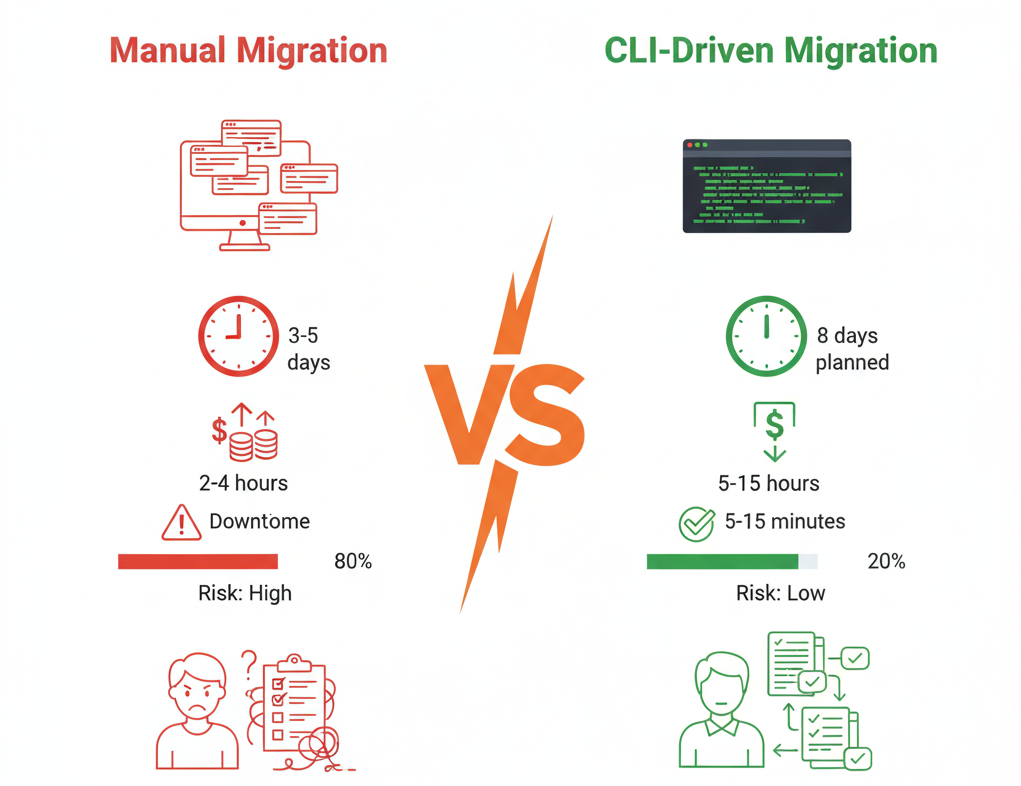
The median AWS migration using manual methods takes relatively longer time with hours of unplanned downtime and costs significantly more than budgeted.
The Foundation: Dual AWS Profile Strategy
The entire CLI-driven approach rests on one simple configuration: two AWS profiles that let you orchestrate across accounts from a single terminal.
Setup Once, Use Everywhere
# Configure source account profile
aws configure --profile source-prod
# Enter credentials, set region

# Configure destination account profile
aws configure --profile dest-prod
# Enter credentials, set region

# Verify both profiles work
aws sts get-caller-identity --profile source-prod
aws sts get-caller-identity --profile dest-prod
This simple setup unlocks powerful migration patterns:
- Read from source, write to destination in a single script
- Parallel operations across accounts without switching contexts
- Atomic cutover sequences that minimize transition time
- Verification loops that compare source and destination states
Security Best Practices
- Use IAM users with minimal required permissions
- Rotate credentials after migration completes
- Log all CLI operations to CloudTrail for audit purposes
The Migration Methodology: Four Principles
Regardless of which AWS service you're migrating, these four principles drive cost reduction and downtime minimisation.
Principle 1: Migrate Data Before Traffic
The pattern: Move data first while systems are still running, then switch traffic in a narrow cutover window.
Why it works:
- Initial bulk transfers happen during normal operations (zero downtime)
- Only the final delta sync requires coordination
- Cutover window is measured in minutes, not hours
Example pattern (applies to S3, databases, file storage):
# Phase 1: Initial sync (while source is live, no downtime)
aws s3 sync s3://source-bucket s3://dest-bucket --profile source-prod

# Phase 2: Final delta sync (during cutover window)
aws s3 sync s3://source-bucket s3://dest-bucket --delete --profile source-prod

# Phase 3: Switch application to new bucket
# Update config, restart services (minutes)
Cost impact: Reduces overlap period from days to hours, cutting duplicate storage/compute costs significantly.
Principle 2: Use Blue-Green Deployments
The pattern: Build complete new environment, verify it works, then switch traffic instantly.
Why it works:
- New environment is tested thoroughly before cutover
- Rollback is instant (just switch back)
- Downtime is limited to DNS/load balancer updates (seconds)
Example pattern (applies to EC2, ECS, Lambda):
# Phase 1: Build new stack in destination (parallel to source)
aws cloudformation create-stack --stack-name new-prod \
  --template-body file://infra.yaml \
  --profile dest-prod

# Phase 2: Deploy and test (hours/days, no downtime)
# Run smoke tests, load tests, integration tests

# Phase 3: Switch traffic (seconds)
aws route53 change-resource-record-sets \
  --hosted-zone-id Z123 \
  --change-batch file://update-dns.json

# Phase 4: Monitor new environment (hours)
# Keep old environment running for quick rollback
Downtime impact: Reduces downtime from 30-60 minutes to <5 minutes in most cases.
Principle 3: Automate Verification
The pattern: Scripts not only migrate but also verify success at every step.
Why it works:
- Catches issues immediately, not hours later
- Provides confidence to proceed to next step
- Documents what "success" looks like for each phase
Example verification pattern:
#!/bin/bash

# Migrate resource
aws lambda create-function ... --profile dest-prod

# Verify it exists
FUNCTION_STATUS=$(aws lambda get-function \
  --function-name my-function \
  --profile dest-prod \
  --query 'Configuration.State' \
  --output text)

if [ "$FUNCTION_STATUS" != "Active" ]; then
  echo "ERROR: Function not active, rolling back"
  exit 1
fi

# Verify it works
aws lambda invoke --function-name my-function \
  --payload '{"test": true}' \
  --profile dest-prod \
  response.json

# Check response
if ! grep -q "success" response.json; then
  echo "ERROR: Function test failed"
  exit 1
fi

echo "✓ Lambda migration verified"
Cost impact: Prevents failed migrations that waste both time and money, reduces troubleshooting time notably.
Principle 4: Parallel Where Possible, Sequential Where Necessary
The pattern: Identify independent resources that can migrate simultaneously versus dependent chains that need ordering.
Why it works:
- Maximizes throughput, minimizes calendar time
- Reduces total migration window
- But respects dependencies to avoid failures
Example workflow:
#!/bin/bash

# These can run in parallel (no dependencies)
(
  # S3 migration
  aws s3 sync s3://data-bucket s3://new-data-bucket --profile source-prod
) &

(
  # Lambda layer migration
  aws lambda publish-layer-version --layer-name shared-lib \
    --content S3Bucket=layers,S3Key=shared.zip --profile dest-prod
) &

# Wait for parallel tasks
wait

# These must run sequentially (Lambda needs layer)
aws lambda create-function --function-name processor \
  --layers arn:aws:lambda:us-west-2:123:layer:shared-lib:1 \
  --profile dest-prod

aws lambda create-function --function-name api-handler \
  --layers arn:aws:lambda:us-west-2:123:layer:shared-lib:1 \
  --profile dest-prod
Time impact: Reduces migration window remarkably compared to purely sequential approaches.
Cost Optimization Strategies
CLI-driven migrations enable precise cost control that's impossible with manual approaches.
1. Just-in-Time Resource Creation
Don't spin up destination resources until source is ready to cut over.
Bad: Create all destination infrastructure Monday, migrate data through Wednesday, cutover Thursday (4 days of double costs)
Good: Prepare scripts Monday-Tuesday, execute migration Wednesday night, cutover Thursday morning (1 day of double costs)
Savings: 75% reduction in overlap period costs
2. Automated Cleanup Scripts
Build cleanup into migration scripts, don't rely on manual steps.
#!/bin/bash

# Migration success check
if [ $MIGRATION_SUCCESS -eq 1 ]; then
  # Wait for stability period (48 hours)
  echo "Waiting 48 hours before cleanup..."
  sleep 172800

  # Automated cleanup
  aws ec2 terminate-instances --instance-ids $OLD_INSTANCES --profile source-prod
  aws s3 rb s3://old-bucket --force --profile source-prod
  aws rds delete-db-instance --db-instance-id old-db --skip-final-snapshot --profile source-prod

  echo "✓ Cleanup complete, costs reduced"
fi
Savings: Eliminates forgotten resources that can cost hundreds/month
3. Cost Monitoring During Migration
Set up real-time cost tracking to catch unexpected charges immediately.
#!/bin/bash

# Get current month costs for both accounts
SOURCE_COST=$(aws ce get-cost-and-usage \
  --time-period Start=$(date +%Y-%m-01),End=$(date +%Y-%m-%d) \
  --granularity DAILY \
  --metrics UnblendedCost \
  --profile source-prod \
  --query 'ResultsByTime[-1].Total.UnblendedCost.Amount' \
  --output text)

DEST_COST=$(aws ce get-cost-and-usage \
  --time-period Start=$(date +%Y-%m-01),End=$(date +%Y-%m-%d) \
  --granularity DAILY \
  --metrics UnblendedCost \
  --profile dest-prod \
  --query 'ResultsByTime[-1].Total.UnblendedCost.Amount' \
  --output text)

TOTAL=$(echo "$SOURCE_COST + $DEST_COST" | bc)

echo "Combined daily cost: \$$TOTAL"

if (( $(echo "$TOTAL > $BUDGET_THRESHOLD" | bc -l) )); then
  echo "⚠️  WARNING: Over budget! Review resources immediately"
  # Send alert to Slack/email
fi
Downtime Minimisation Strategies
The goal isn't zero downtime - it's predictable, minimal downtime.
1. The Rehearsal Principle
Never execute a migration for the first time in production.
Create a staging environment that mirrors production (even at smaller scale) and run the complete migration workflow:
#!/bin/bash

# Run complete migration in staging
./migrate.sh --env staging --dry-run

# Measure timing
START_TIME=$(date +%s)
./migrate.sh --env staging
END_TIME=$(date +%s)

DURATION=$((END_TIME - START_TIME))
echo "Staging migration took $DURATION seconds"

# Now you know production will take similar time
echo "Plan production downtime window: $(($DURATION * 1.2)) seconds (20% buffer)"
2. The Pre-Flight Checklist
Before cutover, verify everything programmatically:
#!/bin/bash

echo "Pre-flight checklist..."

# Verify destination resources exist
aws ec2 describe-instances --instance-ids $NEW_INSTANCES --profile dest-prod >/dev/null 2>&1 || exit 1
echo "✓ EC2 instances ready"

aws lambda get-function --function-name api-handler --profile dest-prod >/dev/null 2>&1 || exit 1
echo "✓ Lambda functions deployed"

aws s3 ls s3://dest-bucket --profile dest-prod >/dev/null 2>&1 || exit 1
echo "✓ S3 buckets created"

# Verify data sync is complete
SOURCE_COUNT=$(aws s3 ls s3://source-bucket --recursive --profile source-prod | wc -l)
DEST_COUNT=$(aws s3 ls s3://dest-bucket --recursive --profile dest-prod | wc -l)

if [ $SOURCE_COUNT -ne $DEST_COUNT ]; then
  echo "✗ Data sync incomplete: $SOURCE_COUNT vs $DEST_COUNT objects"
  exit 1
fi
echo "✓ Data sync verified"

echo "All pre-flight checks passed. Ready for cutover."
3. Atomic Cutover Scripts
Bundle all cutover steps into a single script that executes rapidly:
#!/bin/bash

echo "Starting cutover sequence..."

# Step 1: Put source in maintenance mode (seconds)
aws ec2 stop-instances --instance-ids $OLD_INSTANCES --profile source-prod

# Step 2: Final data sync (seconds to minutes)
aws s3 sync s3://source-bucket s3://dest-bucket --delete --profile source-prod

# Step 3: Update DNS (seconds)
aws route53 change-resource-record-sets --hosted-zone-id Z123 \
  --change-batch file://cutover-dns.json

# Step 4: Start destination services (seconds)
aws ec2 start-instances --instance-ids $NEW_INSTANCES --profile dest-prod

# Step 5: Health checks (30-60 seconds)
for i in {1..10}; do
  HTTP_CODE=$(curl -s -o /dev/null -w "%{http_code}" https://api.example.com/health)
  if [ $HTTP_CODE -eq 200 ]; then
    echo "✓ Service healthy after ${i}0 seconds"
    break
  fi
  sleep 10
done

echo "Cutover complete. Total time: ${SECONDS} seconds"
Typical cutover window: 3-8 minutes for most applications
4. Rollback Readiness
Always have a one-command rollback option:
#!/bin/bash

# Instant rollback: just switch DNS back
aws route53 change-resource-record-sets --hosted-zone-id Z123 \
  --change-batch file://rollback-dns.json

echo "Rolled back to source environment in $(($SECONDS)) seconds"
The Complete Migration Workflow

Here's how these principles come together in a real migration:
Phase 1: Preparation
- Set up dual AWS profiles
- Write migration scripts for each service
- Create verification scripts
- Build rollback procedures
- Set up cost monitoring
Phase 2: Staging Rehearsal
- Execute complete migration in staging
- Time each step
- Identify bottlenecks
- Refine scripts based on lessons learned
Phase 3: Pre-Migration
- Run initial data sync (S3, databases) while systems are live
- Deploy destination infrastructure
- Run pre-flight verification
Phase 4: Cutover
- Execute atomic cutover script
- Monitor health checks
- Verify all services operational
- Update monitoring dashboards
Phase 5: Validation
- Monitor application metrics
- Watch for cost anomalies
- Keep source environment running (rollback insurance)
Phase 6: Cleanup
- Execute automated cleanup scripts
- Decommission source resources
- Document lessons learned
- Archive migration scripts for future use
Typical results:
- Reduced downtime
- Reduced cost
Key Takeaways
The CLI Migration Advantage
- Scripts are rehearsals: Test in staging, execute with confidence in production
- Automation reduces overlap: Faster migrations mean lower costs
- Verification catches issues early: Problems found in staging, not production
- Logs provide audit trails: Essential for compliance and post-mortems
- Rollback is instant: DNS change vs rebuilding manually
Cost Optimization Checklist
- Set up billing alerts in both accounts before starting
- Use right-sizing scripts to optimize instance types
- Build automated cleanup into migration workflow
- Monitor costs daily during migration period
- Schedule migration to minimize resource overlap
Downtime Minimization Checklist
- Migrate data first while systems are live
- Use blue-green deployment patterns
- Rehearse complete workflow in staging
- Create atomic cutover scripts (single command)
- Have one-command rollback ready
The Three Don'ts
- Don't wing it: Every manual migration takes 3x longer than estimated
- Don't forget cleanup: Orphaned resources cost more than the migration itself
- Don't skip staging: The first production attempt should never be the first attempt
The principles outlined here—automation, verification, cost-awareness, and minimal disruption—are core to how we approach every technical decision at Hoomanely.
AWS migrations don't have to be expensive, risky, or disruptive. The difference between a painful manual migration and a smooth CLI-driven one isn't technical complexity—it's approach.
The initial investment in writing migration scripts pays dividends immediately: faster execution, lower costs, minimal downtime, and complete audit trails. And those scripts become reusable assets for future migrations, making each subsequent move even easier.
Start small. Pick one non-critical service, write the migration script, test it in staging, and execute it in production. Learn from that experience, refine your approach, and build a library of migration patterns.
When the next big migration comes—and it will—you'll have confidence, tooling, and a proven methodology that turns what used to be a stressful multi-day ordeal into a well-orchestrated, low-risk process.



