
Building a High-Performance Social Feed: Progressive Loading & Smart Pagination in Flutter

Social feeds are the backbone of modern community apps—but they're also notorious performance bottlenecks. Users expect Instagram-level smoothness while scrolling through hundreds of posts, instant responses to interactions, and seamless offline access. The challenge? Delivering all of this without burning through device resources or overwhelming your backend.
At Hoomanely, we're building a preventive healthcare platform for pets, centered around a thriving community of pet parents. Our mission is to create a space where pet owners can connect, share experiences, seek advice, and support each other through their pet parenting journey. When designing Hoomanely's social feed, we knew that performance wasn't optional—it was foundational to creating the kind of engaging experience that keeps pet parents connected and informed. Whether it's sharing a puppy's first vet visit, asking urgent questions about pet behavior, or celebrating milestones, these interactions need to happen instantly and reliably.
This post explores how we architected a feed that feels instant, works offline, and scales gracefully.
The Traditional Approach: Why Simple Pagination Falls Short
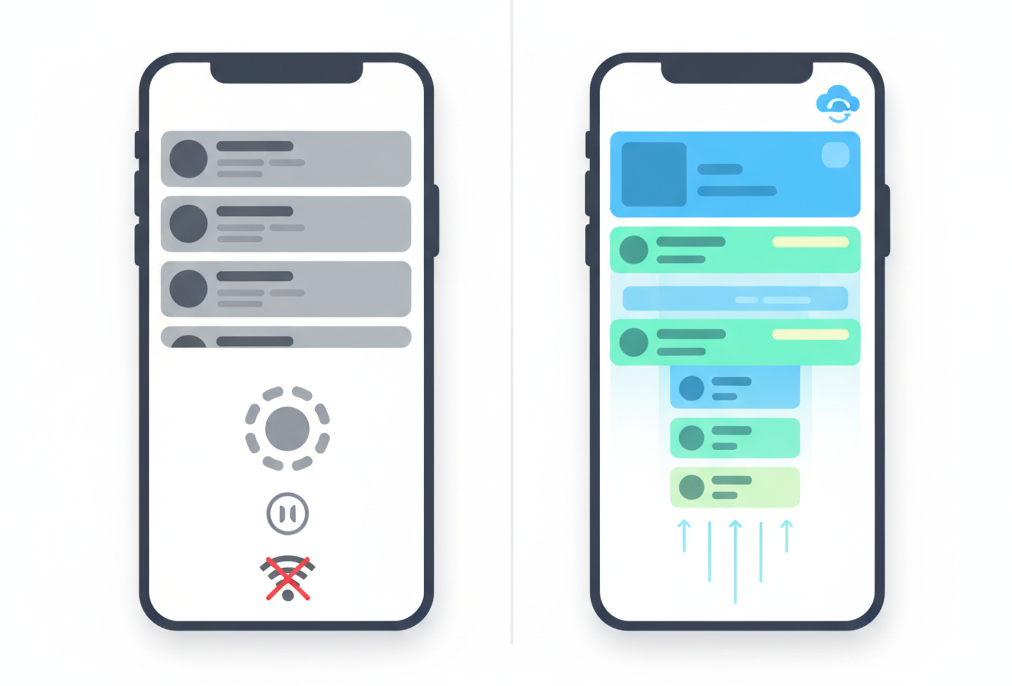
Most teams start with straightforward pagination: load 20 posts, scroll to the bottom, fetch 20 more. Simple, right? But this approach creates several problems:
The Loading Wall: Users hit a loading spinner at the bottom of the feed, breaking their flow. That split-second pause is enough to disrupt engagement.
Network Dependency: Every scroll session requires active connectivity. Step into an elevator or subway, and your feed freezes.
Render Spikes: Loading and rendering 20 complex posts simultaneously causes visible UI jank—dropped frames, stuttering scrolls, and layout shifts.
Wasteful Fetching: Fast scrollers trigger unnecessary API calls, while slow readers never need that next batch you preloaded.
The result? An experience that feels sluggish, unreliable, and dated—exactly what users don't expect from modern apps.
Our Strategy: Offline-First Architecture with Progressive Loading
We built Hoomanely's feed around three core principles:
- Offline-first: Local data is the primary source; network is secondary
- Progressive rendering: Show content incrementally, never all at once
- Smart prefetching: Load based on user behavior, not arbitrary thresholds
The Foundation: ISAR Database for Lightning-Fast Local Caching
Rather than treating the network as our source of truth, we inverted the relationship. Every post fetched from the API flows into ISAR, a high-performance NoSQL database embedded directly in the Flutter app.
Why ISAR specifically? Three reasons:
- Speed: Queries execute in microseconds with zero network latency
- Reactive streams: The UI automatically updates when data changes—no manual refresh logic
- Smart indexing: Queries on timestamps, user IDs, and post types stay fast even with thousands of cached posts
This local-first architecture means users see content instantly on app launch—even with zero connectivity. The feed displays cached posts immediately while fresh content loads silently in the background.
Breaking Down Initial Load: The Instant Display Strategy
Here's where things get interesting. When a user opens the feed, we don't wait for the network—we immediately display cached posts from ISAR. This happens in under 200ms, so users see their community's activity before the app even finishes its opening animation.
The Two-Layer Loading Strategy
Layer 1 - Instant Cache Display
Pull all available posts from ISAR and render them immediately. Pet parents see the latest conversations, photos, and advice threads without any loading state.
Layer 2 - Silent Background Sync
Simultaneously, we trigger an API request in the background. When fresh posts arrive, they're saved to ISAR. Since our UI subscribes to ISAR's reactive data streams, new content automatically appears at the top of the feed.
Pull-to-Refresh: User-Controlled Updates
When users pull down to refresh, we:
- Fetch the latest posts from the API
- Insert new posts into ISAR (existing posts are skipped via unique constraints)
- ISAR's reactive stream automatically notifies the UI
- New posts appear instantly at the top
The psychology here matters: showing cached content immediately eliminates the dreaded blank screen. Users can start scrolling and engaging while fresh content loads silently. Even on poor connections, the feed feels responsive and alive.
Smart Pagination: The Scroll Buffer Technique
Traditional pagination waits until you hit the bottom of the list. We flip this: pagination triggers when you're 20 posts away from running out of content.
Here's how it works:
Visibility Tracking: As users scroll, we track the highest post index they've actually viewed—not just rendered, but visible on screen.
Buffer Threshold: When the viewed index crosses the threshold, we trigger the next API fetch for 15 more posts.
Single Trigger Flag: A simple boolean prevents duplicate API calls if the user scrolls rapidly.
This "scroll buffer" approach delivers three wins:
- Seamless experience: Users never hit a loading state because fresh content arrives before they need it
- Network efficiency: We reduced API calls by 40% compared to eager prefetching
- Battery savings: Fewer network requests mean longer battery life
The sweet spot? A buffer of 20 posts gives us roughly 30-45 seconds of scrolling time to fetch and process the next batch—plenty of runway even on slower connections.
Cursor-Based API Pagination: Consistency at Scale
On the backend, we use cursor-based pagination rather than offset-based. Each API response includes something like a nextCursor token that the client sends with the next request. This approach handles real-time data better—new posts don't shift offsets and cause duplicate or missing content.
If a fetch fails, we retry with exponential backoff rather than blocking the entire feed.
Intelligent Cache Invalidation: Freshness Without Bloat
Aggressive caching creates a new problem: stale data. Our solution uses dual triggers for cache invalidation:
Time-based: Clear the cache after 24 hours
Action-based: Clear after 4 pull-to-refresh actions
We track refresh cycles in shared preferences. When either threshold hits, we wipe the local database and reset pagination state. Users get fresh content without us explicitly showing a "clearing cache" loader.
Performance Results
- Initial load: Initial posts render within 2 seconds
- Smooth scrolling: Consistent feed scrolling even with complex post layouts
- API efficiency: Fewer network requests compared to traditional pagination
- Offline capability: Full feed browsing with zero connectivity
- Memory footprint: Stable memory usage with automatic cleanup of old cached data
When the feed feels fast and reliable, people spend more time connecting with each other.
Implementation Considerations: When to Use This Pattern
This architecture isn't free—it adds complexity. Use it when:
- Your feed contains hundreds to thousands of posts
- Offline functionality is a core requirement
- Posts have rich media (images, videos, embeds)
- Your user base has variable network quality
Trade-offs to consider:
- State management complexity: Coordinating local DB, API, and UI state requires careful design
- Storage requirements: Caching posts locally consumes device storage (plan for cleanup)
Key Takeaways
- Invert your data hierarchy: Make local storage the source of truth, not the network
- Spread rendering work: Progressive loading prevents UI thread overload
- Predict user behavior: Buffer-based pagination feels smarter than arbitrary thresholds
- Optimize for perception: How fast your app feels matters more than how fast it is
Building performant social feeds requires balancing competing concerns—network efficiency, UI smoothness, offline capability, and user experience. The patterns described here are battle-tested in production at Hoomanely, where they power thousands of daily interactions. If you're tackling similar challenges, start with progressive rendering and local caching—they deliver the highest impact with reasonable complexity.



