
Building Responsive Voice Input for Pet Health Conversations
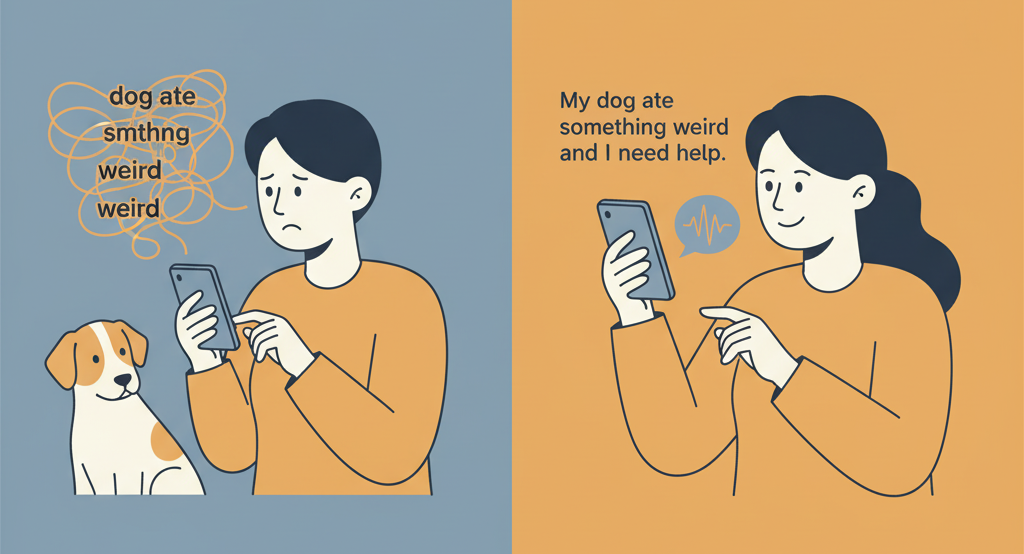
When your dog suddenly starts limping at 2 AM, or your cat refuses to eat for the second day in a row, panic sets in. Pet parents turn to Hoomanely's AI assistant for immediate guidance, but there's a catch: typing out complex symptoms on a mobile keyboard while your pet is in distress is frustrating, slow, and often incomplete. "My dog ate something weird and now he's acting strange" becomes "dog ate smthng weird acting strng" — losing crucial context that could help our AI provide better recommendations.
This disconnect between urgency and input method isn't just inconvenient; it's a barrier to getting pets the help they need quickly. We needed a solution that would let worried pet parents communicate naturally, without fighting with autocorrect or struggling to describe symptoms while comforting their anxious companions.
The Problem: When Keyboards Fail Pet Parents
Pet health conversations are inherently challenging to type. Unlike casual messaging, these interactions require:
Descriptive precision: Pet parents need to explain behaviours, symptoms, and timeline details. "He's been scratching his left ear more than usual since yesterday evening, especially after meals" contains information density that's tedious to type on mobile.
Situational constraints: Often, pet parents are simultaneously trying to comfort their pet, check symptoms, or manage an active situation. One hand might be petting an anxious dog while the other attempts to type.
Medical terminology hurdles: Pet parents may not know how to spell veterinary terms correctly. Voice input bypasses this entirely — users can say what they're seeing without worrying about spelling "gastroenteritis" or "conjunctivitis."
The result? Shortened messages, missed details, and frustrated users who abandon the conversation before getting the help they need.
Exploring Solutions: The Voice Input Landscape
Once we identified voice as the natural solution, the question became: how do we implement it reliably?
Option 1: Custom ML Models
Building our own speech recognition model was the first path we considered. Modern ML frameworks like Whisper, Wav2Vec, or DeepSpeech offer powerful transcription capabilities. The appeal is obvious: complete control over the model, potential for domain-specific training on pet health terminology, and no dependency on third-party services.
The reality check: Custom models require substantial infrastructure. You need audio preprocessing pipelines, model hosting, continuous training data collection, and specialised expertise. For a startup focused on pet health AI, diverting team resources to become speech recognition experts felt like mission drift. More critically, the latency problem remains - even with edge deployment, round-trip time for audio upload, processing, and response typically ranges from 1s to 2 seconds. When someone's describing their pet choking or having a seizure, every second counts.
Option 2: Cloud Speech APIs
Services like Google Cloud Speech-to-Text, AWS Transcribe, or Azure Speech offer production-ready solutions with impressive accuracy. They handle multiple languages, noise cancellation, and continuous updates to their models.
The hidden costs: Beyond obvious pricing concerns (per-minute charges add up with heavy usage), cloud APIs introduce network dependency. A pet parent in a rural area with poor connectivity experiences delayed or failed transcriptions. There's also the data pipeline complexity — you're managing audio uploads, handling streaming vs. batch processing decisions, implementing retry logic for network failures, and storing audio temporarily (raising privacy questions). For real-time use cases, the 1-2s latency for cloud round-trips feels sluggish, creating a disconnect between speaking and seeing text appear.
Option 3: Platform-Native Speech Recognition
Both iOS and Android provide built-in speech recognition APIs — SFSpeechRecognizer for iOS and SpeechRecognizer for Android. These seem perfect: on-device processing, low latency, no per-use costs, and already optimised for the device's hardware.
The fragmentation problem: Native implementations mean maintaining separate codebases for each platform. Bug fixes and feature improvements happen twice. Testing becomes more complex as you need to verify behavior across both ecosystems. For a Flutter application where our value proposition is rapid iteration on pet health features, this fragmentation tax would slow down everything else we're trying to build.
The Elegant Solution: speech_to_text Package
After evaluating these paths, we arrived at a solution that felt almost too simple: the speech_to_text Flutter package. This wasn't settling for good enough — it was recognising that someone had already solved the exact engineering problem we faced.
Why This Package Makes Sense
The speech_to_text package serves as a unified Flutter wrapper around platform-native speech recognition APIs. It gives us the best of both worlds: on-device processing with cross-platform consistency.
On-device performance: Because it uses iOS's SFSpeechRecognizer and Android's SpeechRecognizer under the hood, transcription happens locally. There's no network hop, no cloud dependency, and latency stays under 100ms. Pet parents see their words appear almost instantly as they speak — creating the responsive feel crucial for urgent health queries.
Zero infrastructure overhead: No servers to maintain, no models to host, no audio storage to manage. The package handles all the native platform bridging, permission management, and lifecycle complexity. The team stays focused on improving pet health recommendations, not debugging audio pipelines.
Proven reliability: This package has over 1,000 pub points and is actively maintained. It's battle-tested across thousands of Flutter apps, meaning edge cases we'd spend months discovering have already been found and fixed.
Features That Align With Pet Health Conversations
What makes this package particularly well-suited isn't just what it does, but how its capabilities map to our use case:
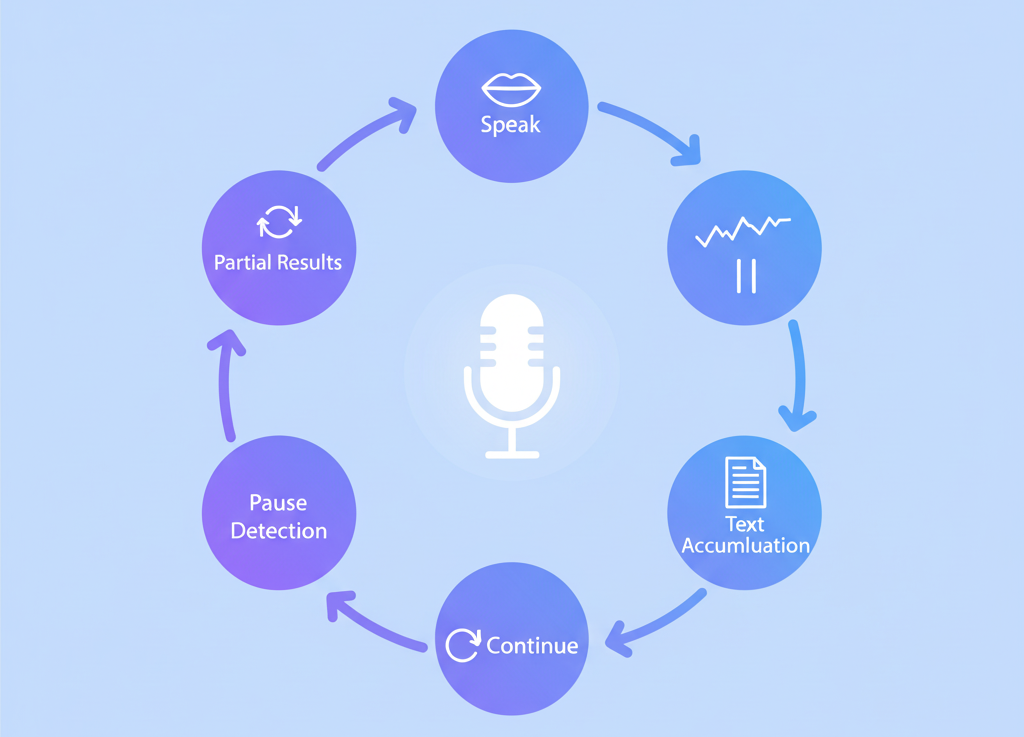
Partial results streaming: The partialResults: true configuration means text appears progressively as the user speaks. This creates natural feedback — pet parents can see their description forming in real-time, catch errors mid-sentence, and feel heard immediately. For our use case, this psychological aspect matters. When someone's anxious about their pet, seeing the AI "listening" reduces anxiety.
Configurable pause detection: The pauseFor: 3 parameter lets us tune how long the system waits before considering speech finished. Three seconds strikes the right balance — long enough for natural pauses ("My dog started limping... I think it was yesterday morning"), but short enough to feel responsive.
Continuous listening architecture: This is where the package truly shines for our needs. Out of the box, most speech recognition APIs have session timeouts (typically 30-60 seconds). For simple voice commands, that's fine. But pet health descriptions often take longer — a worried pet parent might need to gather their thoughts, check their pet's symptoms again, or recall timeline details.
The package's event-driven architecture (onStatus callbacks) gave us the building blocks to implement auto-restart functionality. When a session reaches its natural timeout, we seamlessly start a new one, accumulating text across sessions. To the user, it feels like one continuous conversation. No "recording stopped" interruptions, no manual restarts — just natural speech until they're done talking.
Locale specificity without rigidity: Setting localeId: 'en_US' optimises recognition for American English patterns (including common pet health terms), but the underlying platform APIs are already trained on massive diverse datasets. We get domain-general robustness without needing custom training.
About Hoomanely
Hoomanely is building the most trusted AI companion for pet parents. Our mission is to make expert-level pet health guidance accessible to everyone, anytime, through conversational AI that understands both the medical and emotional aspects of pet care. Voice input is a critical component of this vision - it removes barriers between worried pet parents and the help they need, ensuring that in moments of stress or emergency, communication remains natural and complete.
This implementation reflects our broader technical philosophy: choose boring, proven technology for infrastructure problems, so we can focus innovation on what makes us unique — understanding pets and helping their humans care for them better. The speech_to_text package handles the complex speech recognition plumbing, freeing our team to refine the AI models that interpret those transcriptions and generate helpful, empathetic responses.
Key Takeaways
Match technology to constraints: Custom ML models and cloud APIs offer theoretical advantages, but on-device speech recognition better fits our latency requirements and infrastructure constraints. Sometimes the simplest proven solution is the right one.
Design controls around user intent: The combination of continuous listening, partial results, and explicit confirmation buttons creates a user experience that feels responsive while maintaining user control — crucial when accuracy matters for health conversations.
Embrace platform strengths: Flutter's package ecosystem let us leverage native platform capabilities without fragmenting our codebase. The speech_to_text package is a reminder that abstractions, when done well, provide leverage without lock-in.
Context shapes implementation: Voice input for casual messaging has different requirements than voice input for health conversations. Understanding that our users are often simultaneously managing an anxious pet influenced everything from timeout handling to confirmation UI.
The result is a feature that doesn't feel like a feature — it's just a microphone button that, when pressed, works exactly as pet parents expect. That boring reliability is what lets them focus on what matters: getting help for their pet.



