
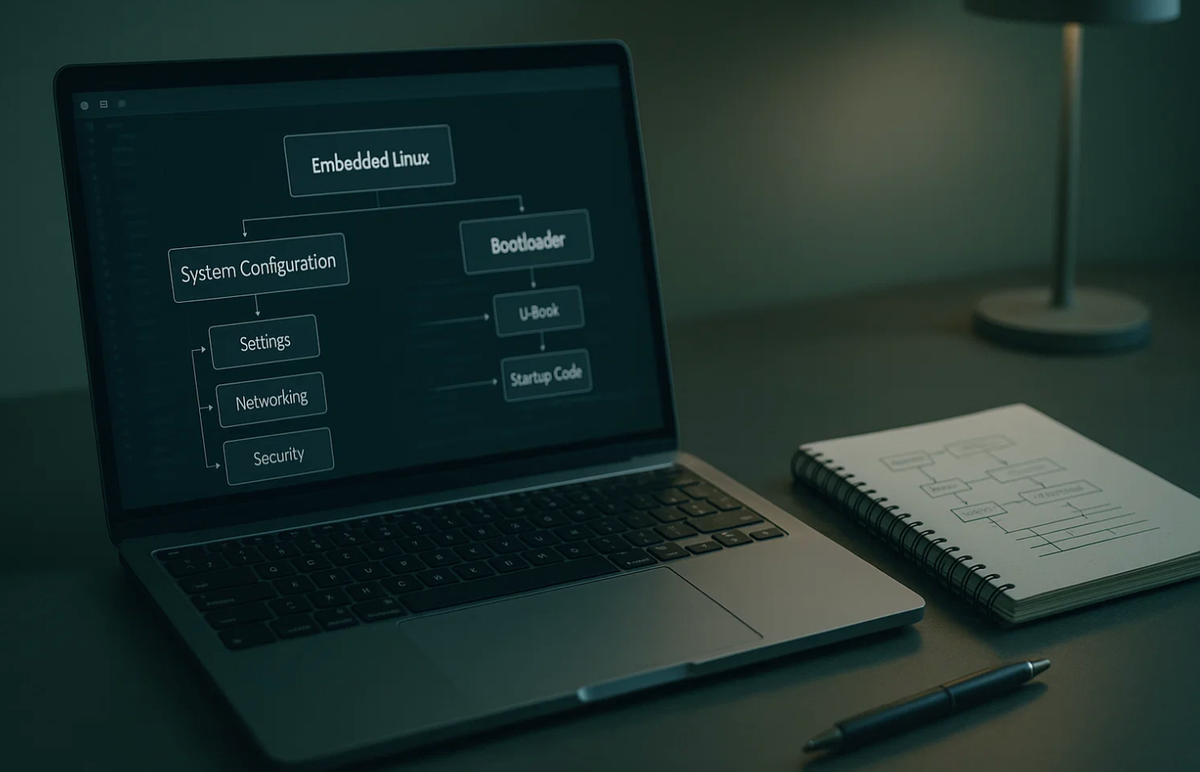
CM4 Configuration Playbook
Hoomanely is a deep-tech hardware startup building intelligent IoT systems designed to be reliable, predictable, and humane in how they interact with users. Our engineering philosophy centers on robust embedded design, modular hardware pipelines, and rapid prototyping without sacrificing stability.
In our early hardware development cycles, the Raspberry Pi Compute Module 4 played a foundational role. Its flexible IO routing, Linux ecosystem, predictable bootloader, and Linux-level configurability made it an excellent reference platform. While our custom SOMs evolved later, the CM4 shaped much of how we approach kernel bring-up, device-tree layering, and recovery-first embedded pipelines.
The CM4 gives you the power of a full Linux computer with the flexibility of a bare compute module, which also makes it significantly more complex than the Raspberry Pi 4 SBC. During prototyping we relied on it heavily to validate carrier boards, sensors, RF modules, and power architectures. This post is a comprehensive walkthrough of how the CM4 boots, how the kernel interacts with hardware, and how the device tree defines system layout, distilled from thousands of hours of engineering effort into a predictable, production-grade workflow.
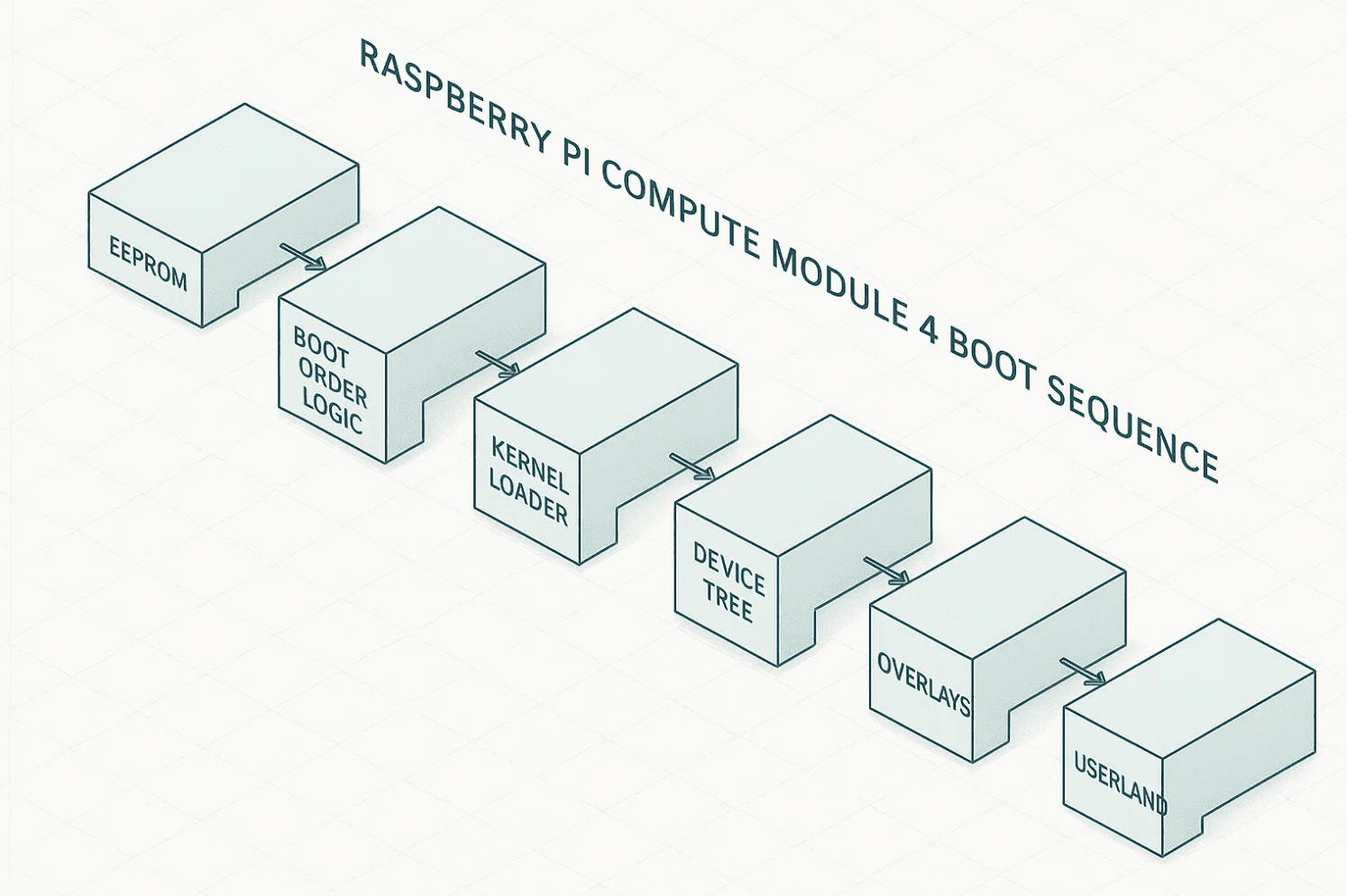
Three control layers define CM4 behavior: the EEPROM bootloader and boot modes, kernel configuration and driver availability, and the device tree and hardware description. Understanding all three is essential before moving toward custom SOM development or production carrier boards.
Why CM4 configuration is complex
Unlike a consumer Raspberry Pi board, the CM4 doesn't assume default hardware routing. Your carrier board defines power, USB topology, SDIO, PCIe, and GPIO usage. Kernel modules don't load automatically unless the device tree describes the hardware. Boot behavior depends on EEPROM configuration, not just SD card presence. And hardware functions require explicit device tree muxing.
During prototyping, each new hardware revision needed new device-tree overlays, kernel module tuning, EEPROM configuration alignment, and a robust recovery pipeline. The CM4 makes no assumptions, which is exactly why it's powerful for embedded systems.
CM4 bootloader and boot modes
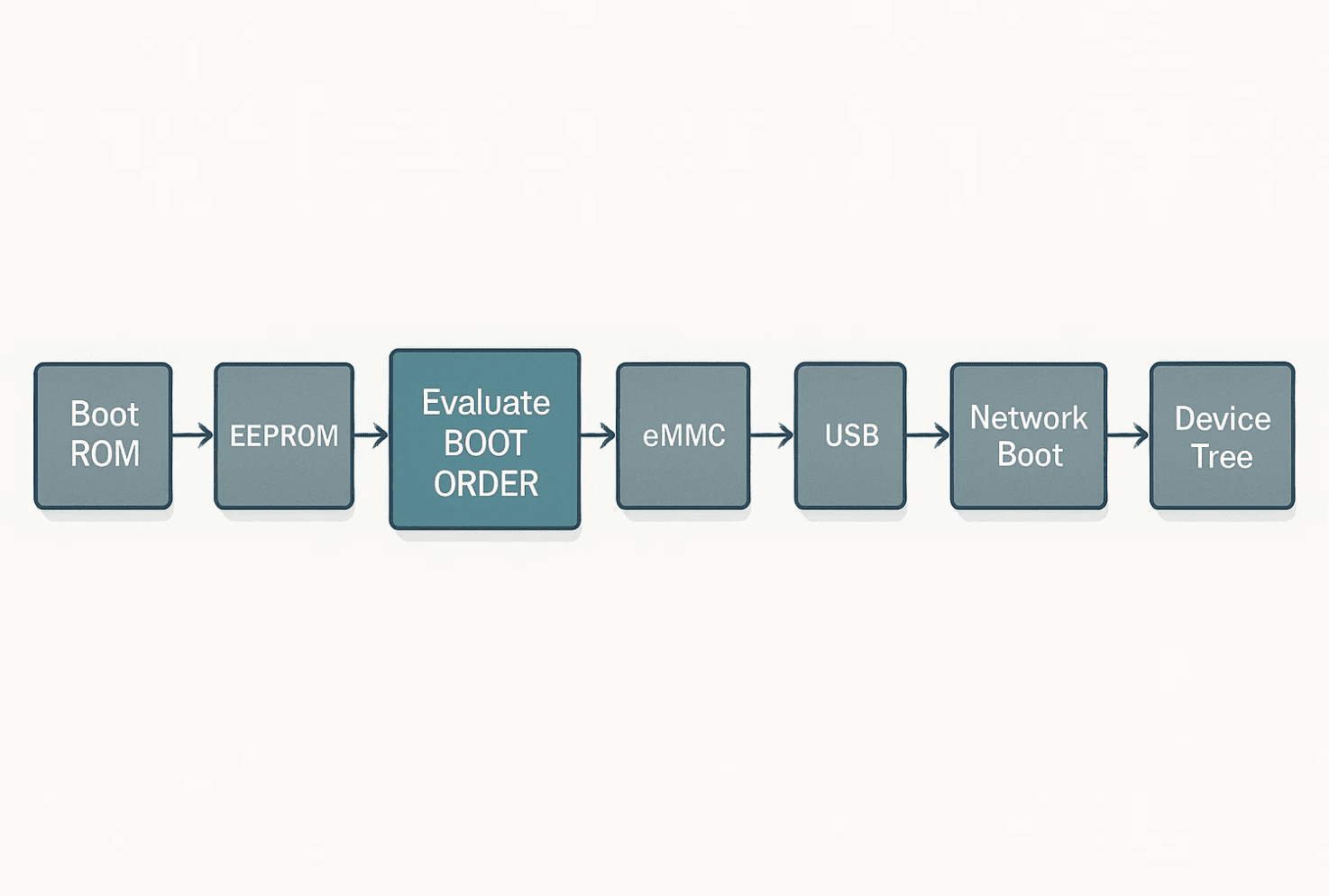
Every CM4 contains an onboard SPI flash storing the EEPROM bootloader, which determines the boot sequence, PCIe enablement, early serial console, network boot behavior, and USB boot behavior. Check the EEPROM version with sudo rpi-eeprom-update and sudo rpi-eeprom-config.
The EEPROM uses a hex sequence defining boot priority. 1 is SD Card, 2 is network boot (PXE), 4 is eMMC, 5 is USB mass storage, and f is stop. For BOOT_ORDER=0xf2541, the bootloader reads right-to-left, so it tries SD, then eMMC, then USB, then network, then stops. This order works well for prototyping since you can experiment with SD or USB boot while still validating eMMC bring-up.
A few properties matter a lot: PCIE_PROBE=1 enables the PCIe root complex early in boot, required for NVMe or PCIe modems. UART_ENABLE=1 enables UART0 debug logs from the bootloader. USB_MSD_EXCLUDE=1 disables USB MSD boot for production hardening. WAKE_ON_GPIO=1 enables wake-from-sleep on GPIO transitions. And pulling the nRPIBOOT pin low forces the CM4 into USB device boot mode for recovery, extremely useful during bring-up when testing unstable kernels or device trees.
Kernel configuration: drivers, DMA, PCIe, and debugging
The CM4 uses the same BCM2711 SoC as the Pi 4, with kernel support delivered through the Raspberry Pi downstream Linux kernel. Kernel config matters because PCIe needs specific drivers and MSI support, DMA engines need to be enabled for high-speed devices, I2C, SPI, and UART controllers need explicit configuration, and filesystem choices affect system lifetime and reliability.
Key kernel flags for CM4-based systems include CONFIG_PCIE_BRCMSTB=y and CONFIG_PCI_MSI=y for the PCIe subsystem, with MSI crucial for stable interrupt delivery. CONFIG_DMA_BCM2711=y for the DMA engine, required for camera pipelines and high-speed SPI sensors. CONFIG_USB_XHCI_HCD=y and CONFIG_USB_DWC2=y for USB host and device support, with XHCI required for USB 3.0. CONFIG_PINCTRL_BCM2835=y and CONFIG_GPIO_SYSFS=y for GPIO and pin muxing. And CONFIG_OVERLAY_FS=y plus CONFIG_SQUASHFS=y for overlay and squash filesystems.
dmesg | grep -iE "pcie|brcm|mmc|dma|xhci" is the diagnostic command we reached for constantly, quickly surfacing PCIe enumeration failures, WiFi firmware load errors, unsupported kernel modules, and bad DMA configurations.
Device tree: hardware description layer
The device tree defines the exact hardware layout of your carrier board. If the DTS is wrong, the kernel simply can't see your hardware, even if it's correctly wired. Extract the live device tree with sudo dtc -I fs -O dts /proc/device-tree > running.dts.
Common tasks during CM4 prototyping include enabling UART4 with dtoverlay=uart4, disabling onboard WiFi and Bluetooth with dtoverlay=disable-wifi and dtoverlay=disable-bt when using external modules, adding a custom I2C sensor with a device tree fragment declaring its compatible string, register address, and interrupt line, and defining custom GPIO pin muxing through &pinctrl with brcm,pins, brcm,function, and brcm,pull. Compile an overlay with dtc -I dts -O dtb custom_overlay.dts -o custom_overlay.dtbo.
Because carrier-board revisions changed weekly during our bring-up phase, we built modular DTS fragments, gave each hardware revision its own DT manifest, and validated DT correctness through boot scripts. That avoided silent hardware misconfiguration during rapid prototyping.
Bring-up and recovery pipeline
Embedded systems need a recovery-first design, and the CM4 gives you several layers. Soft recovery means entering rescue mode with sudo systemctl isolate rescue.target, resetting a broken config.txt from backup, and reinstalling the kernel with sudo apt reinstall raspberrypi-kernel.
EEPROM recovery via USB boot means pulling nRPIBOOT low, connecting the CM4 to a host over USB, and running sudo rpiboot, which exposes eMMC as a USB mass-storage device. This saved a number of CM4 boards during kernel experiments.
Full factory reflash means maintaining a signed base OS image, a validated kernel build, a DTS bundle, and automated bring-up tests, then flashing with rpi-imager --cli --image factory.img --device /dev/sdX or via rpiboot for eMMC variants.
Field-proven troubleshooting
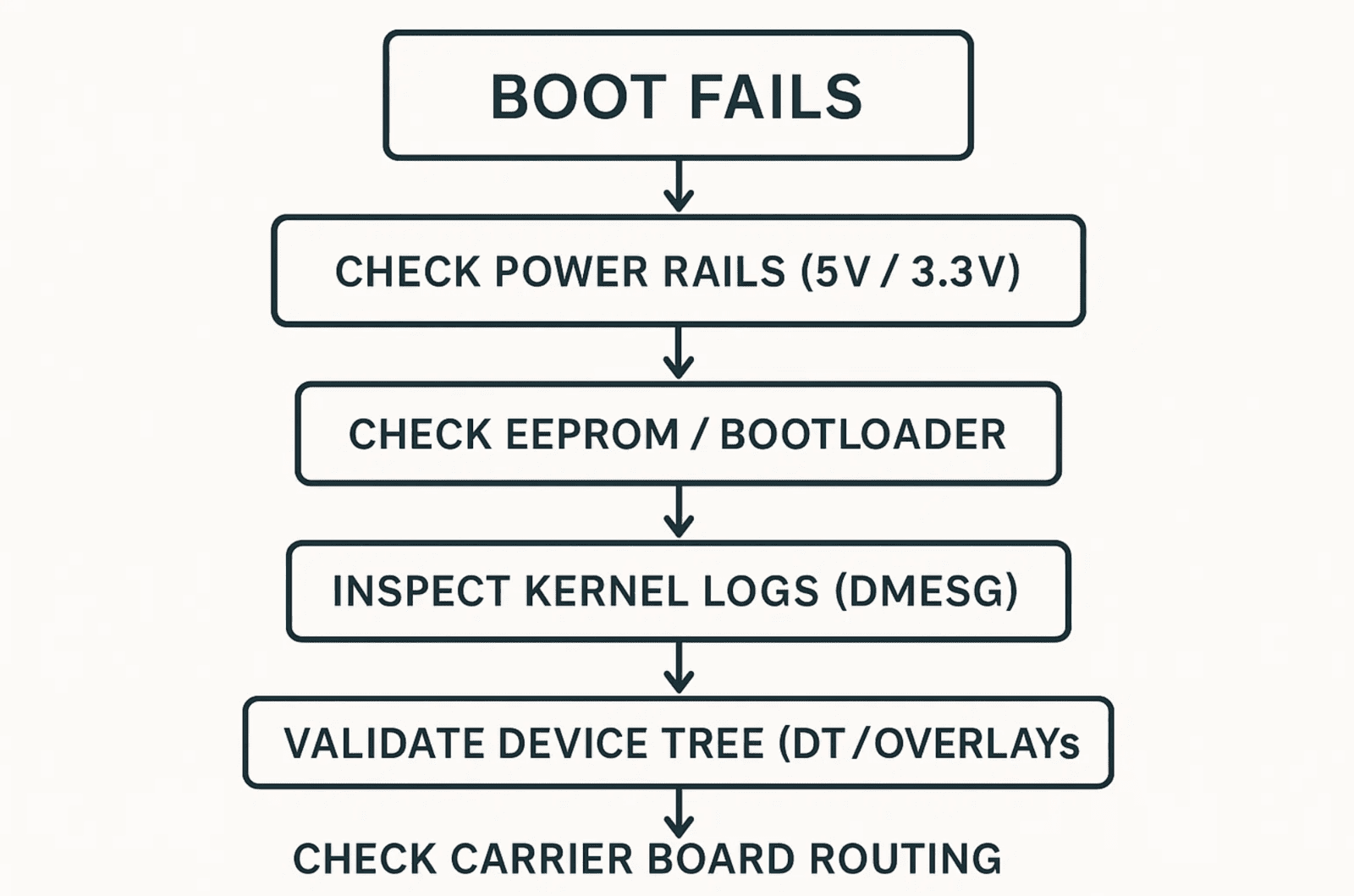
If PCIe isn't enumerating, check dmesg | grep -i pcie and verify PCIE_PROBE=1, REFCLK routing and AC-coupling on the carrier board, kernel MSI support, and that the device tree has a pci@7d500000 node. If WiFi isn't working, check firmware load with dmesg | grep brcmfmac, and look for a missing RF antenna enable GPIO, a bad DT property like brcm,sdio-drive-strength, or a 2.4 GHz antenna mismatch. If SD or eMMC isn't detected, check dmesg | grep -i mmc for a wrong bus width, missing pull-ups on CMD/DAT lines, or an incorrect SDIO voltage domain. If GPIO isn't behaving, check real-time muxing with raspi-gpio get and confirm there's no overlapping DTS function, incorrect pull settings, or an alternate function blocking the GPIO.
Why CM4 was ideal for prototyping
During our hardware discovery and iteration phases, we needed a compute platform that exposed high-speed buses, allowed fast device-tree iteration, provided stable Linux kernel behavior, supported complex sensor arrays, validated RF, PCIe, SDIO, and USB subsystems, and recovered quickly from experimental configurations. The CM4 delivered all of that with predictable EEPROM behavior, deep kernel configurability, flexible muxing, and a fast bring-up cycle, letting us evolve our hardware confidently before moving to custom architectures.
Key takeaways
The CM4 is powerful because it hands you ultimate control, which means understanding the EEPROM, kernel, and DTS layers is non-negotiable. Bootloader configuration defines boot priority, PCIe enablement, debug access, and rescue paths. Kernel flags determine driver availability, DMA paths, and high-speed interface stability. Device tree correctness is essential, get it wrong and hardware becomes invisible to the kernel. Recovery-first design prevents prototype downtime. And the CM4 remains an excellent reference compute module for embedded teams iterating quickly, the way Hoomanely did during our own hardware evolution.



