
Crashlytics and How It Affects App Performance

No matter how polished your app's UI is, a single crash can instantly shatter user trust. Users don't file bug reports—they uninstall.
That’s where Firebase Crashlytics comes in. It’s more than just a crash reporter — it’s a real-time, intelligent insight system that helps you understand why your app crashed, where it happened, and how to fix it quickly. Does Crashlytics itself affect app performance? Let’s dive into the reality behind that.
The Problem — Unseen Crashes, Lost Users
When the app ships to production, visibility becomes your biggest challenge.
Crashes can arise from:
- Unhandled exceptions
- Memory leaks
- Device-specific configuration issues
- Race conditions in async operations
- Poor network handling
- Which users crashed? (Device model, OS version, network conditions)
- What triggered it? (Specific user action, edge case, race condition)
- How often does it happen? (Isolated incident or widespread issue)
Traditional logging (via print() or custom analytics) can’t catch these issues effectively in real-world environments. You might see exceptions in your local console, but once the app is in users’ hands, those errors often disappear into the void. Without this context, we will be fixing symptoms, not root causes.
What is Crashlytics?
Firebase Crashlytics (part of Google’s Firebase suite) solves this visibility gap by automatically capturing crashes and exceptions with context-rich logs, grouped by similarity, and delivered in real-time.
Crashlytics hooks into your app's exception handlers to capture:
- Fatal crashes (app termination)
- Non-fatal exceptions (caught errors you want tracked)
- ANRs (Application Not Responding - Android only)
When a crash occurs:
Crash detected → Stack trace captured → Stored locally →
Uploaded on next app start → Symbolicated on server →
Dashboard updated in real-time
Key insight: Crash data is written to disk immediately, but uploaded asynchronously on the next session. This prevents network calls from blocking your crashed app.
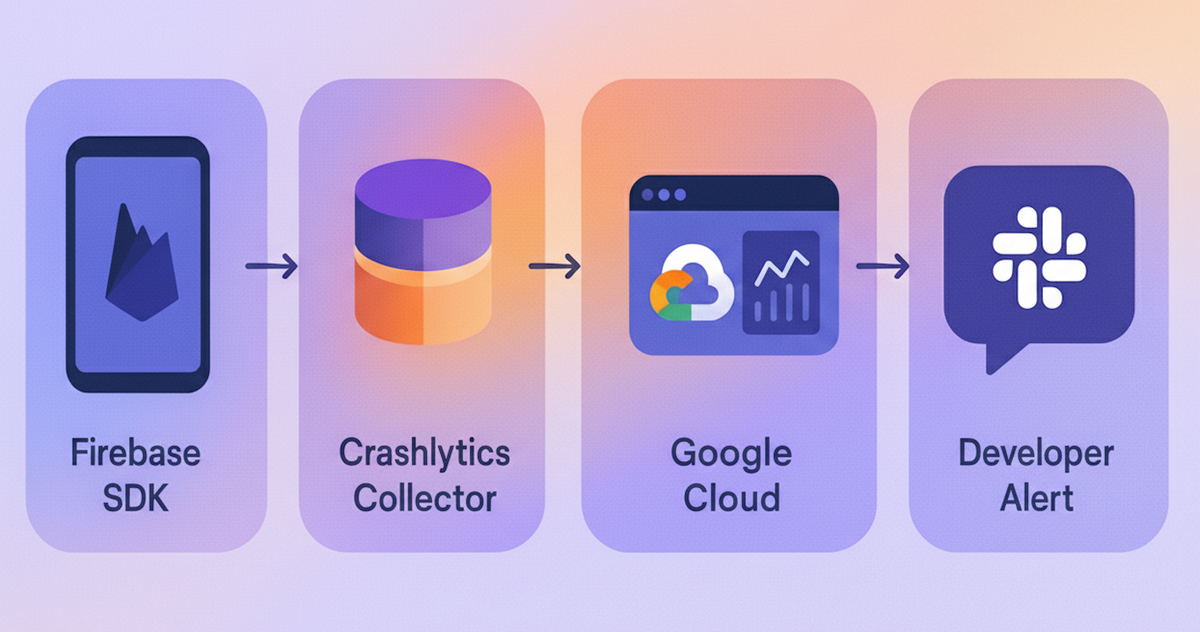
Architecture diagram:
App → Firebase SDK → Crashlytics Collector → Google Cloud → Crashlytics Dashboard → Developer Alert
Behind the Scenes of Crashlytics
Crashlytics uses a lightweight, asynchronous process to collect crash data.
Here’s what happens under the hood:
- When an exception occurs, Crashlytics hooks into the error handler.
- The crash data is cached locally (usually under the app’s private storage).
- On the next app start, it uploads the report to Firebase servers.
This entire sequence happens outside the main UI thread — meaning no noticeable lag to the user.
Crashlytics is designed to be:
- Low-latency (less than 1–2 ms impact during runtime)
- Memory-safe (uses minimal heap allocation)
- Network-efficient (batch uploads only after a crash or restart)
Common Misconception
Many assume Crashlytics constantly listens for events or transmits data in real-time. In reality, it’s event-driven — it only wakes up when something goes wrong.
Manual Exception Tracking
For caught exceptions, you want visibility into:
try {
  await riskyNetworkCall();
} catch (e, stackTrace) {
  // Log context before recording
  FirebaseCrashlytics.instance.setCustomKey('user_action', 'checkout');
  FirebaseCrashlytics.instance.setCustomKey('cart_items', cartCount);

  FirebaseCrashlytics.instance.recordError(
    e,
    stackTrace,
    reason: 'Payment processing failed',
    fatal: false
  );
}
Performance Impact: The Numbers
SDK Overhead
| Metric | Impact | Details |
|---|---|---|
| APK/IPA Size | +200-400 KB | Compressed SDK size |
| Memory | ~2-5 MB | Runtime allocation |
| CPU | <0.5% | Background thread processing |
| Battery | Negligible | Network uploads only on WiFi by default |
| Startup Time | +10-20ms | One-time initialization |
What Actually Causes Performance Issues
❌ Bad practices:
// DON'T: Log in tight loops
for (var item in largeList) {
  FirebaseCrashlytics.instance.log(item.toString()); // Blocks main thread!
}

// DON'T: Excessive custom keys
FirebaseCrashlytics.instance.setCustomKey('timestamp', DateTime.now().toString());
FirebaseCrashlytics.instance.setCustomKey('random_id', uuid.v4());
// ... 20 more keys
✅ Optimized approach:
// DO: Batch logs strategically
final eventSummary = largeList.map((e) => e.id).join(',');
FirebaseCrashlytics.instance.log('Processed items: $eventSummary');

// DO: Use meaningful, stable keys
FirebaseCrashlytics.instance.setCustomKey('screen', 'checkout');
FirebaseCrashlytics.instance.setCustomKey('user_type', 'premium');
Platform-Specific
iOS: Symbolication with dSYM Files iOS crash logs are initially unsymbolicated—just memory addresses:
0x000000010a1b2c3d main + 45
0x000000010a1b5f21 unknown + 128
To decode these into readable stack traces, Crashlytics needs dSYM (Debug Symbol) files from your Xcode build.
Manual upload:
firebase crashlytics:symbols:upload \
  --app 1:1234567890:ios:abcdef \
  path/to/appDsyms/
Automated via build phase (Xcode):
# Add Run Script phase
"${BUILD_DIR%/Build/*}/SourcePackages/checkouts/firebase-ios-sdk/Crashlytics/run"
CI/CD integration (Fastlane):
# Fastfile
lane :upload_symbols do
  upload_symbols_to_crashlytics(
    gsp_path: "./ios/Runner/GoogleService-Info.plist"
  )
end
Result: 0x10a1b2c3d becomes PetDetailViewController.swift:87 → Null pointer in loadImage()
Android: ProGuard/R8 Mapping Files
Whereas in Android, Flutter's Firebase plugin auto-uploads mappings flutter build apk --release if configured correctly.
Verify in android/app/build.gradle:
buildTypes {
    release {
        firebaseCrashlytics {
            mappingFileUploadEnabled true
        }
    }
}
Common Mistakes That Break Crash Reporting
1. Forgetting to Test in Release Mode
# Debug builds behave differently
flutter run --release  # Test this before shipping!
2. Catching All Exceptions Without Recording
// ❌ Silent failure
try {
  await criticalOperation();
} catch (e) {
  print('Error: $e'); // Lost forever
}

// ✅ Tracked failure
try {
  await criticalOperation();
} catch (e, stack) {
  FirebaseCrashlytics.instance.recordError(e, stack);
  showUserErrorDialog();
}
3. Not Setting User Identifiers
// Set once after login
FirebaseCrashlytics.instance.setUserIdentifier(userId);

// Now you can filter crashes by user in Firebase Console
4. Ignoring Crash-Free Users Metric
Firebase shows crash-free users percentage—the only metric that matters.
Notifications for Regressions
Crashlytics also integrates seamlessly with popular workflow and alerting tools like Slack, allowing the team to stay informed without constantly checking the Firebase console. You can configure alert thresholds — for example, trigger a Slack message when crash-free sessions drop below 98%, or when a particular issue spikes beyond a set volume. This makes monitoring proactive instead of reactive, ensuring your team responds to issues before users even notice them.
Real-World Impact: Hoomanely Case Study
After integrating Crashlytics with proper symbolication:
- Crash detection time is reduced with immediate real-time alerts
- Debug time per crash is reduced by a significant amount, as there is full context in reports
Our app Hoomanely uses Crashlytics within a broader observability stack that includes PostHog for behavior analytics and AWS CloudWatch for infrastructure health.
Every crash report helps us deliver smoother, more reliable experiences for pet parents and their companions.
Checklist: Production-Ready Crashlytics
- Crashlytics enabled in release builds
- dSYM/mapping files uploaded automatically
- User identifiers set post-authentication
- Custom keys limited to <10 per session
- Non-fatal exceptions logged for critical paths
- Team alerts are configured for crash rate thresholds
- Crash-free users metric monitored weekly
- Stack traces are readable (no obfuscated/missing symbols)
Key Takeaways
- Crashlytics adds <20ms to startup with negligible runtime overhead
- Bad logging practices cause performance issues, not the SDK itself
- Symbolication is critical—automate dSYM/mapping uploads
- Crash-free users are the goal for store visibility
- Combine with behavior analytics for full observability
Stable apps don't just perform better—they build trust. And in competitive app markets, trust is your moat.



