
Design History Under Control: Git-Based Versioning for Hardware
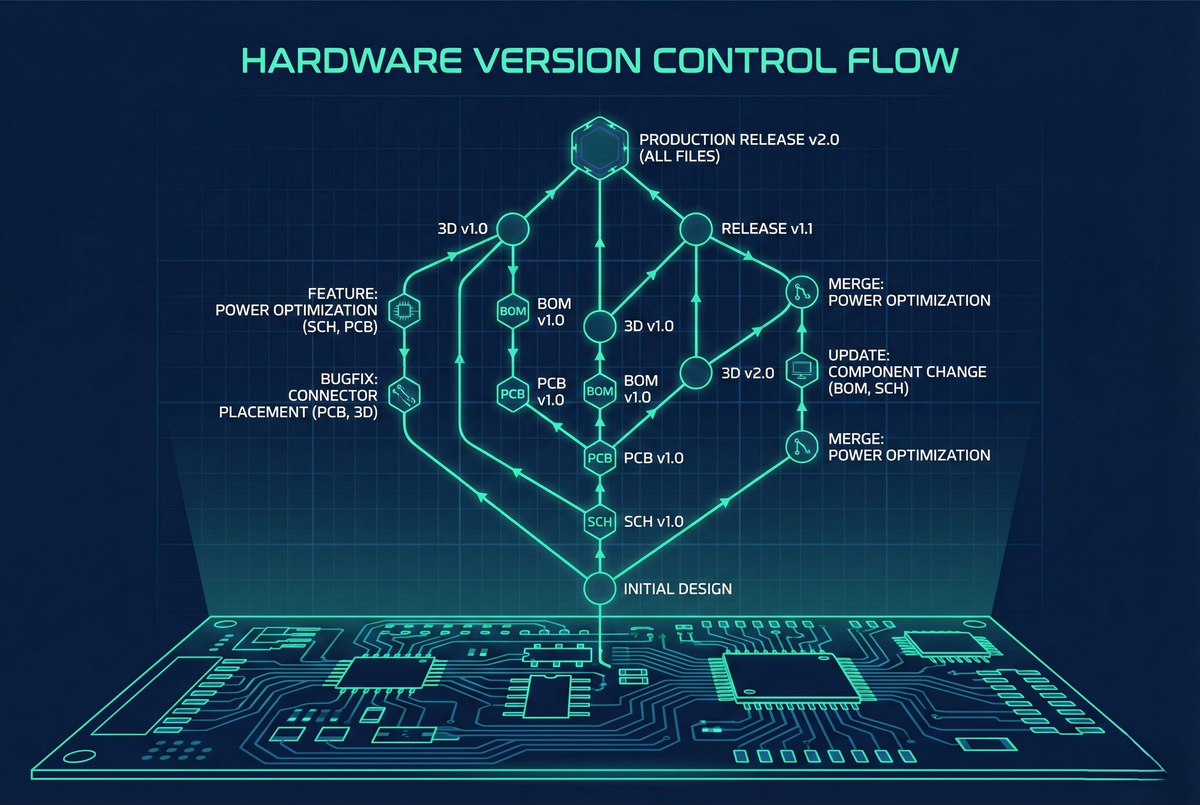
Introduction: Hardware Meets Software Workflow
Hardware design projects generate a wide range of files — schematics, PCB layouts, component libraries, manufacturing outputs, and documentation. Over the course of development, these files go through countless revisions as designs move from prototyping to testing and finally to production. Without a structured version control system, this complexity can quickly spiral into chaos: lost design history, accidental overwrites, difficulty in tracking changes, and collaboration bottlenecks.
At Hoomanely, we’ve addressed this challenge by implementing Git-based version control for all hardware design files, bringing the same disciplined workflow long trusted in software development to electronic design. Using GitHub as our central repository, we now enjoy complete design traceability, smooth collaboration across distributed teams, automated backups, and the confidence to explore new design iterations knowing every change is safely tracked and reversible.
In this post, I’ll share how Git has transformed hardware design at Hoomanely from scattered file management into a cohesive, collaborative, and professionally managed workflow.
Why Version Control for Hardware?
The Traditional File Management Problem
Without version control, hardware teams typically use:
File System Versioning:
Project_v1.DSN
Project_v2.DSN
Project_v2_final.DSN
Project_v2_final_revised.DSN
Project_v3_working.DSN
Issues:
- Which file is actually "final"?
- What changed between v2 and v3?
- Who made changes and when?
- How to collaborate without file conflicts?
Email-Based Sharing:
- Designer emails files to reviewer
- Reviewer makes changes, emails back
- Multiple versions circulating simultaneously
- No central source of truth
Network Drive Storage:
- Shared folder holds "current" design
- Last person to save overwrites previous changes
- No change tracking
- No conflict resolution
Git Advantages for Hardware
Complete History: Every change tracked with:
- Who made it (author)
- When (timestamp)
- Why (commit message)
- What (diff showing exact changes)
Branching and Experimentation: Try design alternatives without affecting main design:
- Create branch for "high-speed-routing-test"
- Experiment freely
- Merge successful changes back or discard branch
Collaboration: Multiple engineers work simultaneously:
- Each has full local copy
- Changes synchronized via push/pull
- Conflicts detected and resolved systematically
Backup and Recovery: Every commit is:
- Stored on local machine
- Backed up to GitHub remote repository
- Retrievable indefinitely
- Protected against hardware failure
Remote Access: Team members anywhere access latest designs:
- Clone repository from any location
- No VPN needed (GitHub provides secure access)
- Works across time zones and continents
Repository Structure: Organized for Hardware
Standard Directory Layout
vbus-cpu-stm32h7/
│
├── README.md # Project overview, setup instructions
├── .gitignore # Exclude temporary/generated files
│
├── hardware/
│ ├── schematics/
│ │ ├── vbus-cpu.DSN # Main schematic (Altium, KiCad, etc.)
│ │ ├── power.SchDoc # Power section (if modular)
│ │ └── cpu.SchDoc # CPU section
│ │
│ ├── pcb/
│ │ ├── vbus-cpu.PcbDoc # PCB layout file
│ │ └── stackup.pdf # Layer stackup definition
│ │
│ ├── libraries/
│ │ ├── components/ # Schematic symbols
│ │ ├── footprints/ # PCB footprints
│ │ └── 3d-models/ # Component 3D models
│ │
│ └── manufacturing/
│ ├── gerbers/ # Gerber files (ignored in git)
│ ├── assembly/ # Pick-and-place, BOM
│ └── test/ # Test specifications
│
├── firmware/ # If firmware part of project
│ └── bootloader/
│
├── documentation/
│ ├── design-notes/ # Design decisions, rationale
│ ├── datasheets/ # Component datasheets (PDFs)
│ └── specifications/ # Requirements, test plans
│
└── releases/
├── v1.0/ # Released versions
└── v2.0/
Benefits:
- Consistent structure across all projects
- Easy navigation for any team member
- Clear separation of design vs. manufacturing files
.gitignore Configuration
Exclude files that shouldn't be version-controlled:
# Backup files
*.bak *~
*.tmp
# Auto-generated files
*.auto_save
*.pcb-save
# Output files (generated from source)
gerbers/*.gbr
gerbers/*.drl
*.zip
# OS files
.DS_Store
Thumbs.db
# EDA tool temporary files
*.lock
*.lck
Rationale:
- Source files versioned (schematics, layouts)
- Generated outputs excluded (can be regenerated)
- Keeps repository clean and lean
- Faster cloning and syncing
Commit Workflow: Capturing Design Intent
Atomic Commits
Principle: Each commit represents one logical change:
Good commits:
"Add decoupling capacitors to CPU power pins"
"Route USB differential pairs with length matching"
"Update BOM with second-source components"
Poor commits:
"Lots of changes"
"Work in progress"
"Fixed stuff"
Why it matters:
- Future review: Understand why change was made
- Selective revert: Roll back specific change without affecting others
- Code review: Reviewer evaluates focused change, not 50 unrelated edits
Commit Messages That Tell Stories
Format: Short summary line + detailed explanation:
Add thermal vias under switching regulator
U3 (TPS62840) was exceeding thermal limits in testing (85°C observed,
target <70°C). Added 30 thermal vias (0.3mm diameter) under exposed
pad to improve heat transfer to bottom copper plane. Thermal
simulation predicts 15°C reduction. Verified no routing conflicts
with via placement.
Related: Thermal test report 2024-12-15
Information captured:
- What changed (thermal vias added)
- Why (component overheating)
- How (specific via count and size)
- Expected result (temperature reduction)
- Validation (simulation performed)
Future value: Six months later, engineer investigating thermal behavior immediately understands design decision.
Commit Frequency
Recommended cadence: Commit after completing each logical design task:
- Completed schematic section: Commit
- Finished component placement: Commit
- Routed critical signals: Commit
- Updated BOM: Commit
Benefits:
- Granular history (easy to find specific change)
- Regular checkpoints (safe rollback points)
- Incremental backup (work protected continuously)
Anti-pattern: Single massive commit at end of day:
- "End of day commit—complete redesign"
- Loses all intermediate history
- Impossible to understand what changed
Branching Strategy: Parallel Development
Main Branch Protection
main branch: Production-ready designs only:
- Passes design review
- Successfully manufactured
- Validated in testing
- Tagged with version number (v1.0, v2.1)
Protection rules:
- No direct commits to
main - Changes via pull request only
- Requires review approval
- Ensures quality gate
Feature Branches
Development workflow:
1. Create branch from main:
git checkout -b feature/add-usb-c-connector
- Make changes in branch:
- Update schematic with USB-C connector
- Route USB signals
- Update BOM
- Commit changes to branch:
git add hardware/schematics/
git commit -m "Add USB-C connector for power and data" - Push branch to GitHub:
git push origin feature/add-usb-c-connector - Create pull request:
- Review changes on GitHub web interface
- Request review from team member
- Discuss changes in PR comments
- Merge after approval:
- Reviewer approves PR
- Merge feature branch into
main - Delete feature branch (no longer needed)
Benefits:
- Main branch stays stable
- Experimental changes isolated
- Review process enforced
- Clean history (each feature = one merge)
Hotfix Branches
Emergency fixes to production designs:
git checkout -b hotfix/fix-wrong-capacitor-value main
# Fix capacitor value in schematic
git commit -m "Correct C12 value from 10uF to 100uF"
git push origin hotfix/fix-wrong-capacitor-value
# Create PR, fast-track review, merge to main
git tag v2.0.1 # Minor version bump for hotfix
Workflow: Similar to feature branches but:
- Higher priority review
- Immediate merge when approved
- Version tag applied
Collaboration Workflows
Designer-Reviewer Interaction
Pull Request Process:
- Designer creates PR:
- Summarizes changes in PR description
- Links to related issues or requirements
- Assigns reviewer
- Reviewer examines changes:
- GitHub shows file diffs
- Comments on specific changes
- Requests modifications if needed
- Discussion and iteration:
- Designer responds to comments
- Makes requested changes
- Pushes updates to same branch (PR auto-updates)
- Approval and merge:
- Reviewer approves
- Designer (or reviewer) merges
Advantage: Complete discussion history preserved with design changes.
Distributed Team Collaboration
Global team scenario:
- Designer A (California) works on power supply
- Designer B (India) works on CPU section
- Designer C (Germany) works on communication interfaces
Git workflow enables:
- Each designer clones repository
- Creates feature branch for their section
- Works independently on local machine
- Periodically pulls updates from
main(stays current) - Pushes completed work to GitHub
- Merges coordinate through PR review
No conflicts: Different board sections = different files = no file conflicts.
Occasional conflicts: Same file edited by multiple people = Git detects conflict, designers resolve collaboratively.
Tagging and Releases
Semantic Versioning
Hardware versions follow semantic versioning: MAJOR.MINOR.PATCH
MAJOR (1.0 → 2.0): Incompatible changes:
- New board outline (doesn't fit old enclosure)
- Different connector (not backward compatible)
- Significant redesign
MINOR (1.0 → 1.1): Backward-compatible additions:
- Added features (new sensor interface)
- Improved performance (better power efficiency)
- Compatible with existing enclosure/connectors
PATCH (1.1 → 1.1.1): Bug fixes:
- Wrong component value corrected
- Routing error fixed
- Silkscreen typo corrected
Creating Release Tags
Tag commits representing production releases:
git tag -a v2.0 -m "Release v2.0 - USB-C power, improved thermal"
git push origin v2.0
GitHub release page: Documents release with:
- Tag version
- Release notes (what changed since previous release)
- Attached files (PDFs, manufacturing outputs)
- Links to issues resolved
Benefit: Instant access to any production revision:
git checkout v1.5 # Jump to exact v1.5 release state
Continuous Integration for Hardware
Automated Checks on Commit
GitHub Actions: Run automated validation on every push:
Example workflow:
- DRC (Design Rule Check): Automated script runs EDA tool DRC:
- Exports DRC report
- Fails if errors detected
- Passes if clean
- BOM Validation: Script checks:
- All components have manufacturer part numbers
- No "DNP" components in production BOM
- Part availability verified via API query to distributors
- Documentation Generation: Auto-generate PDFs:
- Schematic PDF from source
- BOM CSV/XLSX export
- Assembly drawing PDF
- Notification: Slack/email notification if checks fail
Result: Every commit automatically validated—catch issues immediately.
Manufacturing Output Generation
Release workflow triggers automated manufacturing package generation:
- Developer tags commit as release (v2.1)
- GitHub Action detects tag
- Script generates:
- Gerber files
- Drill files
- Assembly files (CPL, BOM)
- Documentation PDFs
- Creates GitHub release with all outputs attached
Benefit: Manufacturing-ready package generated automatically—consistent, error-free.
Design History and Traceability
Finding When Changes Occurred
Git blame: See who changed each line and when:
git blame hardware/schematics/power.SchDoc
Shows:
a4b3c2d (John Doe 2024-10-15) Resistor R15 value: 10K
e5f6g7h (Jane Smith 2024-11-02) Resistor R15 value: 4.7K
Insight: R15 changed from 10K to 4.7K on Nov 2 by Jane—check commit message for why.
Reviewing Design Evolution
Git log: Complete project history:
git log --oneline --graph
Visual timeline:
- e5f6g7h Update R15 for improved timing margin
- d4e5f6g Add thermal vias under regulator
- c3d4e5f Route USB differential pairs
- b2c3d4e Place components in CPU section
- a1b2c3d Initial schematic capture
Diff between versions:
git diff v1.0 v2.0
Shows exact file changes between two releases—every net, every component value difference.
Backup and Disaster Recovery
Multiple Backup Locations
Git's distributed nature = inherent redundancy:
- Each team member's clone: Full repository backup
- GitHub server: Cloud backup
- Optional: Mirror to secondary Git hosting (GitLab, Bitbucket)
Data loss scenario: Developer's laptop dies:
- Clone fresh copy from GitHub
- Resume work immediately
- Zero data loss (all commits were pushed to remote)
Historical Recovery
Accidental deletion scenario:
- Designer accidentally deletes important schematic section
- Realizes mistake hours later (already committed)
Recovery:
git log # Find commit before deletion
git checkout a1b2c3d hardware/schematics/cpu.SchDoc
# File restored to previous state
git commit -m "Restore accidentally deleted CPU section"
Benefit: Mistakes are reversible—encourages bold experimentation.
Conclusion: Professional Hardware Workflow
Git-based version control elevates hardware design from artisan craft to engineering discipline. By tracking every change, enabling fearless experimentation through branching, facilitating global collaboration, and providing complete design history, we've transformed how teams work on complex hardware projects.
For tech enthusiasts: adopting Git for hardware designs isn't just best practice—it's competitive necessity. Solo designers gain reliable backup and design history. Teams gain collaboration superpowers. Companies gain traceability and IP protection. The learning curve is modest; the productivity gains are transformative.
At Hoomanely, Git underpins our vBus development velocity—multiple engineers iterate designs in parallel, confident that integration is systematic rather than chaotic. Our design history is complete and queryable. Our backup is automatic and distributed. Our collaboration is asynchronous yet coordinated.
This is modern hardware development—where version control isn't optional infrastructure, it's a foundational workflow that enables everything else we do.



