
Designing for Scale : The Power of Virtualization

The DOM Performance Ceiling
When architecting our IoT monitoring platform at Hoomanely, we knew we'd be dealing with device data that scales exponentially. Our device status dashboard needed to display real-time information across hundreds of connected devices—device IDs, user details, heartbeat status, timestamps—all updating constantly. Drawing from extensive experience with large-scale data applications, we understood that naive implementations would crumble under this load.
The Fundamental Challenge
The core challenge is fundamental to web development: browsers weren't designed to render thousands of DOM elements simultaneously. Each table row or data card carries event listeners, styling, and nested components. When you're dealing with 500+ devices, that overhead compounds quickly, leading to sluggish interfaces that frustrate users and operations teams.
Traditional approaches render everything at once, creating DOM nodes proportional to the dataset size. This leads to exponential performance degradation as data grows. The browser must maintain, style, and track every single element—even those far outside the visible viewport.
Understanding Virtualization
Virtualization represents a paradigm shift in how we think about rendering large datasets. Instead of creating DOM elements for every data item, virtualization creates only what's visible to the user at any given moment. As users scroll, the system intelligently recycles existing DOM elements, updating their content to display different data.
Think of it like a theater stage with a moving backdrop. The audience (your viewport) only sees a small portion of the story at once, but the illusion of continuity is maintained by carefully orchestrating what appears when. The actors (DOM elements) don't multiply with the length of the story—they're reused for different scenes.
The Core Principles
Viewport-Based Rendering: Only elements within or near the visible viewport are rendered. Everything else exists as data in memory, not as DOM nodes consuming browser resources.
Element Recycling: As users scroll, DOM elements that move out of view aren't destroyed—they're repositioned and updated with new data. This dramatically reduces the overhead of constant creation and destruction.
Predictable Performance: Because the number of rendered elements remains constant regardless of dataset size, performance becomes predictable. Whether you have 100 items or 100,000, the browser manages roughly the same number of DOM nodes.
Why Virtualization Works
The performance benefits stem from fundamental browser limitations. Modern browsers can efficiently handle thousands of data objects in JavaScript memory, but struggle when those objects become DOM elements requiring layout, paint, and composite operations.
Memory Efficiency
Without virtualization, a dashboard displaying 1,000 devices might create 50,000+ DOM nodes when accounting for nested components, icons, and interactive elements. With virtualization, that same interface maintains just 500-1,000 nodes—only what's visible plus a small buffer.
Rendering Performance
Browser rendering pipelines involve multiple expensive operations: layout calculation, style computation, painting, and compositing. Each operation scales with DOM complexity. By maintaining minimal DOM, virtualization keeps these operations lightweight and fast.
Interaction Responsiveness
When users interact with the interface—sorting, filtering, or updating data—the browser only needs to update visible elements. This keeps interactions snappy even with massive datasets, because the computational cost remains constant.
Real-World Performance Characteristics
Virtualized implementation delivers measurable improvements:
- Sub-50ms render times for 1,000+ device records
- 60% reduction in DOM node count compared to traditional approaches
- Smooth 60fps scrolling even with 10,000+ rows
- Consistent memory footprint regardless of dataset growth
The key insight: performance isn't about choosing between features and speed—it's about architecting systems where both coexist harmoniously.
Production-Ready Considerations
Implementing virtualization in production requires addressing real-world complexity beyond basic scrolling.
Dynamic Content Heights
Real-world data rarely fits uniform containers. Device descriptions vary in length, status messages expand and contract, and nested information appears conditionally. Virtualization systems must estimate content heights intelligently, adapting to variable content while maintaining smooth scrolling.
The challenge lies in balancing accuracy with performance. Precise height calculation for every item defeats the purpose of virtualization, but poor estimates cause jarring layout shifts as users scroll.
Comprehensive Accessibility
Virtualization can inadvertently create accessibility barriers if not carefully implemented. Screen readers expect consistent DOM structure, keyboard navigation requires logical focus management, and users with assistive technologies need predictable interaction patterns.
Production implementations must include:
- Semantic markup that conveys structure to assistive technologies
- Full keyboard navigation support across virtual boundaries
- Focus management that preserves user context during scrolling
- Dynamic announcements for content changes
- Proper ARIA labels and roles
Cross-Platform Touch Optimization
Mobile and touch interactions introduce unique challenges. Touch gestures feel different from mouse scrolling, momentum scrolling requires hardware acceleration, and varying screen densities affect height calculations.
Successful implementations optimize for:
- Hardware-accelerated momentum scrolling for fluid mobile experiences
- Touch gesture recognition for swipe actions and pull-to-refresh
- Responsive height calculations across different screen densities
- Touch event optimization to prevent excessive re-renders
Advanced Virtualization Patterns
Overscan and Buffer Management
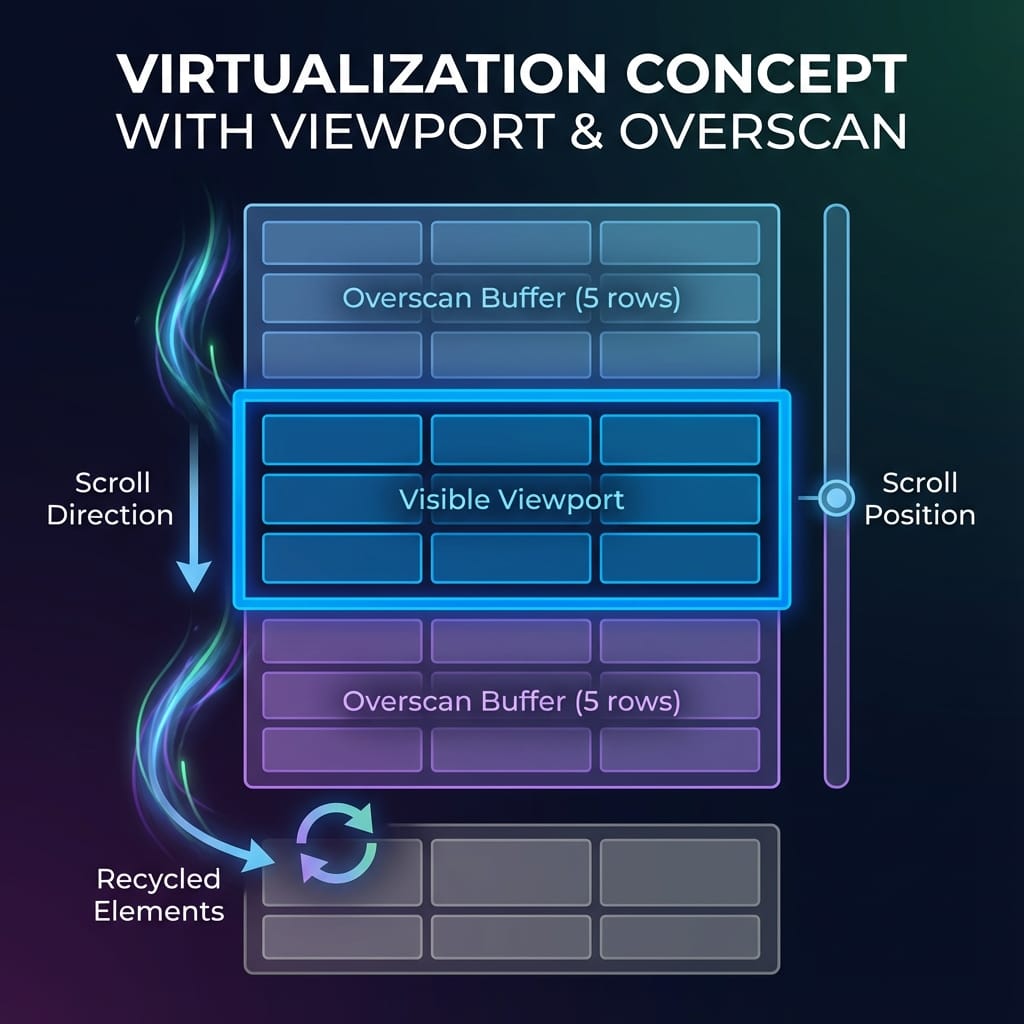
Rendering a few extra items above and below the visible area prevents blank spaces during fast scrolling. This "overscan" creates a buffer zone that ensures smooth scrolling even when users scroll rapidly, trading minimal memory overhead for perceived performance.
The overscan size becomes a tuning parameter—too small and users see blank spaces during fast scrolling, too large and you sacrifice the memory benefits of virtualization.
Dynamic Sizing with Content Observation
For truly dynamic content that changes size after initial render—expanding text areas, loading images, or conditional nested components—virtualization systems must observe and react to size changes.
Modern browser APIs enable efficient observation of element dimensions, allowing virtualization systems to recalculate layouts only when necessary, maintaining accuracy without constant measurement overhead.
Bidirectional Virtualization
When dealing with both many rows and many columns, single-axis virtualization isn't enough. Bidirectional virtualization applies the same principles horizontally and vertically, creating a "window" that moves in two dimensions.
This pattern handles truly massive datasets—think spreadsheets with thousands of rows and hundreds of columns—while maintaining the same performance characteristics as single-axis virtualization.
Progressive Data Loading
Virtualization pairs naturally with progressive data loading strategies. As users scroll toward the end of loaded data, the system can fetch additional records, creating infinite scrolling experiences that feel instantaneous.
The virtualization layer masks the loading process—users see smooth scrolling while the system fetches data in the background, maintaining the illusion of immediate access to unlimited data.
Memory Management and Optimization
Virtualization isn't just about rendering fewer elements—it's about intelligent memory management throughout the application lifecycle.
Preventing Memory Leaks
Long-running applications with virtualization can accumulate memory if not managed properly. Event listeners, cached measurements, and retained references must be cleaned up when components unmount or data changes.
Production implementations include cleanup strategies that prevent memory accumulation, ensuring applications remain performant over extended sessions.
Bundle Size Considerations
Virtualization libraries add to application bundle size. Smart implementations use dynamic imports to load virtualization only when needed—smaller datasets might not justify the overhead, while larger ones benefit significantly.
This conditional loading reduces initial bundle size while ensuring performance scales with data complexity.
Performance Monitoring and Metrics
Ensuring virtualization stays performant requires continuous monitoring of specific metrics.
Core Web Vitals Integration
Modern performance measurement focuses on user-centric metrics. For virtualized interfaces, Largest Contentful Paint (LCP) and Cumulative Layout Shift (CLS) provide crucial insights into perceived performance.
Monitoring these metrics specifically for data-heavy interfaces ensures virtualization delivers the intended user experience improvements.
Memory Usage Tracking
Tracking DOM node count and JavaScript heap size provides concrete evidence of virtualization effectiveness. Production monitoring should compare these metrics against non-virtualized baselines to quantify benefits.
Scroll Performance Measurement
Smooth scrolling requires maintaining 60 frames per second. Measuring frame timing during scroll operations identifies performance regressions and validates optimization efforts.
Implementation Philosophy
Based on extensive experience building production systems, here's our approach to virtualized data interfaces:
Performance First: Establish baseline performance requirements before adding features. Know your target dataset size and acceptable render times.
Measure Relentlessly: Use browser developer tools and real user monitoring to validate assumptions. Performance intuition often misleads—measurements reveal truth.
Accessibility Core: Design for all users from the start. Retrofitting accessibility into virtualized interfaces is significantly harder than building it in from the beginning.
Scale-Ready Architecture: Build for your largest expected dataset, not your current average. Systems that handle edge cases gracefully handle normal cases effortlessly.
Progressive Enhancement: Start with solid fundamentals and add complexity only when needed. Simple virtualization solves most problems—advanced patterns address specific edge cases.
Conclusion
Building scalable data platforms reinforces a fundamental truth: the best interfaces are invisible. They deliver information instantly, handle massive datasets gracefully, and never become the bottleneck in user experience.
Virtualization represents more than a performance optimization—it's a fundamental rethinking of how we render data at scale. By rendering only what users can see and intelligently managing the rest, we create dashboards that scale seamlessly with growing data demands.
Whether you're building IoT dashboards, analytics platforms, or data-heavy applications, virtualization provides the foundation for interfaces that remain fast and responsive as data grows.
In an era where data volumes increase exponentially, virtualization isn't optional—it's essential for building applications that scale from day one.



