DynamoDB sort key design: why a filtered Query still scans
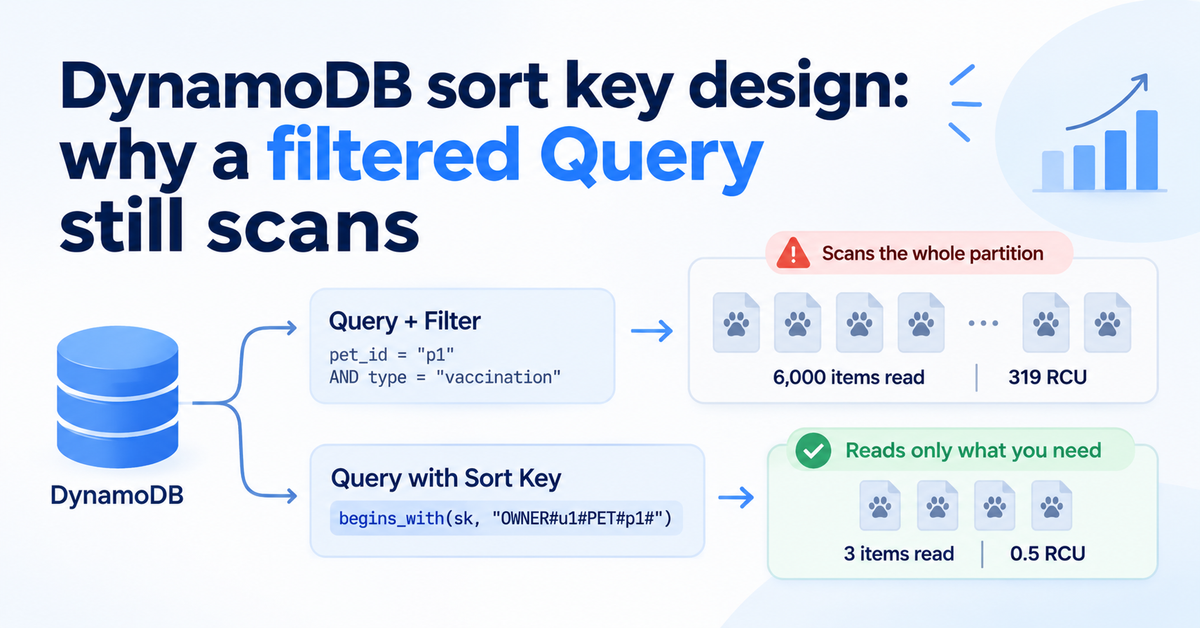
A Query is not automatically cheap. In a test partition of 6,000 pet documents, a Query that filtered on pet_id read all 6,000 items and used 319 read capacity units to return 3. The same request against a composite sort key, OWNER#<owner>#PET#<pet>#DOC#<doc>, read exactly 3 items for 0.5 read capacity units.
This post covers why a filtered Query is still a scan of the partition, how to design a sort key from your access patterns, what must never go into a key, and when a global or local secondary index is the better fix. It ends with the limits of each index type, because the numbers decide the design more often than taste does.
The short version
- A filter expression runs after the read, so a Query filtered on
pet_idread 6,000 items and paid 319 read capacity units to return 3. - A sort key built from broad to narrow, owner then pet then document, answered the same question by reading 3 items for 0.5 read capacity units.
- Only values that never change belong in a key; keeping the editable category out of it still found 1 vaccination record by reading the pet's 3 items.
- A table can have up to 20 global secondary indexes by default but only 5 local ones, and local ones exist only if you create them with the table.
Why a Query can still be a scan
Our backend does not allow Scan at all. A build-time lint fails any code that calls it, which is one of the rules described in every lint rule is a scar. Every read must be a GetItem or a Query inside one tenant's partition, the layout explained in our post on DynamoDB multi-tenant isolation.
That rule turned out to be necessary but not sufficient. Pet documents, such as vaccination certificates, keep their files in object storage, for the reasons in why we trust Amazon S3 with pet moments. The table holds one small item per document, stored with the partition key TENANT#<tenant>#DOC and the document id as the sort key. Asking for one pet's documents was a legal Query, yet it walked the whole partition.
The mechanism is simple. DynamoDB uses the key condition to decide which items to read, and only then applies the filter expression. Read capacity is charged for every item read, not for every item returned, and each request stops at 1 MB of data before the filter runs.
We measured this on DynamoDB Local: the item counts are exact, the capacity units are its estimate, and we leave out latency because an emulator's timings mean nothing. The test partition held 1,000 owners with 2 pets each and 3 documents per pet, about 450 bytes per item. Filtering for 1 pet's documents read the full 6,000 items, about 2.5 MB, which real DynamoDB splits into at least three 1 MB pages. Narrowing the filter to 1 vaccination record changed nothing: still 6,000 items read and 319 units spent.
What we tried first
Before changing any key, the pet's profile got a short list of document ids, a bookmark. The public tag page reads the profile, then fetches each document by id, which is 2 reads instead of a partition walk. It works, but it is a second copy of a fact the document table already holds. Delete a document and the bookmark points at nothing until something cleans it up.
Start from the access patterns
A relational schema starts from the data and lets the planner find the paths later. A DynamoDB table starts from the questions, because the key is the only path the database can take cheaply. Write the questions down before you name a single attribute.
For pet documents the list was short:
- All of an owner's documents, for the owner's document screen.
- All documents of one pet, for the pet's record and its tag page.
- One document by id, to open, rename or delete it.
- One pet's documents of one type, such as vaccinations.
Each question becomes either a key condition or a small filter over a few items. If a question needs a filter over thousands of items, the key is wrong for that question.
Build the sort key from broad to narrow
A sort key condition can match the whole value, a range, or a prefix with begins_with. A prefix can only match the leading part of the string. That one rule shapes the design: put the broadest grouping first and the most specific last, like a folder path. AWS describes the same idea as a hierarchical composite sort key, with locations keyed as country, region, state, county, city and neighborhood.
| Question | Key condition | Items read in the test |
|---|---|---|
| One pet's documents | begins_with(sk, "OWNER#u1#PET#p1#") | 3 |
| One owner's documents | begins_with(sk, "OWNER#u1#") | 6 |
| One pet's vaccinations | the pet prefix, then a filter on type | 3 read, 1 returned |
| One document | the exact sort key | 1 |
The order matters. With PET# before OWNER#, the owner question has no prefix to match and falls back to a walk. Owner first serves both questions with one key.
from boto3.dynamodb.conditions import Key

def pet_documents(table, tenant: str, owner: str, pet: str) -> list[dict]:
    """One pet's documents: reads only that pet's items."""
    prefix = f"OWNER#{owner}#PET#{pet}#"
    items, start = [], {}
    while True:
        page = table.query(
            KeyConditionExpression=Key("pk").eq(f"TENANT#{tenant}#DOC")
            & Key("sk").begins_with(prefix),
            **start,
        )
        items += page["Items"]
        if "LastEvaluatedKey" not in page:
            return items
        start = {"ExclusiveStartKey": page["LastEvaluatedKey"]}
The loop still follows LastEvaluatedKey. A pet with hundreds of scanned records could pass 1 MB, and a missing pagination loop is a silent truncation bug.
What never goes into a sort key
Key attributes cannot be updated. Changing one means deleting the item and writing a new one, inside a transaction if you need it to look atomic. So a key may only hold values that never change for the life of the item. It is the same reasoning behind deriving a pet's life stage from its date of birth instead of storing a value that goes stale.
- Owner, pet and document id belong in the key. A document does not move to another pet.
- Category does not. Owners re-file a document from "uncategorized" to "Vaccinations", and the app does exactly that right after an upload. Keep category as a plain attribute and filter it within one pet's few items.
- Missing values get a fixed placeholder. A document with no pet still needs a valid key, such as
OWNER#u1#PET#_none#DOC#d7. - Every segment gets a label.
OWNER#andPET#make keys readable in the console and stop one kind of id from matching another kind's prefix.
The new key has one cost. Code that fetched a document by id alone now needs the owner and pet too. Most callers already know them; the rest are a case for an index.
GSI or LSI: when the sort key is not enough
One sort key gives you one hierarchy. When a question cuts across it, such as "every document of this pet, newest first, whoever uploaded it", an index adds a second path. In the test, a global secondary index keyed on pet_id answered the pet question by reading 3 items for 0.5 read capacity units, with no change to the table's keys.
| Global secondary index (GSI) | Local secondary index (LSI) | |
|---|---|---|
| How many per table | 20 by default | 5 |
| When you can add it | Any time, on an existing table | Only when the table is created |
| Partition key | Any attribute | Same as the table |
| Read consistency | Eventually consistent | Eventually or strongly consistent |
| Size limit | None per key value | 10 GB per partition key value |
| Throughput | Its own | Shares the table's |
Both kinds share one more limit: at most 100 projected attributes across all of a table's indexes, counted for INCLUDE projections. A GSI also only holds items that have its key attributes, so it can double as a sparse index of just the rows you care about.
Two warnings from the isolation work apply here. A GSI is global, so its partition key must carry the tenant or it becomes a path across tenants. And every write to the table is also a write to each index that projects the item, so five indexes on a busy table multiply its write cost.
Re-key or index?
Re-keying is the cleaner end state: no extra index to pay for and no second path to keep in sync. It costs a migration, because every existing item needs a new key. A GSI can be added to a live table, and DynamoDB backfills it. For a table owned by another team, the index is the smaller request; the re-key is the better long-term design.
What this lets EverBowl™ do
EverBowl learns one dog's routine over months, and a routine is only useful if that one dog's history is quick to read. Keys that run from household to dog to record keep that read the same size whether we serve a hundred households or a hundred thousand. When a vet asks what changed, the answer comes from a few items, not a walk through everyone's data.
The honest limit is that a key encodes one hierarchy. A new question that cuts across it, such as every record of one type across a household, needs a new index or a new item shape before it is cheap. EverBowl does not diagnose; the value is the record.
Conclusion
Banning Scan is the first step, not the whole rule: a filtered Query over a shared partition is a scan with better manners. List the access patterns, build the sort key from broad to narrow, and keep anything that can change out of it. When one hierarchy is not enough, add a GSI before reaching for a second copy of the data. Then measure items read against items returned, and treat a large gap as a key design bug.
FAQs
Does a filter expression reduce DynamoDB read cost?
No. The filter runs after DynamoDB has read the items, so you pay for everything the key condition selected. In the test, filtering 6,000 items down to 3 still cost 319 read capacity units.
How should I order the parts of a composite sort key?
Broadest first, most specific last, because begins_with only matches a leading prefix. Owner then pet then document lets one key answer both the owner question and the pet question.
How many GSIs and LSIs can a DynamoDB table have?
Up to 20 global secondary indexes by default and up to 5 local secondary indexes. Local indexes must be defined when the table is created, while global indexes can be added later.
When should I use an LSI instead of a GSI?
Use an LSI when you need a second sort order within the same partition and strongly consistent reads, and you know it at table creation. Watch the 10 GB limit per partition key value, which a busy tenant can reach.
Can I change a sort key value later?
Not in place. You delete the item and write it again with the new key, so keep anything editable, such as a category or a status, out of the key.
References
- AWS, Best practices for using sort keys to organize data
- AWS, Filter expressions for the Query operation
- AWS, Using global secondary indexes in DynamoDB
- AWS, Local secondary indexes: item collection size limit
- AWS, Quotas in Amazon DynamoDB: secondary indexes
More on Software.