
Embedded Linux Threading Strategies for Real-Time Data Processing
In modern embedded systems—whether high-speed vision sensors, multi-channel audio acquisition, or edge ML inferencing—throughput and latency matter. When you run a full-blown embedded Linux platform yet also need real-time data processing, simple threading isn’t enough. You must structure threads, pick the right scheduling policies, bind threads to cores, and tune communication patterns (producer → consumer) for deterministic behaviour. In this post I’ll dive into threading strategies on Embedded Linux that help you build robust, high-performance pipelines for real-world sensor, data-acquisition or processing workloads.
Problem
In our project at Hoomanely we built a multi-sensor data hub that ingests video, IMU, and CAN-bus data concurrently, processes streams (FFT, event detection), and logs results while meeting latency and throughput budgets. The challenge:
- Threads run side-by-side, some real-time (data capture, processing), some non-real-time (logging, UI)
- Linux scheduler by default may migrate threads between cores, mix RT and non-RT jobs → jitter, cache thrashing
- Data passes from producer threads (capture) to consumer threads (processing) → contention, buffer overruns
- Need to ensure the system meets deadlines (e.g., process 4 kHz IMU + 1080p@60 video frames) without dedicating an entire RTOS
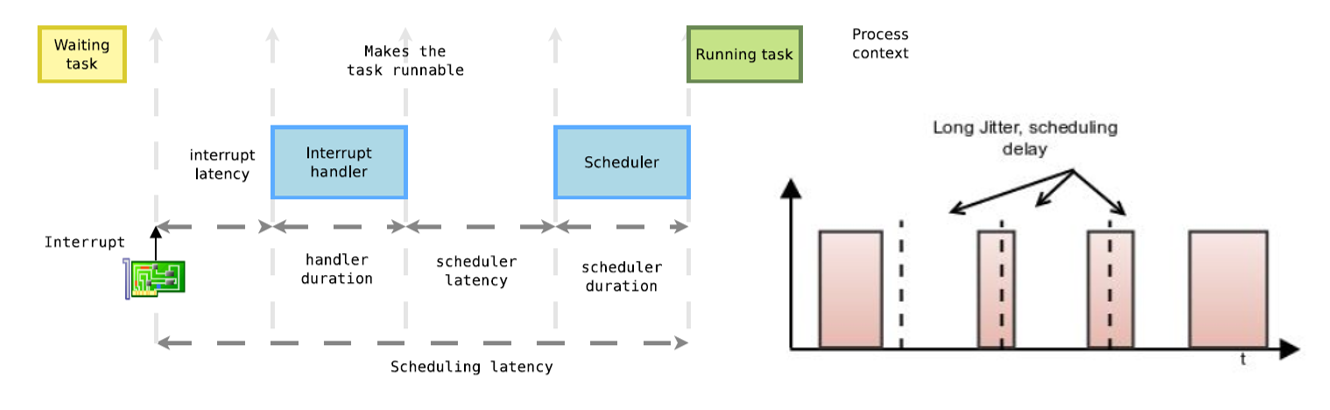
Left un-tuned, you’ll see: spikes in latency, dropped frames, unpredictable behaviour. The root causes often: incorrect priority, wrong scheduling class, threads floating between cores, sub-optimal producer/consumer design.
Approach
We adopted three key strategies:
- Producer-Consumer Pattern
We isolate capture threads (producers) that push data into lock-free or low-latency queues. Consumer threads pull and process. This decouples acquisition from processing and allows buffering of bursts. - CPU Affinity & Core Isolation
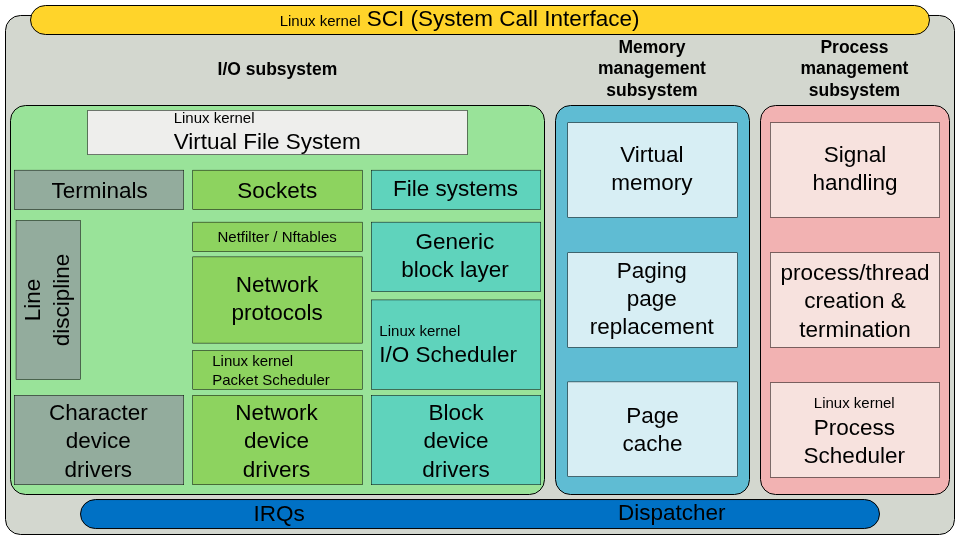
We pin critical threads to specific cores, and optionally isolate cores from general scheduling. At the OS level:sched_setaffinity()orpthread_setaffinity_np()to tie threads to cores. :} We also configure Linux to isolate cores (isolcpus,cgroup cpuset) for real-time threads. - Priority Scheduling / Real-Time Policies
We assign threads real-time scheduling classes (e.g.,SCHED_FIFO) or use newer policies likeSCHED_DEADLINEwhen appropriate. This ensures the real-time threads pre-empt best-effort threads and meet latency budgets. :By combining these, we ensure that data-capture threads always run with high priority and minimal interference, consumer threads process with predictable latency, and logging/UI threads run in the background.
Process
Producer-Consumer Implementation
- Producer threads: one per data source (e.g., camera, IMU). Set
sched_setscheduler()toSCHED_FIFOwith priority ~80 (on Linux RT). - Use a lock-free ring-buffer (or bounded queue) for each producer. On buffer full: increment a drop-counter, record a warning — don’t block the producer.
- Consumer threads: set affinity to same core as producer or dedicated core, priority somewhat lower (e.g., 70) but still high. They
wait()on the queue (or poll with minimal delay). - Non-real-time threads (e.g., logging) run as
SCHED_OTHER, low priority, on separate cores.
CPU Affinity & Core Isolation
- At boot: enable
isolcpus=2-3(for example) in kernel parameters to isolate cores 2 and 3 for real-time use.
Use taskset -p or pthread_setaffinity_np() to bind threads:
cpu_set_t cpuset;
CPU_ZERO(&cpuset);
CPU_SET(2, &cpuset);  // pin to core 2
pthread_setaffinity_np(pthread_self(), sizeof(cpu_set_t), &cpuset);- For interrupts or kernel threads, check
/proc/irq/*/smp_affinityand tune so that interrupt handling doesn’t interfere with real-time cores.
Priority Scheduling
- For Linux threads:
struct sched_param param;param.sched_priority = 80;
pthread_setschedparam(thread, SCHED_FIFO, ¶m);- Ensure the user has permissions (
/etc/security/limits.d/…for RT priorities)
- Ensure the user has permissions (
- Consider
SCHED_DEADLINEif you need strict periodic real-time tasks with specified budget & deadline. - Use
pthread_setaffinity_np()in conjunction to bind the thread to a core and avoid scheduler-induced migration.
Monitoring & Tuning
- Use
htop,top -H, orps -mto check where threads run and their cores. - Measure latency: capture timestamp at queue push and process start; compute jitter and worst-case.
- Track queue drop counters, buffer fullness, and modify queue depths or thread priorities accordingly.
Takeaways
- Use producer-consumer patterns to decouple acquisition from processing; never block a high-priority capture thread.
- Bind threads to cores (CPU affinity) and isolate cores to reduce jitter caused by scheduler interference and cache migrations.
- Use real-time scheduling policies (
SCHED_FIFO,SCHED_DEADLINE) to ensure threads meet deadlines and pre-empt non-real-time work. - Monitor queue depths, drop counters, latency/jitter metrics — tuning is iterative, not “set once and forget”.
- Embedded Linux can meet real-time needs if properly configured: you don’t always need a separate RTOS for moderate latency budgets.
- At Hoomanely, these techniques bolster our vision: delivering high-performance embedded systems that handle demanding sensor and data-processing workloads while remaining flexible, maintainable, and cost-effective.
Author’s Note
At Hoomanely we strive to combine advanced firmware and embedded software expertise with real-world engineering demands. By bringing robust threading and scheduling strategies into our Linux-based sensor and data-processing products, we ensure latency, throughput and reliability all meet our customers’ high-bar expectations.
Thanks for reading — if you’re implementing a real-time data-processing pipeline on Embedded Linux, I hope these techniques help you build a more predictable, performant system.



