
Quick-Connect Reliability: Modular Harnesses in the vBus Ecosystem
Introduction: When Every Minute Matters
At Hoomanely, we design products for the real world—environments where systems occasionally need service, where components eventually reach end-of-life, and where rapid repair directly impacts operational uptime. Our vBus modular architecture extends beyond PCB-level modularity into a complete system philosophy that includes intelligent wire harness design. The result: field-replaceable interconnects that enable 5-minute module swaps instead of hour-long teardown procedures.
Modular harnesses aren't just cables with connectors—they're carefully engineered assemblies that segment electrical interconnects into replaceable units, standardize connection interfaces, and embed identification directly into the physical hardware. This approach transforms service events from complex, error-prone procedures into straightforward plug-and-play operations that technicians execute confidently without extensive training.
Today, I want to share how modular harness design has become integral to vBus product serviceability and rapid field repair.
The Traditional Harness Problem
Monolithic Interconnect Complexity
Traditional product wiring creates service challenges:
Point-to-Point Wiring: Every connection custom-routed:
- Unique wire lengths for each product configuration
- Complex routing through enclosure spaces
- Time-consuming to trace and document
- Difficult to reproduce exactly during repair
Integrated Harnesses: Single harness connects all subsystems:
- Replace one wire? Replace entire harness
- Diagnose connection issue? Test every wire
- Module swap requires complete harness disconnect/reconnect
- High risk of misconnection during reassembly
Service Downtime: These factors compound:
- Diagnosis: 20-40 minutes identifying failed connection
- Disassembly: 30-60 minutes removing covers, routing harness out
- Replacement: 15-30 minutes for installing and routing new harness
- Testing: 10-20 minutes, verifying all connections
- Total: 75-150 minutes per service event
The vBus Modular Harness Philosophy
Segmentation by Function
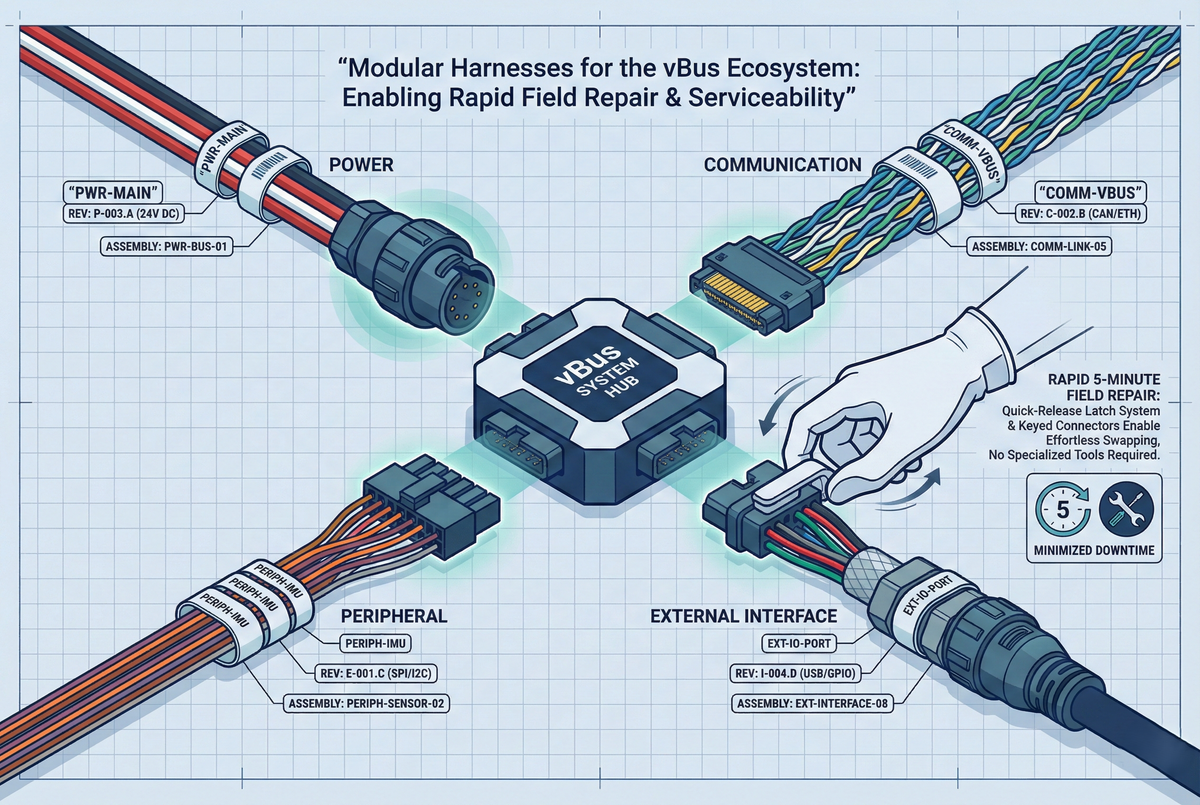
We divide harness assemblies into functional segments aligned with vBus module boundaries:
Power Harness: Connects Power SoM to system power input:
- Dedicated power connector at the module
- Single harness from the power input to the module
- Independent of signal routing
- Quick-disconnect at both ends
Communication Harness: Links modules within vBus ecosystem:
- vBus connector at each module end
- Standardized pinout per vBus specification
- Color-coded by function (data vs. power)
- Keyed connectors prevent misconnection
Peripheral Harness: Connects Peripheral SoMs to external sensors/interfaces:
- Module-specific harness matched to peripheral function
- Sensor connector on one end, vBus connector on other
- Labeled with peripheral type and port assignment
External Interface Harness: User-facing connections:
- USB, Ethernet, power jack, button/LED interfaces
- Front panel connections to internal modules
- Standardized connectors enable field replacement
Benefit: Isolate service to affected subsystem—power issue? Replace power harness only. Communication problem? Swap communication harness. No need to disturb unaffected interconnects.
Standardized Connector Interfaces
vBus Connector Standard: Each harness terminates in vBus-compliant connector:
- 16-pin, 40-pin, 50-pin, or 100-pin depending on module type
- Pin-compatible across product variants
- Keyed to prevent reverse insertion
- Locking mechanism ensures secure connection
External Connectors: Industry-standard interfaces where possible:
- USB Type-A, Type-C (USB interconnects)
- RJ45 (Ethernet)
- Barrel jack or terminal block (power input)
- JST-XH or Molex PicoBlade (sensor interfaces)
Custom Connectors: Only when necessary:
- High-current power (>5A): Anderson Powerpole or similar
- RF connections: SMA or U.FL
- Specialized industrial protocols: M12 circular connectors
Keying and Polarity Protection: Every connector physically prevents incorrect insertion:
- Asymmetric shell design
- Pin-1 indicators
- Polarized latches
- Color coding for additional visual confirmation
Cable Identification System
Label Strategy: Every harness clearly labeled at both ends:
Information Included:
- Harness type:
PWR-MAIN,COMM-VBUS,PERIPH-IMU - Product/module compatibility:
VBUS-CPU-STM32H7 - Connector type:
100-PIN VBUS - Revision:
REV A(harness design version) - Part number:
H-VBUS-CPU-001
Label Format:
┌─────────────────────────┐
│ HOOMANELY │
│ COMM-VBUS │ ← Function
│ 50-PIN VBUS │ ← Connector
│ P/N: H-COMM-001-A │ ← Part number + revision
└─────────────────────────┘
Label Material: Heat-shrink printed labels or cable-wrap tags:
- Durable (resistant to abrasion, chemicals, temperature)
- Permanent (doesn't fade or peel)
- Positioned at connector end (visible when installed)
Wire Color Coding: Consistent color scheme:
- Red: Positive power (5V, 12V)
- Black: Ground return
- Yellow: 3.3V power
- Blue: Communication data lines
- Green: I2C/low-speed control
- White/Gray: General-purpose signals
Rapid Repair Workflow
Diagnosis Phase
Modular harnesses simplify troubleshooting:
Segment Isolation: Systematically test each harness:
- Power harness: Measure voltage at module connector—present? Harness good. Absent? Replace power harness.
- Communication harness: Check data activity LED—active? Harness good. No activity? Swap communication harness.
- Peripheral harness: Test sensor output—valid? Harness good. Invalid? Replace peripheral harness.
Connector Verification: Visual and mechanical inspection:
- Examine connector pins (bent pins visible)
- Check locking mechanism (broken latch obvious)
- Inspect wire strain relief (broken wires at crimp points)
Swap Testing: Fastest diagnostic method:
- Keep spare harness set on hand
- Swap suspected harness with known-good
- Retest system
- Resolution confirms: harness was issue
Diagnosis Time: 5-10 minutes (vs. 20-40 minutes tracing integrated harness)
Replacement Procedure
Tool Requirements: Minimal—often none:
- Most connectors: Hand-detachable (no tools)
- Some connectors: Small flathead screwdriver (release latch)
- No soldering, no crimping, no specialized tools
Step-by-Step Replacement:
1. Power Down System (safety first)
2. Disconnect Failed Harness:
- Identify the harness by the label
- Release locking mechanism (press tab, rotate collar, etc.)
- Gently withdraw the connector (don't force—verify latch released)
- Note routing path (photograph if complex)
3. Route New Harness:
- Follow the same path as the removed harness
- Maintain bend radius (typically >10× cable diameter)
- Avoid sharp edges (wire insulation damage)
- Secure with cable ties at support points if needed
4. Connect New Harness:
- Verify connector orientation (key alignment)
- Insert firmly until latch clicks (audible/tactile feedback)
- Tug gently to confirm locked (connector shouldn't pull free)
5. Power On and Test:
- Apply power
- Verify system boot
- Test affected function (sensor reading, communication, etc.)
- Validate all indicators are normal
Replacement Time: 3-5 minutes per harness (vs. 30-60 minutes integrated harness)
Documentation and Training
Service Manual Integration: Harness replacement procedures documented:
- Exploded-view diagrams showing harness routing
- Connector location photos with labels visible
- Step-by-step replacement instructions
- Troubleshooting decision trees
Video Guides: Short tutorial videos demonstrate:
- Connector release techniques (different connector types)
- Proper harness routing paths
- Verification testing procedures
Training Requirements: Minimal—technician training reduced:
- Traditional: 4-8 hours training per product (learn complex harness routing)
- Modular: 30-60 minutes general training (connector types, labelling system)
- 80-90% reduction in product-specific training time
Design for Manufacturability
Harness Assembly Process
Component Sourcing: Standard connectors from major suppliers:
- Molex, JST, TE Connectivity, Amphenol
- Available globally
- Short lead times
- Competitive pricing
Cable Selection: Application-appropriate wire:
- AWG size based on current (power: 18-22 AWG, signal: 24-28 AWG)
- Insulation rated for environment (temperature, flexibility)
- Multi-conductor vs. discrete wires (depends on complexity)
- Shielding where needed (CAN bus, high-speed data)
Assembly Method:
- Crimp termination: Most connections (reliable, production-friendly)
- IDC (Insulation Displacement): Ribbon cables, high-density connectors
- Soldering: Only for speciality connections (rarely needed)
Quality Control: Every harness tested:
- Continuity check (all connections present)
- Insulation resistance (no shorts between wires)
- Pull test (crimp integrity)
- Hi-pot test (dielectric strength for high-voltage harnesses)
Bill of Materials Management
Harness as Sub-Assembly: Each harness has a dedicated BOM:
- Independent part number
- Components listed (connectors, wire, labels, strain reliefs)
- Assembly instructions referenced
- Test requirements specified
Configuration Management: Product variants use different harness combinations:
- Base configuration: Power + minimal communication harnesses
- Extended configuration: Additional peripheral harnesses
- BOM system tracks which harnesses are required per product SKU
Spare Parts Strategy: Harnesses stocked independently:
- Common harnesses (power, main communication): Higher stock levels
- Speciality harnesses (product-specific peripherals): Lower stock
- Enables rapid field service (ship replacement harness overnight)
Reliability and Testing
Connector Cycle Life
Durability Specification: Connectors rated for repeated mating:
- Industrial connectors: 500-1000 insertion cycles typical
- High-reliability connectors: 5000+ cycles (military/aerospace grade)
- Selection based on expected service frequency
Field Service Expectation: Typical product life:
- Consumer products: 5-10 years, 3-5 service events expected
- Industrial products: 10-20 years, 10-20 service events expected
- Connector life far exceeds expected usage
Validation Testing: Sample harnesses undergo accelerated life testing:
- 50-100 connect/disconnect cycles
- Electrical continuity tested after each cycle
- Connector wear inspected visually
- Ensures design meets reliability targets before production
Environmental Resistance
Strain Relief: Prevents wire fatigue at the connector interface:
- Overmolded strain relief (ideal—integral to connector)
- Heat-shrink tubing (secondary method)
- Cable ties securing to the structure near the connector
Vibration Resistance: Locking connectors prevent disconnection:
- Positive latch mechanisms
- Secondary retention (wire ties, clamps)
- Validated through vibration testing (if applicable to product environment)
Moisture Protection: Appropriate for deployment environment:
- Indoor products: Standard connectors are adequate
- Splash-resistant: IP54-rated connectors (sealed interfaces)
- Waterproof: IP67/IP68 connectors (submersion protection)
Cost-Benefit Analysis
Initial Investment
Development Costs: Modular harness approach requires upfront engineering:
- Connector selection and validation
- Harness routing design
- Labelling system development
- Documentation creation
Manufacturing Costs: Slightly higher per-unit cost:
- Connectors are more expensive than direct solder connections
- Assembly labour (crimping, testing)
- Labeling materials
Typical Cost Delta: +$5-15 per product (depends on harness count and connector types)
Real-World Deployment Success
Field Service Metrics
Time to Resolution: Average repair duration:
- Traditional integrated harness: 90-120 minutes
- Modular harness: 15-25 minutes
- 75-85% improvement
First-Time Fix Rate: Percentage of repairs successful on first attempt:
- Traditional: 75-85% (misconnections, routing errors)
- Modular: 95-98% (keyed connectors, clear labelling)
- Improved success rate reduces repeat service calls
Technician Feedback: Field service personnel report:
- Higher confidence (clear labelling eliminates guesswork)
- Reduced frustration (no tracing through complex harnesses)
- Faster certification (simpler systems to learn)
Customer Impact
Minimised Downtime: Critical for commercial deployments:
- Industrial monitoring: Minutes of downtime vs. hours
- Commercial installations: Service during off-hours becomes feasible
- Laboratory equipment: Rapid restoration of test capability
Self-Service Capability: Some customers perform own repairs:
- Clear labelling enables non-technical users to identify harnesses
- Simple connectors don't require specialised tools
- Video guides provide confidence
- Reduces dependency on vendor service personnel
Conclusion: Modularity Beyond the PCB
Modular harness design exemplifies our vBus philosophy extended into every aspect of product architecture. By segmenting interconnects into functional, field-replaceable assemblies with standardised interfaces and clear identification, we've transformed service from a complex procedure into a straightforward operation.
The benefits cascade through the entire product lifecycle: faster development (reuse harness designs), simpler manufacturing (modular assembly), reduced service costs (rapid repair), and improved customer satisfaction (minimal downtime). The modest upfront cost of connectors and structured harness design returns multiples through operational efficiency.
As our vBus ecosystem scales and products deploy globally, modular harnesses ensure that serviceability remains excellent regardless of location or technician experience level. When a system needs repair, the difference between 15 minutes and 2 hours is the difference between minor inconvenience and significant operational disruption.
This is systems thinking applied holistically—modularity isn't just a PCB design pattern, it's a product philosophy that encompasses every interconnect, every interface, every service touchpoint. When done right, it transforms reliability from "how rarely things break" to "how quickly they're fixed when they do."



