
Real‑Time Telemetry Charts
Real‑time telemetry is the heartbeat of connected products. When the stream looks smooth, teams ship with confidence; when it stutters, trust erodes fast. The silent killers aren’t exotic algorithms—they’re everyday mistakes: rendering on every message, letting arrays grow forever, and forgetting to tear down listeners during page changes. In device ecosystems like smart feeders and wearable trackers, traffic bursts, reconnect storms, and brief offline windows are normal. Your charts must stay predictable—flat memory profile, steady frames, graceful behavior when history floods in after a reconnect. This post condenses practical patterns that hold up for hours-long sessions: a single MQTT‑over‑WebSocket client per tab, reference‑counted subscriptions, bounded ring buffers, time‑based batching, stable chart instances, and pragmatic back pressure. The result is a dashboard that feels calm—even when the data isn’t. No proprietary specifics; just principles and minimal snippets you can apply to any modern web stack.
Problem → Why real‑time charts leak
- Unbounded series: appending forever kills memory, then FPS.
- Dangling listeners: remounts add MQTT callbacks you never remove.
- Object churn: recreating chart instances/datasets per frame forces GC.
- Per‑message paints: bursts = hundreds of layouts per second.
- Wildcard sprawl: too many topics, no accounting, surprise handlers.
- Reconnect floods: devices dump buffered history; UI tries to draw all of it.
Symptoms: creeping heap, jank after ~10–30 minutes, “works locally” but fails in demos.
Approach → Guardrails that always pay off
- One connection per tab anchored to the page/app shell.
- Reference‑counted subscriptions (subscribe once; unsubscribe at zero).
- Bounded ring buffers (e.g., last 60–120 seconds of data).
- Coalesced updates (batch messages; paint at a steady cadence).
- Stable chart instance (mutate data arrays; don’t recreate objects).
- Backpressure/decimation when backlog spikes on reconnect.
- Single cleanup path that clears sockets, listeners, intervals, and rAF.
Process → Build it
1) Single shared MQTT client
// subscribe(topic, cb) -> () => unsubscribe()
const refs = new Map<string, Set<Function>>();
function subscribe(topic, cb){
  if(!refs.has(topic)){ refs.set(topic,new Set()); client.subscribe(topic); }
  refs.get(topic)!.add(cb);
  return ()=>{ const s=refs.get(topic)!; s.delete(cb); if(!s.size){ refs.delete(topic); client.unsubscribe(topic); } };
}
Why: prevents duplicate sockets and orphaned handlers.
2) Bounded series with a ring buffer
function rbuf(N){ const a=new Array(N); let h=0,len=0; return{
  push:v=>{ a[(h+len)%N]=v; len<N?len++:h=(h+1)%N },
  snapshot:()=>Array.from({length:len},(_,i)=>a[(h+i)%N])
};}
Why: memory is capped by design; O(1) writes; predictable.
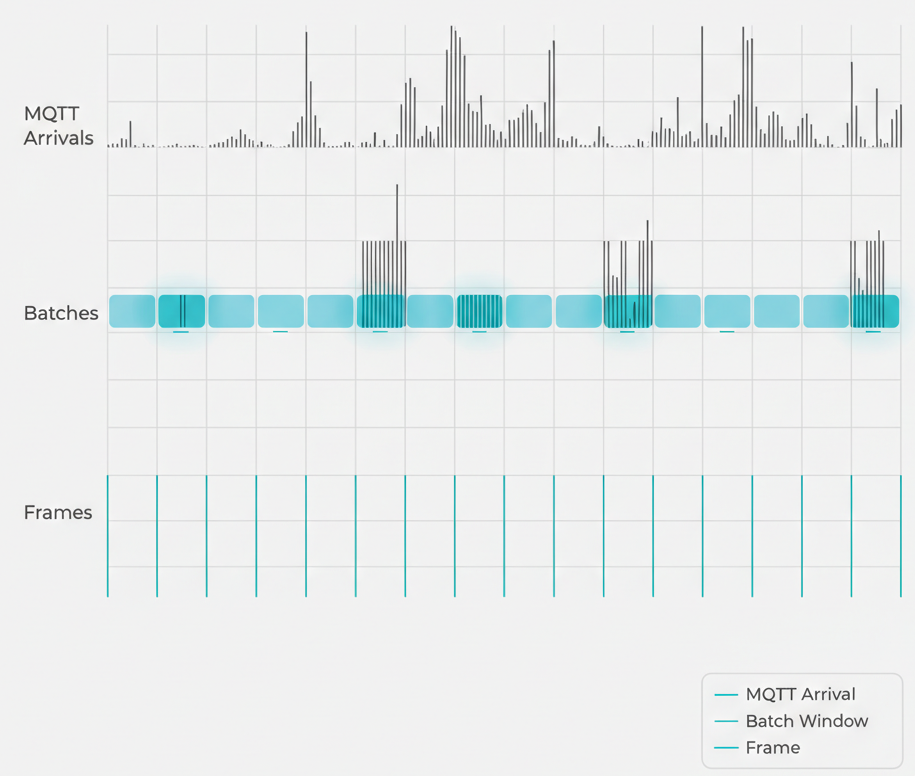
3) Batch messages; paint on time, not on event
const buf=rbuf(3600); let batch=[];
onMqtt(p=>batch.push(p));
setInterval(()=>{ const L=1000; (batch.length>L?batch.slice(-L):batch).forEach(buf.push); batch.length=0; },50);
(function draw(){ chart.setData(buf.snapshot()); chart.update(); requestAnimationFrame(draw); })();
Why: smooth frame pacing; protects the main thread during bursts.
4) Stable chart instance
- Create once per canvas; reuse datasets and arrays.
- Mutate data in place; avoid re‑allocating objects per frame.
- Disable heavy animations for live traces.
- Prefer typed arrays if supported.
5) Backpressure & decimation
- Drop policy: clamp batch to last K points (e.g., K=1000 per tick).
- Per‑pixel decimation: ≤ chart width points per series.
- Adaptive throttle: temporarily increase batch interval (e.g., 50 → 150 ms) until backlog clears.
6) Visibility & power
Pause batching and rAF when the tab is hidden; resume on focus. Keep buffering lightweight if you must retain last‑known points.
7) One teardown to rule them all
On page unmount: unsubscribe all topics, clear intervals, cancel rAF, destroy chart, close socket when app exits. Verify via heap snapshots: no live listeners/timers remain.
Results → What “good” looks like
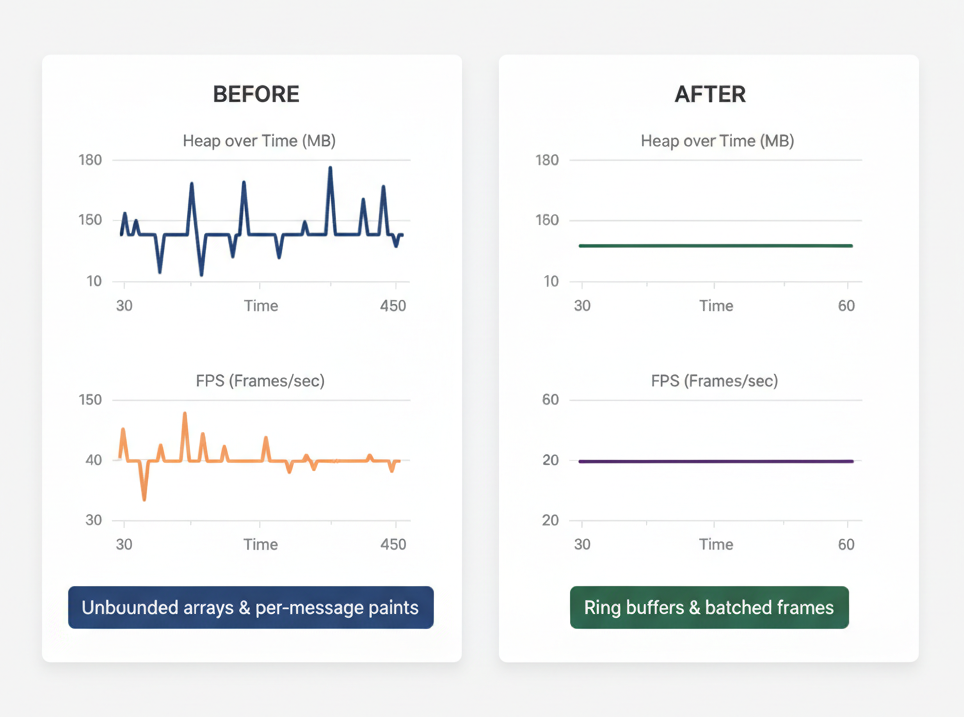
- Heap stays flat (±5%) during multi‑hour runs.
- FPS ~55–60 on modest laptops under 50–100 Hz streams.
- Reconnect storms don’t stall the page; backlog drains via batch/decimation.
- Zero residue after navigation: listener counts, intervals, rAFs return to baseline.
Common issues → Quick fixes
- Chart slows over time → You’re replacing dataset objects; mutate arrays in place.
- Memory creep → Arrays aren’t capped; convert to ring buffers.
- Duplicate points after reconnect → Track last timestamp per topic; drop ≤ lastSeen.
- High CPU when tab hidden → Pause rAF and batching on
document.hidden. - Unsubscribe no‑ops → Implement reference counts; unsubscribe when set size hits zero.
- “Works locally, fails live” → Bursts exceed per‑frame capacity; enable decimation or drop policy.
Performance budgets (simple rules)
- Series window: 60–120 s live view is enough for “now”.
- Max points per frame: ≤ chart width in pixels (e.g., 1200).
- Batch interval: 33–67 ms (30–60 Hz) is perceptually smooth.
- Reconnect backlog: cap (e.g., 50k/series) + decimation.
How it works
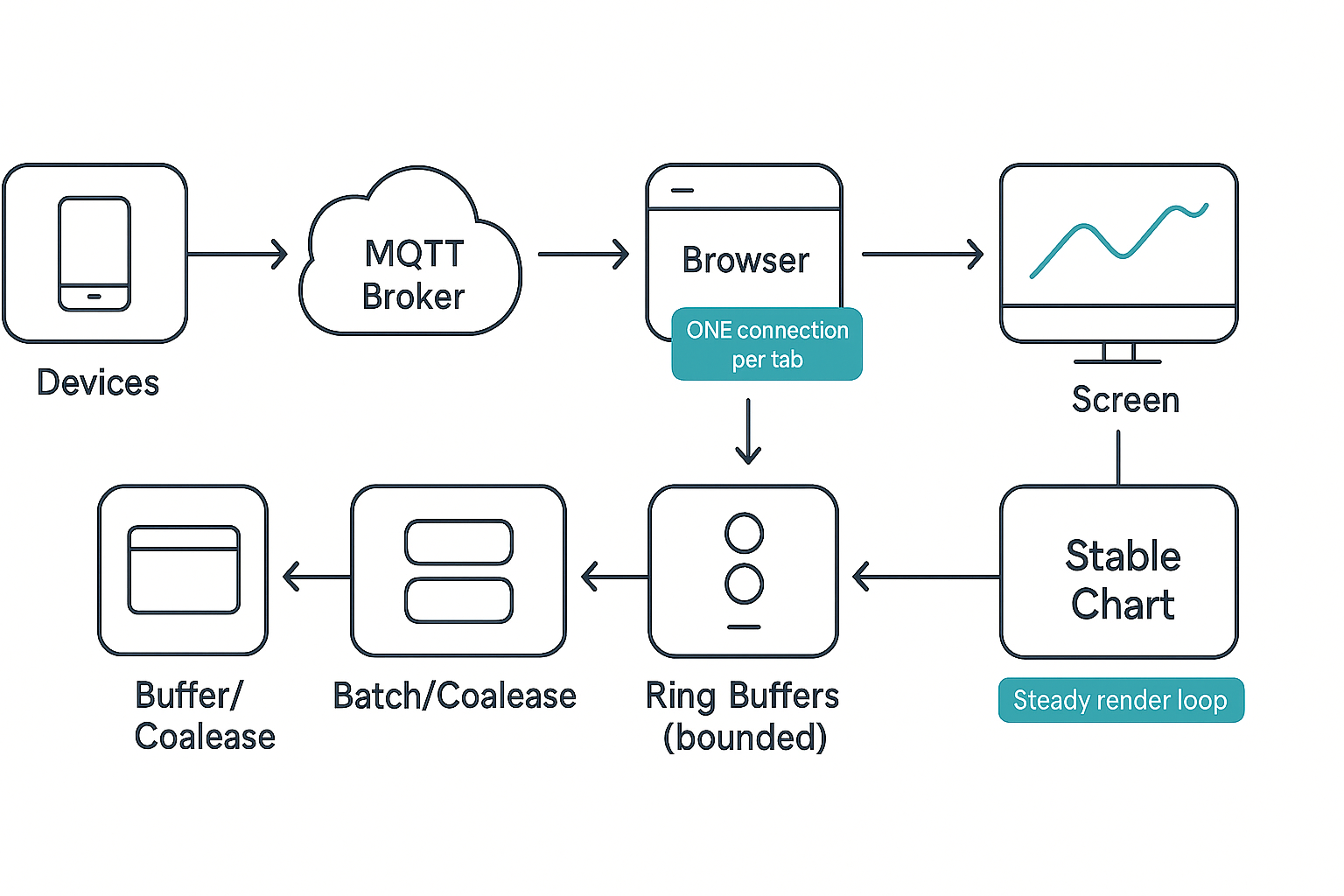
Data flow at a glance: Devices publish light telemetry messages → MQTT broker → browser consumes via a single WebSocket client → messages are staged into a short‑lived batch → batches drain into bounded ring buffers → the chart paints on a time‑driven loop (requestAnimationFrame), not on each message.
Why it holds up under load:
- Temporal decoupling: message rate ≠ paint rate; spikes don’t force repaints.
- Spatial bounds: ring buffers set an upper limit on retained points, so memory cannot drift.
- Lifecycle hygiene: one client, reference‑counted topics, one teardown = zero orphaned listeners.
What changes during reconnect storms:
- Backlog arrives quickly. You decimate or drop to protect the UI.
- Batch intervals may widen briefly (e.g., 50 → 100–150 ms) until queues calm down.
- The chart’s visual window remains consistent (e.g., last 90 s), reinforcing user trust.
Client architecture blueprint
Use these roles to keep the codebase understandable and testable:
- Transport (MQTT WS Client): owns connection, exponential backoff, and topic subscription ref‑counts. Exposes a typed, event‑like API (
onMessage(topic, cb)), and a singledispose()for teardown. - Stream Coordinator: translates raw messages → normalized
{t,y,meta}points, enforces payload sanity (timestamps monotonic, value ranges), and routes to series by key. - Series Store (Ring Buffers): one per visible line/metric; enforces capacity and offers
snapshot()for draw. - Scheduler: runs two clocks—batch clock (every 33–67 ms) to drain messages to buffers, and frame clock (rAF) to paint. Suspends both when tab is hidden.
- Chart Adapter: thin layer to your charting library; never re‑creates the chart instance; mutates arrays in place; toggles decimation if available.
Composition rule: these roles can live in one module for small apps, but keeping the seams clear prevents subtle leaks when the app grows.
Server‑side guardrails (MQTT/Broker)
Even a perfect client suffers without healthy broker and topic design.
- Topic design: prefer stable, minimally wild topics. Example pattern:
devices/{id}/telemetry/{signal}. Avoid over‑broad wildcards in the UI; let the user pick explicit signals. - Retained messages: use sparingly—only for a small “last known” snapshot so fresh charts render immediately without replaying history.
- History fetch: if you support backfill, segment by time and cap the returned points so the browser can decimate locally.
- QoS: choose a level that fits your network and duplication tolerance. For live charts, QoS 0/1 often suffices; don’t let retransmits flood the UI.
- Access control: lock topics with ACLs; never expose raw wildcards to the browser.
Payload design for efficient charts
Aim for compact, parseable, and monotonic:
- Fields:
t(epoch ms),y(number), optionalq(quality/flags),seq(monotonic counter),tag(short string). - Avoid: bulky JSON per point when sending high‑rate streams. If you can, batch points server‑side into small arrays with a shared base timestamp.
- Clock drift: if device clocks vary, normalize
ton the client (relative time within window is what matters for the chart).
Multi‑series & multi‑device views
- Only render what’s visible. If a series is off‑screen or collapsed, suspend its frame updates but keep a tiny buffer to preserve last‑known value.
- Point budgets per chart: cap total points (sum across series) to ≈ the chart width in pixels (e.g., 1200). If you draw 4 series, budget ~300 points each.
- Legend intelligence: convert hidden series into numerical badges (last value / delta) so accessibility and at‑a‑glance use remain strong without cost to FPS.
Downsampling strategies that work
Choose one; keep it predictable:
- Per‑pixel cap (fast & simple): at most one point per pixel column (min/max sampling over time buckets). Preserves spikes.
- Largest‑Triangle‑Three‑Buckets (LTTB): better shape preservation for historical windows; use only when you’re rendering past data, not live 60 Hz views.
- Quantile bins: for very bursty signals, keep min/median/max per bucket; draw as thin whiskers with a median trace.
Guideline: for a live 60–120 s window, per‑pixel cap is typically enough and cheapest.
Instrumentation & observability
What to measure continuously:
- Heap estimate (Chrome Task Manager or Performance panel)—plot alongside FPS.
- Frame time percentiles: P50/P95/P99 (keep P95 < 16.7 ms for 60 Hz feel).
- Batch size distribution: average, P95 during reconnects; an early indicator of storm handling.
- Dropped/decimated points: expose counters; alert if ratios exceed a threshold (e.g., >30% for 10 s).
- Listener counts: periodically assert zero residual listeners for disposed pages.
UX tip: show a small “Live: Good / Catching Up / Degraded” pill derived from these metrics; it sets the right expectation for users during storms.
Failure modes & recovery patterns
- Frozen chart after tab sleep: on wake, discard stale batches and resume from live time; don’t replay stale windows if your promise is “real‑time”.
- Duplicate data after reconnect: track
lastSeen[t]orseqper topic; drop ≤ lastSeen. - Broker throttling: surface a gentle UI hint (“Receiving at reduced rate”); keep interaction snappy.
- Clock jumps (device resets): detect backward time leaps; start a new segment with a subtle visual break.
Security, privacy, and resilience
- Least privilege: browser credentials scoped to read‑only, narrow topic sets.
- PII minimization: avoid embeddings of user identifiers in topic names; use opaque IDs.
- Transport hardening: secure WebSockets/TLS; short‑lived tokens; rotate keys.
- Graceful denial: if auth fails, render last‑known value & diagnostic—not a blank page.
- Error budgets: define acceptable data delay (e.g., P95 < 200 ms) and design backpressure to respect it.
Accessibility & UX polish
- Color + form: never rely on color alone—use dashed vs solid lines; distinct markers for key series.
- Keyboard nav: legend toggles focusable; tooltips accessible.
- Reduce motion: respect “prefers‑reduced‑motion”; drop rAF to 15–30 Hz and simplify animations.
- Assistive summary: show last value, 10‑s delta, and status pill for screen readers.
Mini case study
We integrated these patterns into a device dashboard with multiple concurrent signals (weight, temperature, motion). Initial issues—memory creep after ~25 minutes and frame drops during reconnect storms—were traced to per‑message paints and unbounded arrays. Switching to a single WS client, ring buffers (90‑s window), 50‑ms batch ticks, and per‑pixel decimation turned the experience around: flat heap, steady 57–60 FPS, and predictable behavior during history dumps. The most impactful fix? Mutating dataset arrays in place—it removed hidden object churn that GC struggled to keep up with.
In Hoomanely’s mission is to help pet families keep their companions healthier and happier through thoughtful technology. Leak‑free, real‑time telemetry is the bridge from raw sensor signals to humane, trustworthy insights. Calm, reliable charts build confidence—so alerts are believed, trends are acted on, and care improves.
Takeaways
- Lifecycle first: one connection per tab, one teardown path.
- Bounded by design: ring buffers + per‑pixel caps keep memory flat.
- Paint on a clock: batch irregular arrivals; render at steady cadence.
- Reuse, don’t rebuild: mutate datasets; avoid object churn.
- Plan for storms: decimate/drop when reconnects flood the pipe.
- Measure it: heap + FPS + dropped ratios; ship with budgets and tests.
These patterns are intentionally library‑agnostic. The discipline—temporal decoupling, spatial bounds, clean lifecycle—is what makes real‑time dashboards feel effortless for hours.



