
Secure File Uploads in Next.js

File uploads are a common attack vector in web applications. A single misconfigured endpoint can expose your infrastructure to malware, shell scripts, or malicious payloads disguised as harmless documents. In Next.js applications, handling file uploads securely requires more than basic form validation—it demands a layered approach that includes proper parsing, content scanning, and storage policies.
This post explores a practical strategy for building secure file upload flows in Next.js using Formidable for parsing, antivirus scanning for content validation, and S3 bucket policies for controlled storage. Whether you're building a document management system or handling user-submitted content, these principles help minimise risk without sacrificing functionality.
The Attack Surface
File uploads introduce multiple vulnerabilities. An attacker might upload an executable disguised as a PDF, embed malicious scripts in image metadata, or exploit filename parsing to perform directory traversal. Beyond direct code execution, there's the risk of serving malicious content to other users, consuming storage resources, or bypassing application logic through crafted MIME types.
Traditional approaches often rely solely on client-side validation or basic extension checks. These fail immediately when an attacker bypasses the frontend or renames a malicious file. A robust solution requires server-side validation, content inspection, and restrictive storage permissions.
Architecture Overview
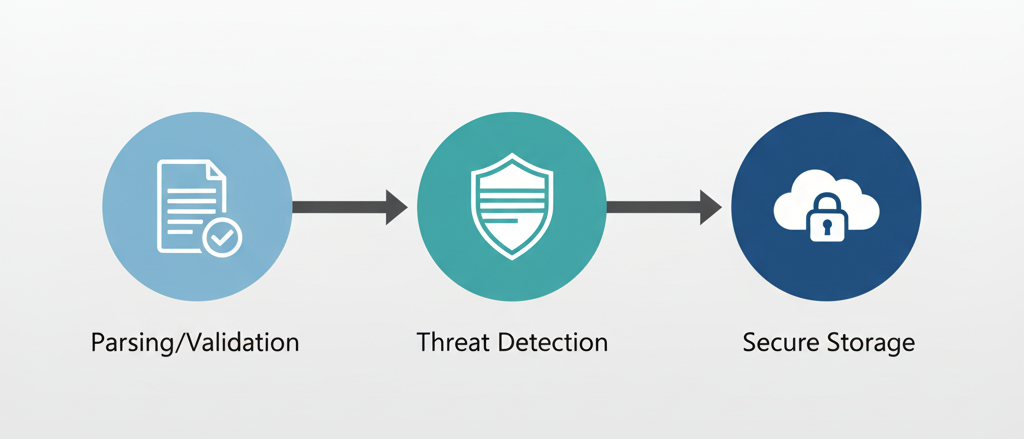
A secure upload flow separates concerns across three layers: parsing and validation, threat detection, and storage isolation. Each layer acts as a checkpoint, reducing the likelihood that malicious content reaches your production storage or users.
Formidable handles the multipart form parsing and provides control over file size, type, and storage location during upload. Finally, S3 bucket policies ensure that even if a malicious file reaches storage, it cannot be executed or accessed improperly.
This approach creates defence in depth—if one layer fails, others still provide protection.
Parsing with Formidable
Formidable is a Node.js library designed for handling multipart/form-data, which is how browsers send files. Unlike simpler parsing solutions, it provides granular control over the upload process, including file size limits, allowed MIME types, and temporary storage locations.
In Next.js API routes, you need to disable the default body parser since it cannot handle multipart data. Configure your route to use Formidable's parser instead:
export const config = {
  api: {
    bodyParser: false,
  },
};
When initialising Formidable, set maximum file sizes, restrict MIME types, and define where files should be temporarily stored. This prevents attackers from uploading arbitrarily large files or bypassing type restrictions.
Key configuration points:
- Set
maxFileSizeto prevent resource exhaustion attacks - Use
filterfunction to validate MIME types before accepting uploads - Store files in a temporary directory isolated from your application code
- Generate random filenames to prevent path traversal attacks
Formidable's filter callback runs during upload, allowing you to reject files immediately based on MIME type or filename patterns. This is more efficient than accepting all files and validating later, especially for large uploads.
Content Scanning Strategy
File extension and MIME type validation catch obvious threats, but sophisticated attacks embed malicious code within legitimate file formats. A JPEG might contain executable code in its EXIF metadata. A PDF could include embedded JavaScript. Content scanning addresses these threats by inspecting file contents.
ClamAV is an open-source antivirus engine commonly used in server environments. For Node.js applications, libraries like clamscan provide an interface to ClamAV's daemon or command-line scanner. After Formidable writes the uploaded file to temporary storage, scan it before proceeding.
Implementation considerations:
- Run ClamAV in daemon mode (
clamd) for faster scanning - Configure timeouts to prevent slow scans from blocking your API
- Delete files immediately if they fail scanning
- Log scan results for security monitoring and incident response
Scanning introduces latency, so consider the user experience. For small files, synchronous scanning works. For larger uploads, queue the scan as a background job and notify users when processing completes.
False positives happen occasionally. Establish a manual review process for files flagged incorrectly, but never automatically whitelist files without human verification.
S3 Bucket Policies
Even if a malicious file passes validation and scanning, bucket policies provide a final layer of defence by controlling how files can be accessed and executed.
Start by disabling public access at the bucket level. Use IAM roles and signed URLs for controlled access rather than making objects publicly readable. This ensures that even if an attacker discovers a file's key, they cannot directly access it without proper credentials.
Restrict content types in bucket policies:
{
  "Condition": {
    "StringNotEquals": {
      "s3:x-amz-server-side-encryption": "AES256"
    }
  }
}
Configure S3 to set appropriate Content-Type and Content-Disposition headers on upload. Force Content-Disposition: attachment for user-uploaded content to prevent browsers from rendering files inline, which could execute scripts.
Use separate buckets for user uploads and static assets. Apply different policies to each—user content should never have execute permissions or be served through your CDN without additional validation.
Additional hardening measures:
- Enable versioning to recover from ransomware or accidental deletions
- Configure lifecycle policies to automatically delete old temporary files
- Use S3 Object Lock for compliance or audit requirements
- Enable CloudTrail logging for all bucket operations
Consider using S3 presigned URLs with short expiration times. Generate URLs server-side only after verifying user permissions, and include metadata that ties each URL to a specific user session.
Integration Flow
The complete flow combines these layers into a cohesive process:
- Receive upload through Next.js API route with Formidable parsing
- Validate file type, size, and filename during parsing
- Scan temporary file with ClamAV or similar engine
- Upload to S3 with appropriate metadata and policies if scan passes
- Delete temporary file immediately after S3 upload succeeds
- Return secure access URL or file reference to client
Handle errors at each stage gracefully. If scanning fails due to a timeout, don't default to accepting the file—reject it and notify administrators. If S3 upload fails, clean up temporary storage and return a clear error to the user.
Monitoring and Iteration
Security is not a one-time implementation. Monitor your upload endpoints for anomalies:
- Unusual upload volumes or file sizes
- Repeated scan failures from specific users or IPs
- Spike in rejected file types
Maintain audit logs that include user identifiers, file hashes, scan results, and S3 keys. These logs are essential for incident response and compliance.
Regularly review and update your MIME type allowlist based on actual usage patterns. Remove allowed types that are rarely used but present higher risk, like office documents with macro capabilities.
Key Takeaways
Secure file uploads require multiple defensive layers. Client-side validation provides user experience improvements but cannot be trusted for security. Server-side parsing with libraries like Formidable gives you control over the upload process before files reach your infrastructure.
Content scanning catches threats that bypass type validation, but it introduces latency and operational complexity. Balance security needs with user experience through asynchronous processing where appropriate.
S3 bucket policies provide a final safeguard by restricting how files can be accessed even if they enter storage. Disable public access, enforce encryption, and use presigned URLs for controlled distribution.
No single technique eliminates all risk, but combining parsing validation, content scanning, and restrictive storage policies significantly reduces your attack surface. Start with strict defaults and relax restrictions only when business requirements demand it—and always with additional compensating controls.



