
The Engineer's Interface: Designing Silkscreen for Serviceability and Debug
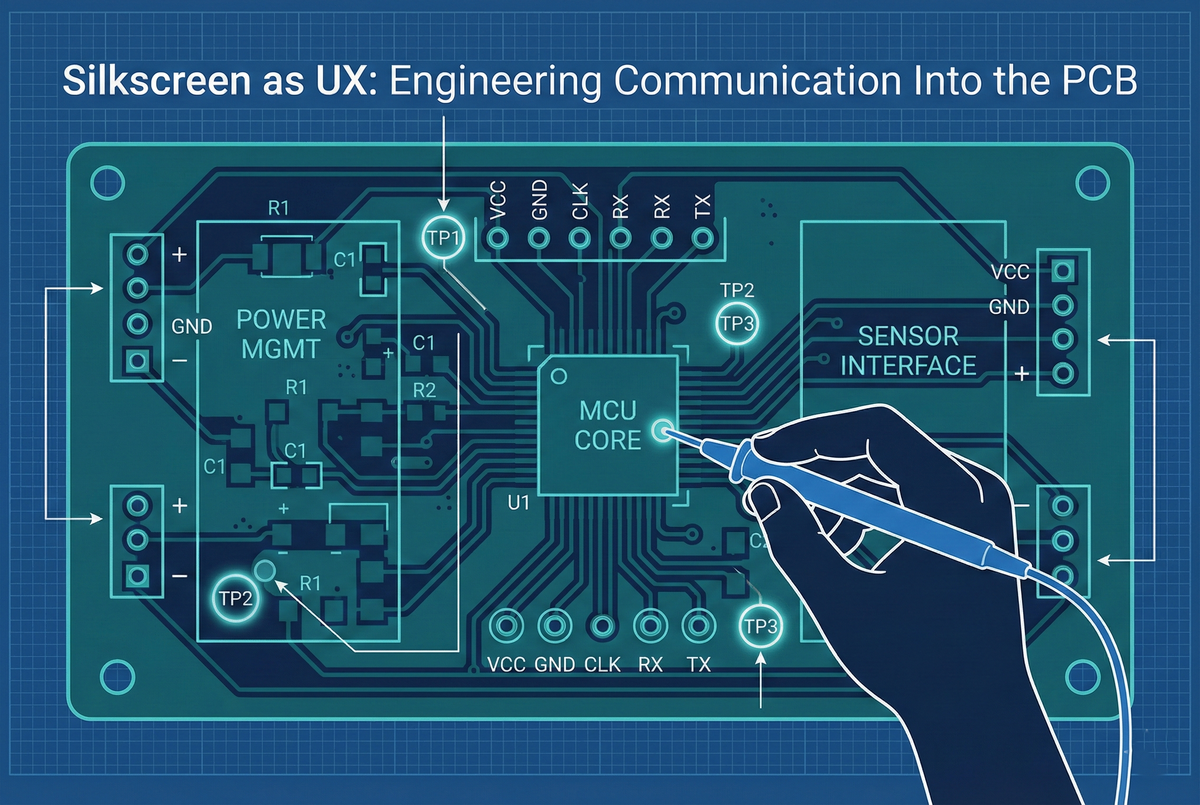
A Printed Circuit Board is more than a carrier for signals; it is a communication medium. At Hoomanely, we operate on a core truth: PCBs are read by humans just as often as they are powered by electricity. From the engineer debugging a prototype on the bench to the technician servicing a unit in the field, the board itself must speak.
For these interactions, the silkscreen is not merely an aesthetic layer—it is the device’s primary User Interface. It transforms a complex, inscrutable artifact into an intuitive, serviceable machine. We treat silkscreen design as a deliberate exercise in User Experience (UX), knowing that clarity accelerates troubleshooting and ambiguity breeds error. Today, we are sharing our philosophy on engineering clarity, serviceability, and usability into the very fabric of our PCBs.
Serviceability First: The Bench Experience
Test Point Identification
When debugging live circuits, engineers need instant access to critical signals. Hunting for the right test point wastes time and risks probing the wrong locations.
Clear Test Point Labelling:
- TP prefix + signal name:
TP_3V3,TP_I2C_SDA,TP_USB_DP - Functional grouping: Power test points clustered, communication interfaces grouped
- Size-appropriate text: 0.8-1.0mm height (readable without magnification)
Voltage Indication: Power rails marked with voltage and current capacity:
+5V (2A) → Immediately communicates rail voltage and capability
+3V3_CPU → Indicates this 3.3V rail powers CPU specifically
GND → Ground test points clearly marked
Signal Flow Indicators: For differential pairs or communication buses:
UART_TX → → Arrow indicates signal direction (helpful for protocol debugging)
CAN_H → High side of differential pair
CAN_L → Low side of differential pair
Component Reference Designators
Every component receives a unique reference designator printed on silkscreen adjacent to the component body:
Standard Prefixes:
U= ICs (U1, U2, U3...)C= Capacitors (C1, C2, C3...)R= Resistors (R1, R2, R3...)L= Inductors (L1, L2...)D= Diodes/LEDs (D1, D2...)J= Connectors (J1, J2...)Q= Transistors/MOSFETs (Q1, Q2...)
Placement Rules:
- Visible after assembly: Designator positioned outside component footprint (not hidden under component body)
- Consistent orientation: All designators read from the same two directions (0° or 90°—no upside-down text)
- High contrast: White text on dark soldermask (or black text on light soldermask)
- Proximity: Designator immediately adjacent to component (no ambiguity about which component it labels)
Value Indication for Passives: Critical passive components include values:
C1 → Basic designator
10uF → Capacitance value
C1 10uF → Combined designator + value (space permitting)
Particularly useful for:
- Timing components (crystals, timing capacitors/resistors)
- Power supply filtering (input/output caps)
- Termination resistors (I2C pull-ups, differential termination)
Voltage Rail Tracing
Engineers troubleshooting power issues benefit from clear rail identification:
Net Name Labels: Power planes labelled at multiple locations:
- Near connectors where power enters
- Adjacent to the voltage regulator outputs
- At high-current component power pins
- Near test points
Format: +5V_MAIN, +3V3_IO, +1V8_CORE
Benefit: The Engineer probing board can instantly identify which power domain they're measuring—critical when multiple voltage rails are present.
Polarity Indicators
Polarised components require clear orientation marking:
Electrolytic Capacitors:
+symbol at the positive terminal- Filled/shaded region at the negative terminal (visual redundancy)
Diodes/LEDs:
- Cathode bar clearly marked
KorClabel at cathode (eliminates ambiguity)Alabel at anode when space permits
Connectors:
- Pin 1 marked with a square pad (electrical layer) + a triangle or dot (silkscreen layer)
- Pin numbering sequence indicated (1, 2, 3... or 1, 5, 10... for large connectors)
- Polarity for power connectors:
+and−orVCC/GND
Functional Block Labelling
PCBs with distinct functional sections benefit from block labels:
Large Text Identifiers:
POWER SUPPLY (positioned in power section)
CPU + DDR MEMORY (near processor and memory)
SENSOR INTERFACES (where sensor circuits located)
COMMUNICATION (wireless/wired interface section)
Font size: 2-3mm height—readable from normal viewing distance without magnification.
Benefit: An Engineer unfamiliar with the board can quickly orient themselves—"I need to debug the power supply" → immediately identifies the correct board region.
Debug and Development Support
Pin Header Labels
Development boards and prototypes include pin headers for probing and expansion:
Per-Pin Labelling: Every pin is labelled with the signal name:
Header J1:
Pin 1: GND
Pin 2: 3V3
Pin 3: I2C_SDA
Pin 4: I2C_SCL
Pin 5: GPIO_15
...
Spacing consideration: Pin pitch (2.54mm typical) often limits label length—abbreviations used consistently:
TXnotUART_TRANSMITSDAnotI2C_DATA- Common abbreviations documented in the reference guide
Dual-Side Labelling: Pin labels on both sides of the header when space permits—readable regardless of board orientation.
Jumper and Switch Configuration
Configuration jumpers and DIP switches require clear documentation:
Jumper Purpose: Label indicates function:
JP1: BOOT MODE
[1-2] = Flash Boot
[2-3] = UART Boot
Switch Settings: DIP switch positions labelled:
SW1: CONFIG
ON = Debug Mode
OFF = Production Mode
Default Settings: Indicate factory default withan indicator dot or text (Default: OFF).
LED Function Indicators
Status LEDs are meaningless without labels:
LED Purpose:
D1: POWER → Power indicator (confirms supply present)
D2: STATUS → General status (firmware-controlled)
D3: TX → UART transmit activity
D4: RX → UART receive activity
D5: ERROR → Error condition indicator
Colour indication when beneficial: D1: POWER (GREEN)
Revision and Version Marking
PCB Revision: Board revision prominently displayed:
REV: 2.1 → Hardware revision 2.1
Date Code: Manufacturing date or design date:
2024-12 → December 2024
Part Number: Product identifier:
P/N: VBUS-CPU-STM32H5
Location: Typically near board edge or in corner—visible when board installed in enclosure.
Manufacturing and Assembly Support
Fiducial Identification
Optical assembly equipment requires fiducial markers:
Clear Marking:
FID1 → Global fiducial 1
FID2 → Global fiducial 2
FID3 → Global fiducial 3
Benefit: Eliminates ambiguity between fiducials and test points or vias during assembly setup.
Component Orientation Indicators
Pin 1 Marking: ICs with many pins (QFN, BGA, LQFP):
- Dot at pin 1 corner
- Triangle pointing to pin 1
- Outline with emphasized corner at pin 1
Polarity Redundancy: Multiple indicators reduce assembly errors:
- Silkscreen marking
- Soldermask opening asymmetry
- PCB copper pad shape (square pad = pin 1)
No-Populate Indicators
Components not installed in certain configurations:
DNP Marking: DNP text adjacent to component designator:
C15 DNP → Capacitor C15 not populated in this variant
Optional Component: OPT indicator for components installed conditionally:
R22 OPT → R22 installed only in certain configurations
Assembly Notes
Critical assembly instructions printed on board:
Special Instructions:
INSTALL U5 BEFORE U6 → Assembly sequence matters (component height conflict)
CLEAN FLUX RESIDUE → For areas requiring cleanliness
Keep-Out Zones:
NO COMPONENTS → Region reserved for enclosure clearance
Regulatory and Compliance Marking
Certification Marks
Products requiring compliance testing:
Standard Locations:
CEmarking (European compliance)FCC ID: XXXX(US radio equipment certification)RoHScompliance indicatorWEEEsymbol (waste disposal directive)
QR Code: Links to online compliance documentation or product information:
- Compliance certificates
- User manuals
- Firmware updates
- Support information
Safety Warnings
High-voltage or hazardous areas:
Warning Symbols:
- High voltage warning triangle
- ESD-sensitive device symbol
- Safety notice text
Example: ⚠️ HIGH VOLTAGE - SERVICE BY QUALIFIED PERSONNEL ONLY
Aesthetic Considerations (That Serve Function)
Logo and Branding
Company branding serves identification purpose:
Hoomanely Logo: Professional appearance, reinforces product authenticity Product Name: Clear identification—"CPU Module," "Power Distribution," etc.
Size: Large enough to be visible but doesn't dominate board—typically 5-10mm height.
Color Contrast and Readability
Soldermask Color Selection:
- Dark colors (black, dark blue, dark green): White silkscreen for maximum contrast
- Light colors (white, light yellow): Black silkscreen
Font Selection:
- Sans-serif fonts (Arial, Helvetica, Roboto) for clarity
- Minimum stroke width: 0.15mm (ensures manufacturability and legibility)
- Minimum text height: 0.8mm for general labels, 0.5mm minimum where space is constrained
Information Hierarchy
Text Size Hierarchy:
- Large (2-3mm): Functional block labels, product name, revision
- Medium (1-1.5mm): Component designators, pin labels
- Small (0.8-1mm): Test points, detailed notes
Purpose: An Engineer's eye naturally focuses on larger text first—the most important information is most prominent.
Design Process Integration
Silkscreen Review Checklist
Before releasing design, systematic review:
Completeness:
☑ Every component has a visible designator
☑ All test points labelled
☑ Power rails identified at key locations
☑ Pin headers fully labelled
☑ Polarity indicators on all polarized components
Readability:
☑ Text size meets minimums
☑ No text obscured by components or pads
☑ Consistent text orientation
☑ High contrast maintained
Accuracy:
☑ Designators match schematic
☑ Pin labels match net names
☑ Voltage markings correct
☑ Revision number updated
Manufacturability:
☑ Silkscreen doesn't overlap exposed copper
☑ Text stroke width within fab limits
☑ Minimum spacing to pads maintained
Peer Review Process
Cross-Functional Review:
- Electrical engineer: Verifies technical accuracy
- Firmware engineer: Confirms debug features are adequate
- Manufacturing engineer: Validates assembly clarity
- Test engineer: Ensures serviceability
Multiple perspectives catch issues a single designer might miss.
Real-World Impact
Quantified Benefits
Debug Time Reduction: Clear labelling reduces troubleshooting time:
- Before: 15-20 minutes locating signals, cross-referencing schematics
- After: 2-3 minutes—signals clearly labelled at test points
- 80-85% time reduction for common debug tasks
Assembly Error Reduction: Clear polarity and orientation marking:
- Industry average wrong-orientation errors: 1-2 per 100 components
- Our rate: <0.2 per 100 components
- 90% reduction in orientation-related assembly defects
Field Service Efficiency: Technicians can identify and replace failed components:
- Clear designators enable quick component location
- Voltage markings aid in troubleshooting power issues
- Service time reduced 40-50% vs. unlabeled boards
Conclusion: Engineering Communication Through Silkscreen
Silkscreen design is human-factors engineering applied to technical hardware. By treating the silkscreen layer as a user interface for engineers, technicians, and operators, we transform PCBs from opaque objects into self-documenting, serviceable systems.
The investment is minimal—silkscreen adds no cost to manufacturing, requires no additional components, and introduces no electrical complexity. Yet the returns are substantial: faster debug, reduced assembly errors, improved field serviceability, and enhanced product professionalism.
As our vBus ecosystem scales and products reach diverse users—from internal development teams to contract manufacturers to field service organizations—thoughtful silkscreen design ensures that everyone interacting with our hardware has the information they need, exactly where they need it.
This is engineering empathy—designing not just for electrical function, but for human interaction. When the person debugging your board at 2 AM can instantly identify signals, quickly locate components, and confidently troubleshoot issues, that's when silkscreen succeeds as UX.



