
Velvet Frames, Relentless Sensors—Flutter Isolate Pipelines
Your sensors never sleep. An IMU chirps at 100–200 Hz, a load cell hums at 10–100 Hz, a microphone races at kilohertz. The instant you do real work—FIR/IIR filtering, debouncing, feature extraction—on the main isolate, your once-silky Flutter UI starts to stutter. The jank isn’t a bug in your charts; it’s a consequence of sharing the same event loop for rendering and signal processing.
This article is a deep, hands-on blueprint for architecting high-rate sensor pipelines in Flutter using isolates. We’ll expand the Problem beyond “it janks,” articulate a pragmatic Approach that survives production realities, and detail a Process that minimizes code while maximizing clarity. You’ll get visual prompts for four illustrations, a measurement plan you can repeat, and guidance on backpressure, hot reconfiguration, and platform quirks. We’ll keep examples generic (IMU, load cells, PPG, mic), using real product contexts sparingly and only when they clarify decisions.
Problem
High-frequency streams and rich UIs collide for structural reasons. Understanding those reasons lets you design once and scale everywhere.
1) One loop to rule them all
Flutter’s main isolate hosts scheduling, layout, and painting. Any CPU-heavy or allocation-heavy work you add to the same loop competes with frame scheduling. At 60 fps you have ~16.7 ms per frame; spend 8–12 ms on filtering and you leave crumbs for everything else. Slack accumulates; frames drop.
2) Platform channel bursts are lumpy, not smooth
BLE, sensors, or audio callbacks rarely arrive as dainty per-sample ticks. They batch, burst, and jitter. If your response to each arriving packet is a rebuild or a synchronous transform in the main isolate, spikes align with paint and GC, amplifying stutter.
3) Allocations and GC are silent saboteurs
Even “small” per-sample or per-message allocations add up. Allocate a new List<double> or temporary buffers in the render path, and you encourage frequent minor collections. GC pauses are short, but short is still longer than your 16.7 ms budget when you’re near the edge.
4) Per-sample UI work is overkill
Human eyes cannot discern 200 Hz UI updates. Painting every sample is wasteful; it multiplies rebuilds and layout passes without improving perceived quality. The right rate for humans is 30–60 Hz; the right rate for DSP correctness may be 200 Hz. Those are different goals; collapsing them into one loop is the root cause.
5) Reconfiguration hitching
The moment you adjust a cutoff, switch taps, or change an IIR biquad, the UI hitches if the change is handled in the render loop. The cost isn’t only math—it’s the payment of new objects, closure captures, and cache invalidation, all happening where frames are precious.
6) Multisensor orchestration magnifies pain
Once you add axes (accel + gyro), parallel sensors (twin bowls, dual microphones), or fused features, naive main-isolate pipelines degrade quadratically: more streams → more contention → more jank.
7) Background capture ≠ background compute.
Android’s Foreground Services or iOS background modes let capture continue, but they don’t protect your UI from compute. Doing transforms on the main isolate still risks jank whenever the user returns to the app or the OS schedules your process less generously.
What this implies: if your pipeline depends on continuous transforms (FIR/IIR, decimation, step detection, debouncing, event inference), doing it in the main isolate means betting your UX on the luck of the scheduler. That’s not engineering; that’s hope.
Approach
The winning pattern separates responsibilities while staying simple enough to maintain.
1) Give rendering the whole stage.
The main isolate should schedule frames, build widgets, and paint—and very little else. Think of it as the conductor, not the drummer.
2) Move DSP to a worker isolate.
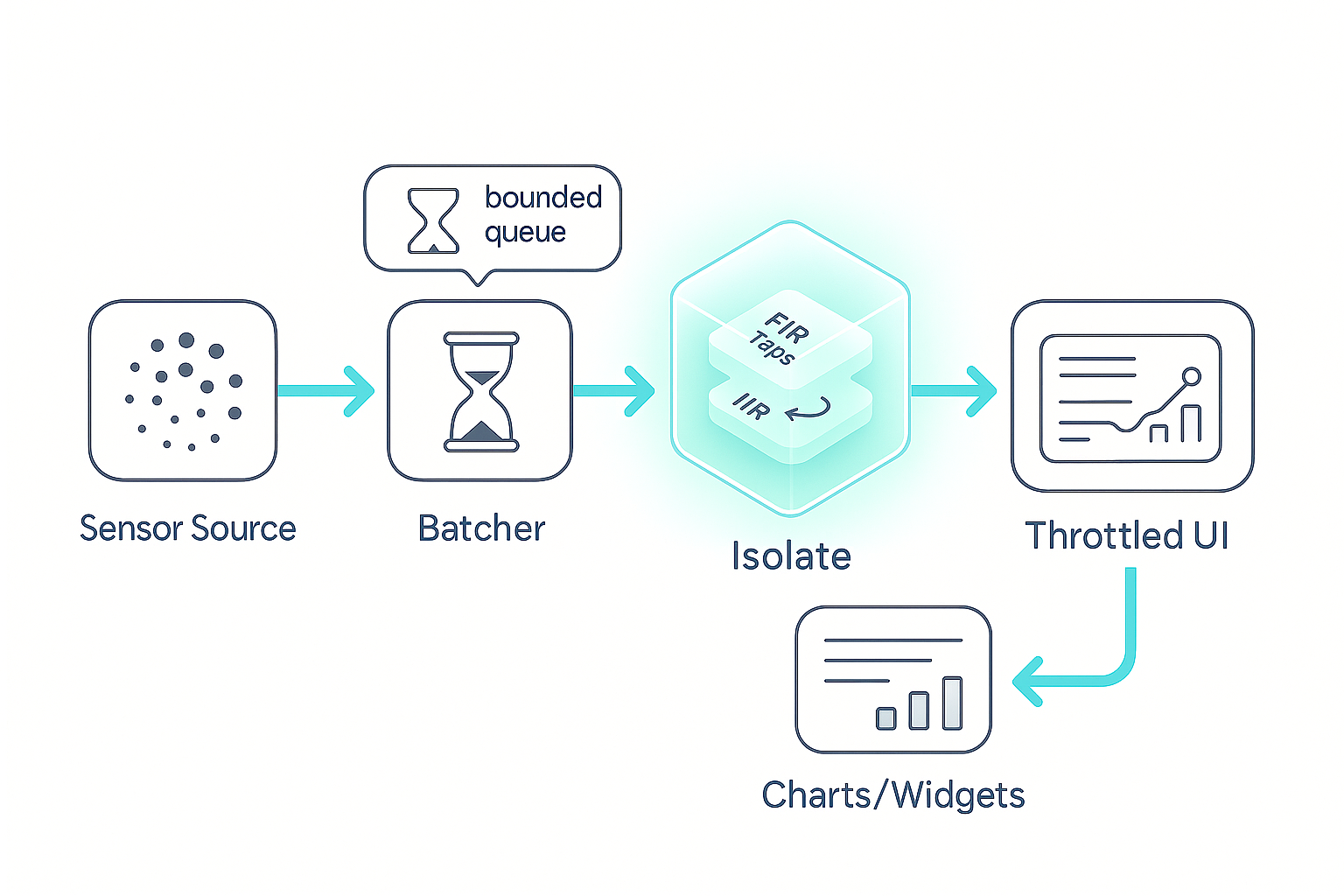
Use Isolate.spawn to create a worker that owns filtering, decimation, and lightweight feature extraction. Communication is via ports; processing is invisible to the frame clock. The one-time handshake is a single line you’ll memorize:
final rx = ReceivePort(); Isolate.spawn(entry, rx.sendPort); final SendPort worker = await rx.first;
Explanation: Create a mailbox, spawn the worker with your mailbox address, and receive its mailbox (SendPort). Now you can send commands and data.
3) Batch by time, not by sample count.
Adopt 10–20 ms frames. At 200 Hz, that’s 2–4 samples; at 100 Hz, 1–2 samples; at audio rates, you’ll pick a frame that balances latency vs. throughput (e.g., 10–20 ms is common). Time-based frames maintain predictable latency and amortize message overhead.
4) Ship frames as TransferableTypedData.
Avoid JSON, strings, or per-element boxing. Move a Float32List frame with minimal copying:
worker.send([Cmd.data, TransferableTypedData.fromList([Uint8List.view(buf.buffer)])]);
Explanation: Wrap the frame’s underlying buffer as a Uint8List, then as TransferableTypedData. The worker materializes it into a typed view and processes it. The return path mirrors the same technique.
5) Keep the inner loop allocation-free.
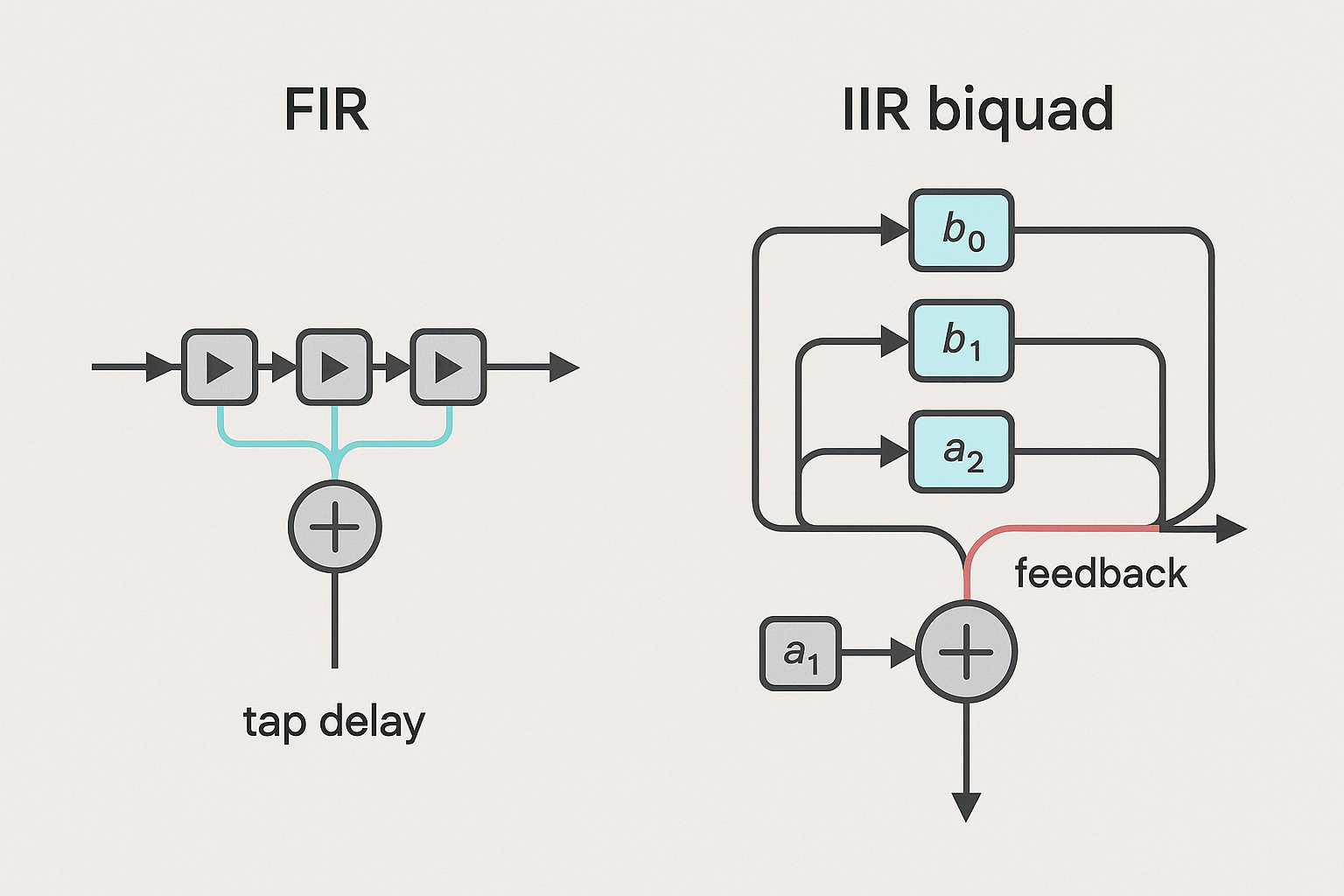
FIR and biquad IIR can be written without per-sample allocation. The only formula you truly need for a normalized biquad (a₀=1) is:
y[n]=b0*x[n]+b1*x[n-1]+b2*x[n-2]-a1*y[n-1]-a2*y[n-2];
Explanation: Maintain x1,x2,y1,y2 as persistent state. For FIR, maintain a tap delay line (or ring buffer) and accumulate.
6) Throttle UI paints to human speed.
Even if your worker runs at 200 Hz, the UI should update 30–60 Hz. A simple timer or debounce on the stream of processed frames lets you paint predictably while preserving full DSP rate for correctness.
7) Enforce backpressure with a bounded queue.
Right before the worker, buffer a handful of frames. If the queue fills, drop oldest. Real-time pipelines prefer freshness over completeness. The same policy can be mirrored on the return path if needed (usually UI throttling is enough).
8) Hot-swap coefficients safely.
Treat configuration as data. Send config messages between frames; the worker swaps coefficients atomically. If your downstream is visually or audibly sensitive, crossfade over one UI frame to avoid pops.
9) Measure relentlessly.
Expect what you inspect. Instrument: (a) dropped frame ratio; (b) end-to-end latency (ingest → filter → paint); (c) main isolate CPU; (d) allocation counts. This is how you avoid arguing about “it feels smoother.” You’ll know.
10) Escalate only when needed.
If the worker isolate still burns CPU (e.g., multi-channel audio with FFT), move the inner loop to C/C++/Rust behind FFI—but keep the isolate architecture. Rendering stays sacred either way.
Process
1) Define a tiny message contract
Keep it boring and predictable: three commands (config, data, dispose), a filter config (coefficients), and a typed frame.
- Commands:
config— sets FIR taps or biquad coefficientsdata— carries a time-windowed framedispose— shuts down the worker - FilterConfig:
bis feed-forward taps (FIR or biquad numerator);ais optional (IIR denominator) and normalized so a₀=1. Ifais null, treat as FIR.
Micro-shape (for your mental model):
enum Cmd { config, data, dispose }
class FilterConfig { List<double> b; List<double>? a; }
Explanation: This isn’t production code; it’s a schema reminder. In real code, add channels, frame size, and validation.
2) Start the worker and handshake
The worker sends back its SendPort once, then listens forever (until dispose). You already saw the one-liner handshake:
final rx = ReceivePort(); Isolate.spawn(entry, rx.sendPort); final SendPort worker = await rx.first;
Explanation: The main isolate opens a mailbox and spawns the worker. The worker replies with its mailbox, giving you a way to push config and data.
3) Frame the data before sending
Why time-frames? Because time is what you perceive. A 10–20 ms frame adds negligible latency while compressing message overhead to a fraction of per-sample chatter. Use a ring buffer per channel; every interval, peel off a contiguous Float32List.
What about bursts? If the device delivers bursty packets (common with BLE), re-slice incoming chunks into fixed time windows. This makes your downstream timing predictable and your latency easy to reason about.
Queue policy: Bound the queue to a handful of frames (e.g., five 20 ms frames ≈ 100 ms). If full, drop oldest to keep real-time behavior. Delivering stale data is worse than skipping it.
4) Ship frames as TransferableTypedData
You saw the essence earlier:
worker.send([Cmd.data, TransferableTypedData.fromList([Uint8List.view(buf.buffer)])]);
Explanation: You’re not copying elements. You’re passing ownership of an underlying buffer. In the worker, call .materialize() to get a Uint8List view, then bind a Float32List on the same buffer for math. Do the same thing on the return path.
5) Filter core without allocations
Two common kernels:
- FIR (no feedback): Weighted sum over N taps. Keep a history of the last N−1 samples across frames. This is a safe, stable smoothing/polish stage.
- Biquad IIR (with feedback): One second-order section, normalized so a₀=1, with states (
x1,x2,y1,y2) persisted across frames. The only “code” you must remember is the formula:
y[n]=b0*x[n]+b1*x[n-1]+b2*x[n-2]-a1*y[n-1]-a2*y[n-2];
Explanation: That’s Direct Form I. For stereo or multi-axis, keep per-channel states. For cascades (multiple biquads), compute one stage after another, passing the output along, reusing buffers to avoid allocations.
Stability notes:
- Validate coefficients. If
|a1| + |a2|approaches 1 with signs that invite oscillation, reject the config. - For numeric safety, clamp extremes and handle de-normals (rare on mobile, but still).
- For FIR, choose taps consistent with your sample rate; for IIR, compute coefficients for the exact Fs (more on this in “Accuracy and Safety”).
6) Throttle paints; don’t starve DSP
Even if your worker runs the kernel at 200 Hz (or higher), paint at 30–60 Hz. A simple timer or micro-scheduler on the main isolate decides when to turn the latest processed buffer (or its features) into a chart update. You maximize perceptual smoothness and minimize rebuild churn.
Why this works: The DSP loop maintains state continuity and correctness at full rate; the human layer remains predictable and cheap.
7) Hot reconfiguration between frames
When a user flips smoothing from “Medium” to “High,” push a new config message. The worker swaps coefficients atomically between batches. If your output is audible or visually sensitive, add a one-frame crossfade to avoid clicks or graph pops. No widget rebuilds needed; config is data.
8) Backpressure that keeps you real-time
Backpressure is non-negotiable. Real-time systems must prefer freshness. A bounded queue with drop-oldest ensures you never backlog frames and show data that’s 300–500 ms stale. If the return path overwhelms the UI, apply the same principle there—or better, ensure UI throttling is the choke point.
9) Observability baked-in
Add lightweight counters and timings:
- Frames ingested, processed, painted
- Dropped frames (pre-worker, post-worker)
- Ingest → filter → paint latency (a timestamp or sequence ID per frame)
- Main isolate CPU and allocation counts (DevTools)
- Health pings (worker should reply at least every N frames)
You cannot fix what you can’t see. Observability makes performance a fact, not an opinion.
10) Decimate and feature early
If the UI doesn’t need raw 200 Hz, low-pass and decimate in the worker (e.g., to 50 Hz). If the UI only needs trends or events, compute RMS, median, peak-to-peak, step counts, “added weight” events in the worker. Emit compact feature vectors or typed events. The UI paints less, the network logs less, and your battery thanks you.
Accuracy, stability, and safety
Coefficient correctness
- IIR coefficients are sample-rate dependent. If your stream’s Fs changes (or users can select it), generate coefficients accordingly.
- Normalize with a₀=1. If you get coefficients with a different a₀, divide every coefficient by a₀ before use.
- Validate poles: for stability, poles inside the unit circle (in z-plane). If your generator can yield marginal filters, bake in a guard.
Impulse and step testing
- Feed an impulse (one “1”, rest “0”). FIR should mirror taps; IIR should ring as designed and decay fast.
- Feed a step (0→1) and check for non-monotonicity (sign of instability or wrong normalization).
- Run these tests per config change in debug builds.
State hygiene
- Persist IIR state across frames. Reset only if changing the algorithm class (e.g., FIR → IIR) or if a user explicitly resets smoothing.
- For cascaded sections, reset each stage coherently; mismatched resets produce transients.
Clamping and denormals
- Hard-limit values to sane bounds if your sensor can spike (e.g., magnetic hits on load cells).
- Handle
NaN/Infby rejecting inputs or resetting the stage to avoid poisoning the pipeline.
Calibration
- If sensors drift (load cells, IMUs), perform calibration logic in the worker. Send events to UI: “tare ok”, “cal drift detected”, “recal required.” Your UI stays light; your logic stays centralized.
Results and validation
A repeatable, boring test plan (the best kind):
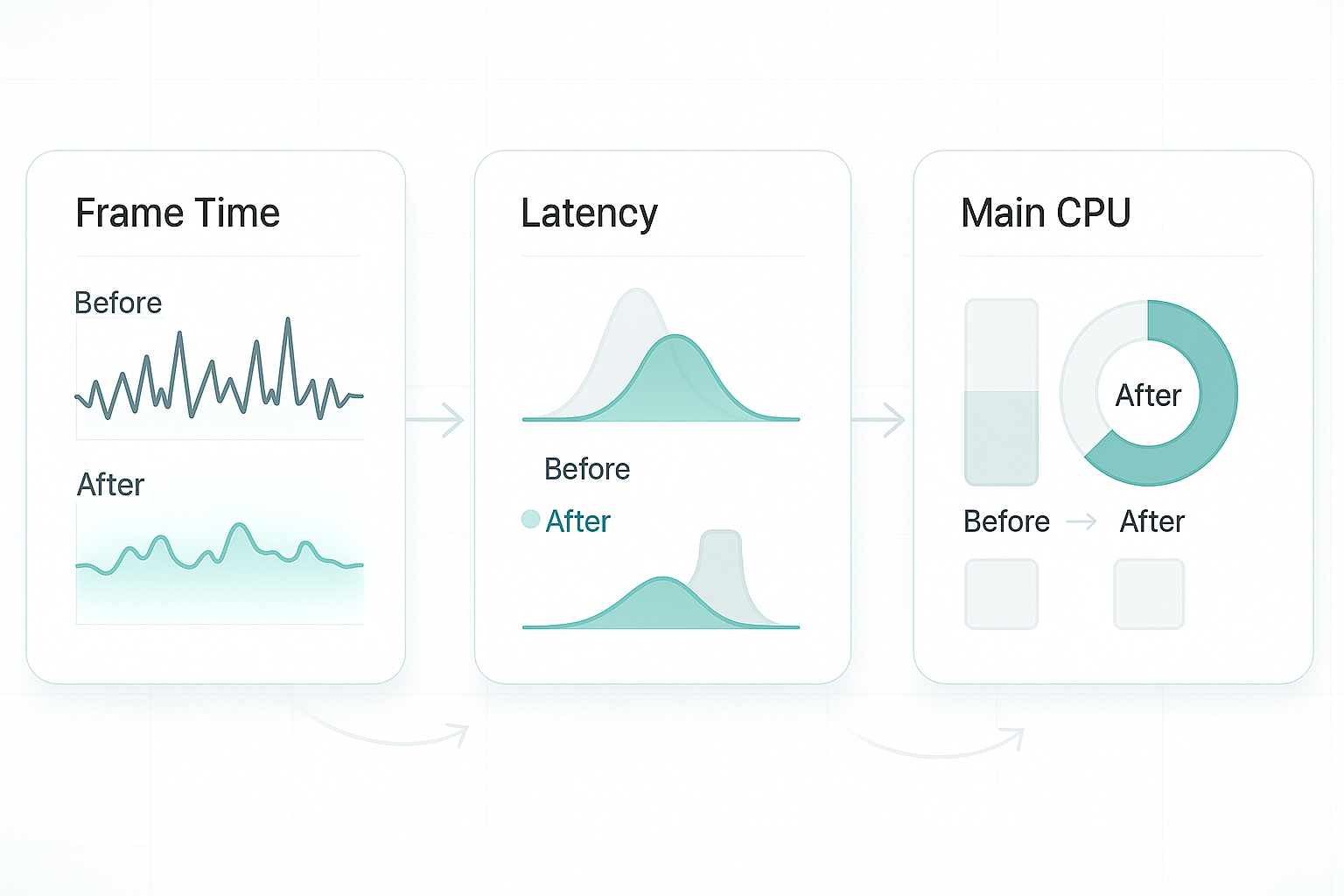
- Baseline (main-isolate DSP). Enable your filters on the main isolate. In Flutter DevTools → Performance, record: frame times, jank count, GC activity, main isolate CPU. Interact with the UI (scroll, tab switch) while streaming sensors.
- Isolate offload. Move DSP to the worker. Repeat the exact interactions and recording. You should see: (a) fewer or no jank frames; (b) lower main-CPU; (c) a stable ingest → filter → paint latency curve.
- Stress. Double the sample rate for a minute or add a second stage (e.g., RMS after FIR). The pipeline should hold; if drops occur, your bounded queue should prevent latency creep.
- A/B a throttle change. Try 30 Hz vs 60 Hz UI cadence. Observe perceived smoothness vs battery impact (primarily on older devices).
- Edge tests. Deliberately starve the device (background process load, power saving) and verify your drop-oldest policy maintains liveliness.
Acceptance targets (tune for your product):
- UI jank < 1% of frames during interaction.
- Main-isolate CPU reduced by 20–50% in sensor-heavy screens.
- End-to-end latency stable and < 100 ms for visuals (often far lower).
- Drop ratio < 2% under normal load; bounded under stress.
Platform realities
Android
- Foreground Service for continuous capture. Isolates don’t confer background execution rights.
- Mind Doze and App Standby. If you need periodic processing while the app isn’t foregrounded, schedule appropriately; the isolate pattern optimizes compute, not OS policy.
- BLE and audio stacks may batch. Your time-based framing normalizes upstream burstiness.
iOS
- Use Background Modes (audio, BLE) where permitted.
- Keep main-thread work tiny. iOS penalizes long main-thread stalls harshly; isolate DSP keeps you safe when the app returns to foreground.
Web
- Isolates map to Web Workers. Confirm transferable buffers for your target browsers.
- If charting feels heavy, prefer canvas-based libraries or GPU-accelerated charts. The architectural separation remains the biggest win.
Design patterns that scale in the real world
Decouple rates everywhere
- Sensor input rate (e.g., 200 Hz)
- Worker DSP rate (usually equals sensor rate)
- UI paint rate (30–60 Hz)
- Logging/analytics rate (1–10 Hz)
This separation turns chaos into independent knobs you can tune for CPU, battery, and UX.
Feature-first UI
- Send events and compact trends instead of raw streams: “weight added,” “stable fill,” “step detected,” “posture change.” The UI becomes declarative; the worker becomes the judge.
Isolate pools (only if needed)
- One isolate per heavy pipeline is often enough. Add a small pool when multiple high-rate sensors or FFT-class transforms saturate a single worker. Use round-robin dispatch; keep the design simple and observable.
Failure-tolerant workers
- Health pings: Expect a reply every N frames; restart on silence.
- Config validation: Reject unstable IIRs; keep the prior config.
- Poison pill:
disposecleans cleanly; avoid orphan isolates on screen changes.
Data governance
- Frames are memory, not logs. Don’t persist raw buffers unless necessary.
- If data is sensitive (e.g., audio), process in worker, output features only, and discard raw samples after use. Respect consent and storage policies.
In Hoomanely’s mission is to make pet tech feel effortless. Efficient, isolate-based sensor pipelines keep experiences responsive and trustworthy—whether you’re inferring motion on a wearable or stabilizing bowl weight—so insights appear instantly without UI hiccups. This blueprint also future-proofs on-device intelligence as models and analytics grow, ensuring the app feels velvet-smooth even as capability expands.
Common pitfalls & quick fixes
- Per-sample
setState: Never. Buffer and paint at 30–60 Hz. - Frames too tiny: <10 ms windows waste cycles and invite GC churn. Start at 10–20 ms.
- Unstable IIR: Normalize a₀=1; validate coefficients; clamp; impulse/step test.
- No drop policy: Latency creep is worse than loss. Use a bounded queue; drop oldest.
- Assuming isolates grant background capture: They don’t. Keep Foreground Service (Android) / Background Modes (iOS) for ingestion.
- Allocation in hot loops: Reuse buffers; avoid new lists per frame.
- Timestamp drift: Align by a monotonic clock from native layers; don’t trust wall clock for stream sync.
- Config in UI code paths: Treat
configas data; don’t rebuild widgets to change coefficients.
Takeaways
- Rendering is sacred. Keep the main isolate focused on frames; move continuous DSP elsewhere.
- Batch and transfer smartly. 10–20 ms frames over TransferableTypedData strike the best balance between latency and throughput.
- Throttle paints, not DSP. Humans need 30–60 Hz visuals; your filters can run faster.
- Treat configuration as data. Hot-swap coefficients between frames; avoid rebuilds; crossfade if needed.
- Prefer freshness over completeness. Backpressure with drop-oldest keeps UX live under stress.
- Measure, or it didn’t happen. Validate with DevTools: frame times, latency, CPU, allocations, drop ratios.
- Scale only when necessary. If one worker still runs hot, move inner loops to C/Rust but keep the isolate architecture.



