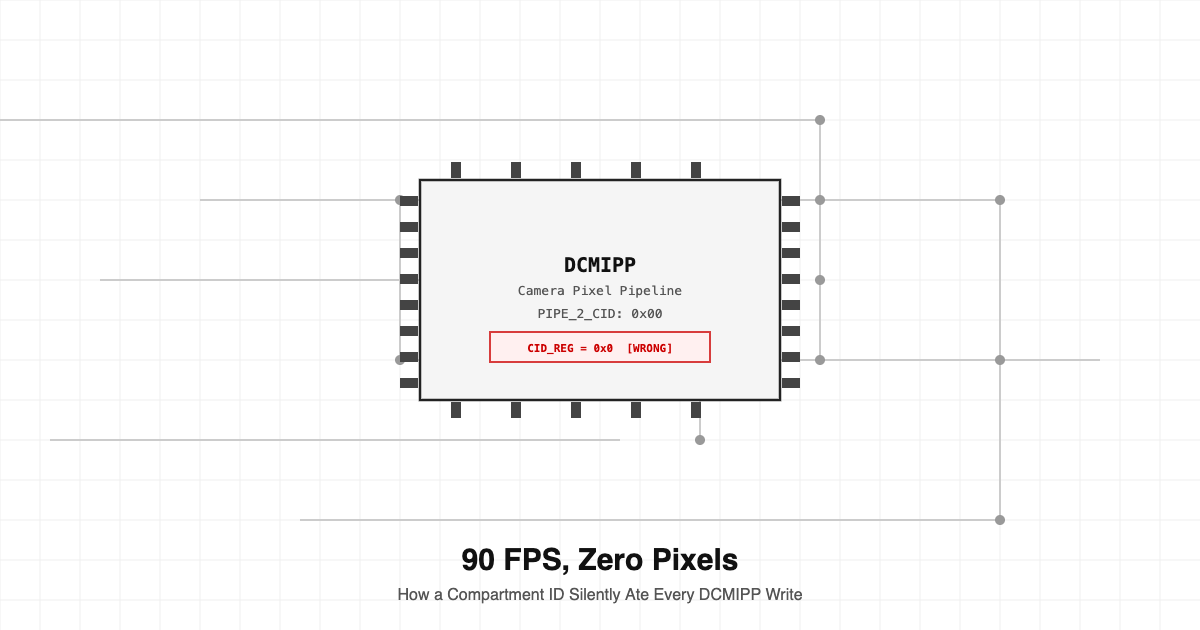
90 FPS, Zero Pixels: How a Compartment ID Silently Ate Every DCMIPP Write
The pipeline ran. Interrupts fired. DMA counters incremented. Every status register said the system was healthy. The buffers were empty. Three days of debugging, one register field.
The DCMIPP driver on this platform isn't complicated to configure, on paper. The register map is documented, the reference manual explains the pipe architecture, and the Linux kernel driver has been in mainline long enough that most of the sharp edges are known. You set your source, pick a pipe, configure the crop and downscale, point the DMA at a buffer, and start the stream. The hardware does the rest.
That was the theory. In practice, we spent three days chasing 90 FPS that produced zero valid frames. The pipeline ran, interrupts fired, DMA counters incremented, every status register said the system was healthy. The buffers were empty.
The root cause was a single field in a single register: the compartment ID. This post is about that field, how it works, why getting it wrong produces exactly the failure we saw, and the broader lesson about hardware bugs that look like software bugs.
What the DCMIPP actually is
The Digital Camera Memory Interface Pixel Pipeline, DCMIPP, is the camera capture subsystem on this SoC family. It sits between an incoming CSI-2 or parallel camera interface and system memory. Its job is to receive raw pixel data, optionally crop and rescale it, and write the result into DMA buffers the application can read.
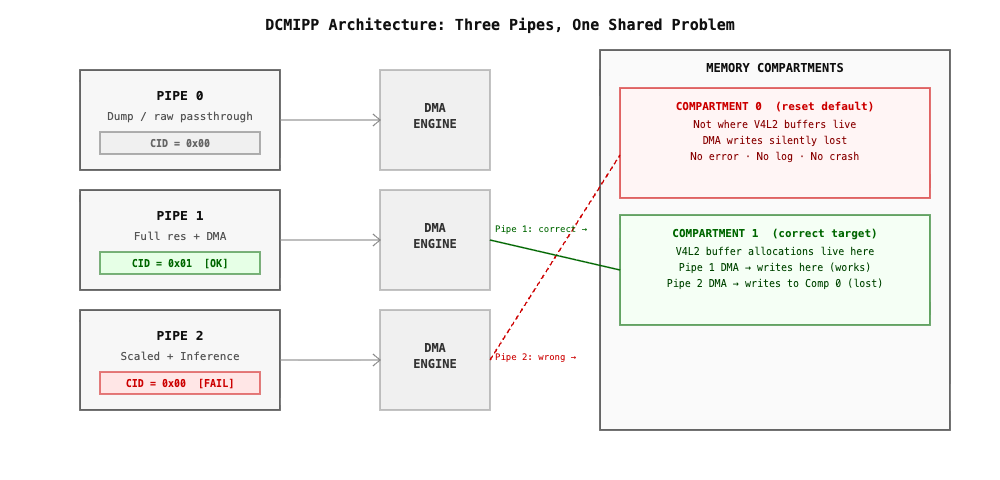
The hardware provides three pipes. Pipe 0 is the dump pipe, a raw passthrough with no processing. Pipe 1 and Pipe 2 are the processing pipes with crop, downscale, and format conversion. Each pipe has its own DMA engine, its own interrupt lines, and its own set of configuration registers.
For our use case, we ran a 90 FPS camera at full resolution on one pipe while feeding a scaled-down stream to a second pipe for inference. The hardware supports it. The driver supports it. Nothing about the setup was unusual.
The setup that should have worked
The camera was a CSI-2 sensor connected over MIPI CSI-2. The SoC ran a mainline kernel with the standard dcmipp driver. We'd configured both pipes, registered V4L2 devices for each, and were consuming frames from both through standard V4L2 MMAP buffers.
Pipe 1 produced frames correctly, 90 FPS, correct resolution, correct format. Every capture worked exactly as expected.
Pipe 2 produced nothing. Zero frames. Not corrupted frames, not wrong dimensions, not partial frames. Zero. The V4L2 DQBUF calls blocked indefinitely. The file descriptor was valid. The stream was started. The queue had buffers. They just never came back filled.
What the debug showed
The first instinct is to look at the obvious things: wrong pixel format, buffer size mismatch, QBUF called wrong, stream not started. We checked all of them. Everything looked correct.
We added printk instrumentation to the driver. The pipe 2 interrupt handler was firing at 90 Hz. The interrupt was firing. The DMA completion callback was executing. The driver was calling vb2_buffer_done on every frame.
But userspace never received the frames. That combination, interrupts firing but userspace receiving nothing, is a pattern worth recognizing. It usually means one of two things: the driver is marking buffers done with an error state, or the buffer the DMA is writing to isn't the buffer userspace queued. We checked the error state first and found nothing, so we started looking at buffer address mismatches.
The compartment ID register
The platform memory subsystem uses a compartment-based access control model. Physical memory regions can be assigned to compartments, and hardware masters, the CPU, DMA engines, peripheral DMAs, each carry a compartment ID that determines which memory regions they're allowed to touch.
The DCMIPP has a register for this. Each pipe's DMA engine has a compartment ID field that tells the memory interconnect which compartment a given DMA access belongs to. The kernel driver sets this field during pipe initialization. The default value in the reference manual is 0. The reset value is 0. The driver was setting it to 0. We'd never touched it.
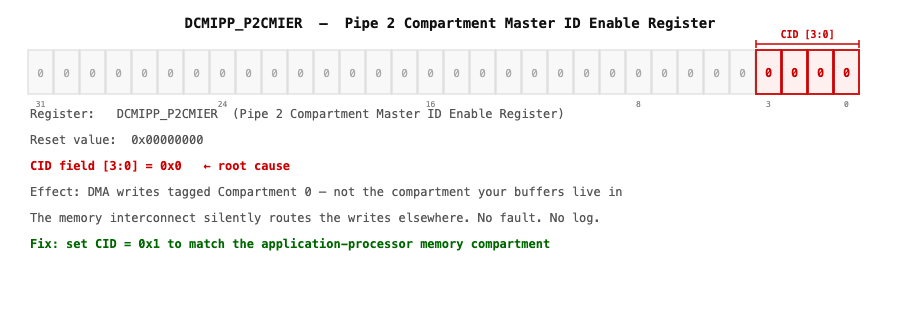
The problem was that 0 is not a valid compartment ID on our platform. The memory regions we'd allocated for the V4L2 buffers lived in a compartment that required a non-zero ID. The DMA was writing to addresses that resolved to a different memory region entirely, or in some configurations, to an address the interconnect silently dropped.
Why Pipe 1 worked and Pipe 2 did not
This is the detail that made the bug genuinely confusing. If the compartment ID was wrong for Pipe 2, why was Pipe 1 fine?
The answer was in the driver initialization order. Pipe 1's DMA and compartment ID got set by a slightly different code path during probe. A previous attempt to configure the pipe for a different resolution had left a non-zero value in the compartment register, and that value happened to be correct for our platform's memory layout, by luck rather than design.
Pipe 2 was configured fresh. No prior state. The register held its reset value of 0. The DMA wrote at 90 FPS to wherever compartment 0 mapped to. None of those writes reached the V4L2 buffers.
The interrupt fired because the DMA completed its write. From the hardware's perspective, the write succeeded. The data went somewhere. That somewhere just wasn't the buffer we'd queued.
The fix
Once we understood the problem, the fix was one line. The compartment ID for the Pipe 2 DMA needed to match the memory compartment where the V4L2 buffers were allocated. On this SoC, the correct value for CID-aware DMA in the application processor context is 1: set the DCMIPP_CMIER_P2CIDC field in DCMIPP_P2CMIER to 1.
After that change, Pipe 2 started delivering frames immediately. Same hardware, same driver, same camera, same buffers. One register field changed from 0 to 1. The system went from zero frames to 90 FPS.
The class of bug this belongs to
This isn't a driver bug in the traditional sense. The driver wasn't wrong about what it was doing. It was setting a register to its documented reset value. The documentation doesn't prominently flag that this reset value is invalid in a compartment-aware system configuration. There's no error log from the hardware, no fault, no exception. The DMA simply writes to an address the interconnect accepts and goes nowhere useful.
It's a configuration correctness bug. The driver was correct in isolation and incorrect in the context of a platform with specific memory compartment requirements. This class of bug shares a structure with other bugs we've written about on this blog: a Python-to-C++ port that compiles and runs but produces wrong answers because library defaults differ across language bindings, a factory bring-up flow that passes every test but fails in the field because a register's reset value assumed a platform configuration that doesn't exist, a firmware feature that works in the lab but corrupts shared state at 3 AM because nobody designed a boundary. In every case, the bug doesn't announce itself. No crash, no exception, no log line. The system runs, reads healthy on every metric you think to check, and silently produces the wrong outcome.
How to find this class of bug
The method that works is systematic state verification, not intuition. For DMA-related failures where interrupts fire but userspace gets nothing, the first question should be: is the DMA writing to the address I think it's writing to? Not the address I configured, not the address the driver calculated. The physical address the DMA controller actually used for the most recent transfer.
On this platform, that's readable. The DMA current-address registers update after each transfer. If those addresses don't match the physical addresses of your V4L2 buffers, the DMA is writing somewhere else, and the reason is upstream of the DMA itself. From there the question becomes: what controls where those writes go? On a platform with memory compartmentalization, the compartment ID is part of that answer. That register field belongs on your checklist the moment you see a DMA that fires but produces no output.
Register fields that hide in plain sight
A reset value of 0 gets interpreted by most engineers as a safe default. Zero usually means disabled, or unconfigured, or identity. In memory access control hardware, 0 often means the first compartment, which may or may not be the one your allocation lives in.
This isn't unique to this platform. Any SoC with a bus-level access control mechanism, TrustZone, an SMMU, Cortex-A CID awareness, or a proprietary interconnect with region-based protection, has register fields where the reset value is technically valid but practically wrong in a real software environment.
The reference manual usually describes these fields accurately. The description is often brief, and it's easy to read it once during initial bring-up and never revisit it when debugging a failure that looks unrelated. The fix is to treat these fields the way the factory bring-up philosophy treats board identity: don't assume the reset value is correct. Verify it. Set it explicitly. Comment why the value is what it is, and what breaks if it's wrong.
What we changed in our driver initialization
After resolving the immediate issue, we audited the DCMIPP initialization sequence for every platform configuration we support. Each pipe's CID register is now set explicitly to the correct value for the target platform's memory map, with a comment referencing the memory compartment assignment in our platform BSP.
We also added a diagnostic check during stream start. If a pipe's DMA current-address register doesn't fall within the expected physical address range of the allocated buffers after the first few frames, the driver logs a warning and reports the configured CID value. This doesn't fix a wrong CID automatically, but it makes the failure visible immediately instead of after three days of debugging. The check costs almost nothing at runtime. It fires once per stream start and stays quiet after that. The diagnostic value is worth the few lines of code.
The debugging principle that would have saved three days
Work backwards from the DMA address, not forward from the configuration.
When a DMA-driven capture pipeline fires interrupts but delivers no data, the standard path is to re-read every configuration register you touched and compare it against the reference manual. That takes a long time and often finds nothing, because you read the registers correctly the first time.
The faster path is to read the registers you didn't touch. The ones with reset values. The ones whose documentation is a single paragraph. The ones that control something orthogonal to what you think you're debugging. On this platform, the compartment ID register is in that category. It isn't in the main configuration sequence. It doesn't appear in typical camera pipeline debugging checklists. It defaults to zero, a valid value, so it doesn't look wrong.
But it was wrong. One field. Three days.
Hoomanely's view on silent hardware failures
At Hoomanely, our hardware runs inference pipelines at the edge. Frame data feeds directly into models. A camera pipeline that delivers zero frames at full reported throughput isn't a theoretical concern, it's a production risk.
We've learned to treat these silent failures as their own category, separate from bugs that crash, log errors, or fail visible assertions. Silent failures need a different debugging posture. You can't wait for the system to tell you something is wrong. You have to verify independently that the output is what you expect, even when every intermediate signal looks healthy. That means checking physical buffer contents, not just buffer states. It means comparing DMA destination addresses against expected physical addresses. It means treating register reset values as candidates for review rather than safe assumptions.
The compartment ID taught us that. One field, never touched, defaulting to zero, silently consuming every frame the camera produced for three days. The hardware was doing exactly what it was told. We just didn't realize what we'd told it.
Antes de elegir entre camisetas de fútbol para colecciones históricas, merece la pena comprobar el tipo de tejido y el corte propio de la época. También ayuda revisar las diferencias de ajuste entre una camiseta retro y una actual antes de completar el pedido.