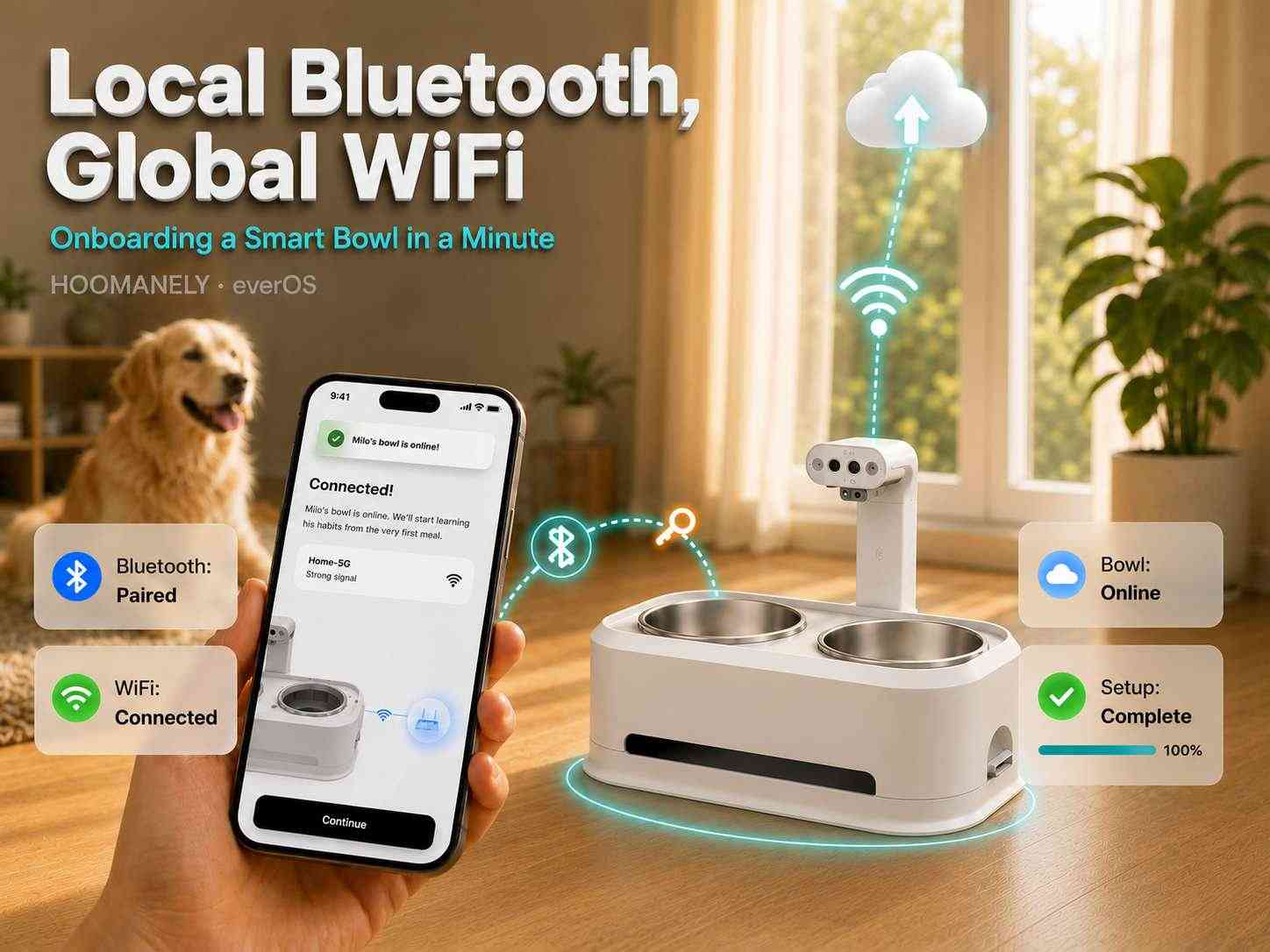
Local Bluetooth, Global WiFi: Onboarding an EverBowl
The first minute a customer spends with a connected device decides how they feel about it forever. Unbox a smart pet bowl, open the app, and within about a minute it should just be online — quietly uploading, ready to watch over their pet. But that minute hides a genuine chicken-and-egg problem: the bowl needs your home WiFi to reach the internet, yet it has no screen and no keyboard for you to type the password into, and it can't ask the cloud for help because it isn't on the network yet. The elegant way out is to use a second, local radio to bootstrap the first. At Hoomanely, the Everbowl uses Bluetooth Low Energy (BLE) to hand off WiFi credentials, turning a fiddly setup into a tap-tap-done experience — and hiding some serious engineering underneath.
The Concept: A Local Radio Bootstraps the Global One
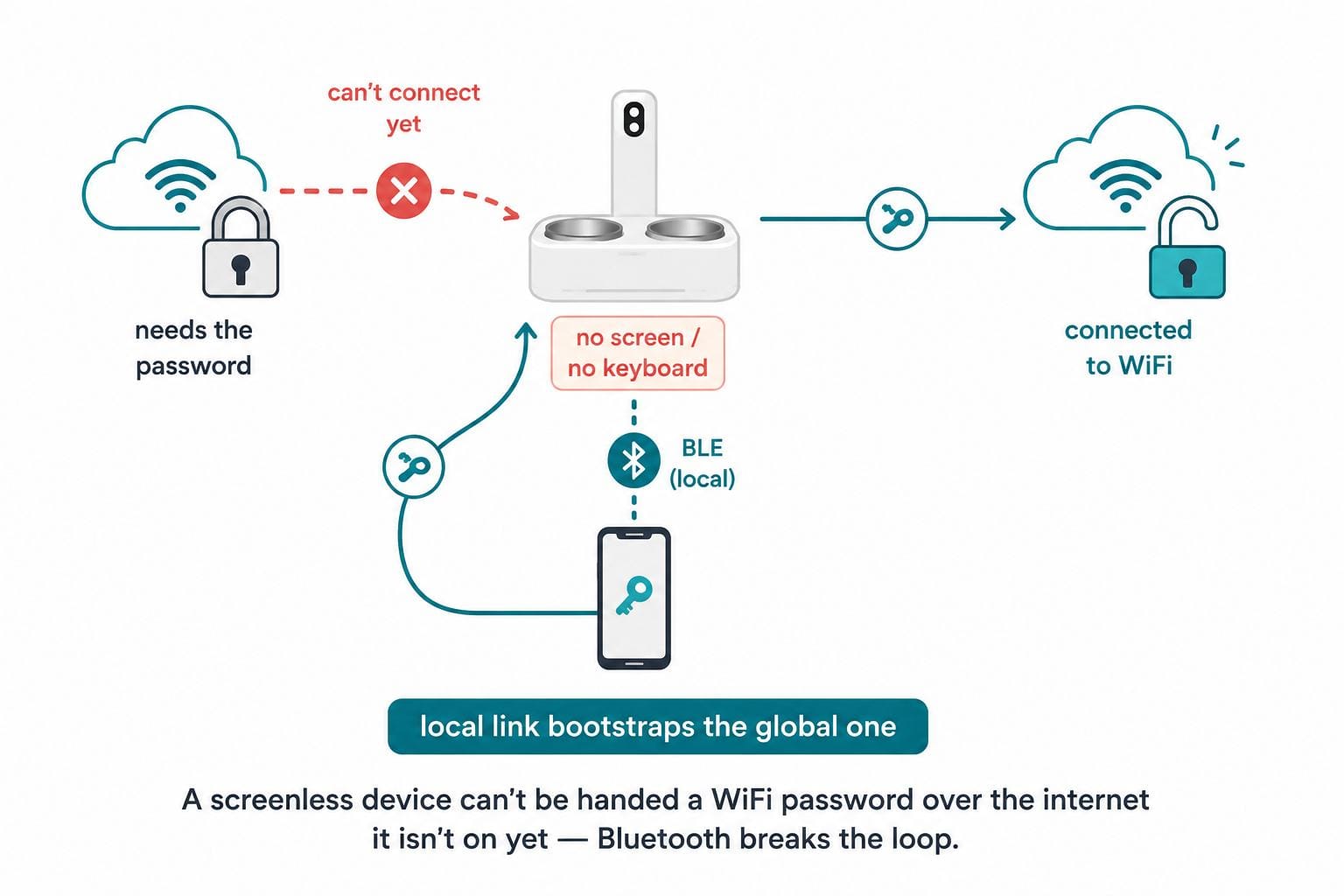
Every headless connected device faces the same puzzle. To be useful it must join the home's WiFi, but WiFi needs a password only the owner knows, and there's no direct way to give a screenless device that password. You can't reach it over the internet — it isn't on the internet yet.
BLE breaks the loop. Bluetooth is a short-range, local link that needs no infrastructure and no credentials to establish. The phone in the owner's hand can talk to the bowl directly, right out of the box, with nothing else set up.
So onboarding is a hand-off: the app connects to the bowl over BLE, learns which WiFi networks the bowl can see, passes along the chosen network and password, and the bowl uses those to join the real network. The local radio's only job is to bootstrap the global one — after that, BLE's work is done.
Why It Matters: The First Impression Is the Product
For a health device that's meant to run for years, onboarding is the one moment the owner is actively involved — and the one place a clumsy experience can sour everything that follows. If setup is confusing, the bowl never gets online, and the most sophisticated AI in the world never sees a single frame.
There's no fallback UI to lean on, either. The bowl has no touchscreen to type into and no buttons to enter a passphrase, so the phone is the interface. That raises the bar: the app-to-bowl conversation has to be reliable enough that a non-technical pet parent, standing in their kitchen, gets to "connected" on the first try.
Getting this right is quietly one of the highest-leverage things an embedded team does. It's the difference between a device that activates itself in a minute and a support ticket on day one.
How It Works: The Onboarding Hand-Off
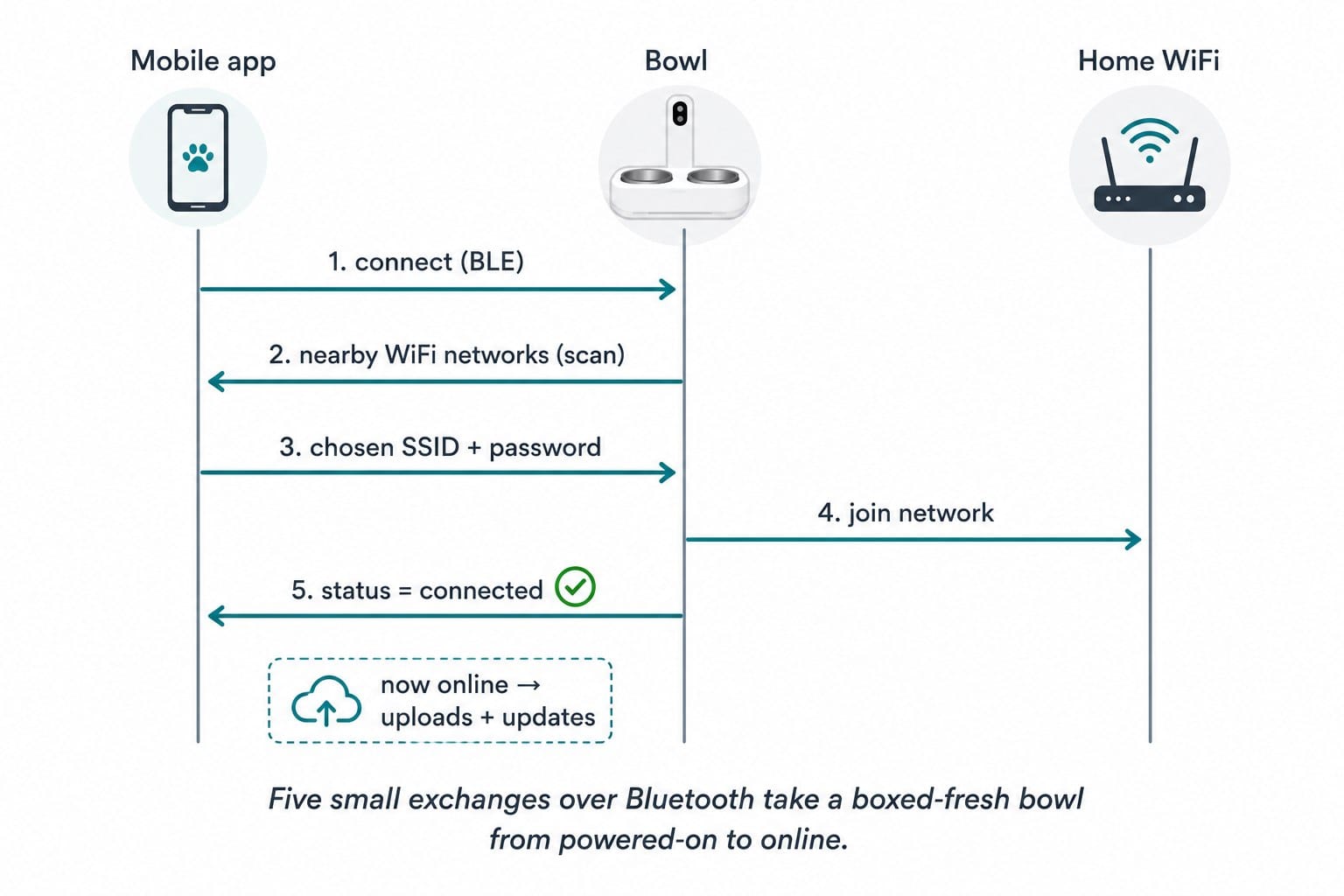
The sequence is short and deliberately boring — boring is what you want in a setup flow. Each step is a small, verifiable exchange over the local BLE link.
First, the bowl advertises itself over Bluetooth with a recognizable name, so the app can find and connect to it locally. Second, the bowl scans for nearby WiFi networks and sends that list back to the app, so the owner simply picks their network from a list instead of typing an SSID. Third, the app sends the chosen network name and password down to the bowl over the BLE channel. Fourth, the bowl attempts to join that WiFi, and finally reports its status back — connected or not — so the app can confirm success or let the owner retry.
The moment the bowl reports "connected," it's on the home network and the internet. From there, the whole product comes alive: it can upload captures, receive commands, and — crucially — pull its own safe over-the-air updates for the rest of its life.
The Hidden Work: A Networking Swap Nobody Sees
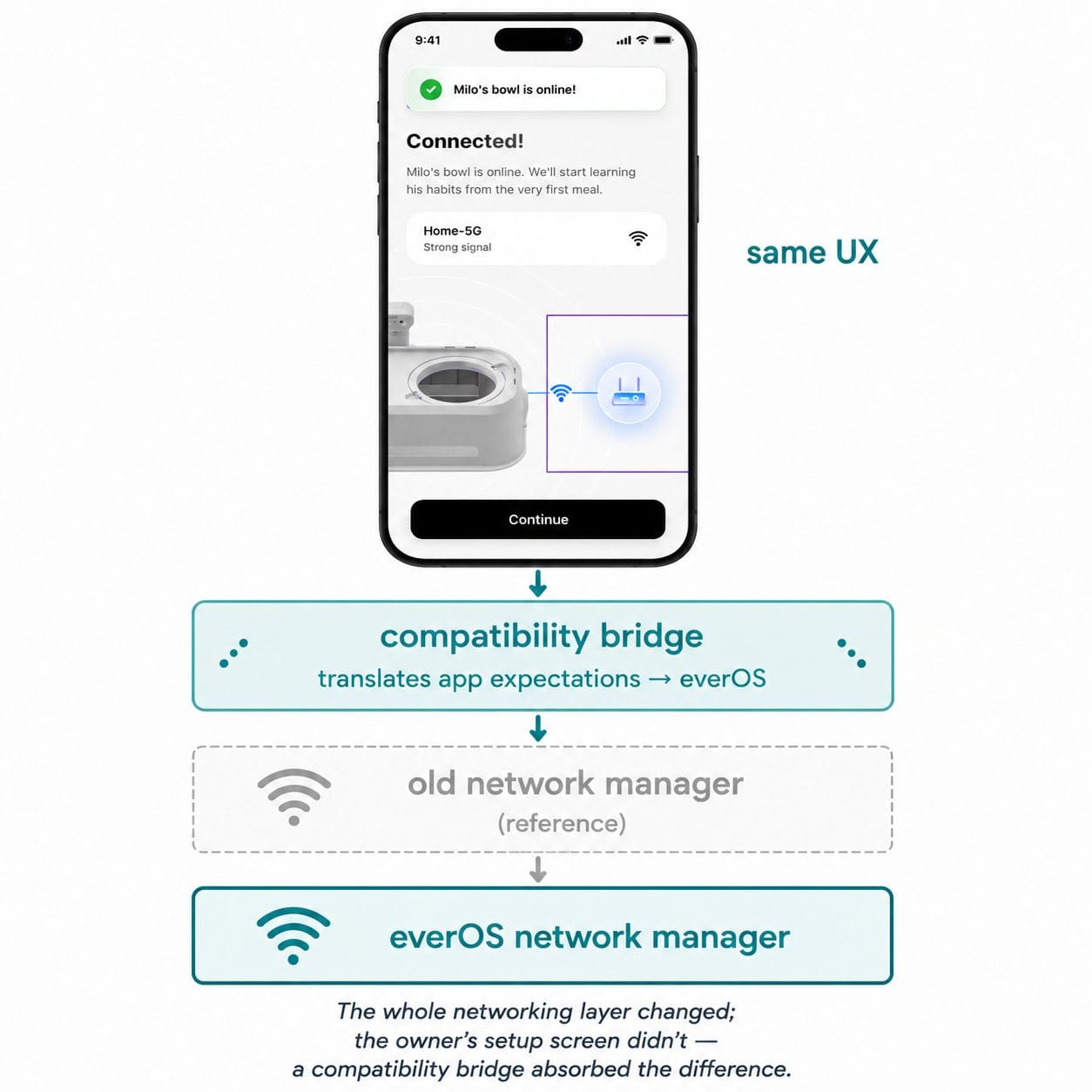
Here's the part the owner never notices, and the part the team is proudest of. everOS — the bowl's purpose-built operating system — manages WiFi with a different network manager than the earlier hand-built reference image used. That's a deep plumbing change: the software that actually joins networks, stores credentials, and reports status is not the same underneath.
The mobile app, however, was written against the old behavior — it expects the network to be managed a certain way. Rebuilding the app to match the new OS would have been slow and risky, and it would have fractured the experience across devices. So instead, the team bridged the app's expectations to the new networking stack under the hood, translating between what the app asks for and what everOS actually does.
The result is that onboarding behaves identically to the owner, on the new OS, with no app changes — and it was validated end-to-end with the real app, not a mock. A whole layer of the device was swapped out, and the setup experience didn't so much as flinch.
In Practice: One Local Tap Unlocks Everything
Once onboarding completes, BLE recedes into the background and WiFi carries the product. That single successful hand-off is what enables the entire lifecycle downstream: continuous uploads to the cloud, on-demand capture triggers, health reporting, and safe remote updates. None of it is reachable until the bowl is on the network, and nothing gets the bowl on the network but this local exchange.
It's also a reusable pattern, not a one-off. Any headless device — a camera, a sensor node, a hub — faces the same bootstrap problem, and the same shape solves it: a local radio to carry credentials, a friendly app flow to gather them, and a clean status handshake so the owner knows it worked. The specifics change; the idea travels.
Why It Matters at Hoomanely
Hoomanely is reinventing healthcare for pets — replacing reactive, imprecise care with continuous, clinical-grade monitoring that catches problems early. Our devices form a Physical Intelligence ecosystem: sensors fused at the edge, feeding the Biosense AI Engine that turns raw signals into personalized, preventive insights.
All of that depends on a device that's actually online, and getting there has to be effortless for the person setting it up. A smooth, one-minute onboarding is the doorway to every insight that follows — and keeping that doorway identical even as the operating system underneath it is rebuilt is exactly the kind of invisible care that separates a product from a prototype.
Our approach is to make the hard engineering disappear behind a calm experience. The owner taps a few times and their pet's new health companion comes to life; the swapped networking stack, the credential hand-off, and the compatibility bridge all stay out of sight — doing their job so the family never has to think about them.
Key Takeaways
- Use a local radio to bootstrap the global one. A screenless device can't be handed WiFi credentials over the internet it isn't on — BLE provides the credential-free local link to break the loop.
- The phone is the interface. With no screen on the device, the app-to-device conversation must be reliable enough for a non-technical owner to reach "connected" on the first try.
- Let owners pick, not type. Having the device scan and return nearby networks turns setup into a selection instead of an error-prone SSID entry.
- Confirm with a status handshake. Reporting "connected / not connected" back to the app is what makes the flow trustworthy and retryable.
- Hide deep changes behind stable UX. A compatibility bridge let a whole networking-stack swap happen with zero change to the owner's setup experience.
Author's Note
BLE onboarding is the front door to everOS, the operating system behind Hoomanely's Everbowl. It's the first thing a customer does and the last thing they should ever have to think about — a local Bluetooth handshake that quietly hands a health device the keys to the home network, then gets out of the way. Behind that calm minute sits a swapped networking stack and a compatibility bridge, doing invisible work so a pet's new companion simply comes online and starts watching over them.
Al considerar diferencias entre camiseta local, visitante y tercera equipación, la decisión resulta más sencilla cuando se confirma la disponibilidad de manga corta o larga. La decisión queda mejor respaldada al comprobar que la ficha identifique claramente la versión elegida.