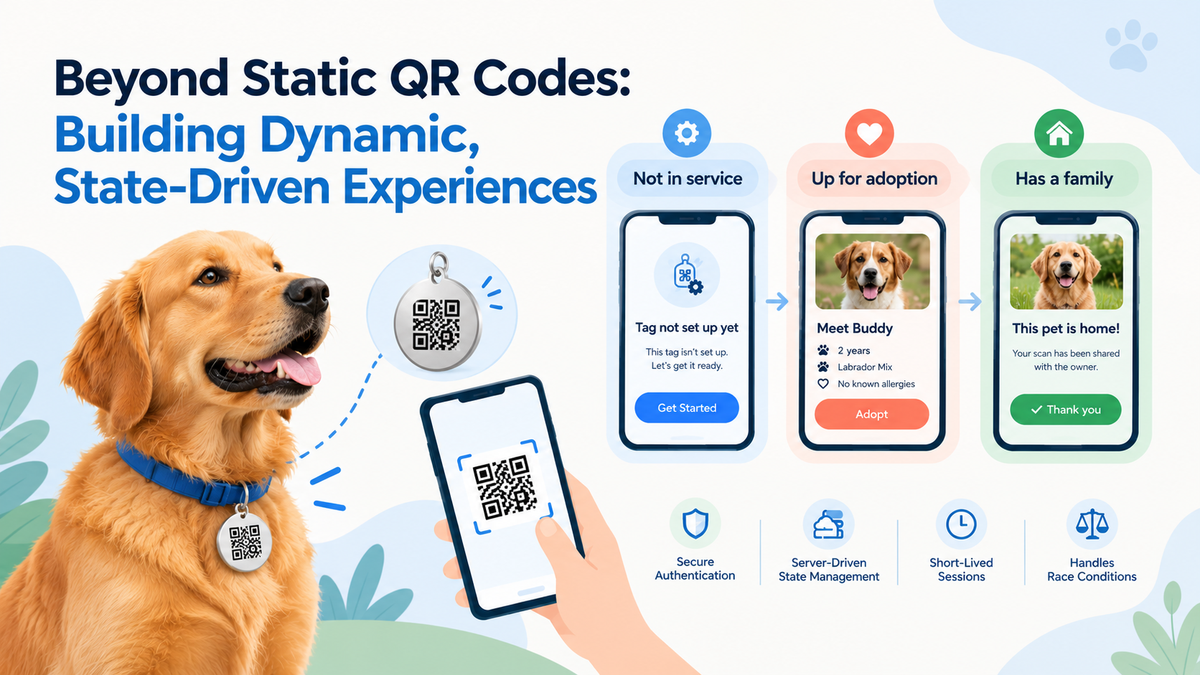
Beyond Static QR Codes: Building Dynamic, State-Driven Experiences
One QR Tag, Three Lives: Designing for a Code That Never Changes
Scan the disc on a dog's collar and a web page opens. Usually that page has one job: help a stranger get a lost pet home. It shows the pet, lets the owner know their tag was scanned, and makes it easy for the finder to reach them.
Then we started putting the same tags on shelter dogs. Suddenly, the person scanning isn't a finder. They might be a future family. There's no owner to alert yet. And a few days later, once the dog is adopted, that very same disc has to go back to being an ordinary lost-pet tag.
This post is about designing for that: one printed code whose meaning changes over a dog's life, and a way to verify a stranger that lasts just long enough to do one thing, then disappears.
THE PROBLEM: THE CODE IS PRINTED ONCE, THE STORY KEEPS MOVING
A QR code stamped on metal can never change. The dog wearing it changes a lot. It waits in a shelter, meets a family, goes home. Whatever opens when someone scans that disc has to keep up with the dog, not with the day the tag was made.
Four things made this harder than "just add an adoption page":
- One code, every stage. There's no special adoption link. The disc a volunteer clips on at the shelter is the same disc the dog wears at home.
- The visitor is a stranger who'll probably visit once. Someone at an adoption drive scans a collar on their phone. Ask them to create an account or install an app just to say "I'd like to adopt this dog", and most of them will walk away.
- The request still has to be real. A shelter needs to know a reachable person asked, not a bot or a typo.
- The dog can find a home while you're looking at it. Two people at the same event can open the same dog's page, and only one of them will be first.
We'd also learned one lesson the hard way. When a page tries to work out "what kind of tag is this?" on its own from scattered clues, every new situation means more guessing, and sometimes it guesses wrong. A finder's phone shouldn't have to solve that puzzle.
THE APPROACH: LET ONE ANSWER DECIDE WHAT THE VISITOR SEES
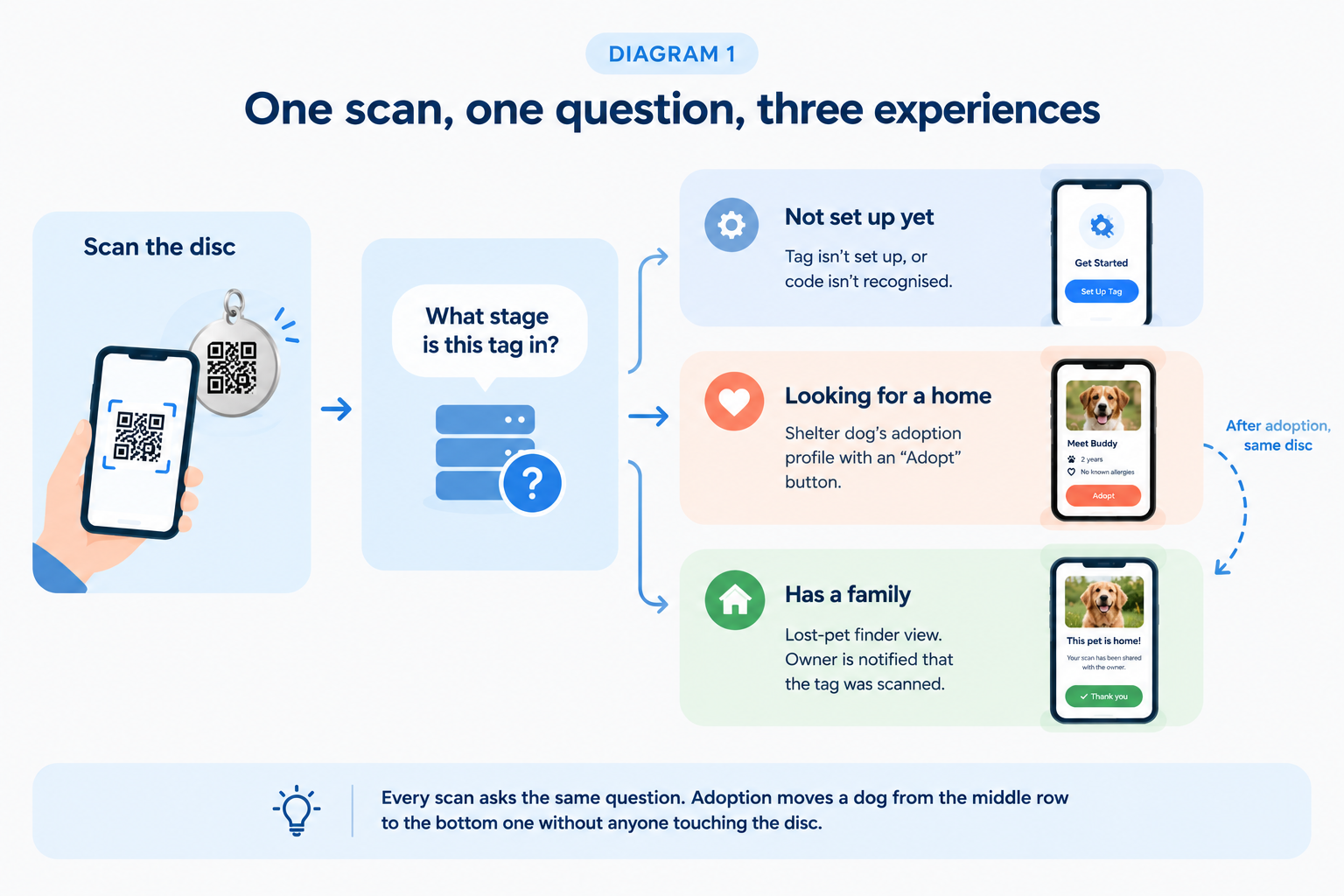
Every scan now starts with a single question: what stage is this tag in right now? The page shows what the answer says, and nothing else.
There are three stages a visitor can land in:
- Not set up yet: a brand-new tag. The visitor sees how to get started.
- Looking for a home: a shelter dog. The visitor meets the dog and can ask to adopt.
- Has a family: an ordinary pet. The visitor sees the lost-pet view, and the family is told their tag was scanned.
Two principles came out of this.
Ask a small question first. Only "looking for a home" leads to more detail, and that detail is deliberately limited to what a stranger should see about a dog waiting for adoption: photos, the basics, health notes that matter to a new family, and how to reach the shelter. It has nothing in common with the private details of a pet that already has a home.
Let actions follow the stage, not the page visit. Alerting an owner makes sense only when there is an owner. Tying that action to the "has a family" stage means a shelter dog's scan can never send a confusing alert to nobody, and a future stage can't trigger one by accident.
THE PROCESS: THREE PROBLEMS WORTH TALKING ABOUT
- When the answer changes while you're reading it
Between the moment a page learns "this dog is looking for a home" and the moment it shows the dog, someone else's adoption might go through. The tempting fix is clever logic that patches things up on the visitor's screen. We chose the boring fix instead: if what we hear back doesn't line up, ask the original question again and believe the fresh answer.
The same idea covers the slower version of the race. If a visitor fills in the form and someone else is confirmed first, they don't get an error. They get a warm "this dog found a home" message, and the page simply starts over with the dog's new stage.
The lesson here is to treat races as a normal part of the flow. Plan for them, and they turn into a kind message instead of a bug report.
- Verification that lasts exactly one request
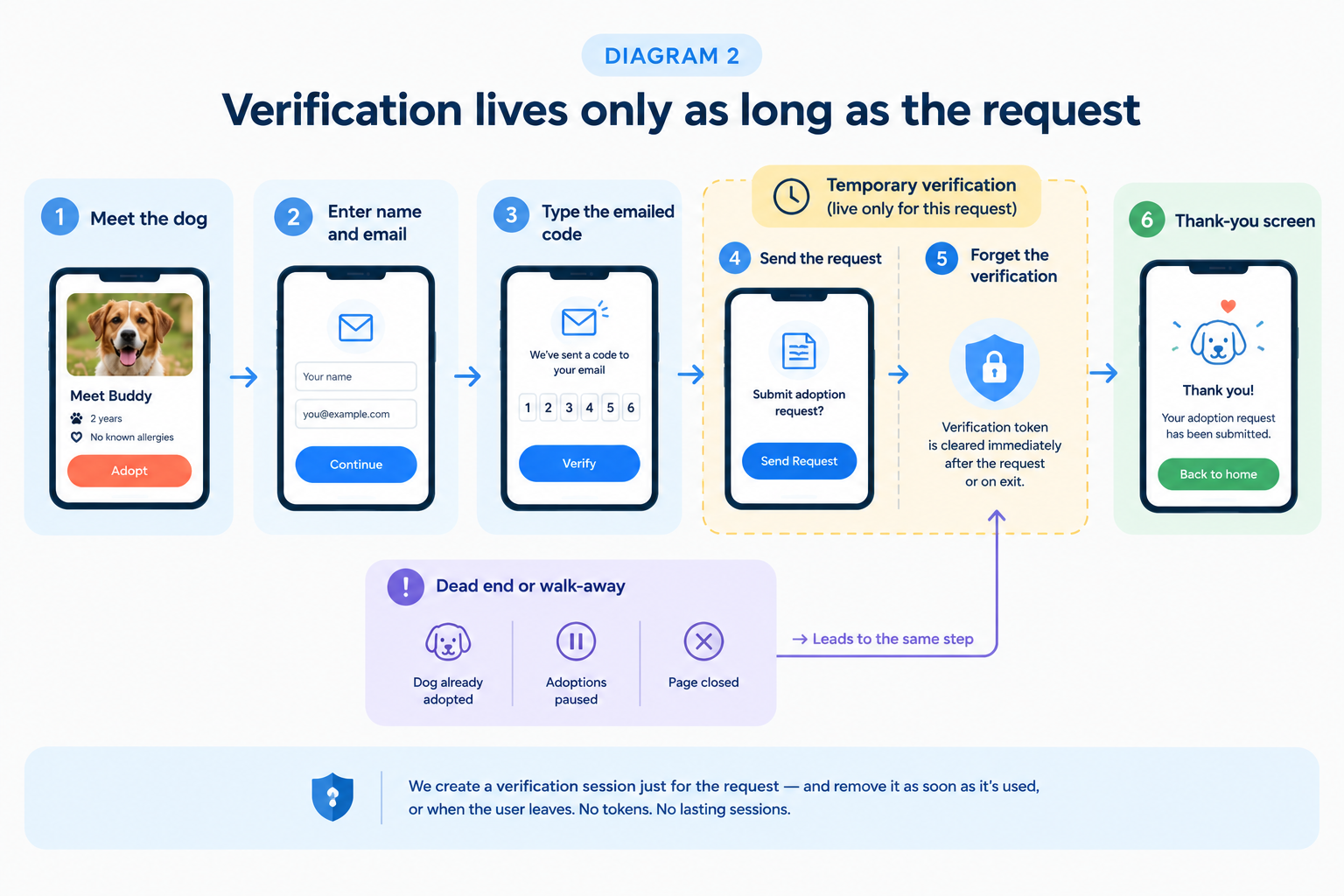
We needed to know an adoption request came from a real, reachable person, but we didn't want to give a one-time visitor an account they'd never use again. So the adopt step asks for a name and an email, sends a one-time code, and the visitor types it in. That's it: no password, no download.
What matters is how long that verification lives. We treat it like borrowing a pen at a front desk: pick it up late, put it back early, and put it back no matter how you leave.
- Nothing saved on the device. Adoption drives are full of shared and borrowed phones. Nothing the next person could reuse is left behind in the browser.
- Ended on every way out. The verification ends when the request is sent. It also ends when the request can't be sent (the dog was just adopted, or the shelter paused adoptions), and when the visitor simply closes the page.
- Who's asking comes from the verification, not the form. A request is tied to the email that was actually confirmed, so nobody can file one in someone else's name.
The "simply closes the page" case is the one that's easy to forget. It's also the most common way people leave, so it got the same care as the happy path.
- Sorting errors by what the visitor can do next
There are many ways this short flow can fail: a mistyped code, an expired one, too many attempts, a patchy connection, a dog that just found a home, a shelter that has paused adoptions. Pages that react to each technical failure one by one get messy fast.
So we turned it around. Every failure is sorted by the one thing that matters to the visitor: what can I do now?
- Try again: nothing you did was wrong, so one tap retries.
- Fix what you typed: the message appears right next to the field.
- Get a fresh code: the old one is no longer valid, so start that step again.
- Stop here: there's nothing more to do, and a friendly screen explains why.
Two failures that look identical from a technical point of view can need completely different screens. "Someone else adopted this dog" and "the shelter has paused adoptions" are different moments for a visitor, so they get different messages. Asking twice for the same dog isn't treated as a failure at all. The visitor just sees "Request already sent".
We applied the same restraint to measurement. We follow the adoption journey step by step to learn where people hesitate, but the adopter's name and email are never part of that tracking.
RESULTS
The same printed disc now carries a dog from shelter to sofa without being reprinted. Before adoption, a scan introduces the dog to a potential family. After adoption, the same scan helps bring the dog home if it ever wanders off.
What changed:
- One code, every stage. Setup, adoption and lost-pet experiences all come from one answer. The visitor's phone never has to guess.
- Adopting takes a name, an email and a code. There's no account, password or app needed to raise your hand.
- Nothing left behind. Verification ends on success, on a dead end and when someone just walks away, so a borrowed phone keeps nothing.
- Private by default. A stranger sees only what a dog waiting for a home needs to share.
- Problems caught early. Testing the full journey end to end surfaced a verification mistake before any real visitor could hit it.
The experience is in final review before it reaches our first partner shelters, so we don't have adoption numbers to share yet. Step-by-step journey tracking is already in place to show us where people drop off once it's live.
KEY TAKEAWAYS
- When something printed can't change, let the meaning live somewhere that can. A fixed code plus a live answer about its stage means a new chapter in the dog's life is an update, not a reprint.
- Ask a small question first. Learn the stage, then fetch only the details that stage is allowed to show.
- Tie actions to stages, not to page visits. Alerts belong to "has a family", and new stages can't fire them by accident.
- Treat races as normal. When answers disagree, ask again and show a kind message instead of patching things on the screen.
- Scope trust to one action. Verify late, end it early, and end it on every exit, including the quiet ones.
- Sort errors by what the user can do next. People don't need the reason something failed. They need to know their next step.
ABOUT HOOMANELY
Hoomanely builds technology that helps people take better care of their pets: smart pet tags, health records and the EverWiz app, all centred on one complete picture of each pet. Our aim is to make every pet's health and safety easier to understand and act on, for the people who love them.
Shelter adoption takes that picture back to the start of a dog's story. A shelter dog's records, photos and tag go home with it, so a new family doesn't start from a blank page. The tag a volunteer clipped on at the shelter becomes the one that brings the dog home if it's ever lost. Every adoption a scan helps along is one more dog with a family, and a health history that follows it.