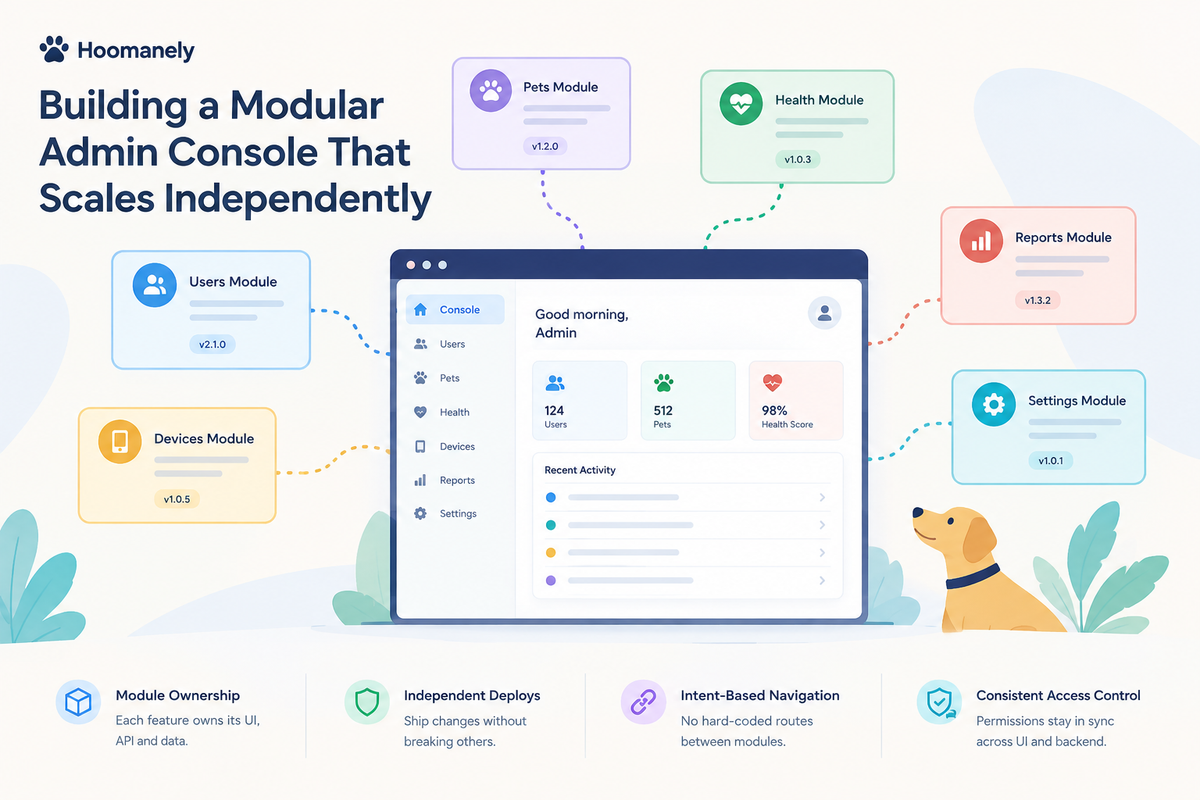
Building a Modular Admin Console That Scales Independently
Every product company ends up with two applications. One is the product customers see. The other is the internal console where operations, support and ML teams calibrate devices, review flagged content, inspect a customer's setup and approve batch jobs.
The first gets the design reviews. The second gets whatever is left. It usually starts as one repository with a page per backend feature. A year later it's the most coupled codebase in the company. Every backend change has a twin pull request in the console, every new feature waits on the console team, and nobody quite owns access control.
We're rebuilding our internal console on a different premise: the console shell should not know that any feature exists. Each backend module owns its own admin screens, the same way it owns its data. This post covers how that works, and the three problems it forced us to solve: discovery, cross-module navigation, and deploys that don't break open tabs.
THE PROBLEM: THE CONSOLE WAS A SECOND BACKEND
In a typical setup, adding an admin screen for a new backend module looks like this:
- Add admin endpoints to the backend.
- Open the console repository and add a page, a route and a menu item.
- Add a permission check in the console, and hope it matches the backend.
- Deploy both, in the right order.
Each step creates a coupling. The console holds a hard-coded list of features. Its permission logic drifts from the backend's. A renamed field breaks a screen that lives in another repository. And because the console can read across all modules, it slowly turns into the place where cross-module business logic hides.
Our backend is already organised as modules with strict seams. Each module owns its data, and other modules reach it only through a published interface. The console was the one place that ignored those seams. We wanted it to follow the same rules.
THE APPROACH: MODULES OWN THEIR SCREENS; THE SHELL ONLY HOSTS THEM
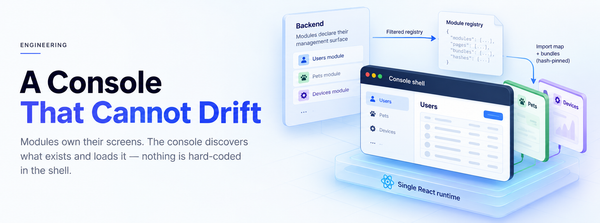
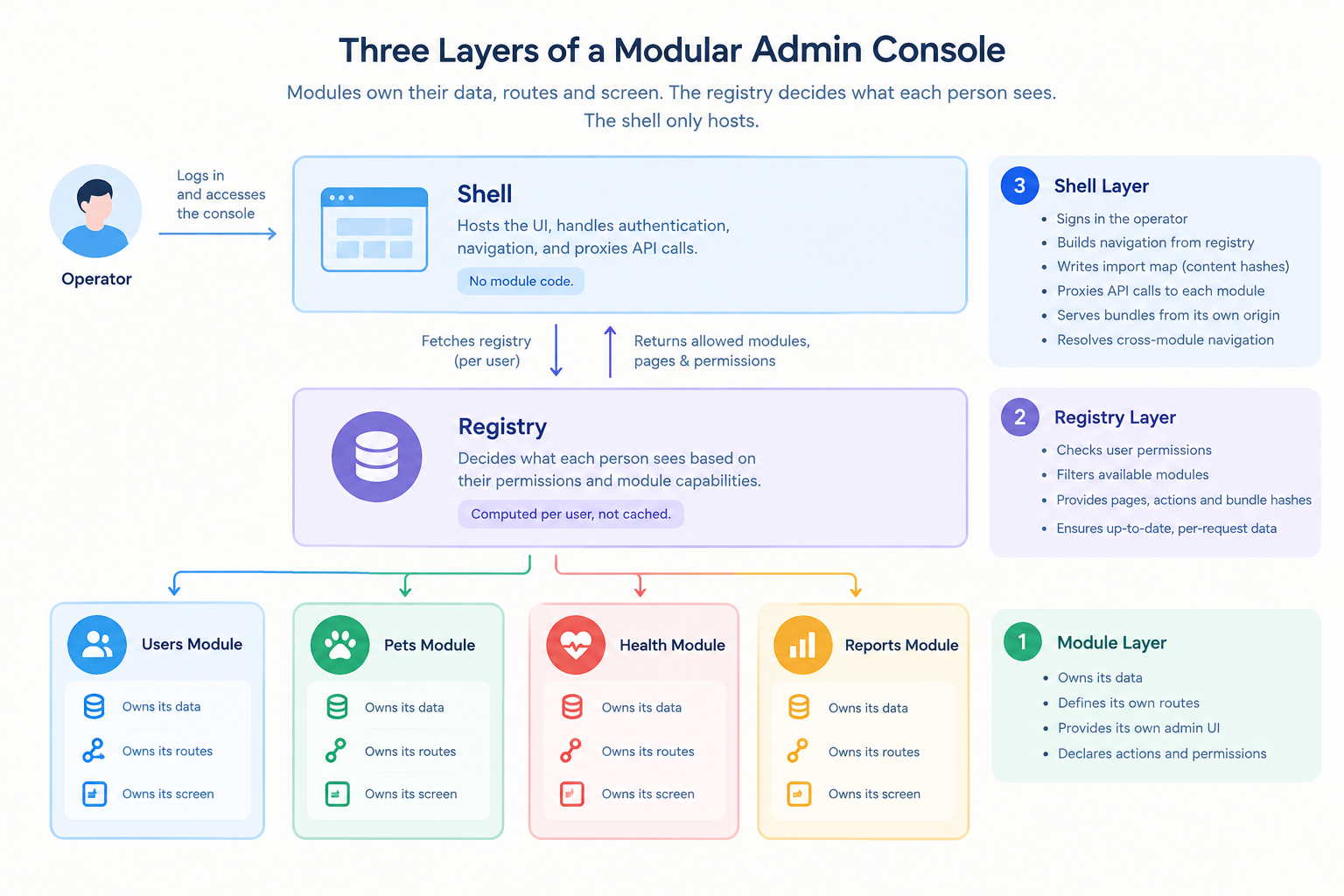
The design rests on one rule: a module owns its data, its management routes and its screen. The shell knows no module by name.
In practice, a module now carries one more file next to its service and repository: a declaration of its management surface. That covers which console section it belongs to, its pages, and the actions an operator can take, each tied to an operation (create, read, update, delete) and optional flags such as "touches personal data" or "exports data".
# Simplified illustration
MANAGEMENT = ManagementSpec(
group="customers",
label="Pets",
pages=(
PageSpec(id="pets", path="pets", nav=PRIMARY, requires=("pets.view",)),
PageSpec(id="pet", path="pets/:pet_id", nav=NONE, parent="pets",
handles=(Handle(VIEW, type="pet.pet", params={"pet_id": "id"}),)),
),
actions=(Action("pets.view", op=READ),),
)
The module's admin routes live in the same file, and each route must name a declared action. The module's screen lives in a ui/ folder next to it, as an ordinary React app. A module with nothing to manage yet must say so explicitly and give a reason. Saying nothing fails the build.
The backend then serves a single registry endpoint. For the signed-in operator, it lists only the modules they hold at least one action on, along with each module's pages, held actions and the content hash of its screen bundle. The registry is computed per person and per request, and it is never shared-cached: a stale copy would mean a stale menu and stale permissions.
The shell, for its part, does six things:
• signs the operator in and holds the session on the server
• builds the navigation from the registry
• writes an import map that pins every bundle to its hash
• proxies API calls, each screen to its own module only
• serves bundles from its own origin
• resolves cross-module navigation (more below)
It contains no module code. The test of the design is that searching the shell's source for any module name finds nothing.
THE PROCESS: THREE PROBLEMS THAT MADE IT REAL
- One React, isolated screens
Each module's screen is built into one ES module, named by its content hash. React and a shared UI kit are marked external, and the import map points them at a single shared runtime. The build fails if React internals show up in a module's output, so a page never runs two copies of React by accident.
Each screen gets a small lifecycle (mount, update, unmount) and an SDK. That SDK's API client is pinned to the screen's own module, and the server-side proxy refuses any other module's prefix. A screen physically cannot call another module's admin API.
CSS gets the same treatment. The build wraps each module's stylesheet in a cascade layer and an @scope tied to the screen's mount root. A module's rule can't outrank the shell's layout, however specific it is, and can't style anything outside its own area. Global selectors such as :root, body and * are rejected at build time.
One detail we like: the shell and the module screens run different major versions of React. That's fine, because they never share a tree. The shell hands a bare DOM element to mount, and the screen never passes React elements back. The shell's framework and the module runtime can be upgraded independently.
- Cross-module navigation without coupling
The Users screen needs a "Pets" button. The obvious implementation, linking to /pets/owner/123, quietly couples Users to the Pets module's URL structure.
Instead, screens send intents. A screen asks the shell for an outcome on an entity. It names the entity type, never a module or a path:
sdk.open({ action: "view", type: "user.pets", id: user.id });
The Pets module declares on one of its pages that it handles view for user.pets. That declaration rides along in the registry. The shell keeps a small table from entity type to page, fills in the path parameters from the id, and mounts the target exactly as if the operator had clicked its own menu.
It's the operating-system model: processes don't call into each other's memory. They send an intent, and the OS decides who handles it.
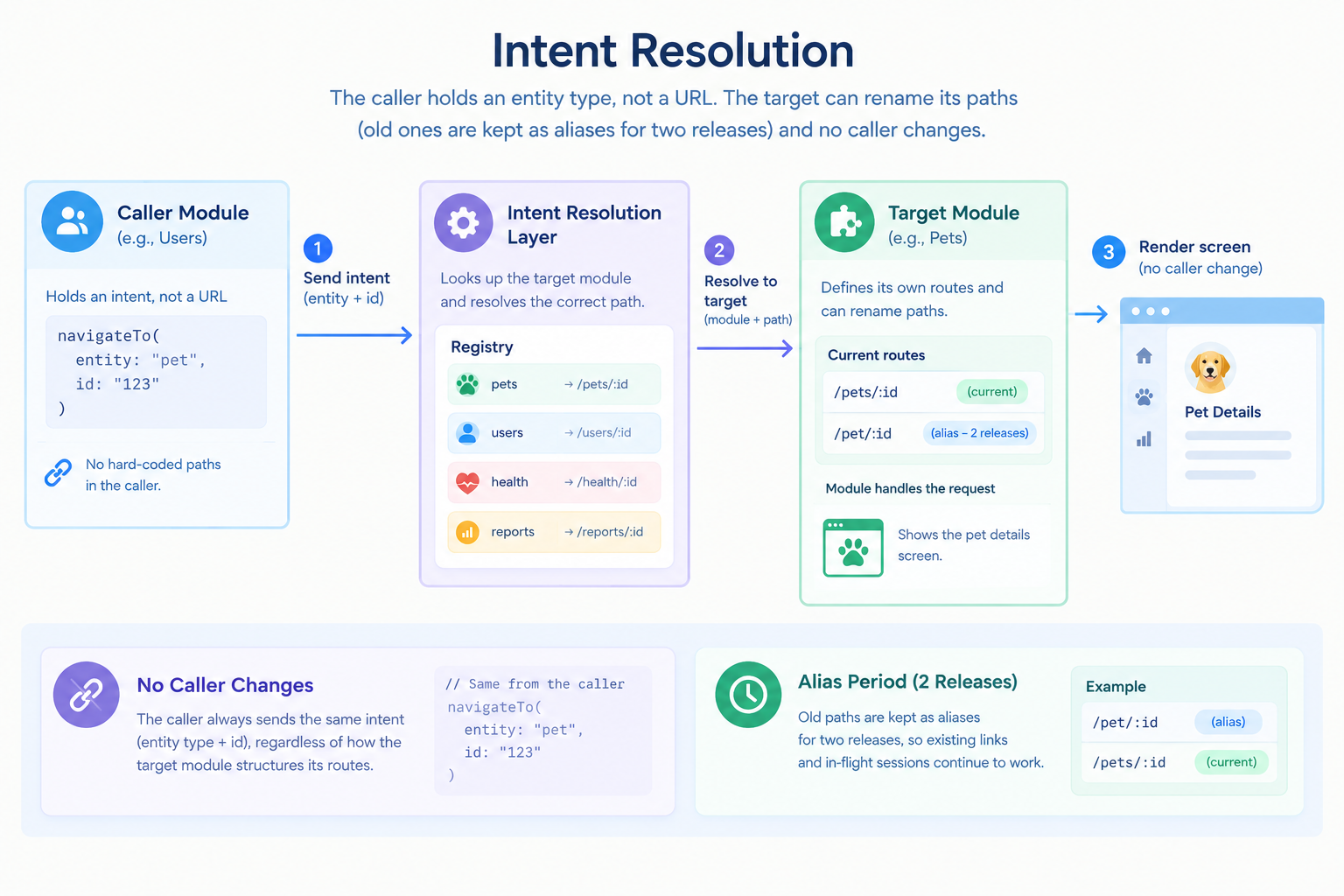
There are two useful side effects. If no module handles the type, or the operator has no access to the module that does, the shell shows "Not available", and the caller can't tell which of the two it was. The shell also passes only the id, never a record, so the target loads its own data through its own routes, and its own permission check applies no matter who asked.
On the backend, the same rule holds through contracts. The Pets module needs the pet ids that live on a user record. It doesn't read the users table. It asks the Users module's published interface, which decides what other modules may know about a user.
- Deploys that don't break open tabs
Console tabs stay open for hours. Because bundles are content-hashed, every deploy changes their paths. So a tab opened before a deploy can ask for a bundle that the new release no longer has:
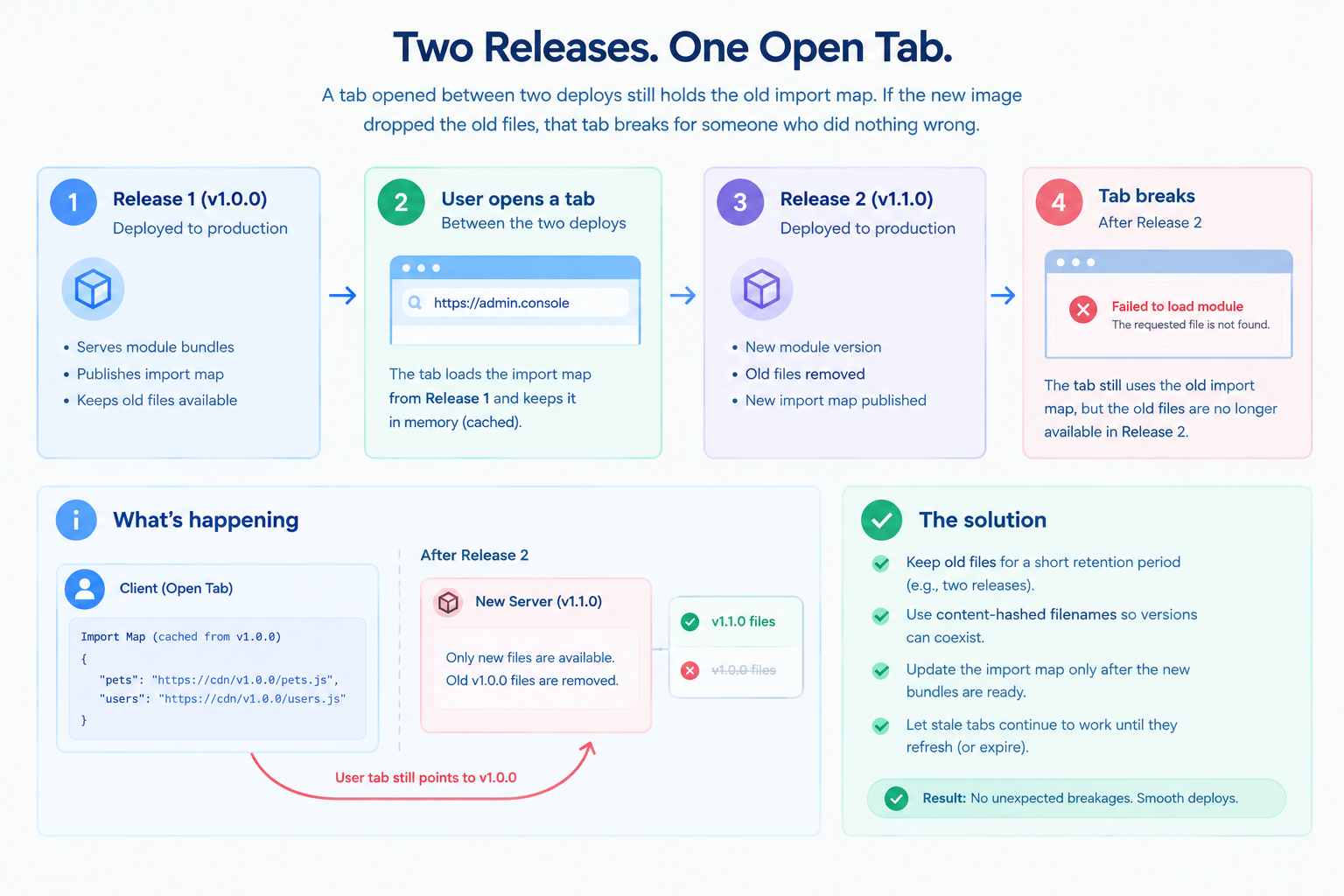
The fix is three layers deep:
• The build retains instead of wiping. It keeps every file the previous manifest named and deletes only anything older. The image grows by exactly one release's bundles, never by history.
• CI seeds the previous release. A fresh checkout has no bundles, so before building the image, CI copies the bundle folder out of the image that's currently live.
• The shell heals the rest. If an import still fails (a tab older than two releases, or a hash mismatch), the shell refreshes the registry once, gets a new import map and retries. Only if that also fails does the operator see "This screen couldn't load" with a Retry button.
The API has the matching problem: a module's routes change while an old screen is still open. Each module declares an API version, and the screen sends it on every call. A mismatch gets a specific "stale screen" response, and the shell treats it as "reload this screen", never as data. A contract test pins each module's admin API surface. If the routes change without a version bump, the gate fails, so nobody can forget the bump.
RESULTS SO FAR
We want to be precise about where this stands. We built a proof of concept against this design and ran it end to end:
• operator sign-in
• navigation built entirely from the registry
• three modules
• cross-module navigation from a user to their pets to a single pet
• permission checks enforced by the backend
• API versioning
• bundle retention
Two checks mattered most to us. A new module appeared in the console with no change to the shell. And a tab opened before a rebuild kept working after it.
Then we deliberately threw the prototype away. Building it turned up a dozen decisions the prototype had made by accident: navigation by path, a session token stored in a cookie, a shortcut around our data-access layer for legacy tables. Each one was settled explicitly in a decision log, and the production build starts from the written specification rather than from prototype code. Every rule in that specification has an automated check behind it or is listed as not yet enforced. Nothing is enforced only by convention.
We don't have production metrics yet, and we won't invent them. The claim we can make today is structural: in this design, adding a console screen is a change to the module that owns the data, shipped with that module's own deploy.
TAKEAWAYS
- Put admin screens where the data lives. The module that owns the data should own its management routes and screen. The console becomes a host, not a second backend.
- Use a per-person registry, not a hard-coded menu. One endpoint that lists exactly what this operator may do keeps the UI and the backend permission check from drifting apart.
- Navigate by intent, not by URL. Naming an entity type instead of a path lets each module own its routes and keeps permission checks at the target.
- Content-hash everything, and keep one release back. Hashed bundles make caching safe. Retaining the previous release keeps open tabs working through deploys.
- Prototype to learn, then delete it. A prototype's real output is the decisions it forces you to make, not its code.
ABOUT HOOMANELY
Hoomanely builds technology that helps pet parents understand and care for their pets' health, through connected devices, on-device intelligence and a companion app. Behind that experience, our operations, support and ML teams run devices, models and content every day. A console where every module owns its own admin surface lets each team ship operator tooling as fast as it ships features. The same design keeps strict control over who can see a household's data: access is denied by default, checked by the backend on every call, and audited. As the platform grows, internal tooling grows with it instead of falling behind.