How Flutter Talks to iOS & Android:

A Deep Dive into Method Channels & Native Integration
Introduction
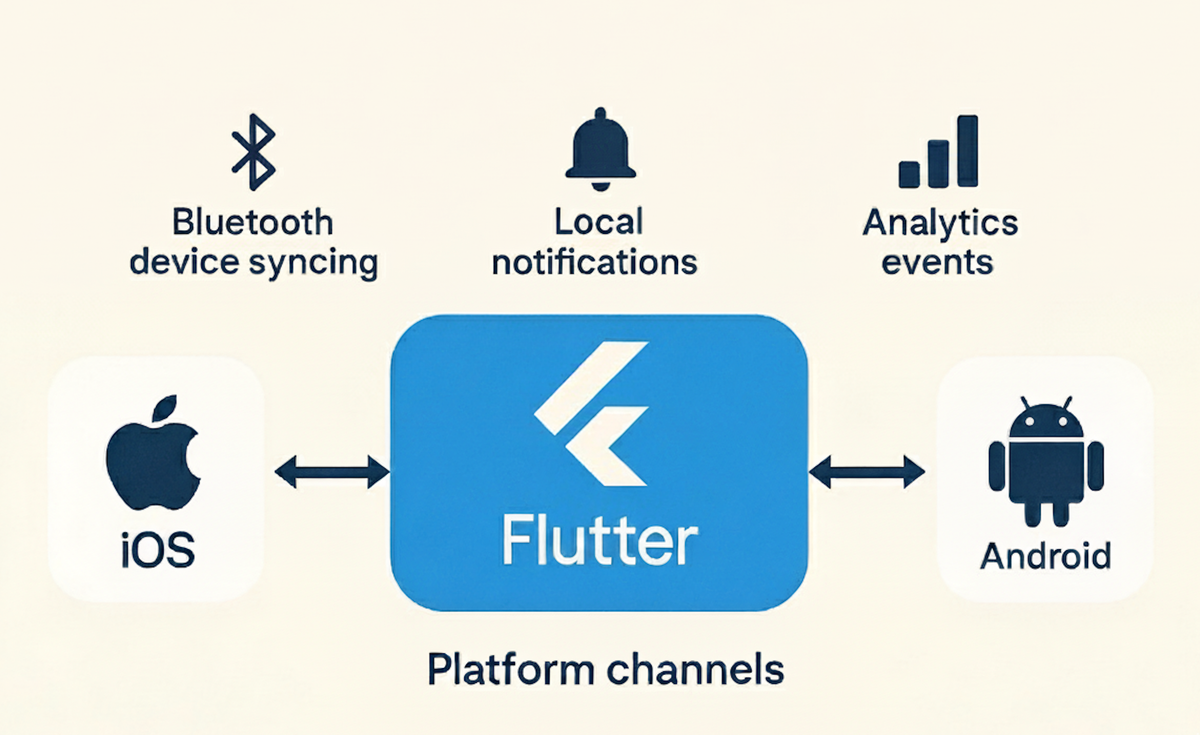
Flutter makes UI development fast and easy. But as soon as you need platform features — like Bluetooth, background tasks, secure storage, sensors, notifications, or camera APIs — one question becomes important:
"How does Flutter communicate with the native side?"
This is where Flutter's engine, platform channels, MethodChannels, EventChannels, Pigeon, FFI, and Platform Views come in. Understanding these is essential not just for plugin authors but for any serious Flutter product, where you continuously integrate native SDKs, hardware devices, analytics frameworks, and OS-level capabilities.
In this blog, we break everything down clearly:
- How Flutter's engine works internally
- How the Dart runtime communicates with Swift/Kotlin
- When to use MethodChannel, EventChannel, or FFI
How Platform Channels Work Internally
Flutter’s architecture:
- Flutter Framework (Dart): Widgets, state, UI code
- Flutter Engine (C++): Skia graphics, Dart VM, message channels
- Embedding Layer (Swift/ObjC/iOS, Kotlin/Java/Android): Connects engine to OS APIs
Flutter encodes each Dart-to-native call as a binary message, delivers it to the corresponding OS thread, and decodes the result back. For best results, offload intensive native work to background threads—use DispatchQueue.global() (Swift) and Dispatchers.IO (Kotlin). Never block main/UI threads in either layer.
Three Core Communication Models
| Channel Type | When to Use | Example Feature |
|---|---|---|
| MethodChannel | Call one function, await result | Battery, file picker, SDK call |
| EventChannel | Native source emits stream of events | BLE sensor, location |
| BasicMessageChannel | Custom, bidirectional raw messaging | Chat, JSON, custom protocol |
MethodChannel: Robust Request & Response
It is the most commonly used platform channel in Flutter — and for good reason. It provides a simple, reliable request–response model between Dart and native code. Think of it as Flutter’s equivalent of making a function call on the other side of the bridge.
- Example for one-off Dart-to-native (and native-to-Dart) method calls.
- Triggering a native SDK method
- Synchronous or async tasks
How does it work?
- Dart sends a message with:
- channel name
- method name
- optional arguments
- Native code receives the message through the handler
- Native runs the requested functionality
- Native returns a value (or error) to Dart
Dart Implementation
import 'package:flutter/services.dart';

class BatteryService {
  static const MethodChannel _channel =
      MethodChannel('com.mycompany.native/battery');

  Future<int?> getBatteryLevel() async {
    try {
      final int? level = await _channel.invokeMethod<int>('getBatteryLevel');
      return level;
    } on PlatformException catch (e) {
      debugPrint('Native error: ${e.message}');
      return null;
    }
  }
}
Kotlin Implementation
// MainActivity.kt
class MainActivity : FlutterActivity() {
    private val CHANNEL = "com.mycompany.native/battery"

    override fun configureFlutterEngine(flutterEngine: FlutterEngine) {
        MethodChannel(flutterEngine.dartExecutor.binaryMessenger, CHANNEL)
            .setMethodCallHandler { call, result ->
                when (call.method) {
                    "getBatteryLevel" -> {
                        CoroutineScope(Dispatchers.IO).launch {
                            val batteryLevel = getBatteryLevel()
                            withContext(Dispatchers.Main) {
                                result.success(batteryLevel)
                            }
                        }
                    }
                    else -> result.notImplemented()
                }
            }
    }

    private fun getBatteryLevel(): Int {
        val manager = getSystemService(Context.BATTERY_SERVICE) as BatteryManager
        return manager.getIntProperty(BatteryManager.BATTERY_PROPERTY_CAPACITY)
    }
}
Swift Implementation
// AppDelegate.swift
import UIKit
import Flutter

@UIApplicationMain
@objc class AppDelegate: FlutterAppDelegate {
    override func application(_ application: UIApplication,
                             didFinishLaunchingWithOptions launchOptions: [UIApplication.LaunchOptionsKey: Any]?) -> Bool {
        let controller = window?.rootViewController as! FlutterViewController
        let channel = FlutterMethodChannel(name: "com.mycompany.native/battery",
                                           binaryMessenger: controller.binaryMessenger)
        channel.setMethodCallHandler { call, result in
            switch call.method {
            case "getBatteryLevel":
                DispatchQueue.global().async {
                    let level = self.fetchBatteryLevel()
                    DispatchQueue.main.async {
                        result(level)
                    }
                }
            default:
                result(FlutterMethodNotImplemented)
            }
        }
        return super.application(application, didFinishLaunchingWithOptions: launchOptions)
    }

    private func fetchBatteryLevel() -> Int {
        let device = UIDevice.current
        device.isBatteryMonitoringEnabled = true
        guard device.batteryState != .unknown else { return -1 }
        return Int(device.batteryLevel * 100)
    }
}
EventChannel: Efficient Streaming
It is designed specifically for continuous streams of data coming from the native side into Flutter.
It shines when the native platform needs to push updates repeatedly — without Dart asking every time.
It follows a publisher–subscriber pattern:
- Native side = publisher of events
- Dart side = listener/subscriber
Once the stream starts, Flutter receives updates as they happen, with minimal overhead.
- Recommended for continuous sensor data, notifications, and any scenario where the native layer pushes updates.
Dart Implementation
class LocationService {
  static const EventChannel _eventChannel =
      EventChannel('com.mycompany.native/location');

  Stream<Map<String, double>> get locationStream =>
      _eventChannel.receiveBroadcastStream().map(
          (event) => Map<String, double>.from(event as Map));
}
Kotlin Implementation
// Location streaming with coroutines
EventChannel(flutterEngine.dartExecutor.binaryMessenger, "com.mycompany.native/location")
  .setStreamHandler(object : EventChannel.StreamHandler {
      private var locationManager: LocationManager? = null
      private var locationListener: LocationListener? = null

      override fun onListen(arguments: Any?, events: EventChannel.EventSink) {
          locationManager = getSystemService(Context.LOCATION_SERVICE) as LocationManager
          locationListener = LocationListener { location ->
              CoroutineScope(Dispatchers.IO).launch {
                  val data = mapOf("latitude" to location.latitude, "longitude" to location.longitude)
                  withContext(Dispatchers.Main) { events.success(data) }
              }
          }
          locationManager?.requestLocationUpdates(
              LocationManager.GPS_PROVIDER, 1000L, 10f, locationListener!!
          )
      }
      override fun onCancel(arguments: Any?) {
          locationManager?.removeUpdates(locationListener!!)
          locationManager = null
          locationListener = null
      }
  })
Swift Implementation
// LocationStreamHandler.swift
import CoreLocation

class LocationStreamHandler: NSObject, FlutterStreamHandler, CLLocationManagerDelegate {
    private var locationManager: CLLocationManager?
    private var eventSink: FlutterEventSink?

    func onListen(withArguments arguments: Any?, eventSink events: @escaping FlutterEventSink) -> FlutterError? {
        self.eventSink = events
        locationManager = CLLocationManager()
        locationManager?.delegate = self
        locationManager?.requestWhenInUseAuthorization()
        locationManager?.startUpdatingLocation()
        return nil
    }

    func onCancel(withArguments arguments: Any?) -> FlutterError? {
        locationManager?.stopUpdatingLocation()
        locationManager = nil
        eventSink = nil
        return nil
    }

    func locationManager(_ manager: CLLocationManager, didUpdateLocations locations: [CLLocation]) {
        if let location = locations.last {
            let data: [String: Double] = [
                "latitude": location.coordinate.latitude,
                "longitude": location.coordinate.longitude
            ]
            eventSink?(data)
        }
    }
}
Register your stream handler in AppDelegate using:
let locationChannel = FlutterEventChannel(name: "com.mycompany.native/location", binaryMessenger: controller.binaryMessenger)
locationChannel.setStreamHandler(LocationStreamHandler())
BasicMessageChannel: Custom Protocols
Use when you need a raw pipe for JSON, custom protocols, large payloads, or specialized bidirectional messaging.
static const messageChannel = BasicMessageChannel<String>(
  'com.mycompany.native/messages', StringCodec());

await messageChannel.send('Hello from Dart');
messageChannel.setMessageHandler((msg) async => 'Hi from Dart');
Advanced Alternatives FFI (Foreign Function Interface)
Perfect for calling C/C++/Rust libraries directly for ML, graphics, encryption, or very large data processing (10-25× faster than channels).
import 'dart:ffi';
import 'dart:io';

final DynamicLibrary lib = Platform.isAndroid
    ? DynamicLibrary.open('libnative.so')
    : DynamicLibrary.process();

typedef NativeAdd = Int32 Function(Int32 a, Int32 b);
typedef DartAdd = int Function(int a, int b);
final add = lib.lookupFunction<NativeAdd, DartAdd>('native_add');
final sum = add(5, 3);
Platform Views
For true native UI embedding (maps, camera, webviews).
AndroidView(
  viewType: 'com.mycompany/webview',
  creationParams: {'url': 'https://example.com'},
  creationParamsCodec: StandardMessageCodec(),
)
UiKitView(
  viewType: 'com.mycompany/webview',
  creationParams: {'url': 'https://example.com'},
  creationParamsCodec: StandardMessageCodec(),
)
Pigeon
Type-safe auto-generation of platform channel code, reducing manual serialization mistakes—highly recommended for large-scale apps.
// pigeon/messages.dart
import 'package:pigeon/pigeon.dart';

class BatteryState {
  int? level;
  bool? isCharging;
}

@HostApi()
abstract class BatteryApi {
  BatteryState getBatteryState();
  void startCharging();
  void stopCharging();
}
After running Pigeon, you implement platform-specific stubs in Kotlin and Swift.
Structuring Large Apps
Adopt a modular codebase structure:
  platform/
    battery/
      battery_platform.dart          # Abstract interface
      battery_method_channel.dart    # MethodChannel implementation
      battery_mock.dart              # Unit test mock implementation
    notifications/
      notification_platform.dart
      notification_method_channel.dart
    bluetooth/
      bluetooth_platform.dart
      bluetooth_event_channel.dart

ios/
  Runner/
    Platform/
      Battery/
        BatteryManager.swift
      Notifications/
        NotificationManager.swift

android/
  app/src/main/kotlin/
    platform/
      battery/
        BatteryManager.kt
      notifications/
        NotificationManager.kt
Every feature has an abstract interface, a channel-based implementation, and mocks for testing. Native folders mirror the Dart structure for clarity and ease of onboarding.
Best Practices for Production
- Use clear, namespaced channel names:
com.mycompany.native/battery - Keep one channel per domain/module—not one global channel
- Never block the Dart UI or OS main thread
- Validate all method names and return types on the native side—handle “not implemented” explicitly
- Batch messages for performance, but keep each payload small; use FFI if streaming or processing huge data
- Request and manage all device permissions natively
- Always log channel traffic for debugging
- Clean up EventChannel subscriptions (avoid leaks)
Common Pitfalls
- Calling channels inside the widget
build()methods (unintended repeat calls) - Not handling nulls or exceptions on both sides
- Failing to move long-running native tasks to a background thread
- Forgetting to clean up EventChannel listeners in the state lifecycle
- Neglecting necessary OS permissions before calling native services
- Creating new channel instances unnecessarily—reuse for efficiency
Debugging
- Instrument both Dart and native handlers with debug logs for method calls, arguments, and results
- Use Xcode console and Logcat on devices—add meaningful log tags
- Use Flutter DevTools to inspect channel communication and isolate message flows for troubleshooting
Hoomanely Context: Why This Matters to Us
For Hoomanely, native integration is not optional — it’s what powers some of our most meaningful product experiences. Our Bluetooth channel for device connection, our analytics stack leverages native SDKs to capture precise behavioral data. Platform channels enable Flutter to orchestrate all of this without compromising performance or accuracy.
Key Takeaways
- Flutter needs native integration for Bluetooth, notifications, analytics, sensors, and platform APIs.
- Platform Channels are the bridge between Dart and native code.
- MethodChannel = request/response; EventChannel = streams; BasicMessageChannel = raw messaging..
- On the native side, you only register the MethodChannel and handle incoming calls.
- Use FFI for heavy, performance-critical operations instead of MethodChannels.
- Pigeon provides type-safe, auto-generated native interfaces.
- Use Platform Views when embedding native UI widgets.