
Image Size Budgets in Embedded Systems: Pruning, Stripping & Compression for Efficient Edge Imaging

In modern imaging pipelines especially those running on edge devices every byte matters.
When an embedded system captures images, those images must travel through limited memory, constrained communication buses, and strict power budgets. Large image payloads degrade system performance, slow down recovery pipelines, and create unpredictable behavior.
To keep imaging fast and predictable, we define image size budgets.
Image size budgeting is the practice of controlling how large an image is allowed to be across its lifecycle from capture to transmission to storage. At Hoomanely, while building our AI-powered smart pet bowl with an camera sensor, we learned this lesson the hard way.
Our initial implementation captured maximum resolution images and attempted to transmit them to an edge device for ML inference. The result? Multi-second transmission times.
Achieving efficient imaging requires three complementary strategies applied sequentially:
- Pruning – minimize what you capture
- Stripping – remove what you don't need
- Compression – encode what remains efficiently
This post explains these techniques, when to apply them, and the architectural thinking behind building predictable imaging systems.
The Problem: The Hidden Cost of Uncontrolled Images
In resource-constrained systems, raw unoptimized images lead to:
- Longer transfer and sync times: Minutes instead of milliseconds
- Unpredictable memory consumption: Exhausting available storage unpredictably
- Reduced throughput in recovery pipelines: Bus congestion blocks critical sensor data
- Increased latency on transmission pathways: Delays prevent real-time inference
The most effective architectures follow this sequence:
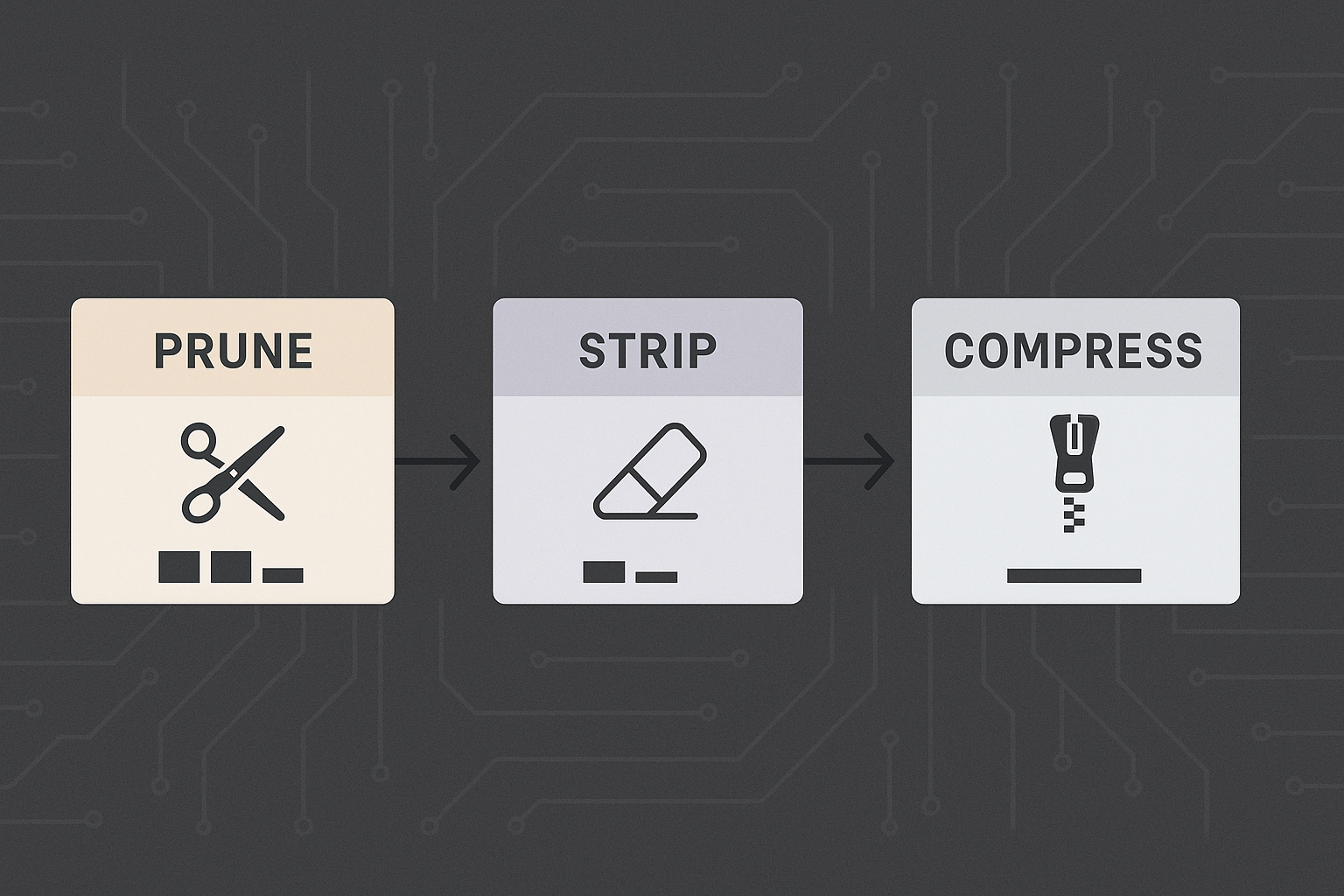
Each stage reduces payload before the next process touches it, enabling predictable latency, controlled memory usage, and efficient recovery pipelines.
1. Pruning - Reduce What You Capture
Pruning removes unnecessary image data before encoding or transmission.
Instead of capturing, storing, or transmitting the entire image frame, pruning forces the system to define what portion is actually useful for the task at hand.
Why Pruning Comes First
The camera sensor can capture at maximum resolution, but not all tasks require that level of detail. Different contexts need different amounts of visual information:
- Some tasks benefit from richer detail and color information
- Others work effectively with reduced resolution
- Certain analyses only need grayscale data
- Many scenarios require just a portion of the frame
Typical Pruning Operations
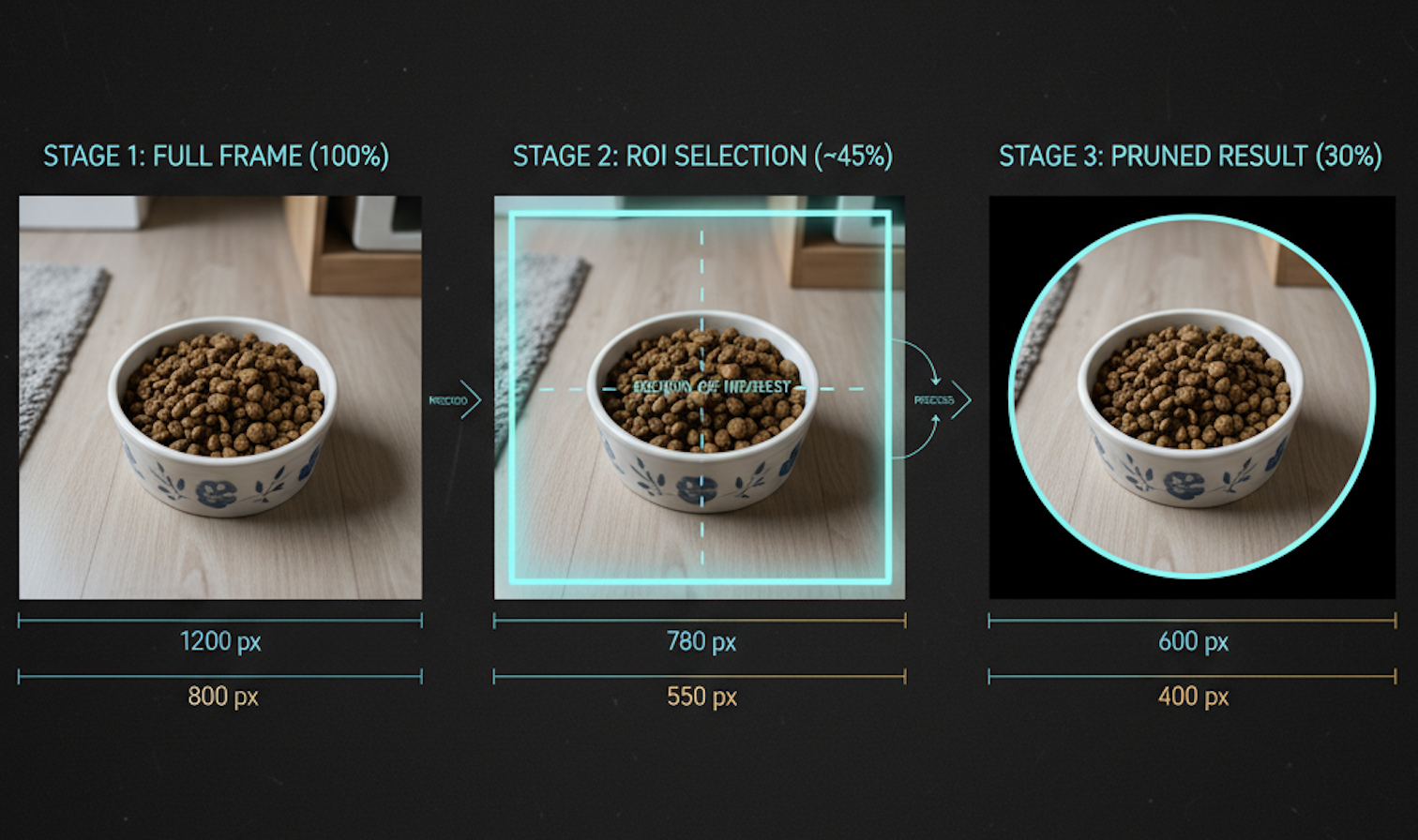
Resolution reduction: Configure the sensor to capture only what's needed. Maximum resolution looks impressive but wastes transmission bandwidth.
Region of Interest (ROI) cropping: Our bowl occupies a fixed position in the frame. Why transmit the surrounding environment? Crop to just the bowl area.
Color space conversion: RGB provides full color information, but water level detection works perfectly fine with grayscale, reducing data by one-third.
Channel elimination: Remove alpha channels or unused color components that don't contribute to inference accuracy.
The Key Principle
The cheapest byte is the byte never generated.
Pruning happens at capture time, where the cost of moving extra pixels is highest. Every pixel that doesn't get captured doesn't need to be stored, transmitted, or processed downstream.
2. Stripping - Remove What You Don't Need
After pruning reduces pixel count, the next step is eliminating non-pixel overhead.
Digital images carry hidden baggage that bloats file sizes without contributing to image quality or ML inference accuracy.
What Gets Stripped
EXIF metadata: Camera make and model, capture settings, timestamps, GPS coordinates, shutter speed, ISO values. Useful for photography, irrelevant for embedded vision systems.
Color profiles: ICC calibration data that ensures color accuracy across different displays. Edge devices performing inference don't render images for human viewing.
Sensor calibration data: The AR0144 embeds color correction matrices and lens shading correction data in captured frames. This helps image processing but isn't needed after initial processing.
Debug information: Thumbnails, sensor register dumps, frame counters. Valuable during development, wasteful in production.
The Critical Difference
| Aspect | Pruning | Stripping |
|---|---|---|
| Removes pixels? | Yes | No |
| Removes metadata? | No | Yes |
| Changes visual quality? | Yes, by design | No |
| When applied? | At capture | After capture |
Stripping preserves every pixel while eliminating ancillary data. The image looks identical but occupies less space.
Real-World Impact
Metadata overhead varies by sensor and configuration, but typically adds several kilobytes per frame. Over hundreds of daily captures, this compounds into megabytes of wasted storage and transmission bandwidth.
More importantly, stripping reduces transmission time. On bandwidth-constrained buses, every kilobyte saved frees capacity for other critical sensor data - weight sensors, temperature probes, proximity detectors.
Stripping reduces clutter, not clarity.
3. Compression - Make Remaining Data Efficient
After pruning pixels and stripping metadata, compression reduces the size of what remains.
Compression is where format selection matters — JPEG, PNG, WebP — but the fundamental rule is:
Compression should be applied only after pruning and stripping.
Compressing a full-resolution image with metadata is wasteful. Compress the lean, optimized payload instead.
Compression Types
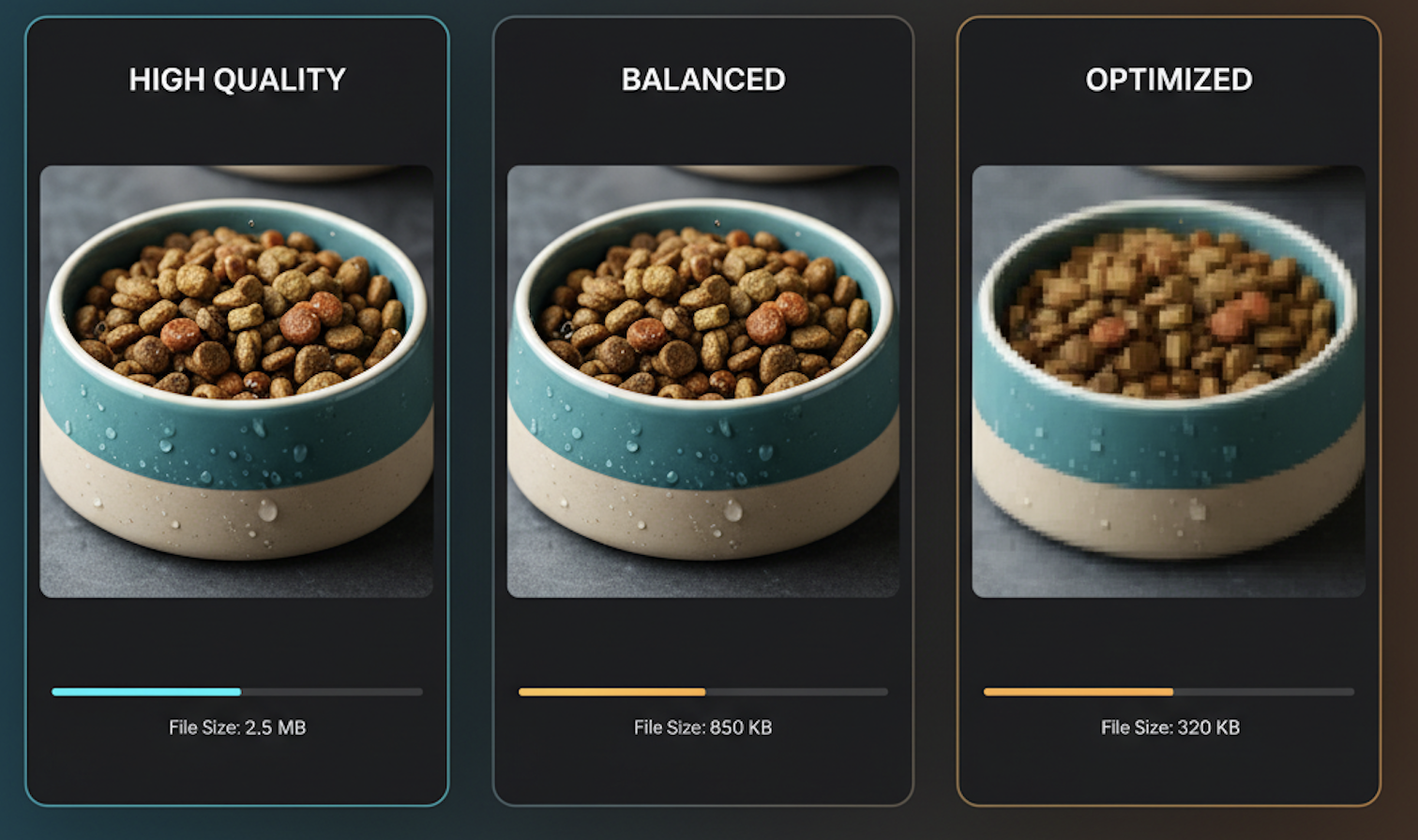
Lossless compression: Preserves every bit of information. Essential for debug builds, reproducibility, and exact comparisons. Larger file sizes but perfect reconstruction.
Lossy compression: Discards perceptually insignificant information to achieve dramatic size reduction. Ideal for transmission, bandwidth-constrained channels, and scenarios where perfect reconstruction isn't required.
Context-Aware Compression
Different use cases demand different compression strategies. The key is matching compression parameters to the task. Quality settings should be tuned dynamically based on available bandwidth, urgency, and inference requirements.
System Architecture Perspective
A predictable imaging pipeline follows this structure:
[ Image Capture ]
       ↓
[ Pruning Layer ]
   (Resolution, ROI, Color Space)
       ↓
[ Stripping Layer ]
   (Metadata Removal)
       ↓
[ Compression Layer ]
   (Format Encoding)
       ↓
[ Transmission ]
   (Bus, Network, Storage)
Each stage reduces payload size before the next process handles it. This architecture enables:
- Predictable latency: Known maximum transmission times
- Controlled memory usage: Bounded buffer requirements
- Efficient recovery pipelines: Smaller logs, faster sync
- Power optimization: Shorter transmission windows
- Bus efficiency: More bandwidth for other sensors
The Compounding Effect
Optimizations compound across stages. If pruning achieves a reduction factor, and stripping adds another reduction, and compression adds yet another — the final payload can be orders of magnitude smaller than the raw capture.
This isn't about clever tricks. It's about intentional engineering decisions made at each pipeline stage.
When to Use Which Technique
Use Pruning When:
- You don't need the entire scene captured
- Smaller dimensions are acceptable for your ML model
- Different contexts require different resolutions
- Real-time performance is critical
Use Stripping When:
- Pixel integrity must remain completely untouched
- Metadata offers no operational value to downstream systems
- You need guaranteed visual quality with smaller files
- Storage efficiency matters over long deployments
Use Compression When:
- Format compatibility is required (JPEG for web, etc.)
- Network bandwidth is the primary constraint
- You need a balance between quality and size
- Transmission time directly impacts user experience
Combining All Three:
The most effective pipelines use all three techniques sequentially. Prune first to eliminate unnecessary pixels. Strip second to remove overhead. Compress last to efficiently encode what remains.
Image optimization isn't about "shrinking images" - it's about preserving value while eliminating waste.
Results and Real-World Impact
After implementing this three-stage pipeline in Hoomanely's pet bowl system:
Performance Improvements
- Transmission time: Reduced from several seconds to under 200 milliseconds
- Bus utilization: Dropped from congested to healthy levels, freeing bandwidth
- Daily storage requirements: Decreased from hundreds of megabytes to single-digit megabytes
- Battery life: Nearly doubled due to shorter transmission windows
- Inference latency: Enabled true real-time pet monitoring
System Reliability
- Multi-pet households: Simultaneous bowl transmissions no longer cause collisions
- Real-time alerts: Pet owners receive feeding notifications instantly
- Consistent performance: Predictable latency regardless of network conditions
- Extended operation: All-day monitoring without recharging
Model Accuracy
Despite aggressive optimizations, ML model accuracy remained high. Minor accuracy losses were acceptable trade-offs for dramatically improved user experience and system performance.
The key insight: Most computer vision models don't need maximum resolution to perform well. Finding the minimum acceptable quality unlocks massive efficiency gains.
Efficient imaging pipelines allow our products to be faster, predictable, and smoother for end users. This is why exploring structured image size budgeting strategies - pruning, stripping, and compression becomes critical for any intelligent hardware system that captures visual data.
Conclusion
Image size budgets transform imaging systems from unpredictable to reliable. By applying pruning, stripping, and compression sequentially, we can build pipelines that respect memory constraints, transmission limitations, and power budgets while delivering high-quality results.
The lesson from building Hoomanely's pet monitoring system: constraints breed creativity. Limited bandwidth forced us to question every assumption. Limited power forced us to optimize every stage. Limited memory forced us to define what actually matters.
The result is a system that works reliably in real homes, monitors pets effectively, and provides peace of mind to owners all running on affordable, accessible hardware.
If you're building embedded vision systems, IoT devices, or edge ML applications: define your image size budget early. Embrace the constraints. Your users will thank you with every millisecond you save.



