JPEG Compression on a Microcontroller

From Raw Bayer to JPEG on STM32H5 in ~200ms
When a Camera Sensor Captures an Image
When a camera sensor captures an image, it does not directly produce a photograph. Instead, it generates a grid of raw intensity values arranged behind a color filter mosaic.
On a desktop system, converting this raw data into a JPEG image is relatively straightforward.
On a microcontroller with 42KB of heap, no hardware JPEG accelerator, and a tight timing budget of 200ms, the problem requires a different approach. Rather than optimizing individual steps, the entire pipeline needs to be designed with these constraints in mind.
Standard JPEG: A Quick Refresher
The JPEG compression standard assumes the input is already in RGB or YCbCr format.
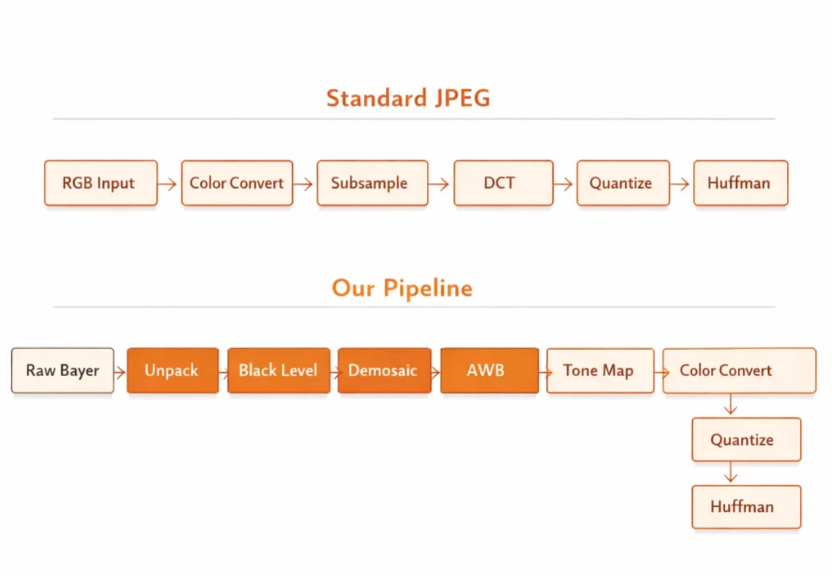
A typical pipeline includes:
- RGB to YCbCr conversion
- Chroma subsampling
- Splitting into 8×8 blocks (MCUs)
- Discrete Cosine Transform (DCT)
- Quantization
- Huffman encoding
Desktop implementations such as libjpeg rely on floating point operations, full image buffers, and relatively large memory availability.
In contrast, an STM32H5 based on an ARM Cortex-M33 at 250MHz operates under significantly tighter constraints.
Our Pipeline Starts Before JPEG
In this system, the input is not a processed image but raw sensor data.
The sensor provides 12-bit intensity values arranged in a GRGB Bayer pattern, where each pixel represents only a single color component.
To generate a JPEG image, it is necessary to perform several image signal processing steps in software before applying standard JPEG compression.
The overall pipeline is:
Raw Bayer → Unpack → Black Level → Demosaic → White Balance → Tone Map → Color Convert → DCT → Quantize → Huffman
Standard JPEG libraries are not designed to accept Bayer data, so the stages prior to encoding must be implemented separately. These stages are also structured to operate within a 200ms processing window for a 640×400 frame.
Stage 1: Unpacking 12-bit Sensor Data
The sensor outputs 12-bit values stored in 16-bit containers, aligned to the most significant bits.
This format allows unpacking to be handled efficiently using a direct memory copy.
Alternative packed formats, such as tightly packed 10-bit or 12-bit layouts, require bit-level extraction and introduce additional overhead. Selecting an appropriate sensor output format helps avoid this cost.
Stage 2: Black Level Subtraction
Image sensors typically report a non-zero value even in the absence of light. This offset, known as the optical black level, needs to be removed before further processing.
On the Cortex-M33, the USUB16 DSP instruction can be used to process two 16-bit pixels simultaneously.
By packing pixel values into a 32-bit register, subtraction can be applied in parallel, reducing the number of instructions required per row.
Stage 3: Demosaicing
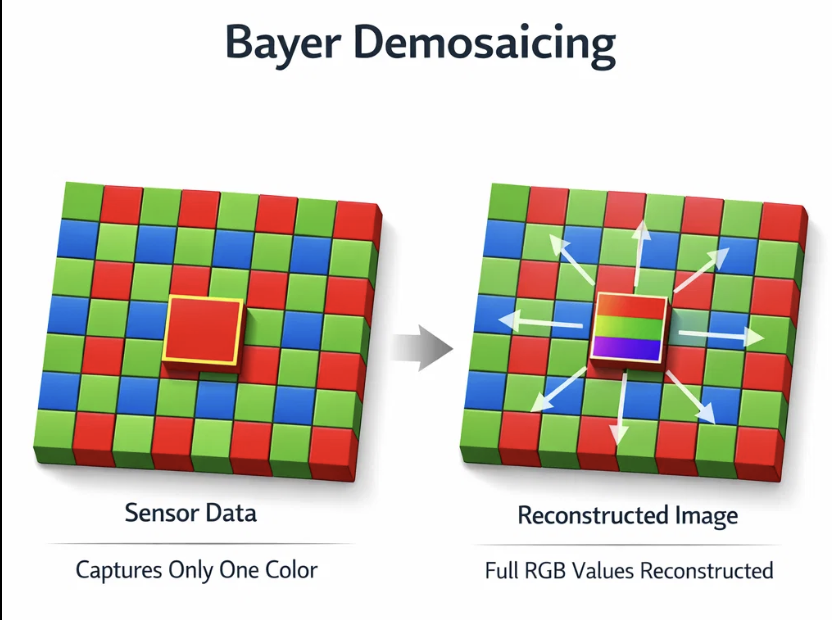
Because each Bayer pixel contains only one color component, demosaicing is required to reconstruct full RGB values.
A straightforward implementation would allocate a full RGB buffer:
640 × 400 × 3 bytes = 768KB
This is not practical on the target platform.
Instead, the image is processed in strips of 8 to 16 rows. Each strip is demosaiced and then passed directly to the JPEG encoder.
To maintain correctness at strip boundaries, a small number of carry-over and lookahead rows are retained.
This approach reduces memory usage from hundreds of kilobytes to approximately 13KB.
For most pixels, interpolation is implemented using shift-based averaging. Edge pixels use a more general path, though they represent a small portion of the image. The Bayer pattern lookup is precomputed to avoid branching within the inner loop.
Stage 4: Fixed-Point White Balance
White balance is often implemented using floating point multiplications.
In this implementation, Q8 fixed-point arithmetic is used instead.
For example:
- 1.375 becomes 352
- 1.200 becomes 307
Each operation is reduced to an integer multiplication followed by a right shift.
This approach avoids floating point overhead while maintaining adequate precision for 8-bit output.
Stage 5: Tone Mapping
Tone mapping, including gamma correction and contrast adjustment, is implemented using a precomputed lookup table.
The table contains 256 entries and encodes the desired tone curve, including:
- Gamma of 0.92
- Contrast adjustment around a midpoint of 128
At runtime, tone mapping is reduced to a single lookup per pixel.
Stage 6: Color Conversion with DSP
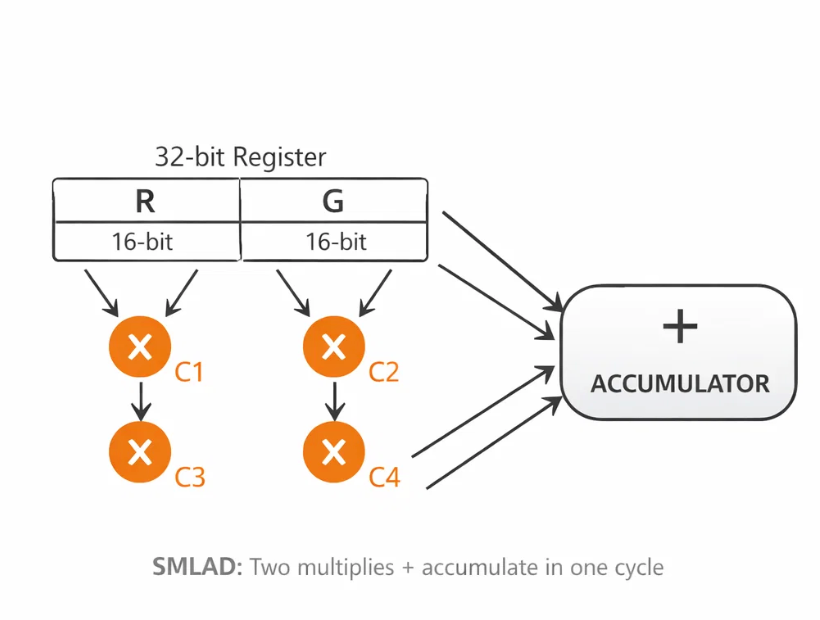
Converting RGB to YCbCr involves multiple multiply-accumulate operations.
The Cortex-M33 provides DSP instructions such as SMLAD, which can perform two 16-bit multiplications and an accumulation in a single cycle.
By packing color components into registers, parts of the conversion can be computed more efficiently, reducing the overall instruction count.
JPEG Core: Division-Free Quantization
Standard JPEG quantization relies on division, which can be relatively expensive on embedded processors.
In this implementation, division is replaced with reciprocal multiplication.
Each quantization entry includes a precomputed reciprocal, allowing division to be approximated using a multiply and shift.
Additionally, blocks with minimal high-frequency content can be detected and partially skipped during encoding, reducing the amount of work for smoother image regions.
DCT: Integer Implementation
The Discrete Cosine Transform is implemented using integer arithmetic with Q8 scaling.
Example constants include:
- 181 for 1/√2
- 98 for cos(3π/8)
- 334 for cos(π/8)
All intermediate values fit within 32-bit integers, avoiding overhead associated with mixed-width operations.
Huffman Encoding Optimization
A lookup table with 2048 entries is used to resolve both magnitude and sign information for coefficients.
This avoids conditional branching for negative values and improves pipeline efficiency.
In practice, this optimization provides a noticeable reduction in encoding time.
Memory Budget
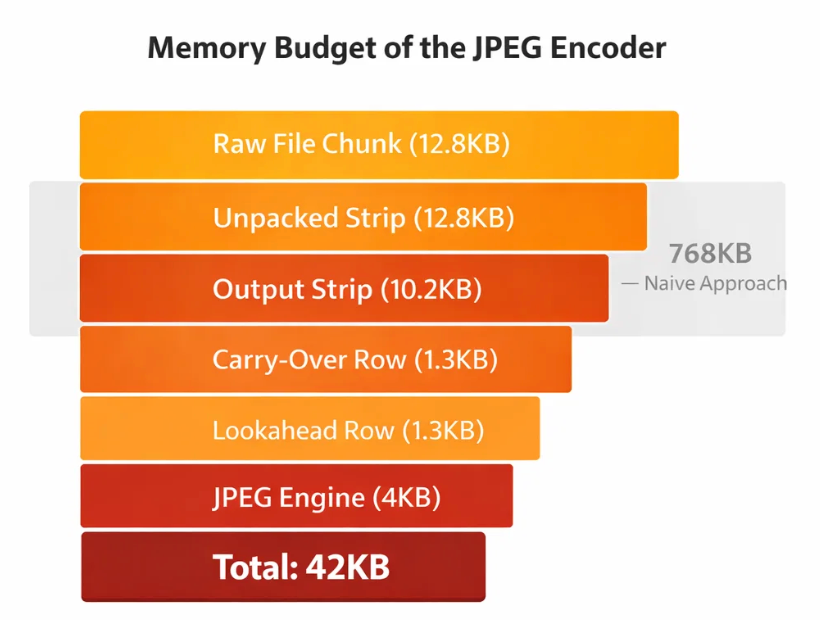
The full pipeline operates within approximately 42KB:
- Raw input strip: 12.8KB
- Unpacked strip: 12.8KB
- Output YCbCr strip: 10.2KB
- Carry-over row: 1.3KB
- Lookahead row: 1.3KB
- JPEG engine state: 4KB
A naive full-frame RGB buffer would require approximately 768KB.
Timing Breakdown
- Demosaic, white balance, tone mapping: ~45%
- DCT and quantization: ~25%
- Color conversion: ~12%
- Huffman encoding: ~10%
- Unpacking and black level: ~8%
Total processing time is approximately 200ms for a 640×400 image.
Key Takeaways
This implementation combines a software ISP with a JPEG encoder in a single pipeline.
- Floating point operations are avoided in performance-critical paths
- Full-frame buffers are not required
- Division is removed from quantization
- Branching is minimized in encoding stages
- DSP instructions are used where beneficial
- Processing is performed in a streaming manner
The result is a complete raw-to-JPEG pipeline that operates within tight memory and timing constraints.
Closing
Achieving JPEG compression on a microcontroller is less about optimizing individual stages and more about structuring the entire pipeline carefully.
A streaming approach, where data flows continuously through each stage, helps ensure both memory efficiency and predictable performance.