
Multi-Source Timeline Architecture: Merging Local Logs, Device Data, AI Insights & Server Events in Flutter
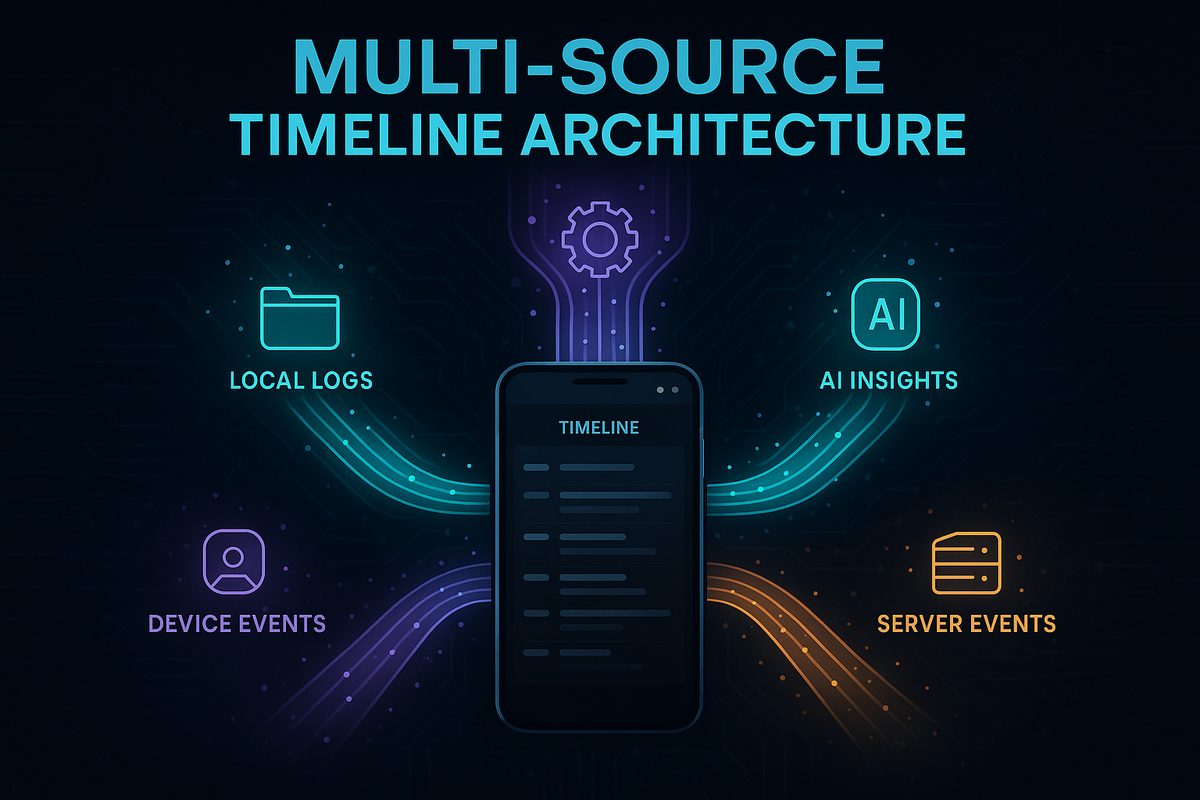
A timeline is often the most deceptively complex screen in any modern mobile experience. It looks simple: a neat vertical feed of moments, updates, and events. But behind the scenes, it is a battlefield of asynchronous data, inconsistent timestamps, unmerged identities, and late-arriving corrections.
In a connected pet-tech ecosystem like Hoomanely, the timeline becomes even more critical. Pet parents rely on it as the unified lens into everything happening around their pet: meals, bowl interactions, movement patterns, AI-generated insights, and periodic server enrichments. All of these originate from different layers — local logs in the app, Bluetooth or WiFi device readings, AI modules running on the backend, scheduled server enrichments, and user-added notes. Each behaves differently under poor network, app restarts, or inconsistent device connectivity.
This blog explores how to architect a Multi-Source Timeline in Flutter — a robust, offline-ready, deterministic system that merges local logs, device data, AI insights, and server-side events into a single, coherent, reactive surface. The focus is fully technical: modeling events, normalizing timestamps, stitching streams, resolving conflicts, handling offline mode, and keeping the UI jank-free.
Throughout the post, you’ll see where this architecture strengthens Hoomanely’s reliability, especially when merging EverBowl readings, EverSense movements, and EverMind AI insights — but without overusing product-specific references. The goal is to keep the explanation generic and reusable across any multi-source feed use case.
The Problem
Modern mobile apps increasingly rely on numerous independent data sources, each with its own reliability patterns, timing behavior, and semantic quirks. When these streams converge into a single timeline, inconsistencies quickly emerge—especially when events arrive late, arrive in bursts, or originate from systems that disagree on identity or timestamp conventions. Without a structured approach, the result is a feed that jumps unpredictably, shows duplicates, or fails to reflect the real sequence of events. A unified, deterministic merge strategy is essential for ensuring the timeline remains stable, coherent, and trustworthy.
1. Local Logs
These are instantaneous events generated directly within the app:
- User actions
- Notes or annotations
- Offline events
- Cached temporary states
Local logs are fast and responsive but not authoritative, making them prone to overwriting and duplication after sync.
2. Device Events
Events originating from hardware or connected accessories can include:
- Bluetooth peripherals
- WiFi-connected devices
- Periodic sensor packets
- Hardware-triggered updates
Device timestamps may drift, and packets often arrive late or in irregular bursts.
3. Server Events
As the system’s “source of truth,” server events typically include:
- Backfilled sensor logs
- AI-generated insights
- Versioned corrections or updates
- Scheduled enrichments
- Batch-processed predictions
These events are authoritative but frequently delayed due to processing or network constraints.
4. AI Insights
Derived computationally rather than captured in real time, AI-driven events come from:
- Machine learning pipelines
- Cloud inference models
- RAG or knowledge-based systems
- Reactive or scheduled triggers
These insights must be integrated into the timeline in a way that feels contextual and narrative-friendly.
Most naive timeline implementations eventually break because:
- Events don’t follow a shared identity model
- Timestamps differ across server, device, and local sources
- Local writes appear twice after syncing
- Server corrections arrive late and disrupt ordering
- Streams push updates at different speeds
- UI components rebuild excessively
- Offline mode produces phantom or missing events
To solve this, a multi-source timeline must implement a deterministic merge pipeline—one that assigns each event a clear identity, consistent timestamp, and stable place in the feed, even when data arrives late or out of order.
Event Modeling: The Backbone of the Timeline
Before you merge anything, you must define a unified event model.
A common mistake is letting each data stream define its own shape, resulting in:
- Irregular fields
- Missing timestamps
- Inconsistent types
- Lack of identity rules
Instead, define one universal schema:
class TimelineEvent {
  final String id;            // Stable identity
  final EventSource source;   // local, device, server, ai
  final DateTime timestamp;   // normalized
  final EventType type;       // meal, note, reading, insight
  final Map<String, dynamic> payload;
  final EventSyncState sync;  // pending, synced, corrected

  TimelineEvent(...);
}
Identity Rules
Stable identity matters more than content.
- Local events → temporary UUID (later replaced by server ID)
- Device events → composite identity (deviceId + sequence)
- Server events → authoritative ID
- AI insights → derived deterministic ID (hash of inputs + model version)
Sync States
These help the UI and aggregator reason about lifecycle:
| State | Meaning |
|---|---|
pending |
User/local creation waiting for server |
synced |
Server accepted, verified |
corrected |
Server updated or refined the event later |
Hoomanely relies heavily on these states to ensure the timeline doesn’t jump around when EverBowl weight readings are backfilled or EverMind AI enrichments arrive late.
Normalizing Timestamps Across Sources
Typical problems
- Device clocks drift
- Server timestamps reflect processing time, not event time
- Local events may use the wrong timezone
- AI insights may not map to a specific moment
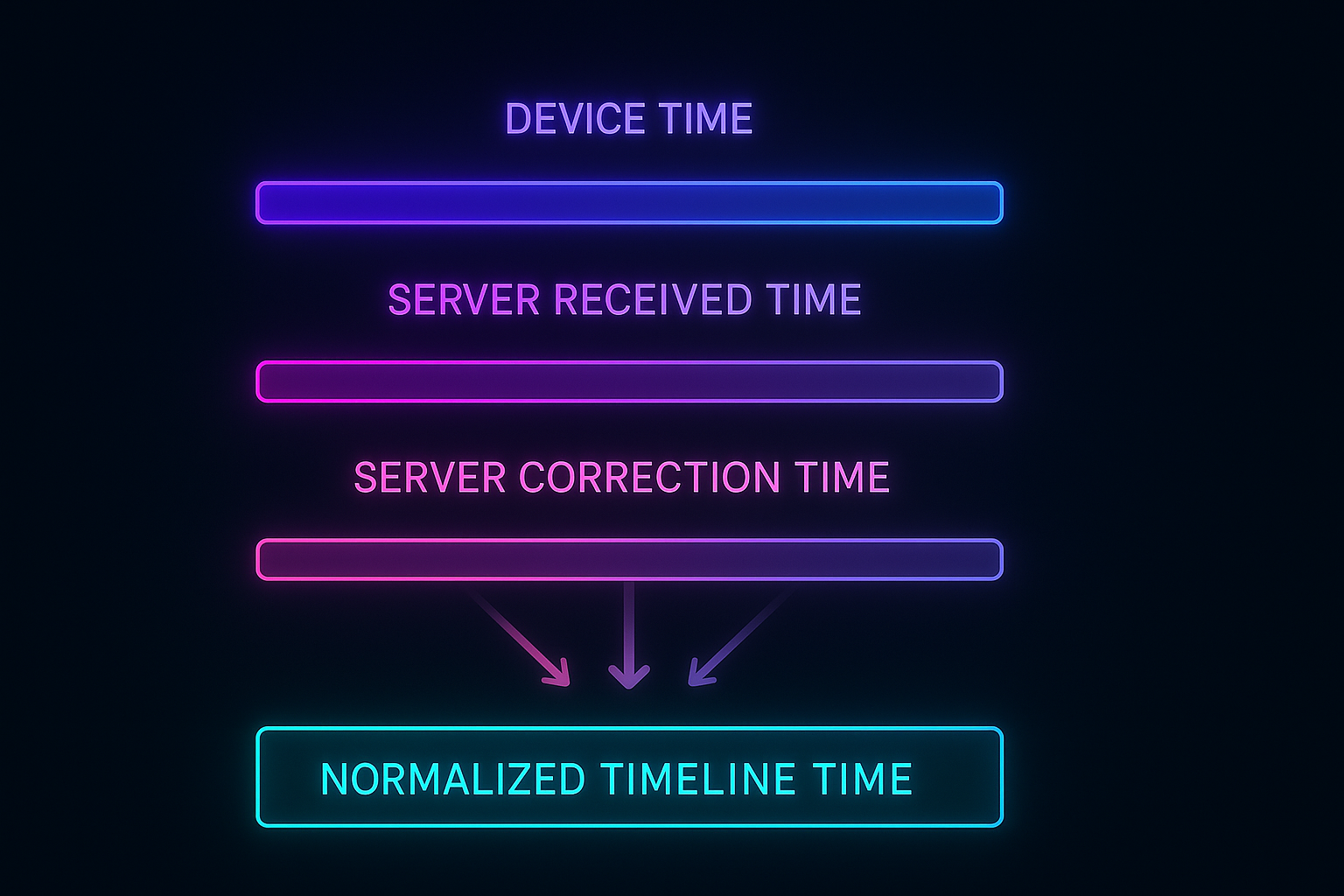
Normalization Strategy
- event_time for ordering
- received_time for tie-breaking
- corrected_time for server corrections
- A universal timeline_time for rendering
Example
- Device sends reading at 4:10 PM → device clock 4 minutes behind
- Server receives at 4:14 PM
- Server enriches later at 4:20 PM
Normalization produces a stable ordering:
event_time:     4:10 PM
received_time:  4:14 PM
timeline_time:  4:10 PM  (uses authoritative event_time)
The timeline never “jumps” visually even when corrected data arrives.
Merge Operators: The Heart of the Timeline Engine
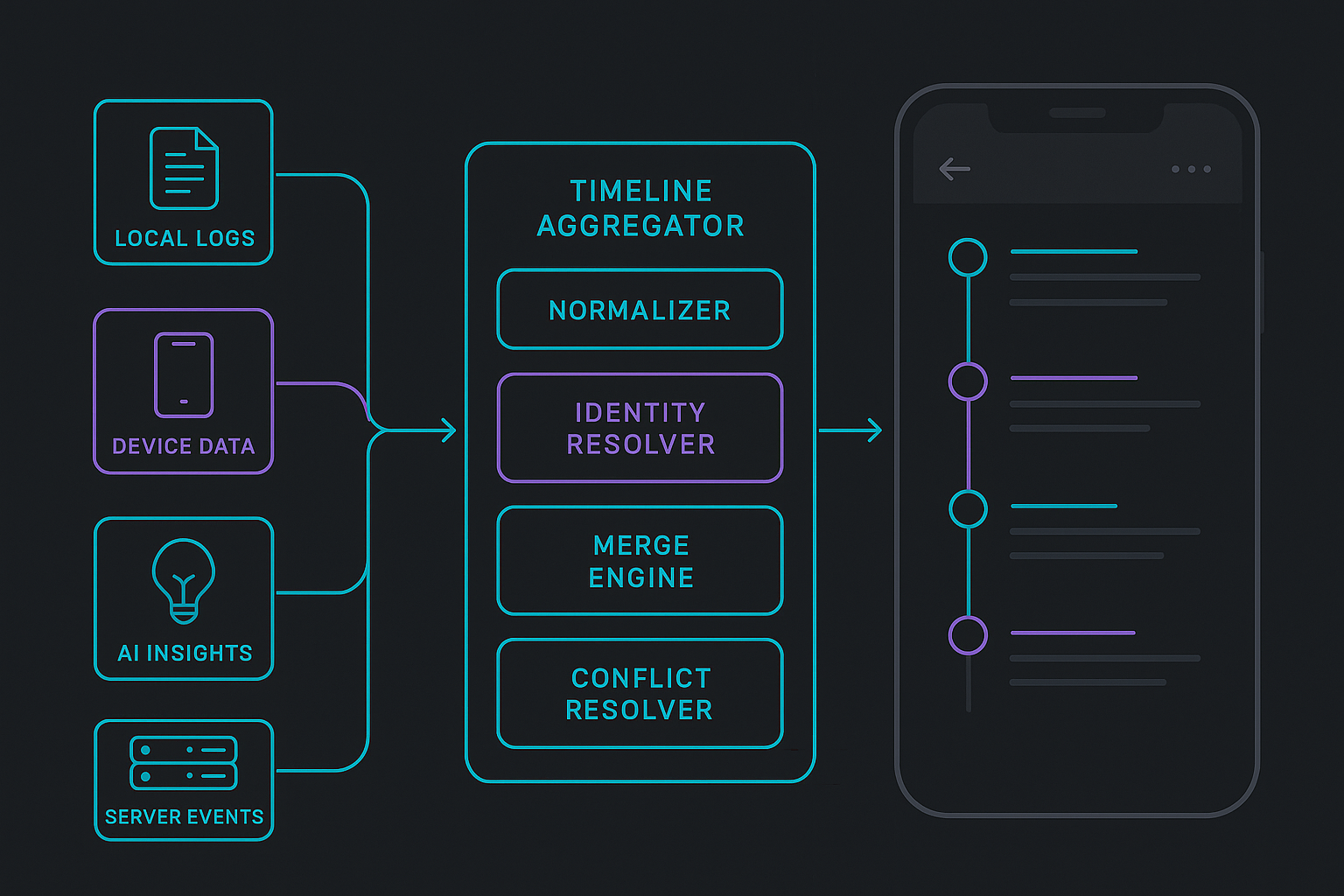
The aggregator sits between streams and the UI. Its job:
- Collect events from local, device, AI, and server streams
- Apply identity resolution
- Normalize timestamps
- Deduplicate events
- Reorder correctly
- Handle sync transitions
- Emit a stable, reactive list to the UI
High-Level Architecture
final timelineStream = CombineLatestStream.list([
  localRepo.events,
  deviceRepo.events,
  serverRepo.events,
  aiRepo.events,
]).map((chunks) {
  final all = merge(chunks.expand((e) => e).toList());
  return sortAndDeduplicate(all);
});
Important Operators
mergeLocalFirst()— local events shown instantlyapplyServerCorrections()— authoritative updatescollapseDuplicates()— remove overlapspromotePendingToSynced()— replace temporary IDsresolveConflictsBySource()— server > device > local > ai
These produce a deterministic result even under rapid incoming updates.
Example: Local Note → Server Sync
- User adds note → shows instantly as
pending - Server sync returns authoritative ID
- Aggregator replaces local pending entry with server one
- Timeline reorders if server timestamp differs
This is heavily used in Hoomanely when pet parents log meals while offline or add quick notes about their pet’s behavior.
Offline-First Behavior
A robust multi-source timeline must behave predictably even when the device is offline. Users should be able to add notes, interact with devices, and perform quick actions without waiting for network responses. The system must gracefully accept offline writes, store them safely, and reconcile everything once the connection returns — without creating duplicates or causing confusing jumps in the timeline.
Offline Writes
When the app is offline, any newly created events are:
- Stored locally
- Assigned temporary IDs that can later be replaced during sync
- Timestamped using the local device clock
- Emitted into the UI timeline immediately to maintain responsiveness
This ensures the timeline remains interactive and never appears “blocked” or frozen due to network unavailability.
Catch-Up Mode
When connectivity is restored, the system enters a reconciliation phase where pending work is synchronized. During this phase:
- Local pending logs are sent to the server
- Server responses replace temporary IDs with authoritative ones
- The server may also send corrections such as updated timestamps or enriched metadata
- The aggregator merges server truth with local state, reconciling them without visual flickers
Common Offline Errors
Without a careful design, offline-first feeds commonly suffer from:
- Duplicate entries appearing after sync
- Timeline jumping because server timestamps differ from local ones
- Locally edited events being overwritten unintentionally
- Missing UI state transitions when local → synced happens too fast
How These Are Solved
A disciplined timeline engine solves these issues using:
- Stable temporary IDs to ensure offline continuity
- Sync states to track pending → synced → corrected
- Normalized timeline-time to avoid order jumping
- Source-aware conflict resolution, where server truth overrides others safely
Performance Optimization
A multi-source aggregator can easily overwhelm the UI if it emits too many updates, especially when device data or server corrections arrive rapidly. Without optimization, this leads to heavy widget rebuilds, scroll jank, frame drops, or even momentary UI freezes. Performance tuning is therefore essential for real-world production use.
Common Symptoms of Poor Optimization
- Excessive rebuilds as multiple streams push overlapping updates
- Noticeable jank when scrolling through long timelines
- Frozen interaction during rapid bursts of incoming events
To avoid this, a well-designed aggregator follows three golden rules.
Three Golden Rules
1. Use Immutable Lists
Immutable event lists eliminate the complexity of in-place mutations. They help Flutter:
- Avoid expensive deep comparisons
- Reuse existing widgets efficiently
- Predict and optimize rebuild behavior
This leads to smoother UI performance, especially when updates arrive frequently.
2. Diff-Based Emission
The timeline engine should only emit a new list when the actual data set has changed. This prevents unnecessary rebuilds:
if (!listEquals(prev, next)) controller.add(next);
This tiny rule dramatically reduces wasted work in the widget tree.
3. Lazy Loading
For long timelines, loading everything at once is costly. Instead, use:
- Pagination to load data in chunks
- Load-from-anchor strategies for deep timeline navigation
- Automatic prefetching when the user approaches the edge of loaded data
These techniques maintain a responsive UI even when dealing with months of logs, device events, or insights.
Testing with Golden Timeline Traces
Testing a multi-source timeline is not optional. A stable feed requires deterministic behavior when:
- Server corrections arrive
- Device logs arrive late
- Local events sync
- AI pushes insights unexpectedly
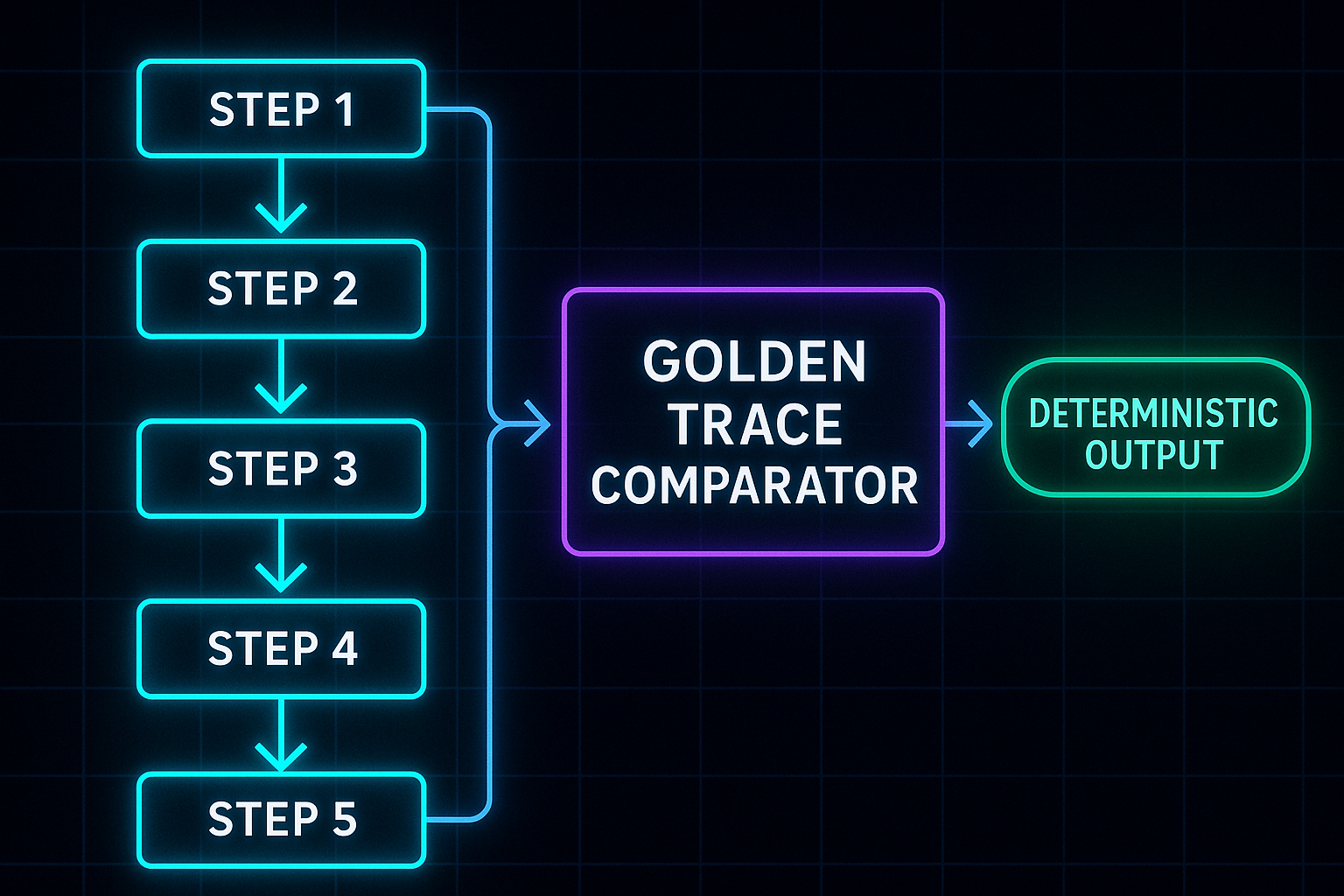
Golden Timeline Traces
A test format storing:
Step 1: local add
Step 2: device event arrives
Step 3: server sync updates ID
Step 4: AI insight arrives
Step 5: server correction for timestamp
Expected output: Timeline index order, Sync states, IDs, Contents
These are used extensively in Hoomanely’s EverMind AI insight testing to ensure no regressions across releases.
Hoomanely’s ecosystem brings together a wide range of signals—bowl interactions, motion and activity patterns, AI insights from EverMind, user-added notes, server-side enrichments, and health-related predictions. Each of these sources behaves differently in the real world. Sensor packets may arrive in bursts or with timing inconsistencies, AI insights show up asynchronously based on model triggers, server pipelines run periodic enrichments, and users generate logs instantly as part of their day-to-day interactions. This natural variability introduces complexity in maintaining a coherent and predictable timeline experience.
The multi-source architecture is what allows Hoomanely to blend these diverse, independently behaving streams into a single smooth narrative. Events consistently appear in their correct positions, even when corrections or backfills arrive late from the server. AI insights are positioned at the right moment in the user’s day rather than showing up as random late entries. Rapid device bursts don’t cause UI jank or timeline jumps, and meal logs created offline merge seamlessly once the network is restored. The result is a stable, chronologically meaningful feed that hides all underlying inconsistency from the user.
Concretely, this architecture delivers a timeline that remains steady and readable under all conditions, powered by diff-based UI updates that prevent unnecessary rebuilds and ensure a fluid scrolling experience. Deterministic ordering rules mean engineers always know how the system will behave, no matter the combination or sequence of incoming events. This predictability translates directly into higher developer velocity, fewer regression bugs, and a deeply reliable user experience. The multi-source timeline engine is therefore not just a feature—it is a foundational part of Hoomanely’s reliability promise across the entire product ecosystem.
Avoiding Common Anti-Patterns
Designing a multi-source timeline isn’t only about following best practices — it’s also about avoiding the pitfalls that quietly degrade reliability and introduce inconsistencies. These anti-patterns usually emerge when teams try to “quick fix” issues without considering the deeper architectural implications. Recognizing them early ensures the timeline remains deterministic, scalable, and easy to maintain across releases.
1: Source-Specific Models
Creating separate models for each data source leads to messy conversions, fragmentation, and inconsistencies.
- Always prefer one universal event schema
- Keep all fields normalized from the start
- Let event type, not event model, vary per source
2: UI Handles Merging
Letting the UI assemble or merge streams seems convenient, but it eventually leads to unpredictable behavior.
- Keep the UI stateless and declarative
- Offload merging to a dedicated aggregator layer
- Emit ready-to-render lists, not raw streams
3: Server-Only Ordering
Relying purely on server timestamps breaks offline mode and causes incorrect ordering when device clocks drift.
- Combine: event_time + received_time + correction_time
- Use normalized timeline-time for ordering
- Let the aggregator reconcile time conflicts
4: Immediate ID Swapping Without Buffers
When a local temporary ID is instantly replaced with a server ID, the UI may flicker or re-render unpredictably.
- Use short-lived buffers to smooth transitions
- Keep sync states visible to the aggregator
- Only swap IDs when the UI can maintain context
5: Treating Device Data as Authoritative
Device timestamps can be helpful but are rarely authoritative.
- Treat device time as a hint, not a truth
- Prefer server corrections for ordering
- Override device times only when explicitly permitted
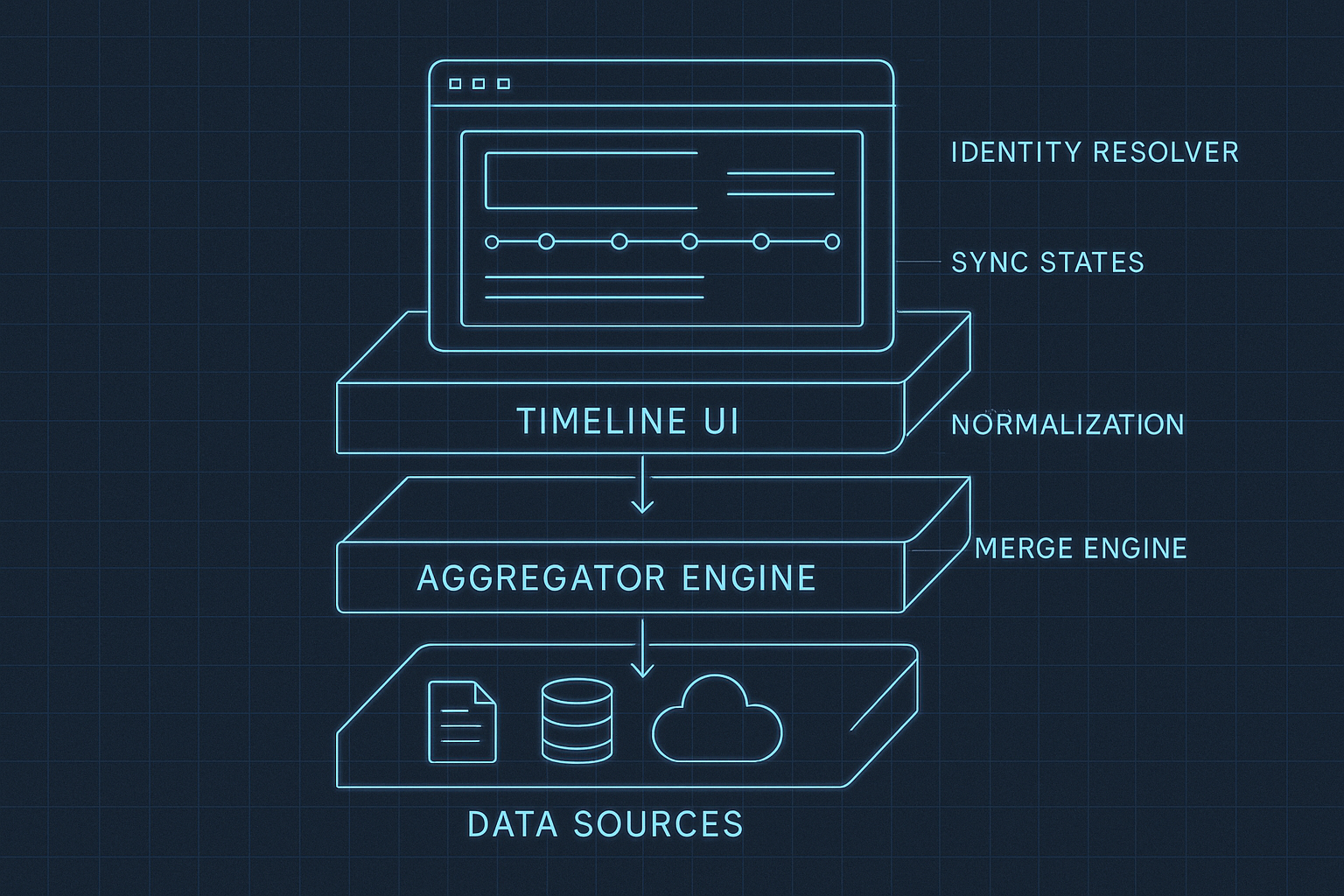
A mature multi-source timeline requires structure at every layer. These recommended architectural components form a blueprint that can be applied across mobile apps, IoT ecosystems, or AI-driven platforms. Each layer has one responsibility and avoids leaking concerns into others, keeping the system predictable and maintainable.
1. Data Sources
This layer gathers events from all origins while keeping each source isolated and predictable.
- Local — handles user actions, offline logs, temporary events
- Device — ingests sensor packets, peripheral readings, real-time device events
- Server — processes server truth, corrections, enrichments, backfills
- AI — manages model-derived insights, predictions, and nudges
2. Aggregator Layer
The intelligence of the timeline lives here. It transforms raw events into a unified, deterministic stream.
- TimestampNormalizer — aligns local, device, and server timestamps
- IdentityResolver — manages temp → server ID swaps and composite identities
- EventMerger — deduplicates, sorts, and merges all sources
- ConflictResolver — enforces source priority and handles corrections
3. Presentation Layer
This layer should be lightweight, declarative, and fast. Its job is to render the timeline — nothing more.
- TimelineBloc / Notifier — subscribes to the aggregator and exposes final UI-ready lists
- Paginated Builders — render long timelines without loading everything at once
- Lazy Loading — fetches older events on scroll demand
- Smooth Diff-Based UI — rebuilds only what changes, reducing jank
4. Testing
Testing makes the timeline deterministic across releases and environments.
- Golden trace tests for multi-step sequences
- Mock streams to simulate out-of-order arrivals
- Correction tests for timestamp and ID swaps
- Load tests for rapid device bursts
Takeaways
A multi-source timeline is challenging because real-world data is messy:
- Different clocks
- Different reliabilities
- Different arrival patterns
- Offline-first constraints
- AI-generated insights arriving unpredictably
A strong timeline architecture must:
- Define a universal model
- Normalize timestamps
- Handle identity & sync states
- Merge with deterministic rules
- Remain performant
- Handle offline gracefully
- Be thoroughly tested
This approach powers reliable experiences in ecosystems like Hoomanely — but applies equally to fitness apps, home automation, robotics logs, or any domain with multi-source event streams.
A well-designed timeline isn’t just a feed; it’s a story engine that turns scattered events into a coherent narrative. Build it with discipline and clarity, and the rest of your product will feel more intelligent, stable, and user-centered.



