One Schema, Multiple Formats: A Backend Debugging Story
When One Field Breaks the Contract: Fixing Pet Allergy Data Types
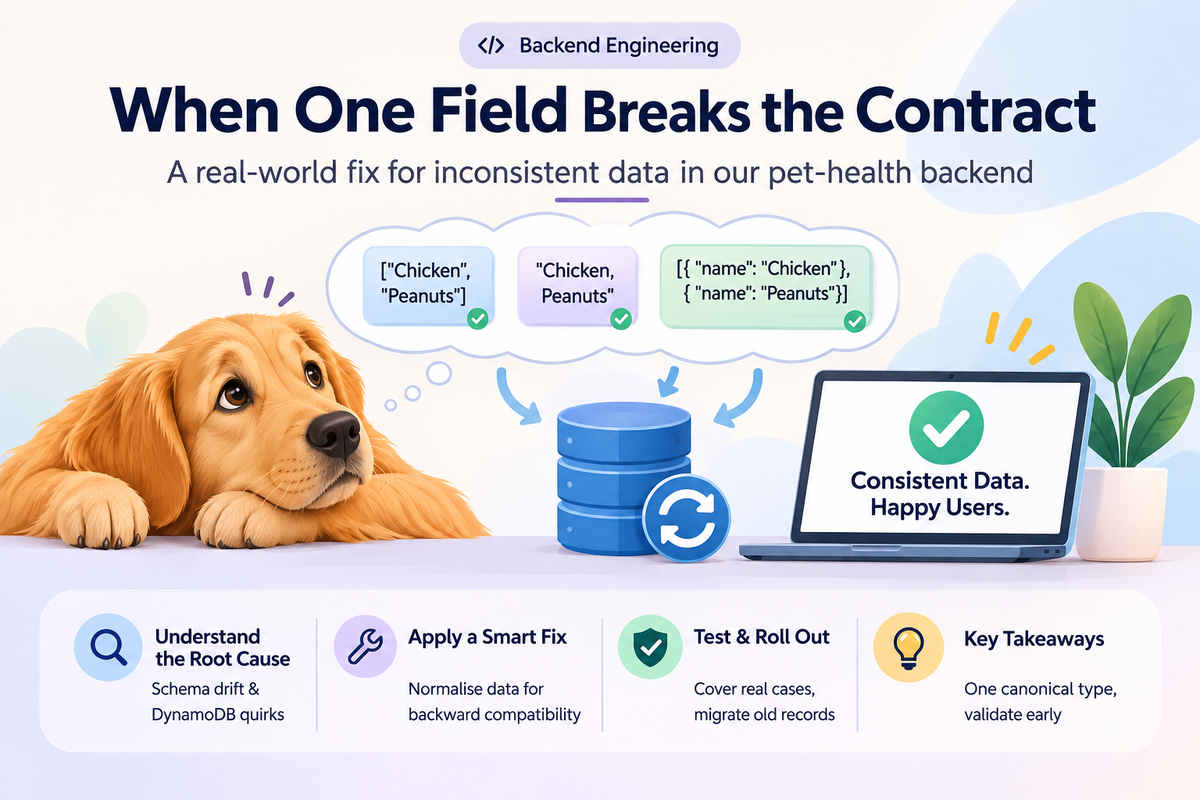
A field that stores a pet’s allergies might look simple. It could be a list of strings, such as ["Chicken", "Peanuts"]. But what happens when one part of the system expects a list, another returns a string, and an older database record uses a completely different structure?
That small mismatch can become a backend bug that affects API responses, validation, and what users see in the app.
In Argos, our pet-health backend built with Python, FastAPI, Pydantic, and DynamoDB on AWS, this kind of problem highlights an important engineering principle: a field is only reliable when every layer agrees on what it contains.
The problem: One field, different shapes
Pet allergy information is useful only when we can store it consistently and return it in a predictable format.
Imagine our API expects allergies to be a list of strings:
{
  "pet_id": "pet_123",
  "allergies": ["Chicken", "Peanuts"]
}
This is straightforward. The client can display each allergy, and the backend can validate the response against its schema.
Now imagine that an older record contains a comma-separated string instead:
{
  "pet_id": "pet_123",
  "allergies": "Chicken, Peanuts"
}
Or another part of the system represents each allergy as an object:
{
  "pet_id": "pet_123",
  "allergies": [
    {"name": "Chicken"},
    {"name": "Peanuts"}
  ]
}
All three representations communicate similar information, but they are not interchangeable data types.
A Pydantic model expecting list[str] may reject the string or object-based representation, depending on its configuration and validation rules. If that validation error is not handled correctly, the request or response can fail. If the client assumes a different shape, the allergy information might not render as expected.
The important distinction is that the information itself may still exist. The problem is that the system cannot reliably interpret it.
Root cause: The schema changed, but the data did not
The issue is not necessarily DynamoDB itself. It is the contract between the application and the data it reads.
In a backend application, several layers participate in handling a field:
- API layer: FastAPI receives requests and returns responses.
- Validation layer: Pydantic checks whether incoming and outgoing data matches the expected model.
- Storage layer: DynamoDB persists records that may outlive several versions of the application.
- Client layer: The mobile app consumes the API response and expects a particular structure.
These layers need to agree on the representation of allergies.
Schema drift is not the only challenge when working with DynamoDB. The way we design partition keys, indexes, and repository access also affects how reliably we retrieve data. Our article on DynamoDB multi-tenant isolation explores another important part of building reliable data access.
Deploying a new Pydantic model does not automatically rewrite records already stored in DynamoDB. Those records can remain in their original format until the application updates or migrates them.
DynamoDB is flexible about item attributes, which makes this especially important. An attribute can contain different supported data types across different items. A Python application must therefore account for the actual shape of the retrieved value rather than assume every historical record follows the latest schema.
The underlying problem is a missing or inconsistent data contract.
The fix: Normalise data at the boundary
Instead of forcing every existing record and client to change immediately, we can introduce a normalisation step at the backend boundary.
Normalisation means converting supported representations into one canonical format before the application uses them.
For this example, we choose list[str] as the canonical representation:
from pydantic import BaseModel, field_validator


class PetProfile(BaseModel):
    pet_id: str
    allergies: list[str] = []

    @field_validator("allergies", mode="before")
    @classmethod
    def normalise_allergies(cls, value):
        if value is None:
            return []

        if isinstance(value, str):
            return [
                item.strip()
                for item in value.split(",")
                if item.strip()
            ]

        if isinstance(value, list):
            normalised = []

            for item in value:
                if isinstance(item, str):
                    name = item.strip()
                elif isinstance(item, dict):
                    name = item.get("name", "")
                else:
                    continue

                if name:
                    normalised.append(name)

            return normalised

        raise ValueError("Unsupported allergies format")
For the implementation itself, the Pydantic validators documentation explains how we can validate and transform incoming data before it reaches the rest of the application. This simplified example uses a Pydantic v2 mode="before" validator, which runs before normal type validation.
The validator handles three supported cases: a missing value, a comma-separated string, and a list containing strings or objects with a name field. Each supported representation is converted into a list of strings.
For example, both of these inputs:
"Chicken, Peanuts"[{"name": "Chicken"}, {"name": "Peanuts"}]become:
["Chicken", "Peanuts"]The rest of the application can now work with one predictable structure.
In production, we would make the accepted legacy formats explicit, avoid silently discarding unexpected values, and ensure that mutable defaults use Field(default_factory=list). We would also distinguish malformed data from an intentionally empty allergy list.
Why backward compatibility matters
A breaking change would require every stored record and every client to adopt the new format at the same time. That can be risky when different app versions are still in use.
Backward-compatible normalisation gives us a safer transition. The backend accepts known legacy formats while consistently producing the canonical format.
This does not mean supporting every possible shape forever. It means allowing existing data to continue working while giving us time to migrate it deliberately.
The canonical type remains the long-term contract. Compatibility is a transition strategy, not a replacement for a clear schema.We also need to consider how older records behave as our application evolves. In Deriving Pet Life Stages From Date of Birth Without a Cron Job, we explore a related problem: keeping existing pet profiles usable while handling values that may no longer match the current application logic.
Testing and rollout: Verify the data, not just the model
A validator that works for one example is not enough. We need to test the formats the application may actually encounter.
We would start with unit tests for each supported representation:
def test_allergies_as_list():
    pet = PetProfile(
        pet_id="pet_123",
        allergies=["Chicken", "Peanuts"],
    )
    assert pet.allergies == ["Chicken", "Peanuts"]


def test_allergies_as_string():
    pet = PetProfile(
        pet_id="pet_123",
        allergies="Chicken, Peanuts",
    )
    assert pet.allergies == ["Chicken", "Peanuts"]


def test_missing_allergies():
    pet = PetProfile(pet_id="pet_123")
    assert pet.allergies == []
We would add tests for object-based entries, whitespace, empty strings, null values, malformed input, and any legacy formats found in actual records.
Next, we would test the complete data path: retrieve a representative record from DynamoDB, pass it through the model, and verify that the API returns the expected structure. This helps catch differences that a unit test using hand-written Python dictionaries might miss.
For rollout, we would first identify which historical formats exist and how frequently they occur. If old records require updating, we could run a controlled backfill: read affected records, convert their allergy values to the canonical list, validate the result, and write the updated values back.
The migration should be idempotent, meaning that running it again does not change already-correct records or introduce duplicates. We would also use pagination, appropriate write permissions, and error logging so that large datasets can be processed safely.
Finally, we would monitor validation failures and API errors after deployment. The migration should not be considered complete until we have verified the resulting data and confirmed that supported client versions continue to work.
The exact rollout depends on what the existing records contain. If every record already uses the canonical format, a backfill may not be necessary.
What we learned
1. Define one canonical type.
A field should have one documented representation across the API, backend models, storage conventions, and client contract. For allergies, that might be list[str].
2. Validate at the boundary.
Convert known legacy formats where data enters the application, rather than scattering conversion logic across endpoints and services.
3. Treat historical data as part of the system.
Changing a schema does not change existing database records. Every schema change should consider what happens to data written by earlier versions.
4. Test with real record shapes.
Unit tests are valuable, but representative database records and end-to-end API tests reveal compatibility problems that idealised fixtures can miss.
A small field, a system-wide contract
Fixing a data-type mismatch is not just about making validation pass. It is about restoring a consistent contract between the database, backend, and client. When every layer agrees on the shape of a field, even a small piece of data like pet allergies becomes much more reliable.
FAQ :
1. Why can a data-type mismatch cause a backend error?
A data-type mismatch happens when one part of the application provides data in a different format than another part expects. For example, an API might expect a list but receive a string. This can cause Pydantic validation errors, failed API responses, or unexpected behaviour in the client app.
2. How can schema drift happen in DynamoDB?
Schema drift can happen when an application's data structure evolves over time, but existing database records retain their original formats. DynamoDB does not automatically convert older attributes to match a new Pydantic model, so the backend must account for historical data.
3. Why use normalisation instead of changing every existing record immediately?
Normalisation allows the backend to accept known legacy formats and convert them into one consistent representation. This reduces the risk of breaking existing clients while the team plans and executes any necessary data migration.
4. What is the role of Pydantic in preventing these issues?
Pydantic validates data against defined models. It helps identify unexpected types and structures before they move further into the application. Custom validators can also normalise supported legacy formats, keeping the rest of the code consistent.
5. Do we still need a database migration if we add a normalisation validator?
Not always. A validator can handle older formats when records are read, but the database may continue storing inconsistent values. A backfill or migration is useful when we want to make historical records consistent, simplify future code, or remove legacy-format support safely.
6. How do we make sure the fix does not break existing clients?
We test the supported historical formats, verify that API responses follow the expected contract, and check compatibility with existing client versions. During rollout, monitoring validation failures and API errors helps us identify issues that tests may not catch.
Conclusion
A small data-type mismatch can reveal a larger problem: different parts of an application no longer agree on the shape of their data.
By defining one canonical type, validating and normalising data at the boundary, and handling historical records deliberately, we can make the backend more predictable without introducing unnecessary breaking changes.
The key lesson is simple: consistent data starts with a clear contract, but keeping that contract reliable requires testing, migration planning, and ongoing validation.