Sending large files over MQTT
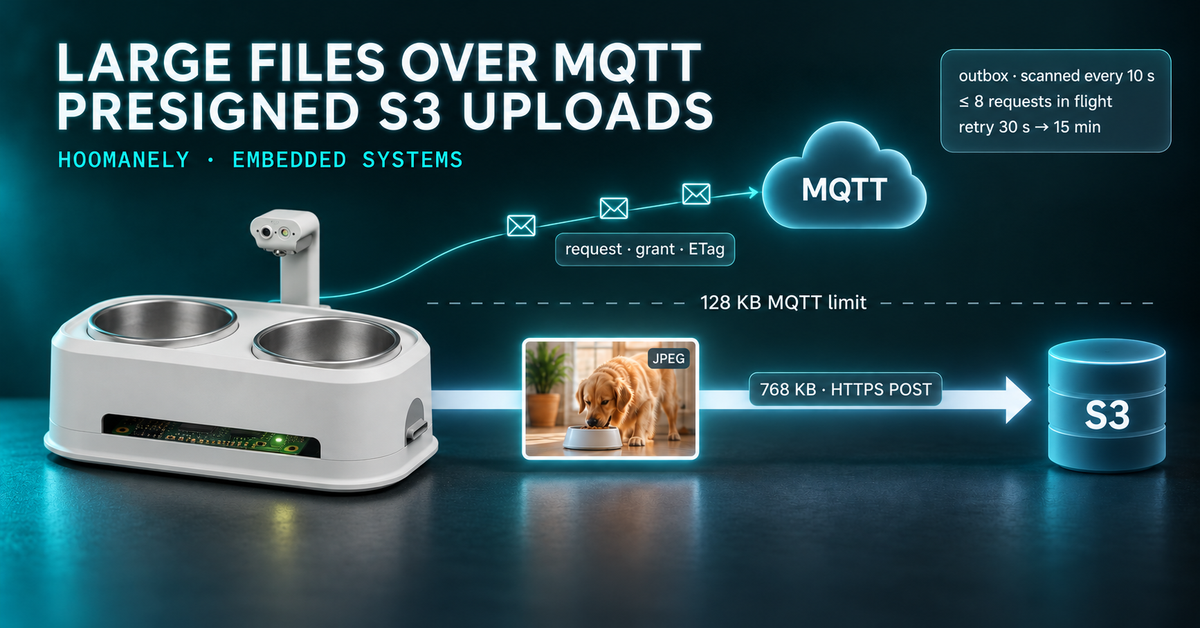
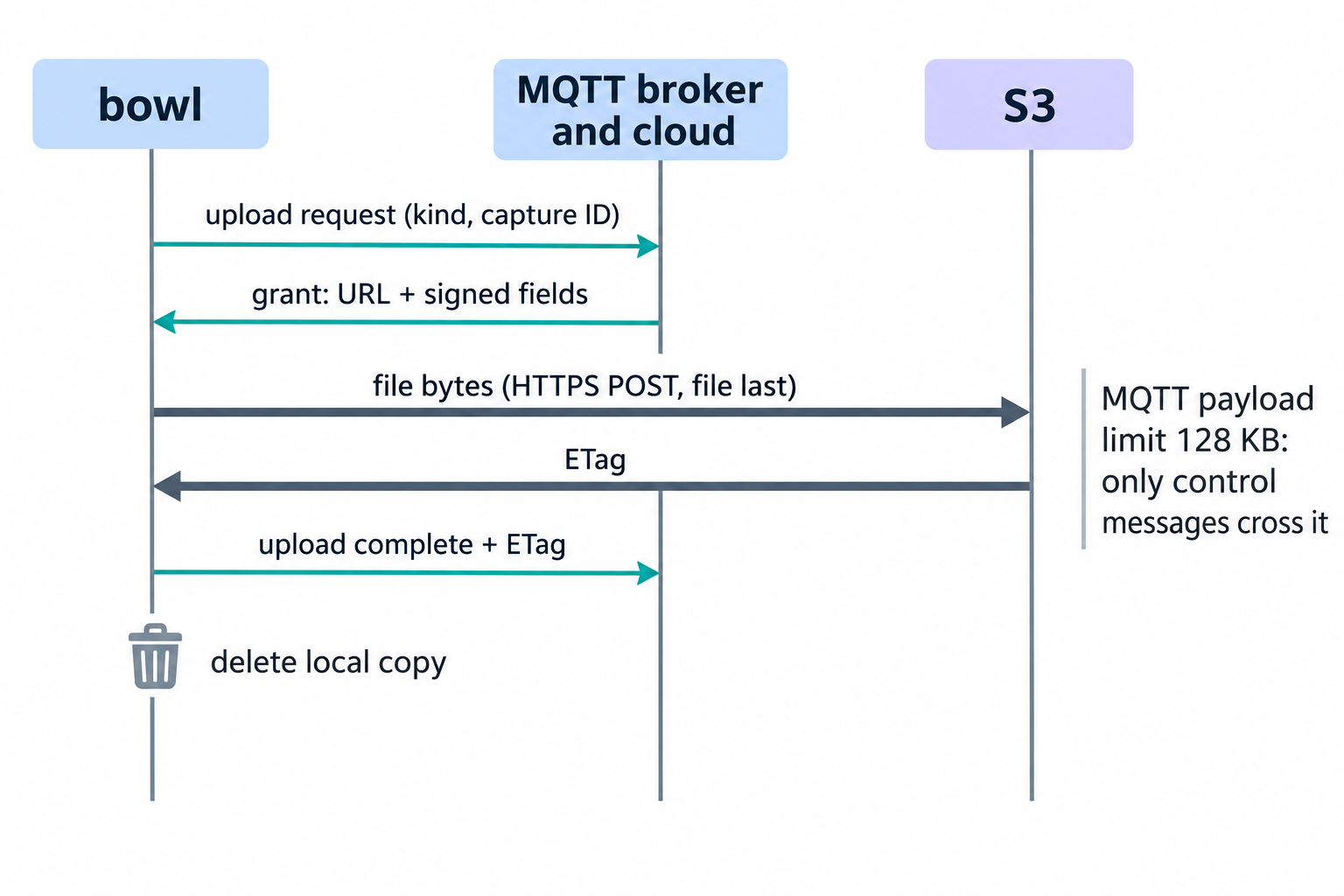
The reliable way to send large files over MQTT is to not put them in MQTT at all. AWS IoT Core caps a single publish at 128 KB, so on our pet bowl the MQTT connection carries only a small request, the cloud answers with a presigned S3 POST, and the device sends the bytes straight to S3 before reporting the stored file's ETag back over MQTT. On a bench bowl, a 768 KB camera frame went through this path end to end, re-encoded as a JPEG at quality 92.
This post covers the on-disk outbox that feeds the lane, the request and grant exchange, the upload itself, and how retries and a daily upload quota are handled. It closes with a comparison against sending files inside MQTT messages and what this lets EverBowl do.
The short version
- AWS IoT Core accepts at most 128 KB per publish, so files travel to S3 directly and MQTT carries only the request, the grant and the result.
- Files wait in an outbox on the data partition, scanned every 10 s, so a restart or an A/B update loses nothing.
- At most 8 requests wait for an answer at once, and a failed upload retries after 30 s, doubling to a ceiling of 15 minutes.
- On a bench bowl a 768 KB camera frame, re-encoded as a JPEG at quality 92, uploaded through the lane end to end.
Why large files do not belong inside MQTT messages
MQTT is designed for many small messages, and a managed broker enforces that. AWS IoT Core rejects any publish larger than 128 KB, and a single camera frame from the bowl is several times that. Splitting a file into chunks is possible, but then the device and the cloud both need reassembly, ordering and gap detection for every file.
Object storage already solves the hard part. S3 accepts a large upload over HTTPS in one request, checks it against a signed policy, and returns an ETag that identifies exactly what it stored. The MQTT connection is still valuable for what it is good at: an authenticated, always-on channel for small control messages.
So the lane splits the job. MQTT carries three small messages per file, and HTTPS carries the bytes. Our posts on durable command acknowledgements over MQTT and on resilient MQTT clients cover the connection those messages ride on.
The outbox
Every part of the bowl that wants a file in the cloud writes it into one directory. The header that defines the lane states the contract:
4	// Anything that wants a file in the cloud -- the log uploader today, the capture
5	// pipeline later -- writes it into the outbox as <kind>__<capture_id>.<ext>.
6	// cm4_mqtt asks the cloud for each one (vbus CMD_BLOB_UPLOAD), posts the bytes
7	// straight to S3 with the grant it gets back, says it is done
8	// (EVENT_BLOB_UPLOADED), and deletes the file. The outbox lives under /data, so a
9	// restart or an A/B update loses nothing.
The file name is the whole interface. The kind before the double underscore tells the cloud what the file is, and the capture ID after it ties the file to the event that produced it. A capture ID must be 1 to 64 safe characters, and anything that does not match is ignored.
Writers that need time to finish a file use a ".part" suffix and rename it into place when it is complete. The scanner skips ".part" files, so it never uploads half a file. Because the outbox sits on the persistent data partition, it survives the root-filesystem swap described in our A/B update post.
How a file moves through the lane
Every 10 s the lane scans the outbox, oldest file first, and keeps a record of each file it has not finished. Four steps take a file from disk to S3.
Step 1: ask for permission
The device publishes a short upload request naming the file's kind and capture ID. Requests go out at low priority, so files never get ahead of sensor readings or command acknowledgements on the shared connection. If a request goes unanswered, it is asked again after 30 s, then at doubling intervals up to 15 minutes.
Step 2: read the grant
Grants arrive on the MQTT library's own thread, so the lane only queues them there under a lock. The main loop drains that queue on its next pass, which keeps every file decision on one thread and removes any need to lock the pending list itself.
The cloud answers on the device's grant topic, and the answer can say three things. "Granted" carries an upload URL and a set of signed form fields. "Uploaded" means the cloud already holds this capture, and anything else is a refusal with a reason:
593	    const std::string status = field_string(f["status"]);
594	    if (status == "granted" || status == "uploaded") lift_quota_hold();
595	    if (status == "granted") {
596	      upload(p, field_string(f["url"]), f["fields"]);
597	      return;
598	    }
599	    if (status == "uploaded") {
600	      // The cloud already holds this capture (a re-sent request): nothing left to do.
601	      std::error_code ec;
602	      std::filesystem::remove(p.item.path, ec);
603	      std::cout << "cm4_mqtt: " << capture_id << " already uploaded\n";
604	      pending_.erase(it);
605	      return;
606	    }
607	    const std::string reason = field_string(f["reason"]);
608	    std::cerr << "cm4_mqtt: upload of " << capture_id << " refused: " << reason << "\n";
609	    if (reason == "quota_exceeded") {
610	      // The quota is per bowl per UTC day, so one refusal answers every file still waiting:
611	      // hold them all (not just this one) until the next day, and remember it across restarts.
612	      hold_until_next_utc_day();
613	      return;
614	    }
The "uploaded" answer is what makes the lane safe to repeat. A device that asks twice for the same file, for example after a reconnect, simply deletes its copy instead of uploading it again. Any other refusal moves the file to a separate folder for a person to review, so it never blocks the queue.
Step 3: post the bytes to S3
A presigned S3 POST is a multipart form, and S3 ignores every field that comes after the file. The upload code makes that order structural rather than a convention:
89	  curl_mime* mime = curl_mime_init(handle);
90	  for (const auto& [key, value] : fields) {
91	    curl_mimepart* part = curl_mime_addpart(mime);
92	    curl_mime_name(part, key.c_str());
93	    curl_mime_data(part, value.c_str(), CURL_ZERO_TERMINATED);
94	  }
95	  // Last, always: S3 ignores every field that follows the file.
96	  curl_mimepart* body = curl_mime_addpart(mime);
97	  curl_mime_name(body, "file");
98	  curl_mime_filedata(body, file.string().c_str());
99	  curl_mime_type(body, content_type.c_str());
The signed fields are added in the exact order the grant lists them, and the file always goes last. The upload has a 20 s connect timeout and a 120 s overall timeout. The response body is discarded, and only the ETag header is kept.
Step 4: report and delete
Once S3 accepts the upload, the device publishes an upload-complete event carrying the capture ID and the ETag. Only after that message is sent does it delete the local file. If the report cannot be sent yet, the file stays, and the lane retries the report rather than the upload.
Retries, pacing and the daily quota
A failed upload waits 30 s before its next attempt, and each further failure doubles the wait up to 15 minutes. That keeps a bowl on a poor network from saturating its own link, while still retrying a few times an hour at worst.
No more than 8 requests wait for an answer at any time. A large backlog, for example after a long network outage, therefore drains in order rather than as one burst of requests.
The cloud can also enforce a per-bowl daily upload quota. A single quota refusal holds every waiting file until the next UTC midnight plus one minute, because the quota applies to the whole bowl, not one file. The hold is written atomically to a small file in the outbox, so a restart does not ask again. While held, the lane asks for one file once an hour, and any grant lifts the hold immediately.
Keeping the outbox bounded
The outbox lives on the same data partition as everything else the bowl stores, so it has firm limits. By default it holds at most 5,000 files or 512 MB, whichever comes first, and both limits can be changed per bowl through the environment. When a limit is reached, the oldest waiting files are removed first, because a fresh capture is worth more than a stale one.
One rule overrides the limits: a file whose bytes are already in S3 is never removed, since only its completion report is still owed. Every removal is logged by kind and size, so nothing leaves the outbox silently.
The folder for refused files has its own limit and keeps only the newest 200. A file that is still zero bytes a minute after it was last written is moved there as well, since it can never satisfy the grant's size policy.
Sending files inside MQTT versus a presigned S3 upload
| File inside MQTT messages | MQTT request plus presigned S3 upload | |
|---|---|---|
| Size limit | 128 KB per publish on AWS IoT Core | Set by the signed policy |
| Large files | Device and cloud must chunk and reassemble | One HTTPS POST |
| Integrity proof | Must be built per file | ETag returned by S3 |
| Load on the MQTT connection | Every byte of every file | Three small messages per file |
| Repeat requests | Duplicate data unless deduplicated | "Uploaded" answer, local copy deleted |
| Survives a restart | Only if chunk state is persisted | Outbox on the data partition |
The trade is one extra HTTPS connection per file. In exchange, the MQTT channel stays small and fast, and storage does what it was built for, as covered from the cloud side in our post on presigned uploads and lifecycle policies.
Bench results
We verified the lane live on a bench bowl. The bowl's fisheye-corrected camera frame is a 768 KB bitmap, and the mirror re-encodes it as a JPEG at quality 92 before writing it to the outbox. That file was requested, granted, posted to S3 and reported with its ETag, and the local copy was deleted.
The same outbox now carries images, thermal frames, audio clips and compressed logs. Each kind maps to its own content type, so S3 stores every file with the right media type.
What this lets EverBowl do
EverBowl™ learns a dog's routine from what its cameras, thermal sensor and microphone capture at the bowl, and those captures are files. Moving them over an authenticated MQTT channel plus direct S3 uploads means every capture reaches the cloud with an ETag confirming what was stored, even across restarts and updates.
The honest limit is that the lane is new and runs alongside our existing HTTPS uploads while it proves itself across the fleet. A capture that sits in the outbox during a long outage waits there until the bowl reconnects. EverBowl does not diagnose; the value is the record.
Conclusion
If your devices need to send files larger than an MQTT message, keep MQTT for control and let object storage take the bytes. Give the device one outbox on persistent storage, make every request safe to repeat, and pace retries so a backlog drains in order. Start with one file kind on one device, then add kinds as the cloud side declares them. More of our device-side work is in the embedded systems category.