
The Silent Tax: When Compression Demands More RAM Than Your System Has
In embedded firmware, "optimization" is usually the golden word. We optimize for speed, for power, and most frantically, for memory. We count bytes like misers counting pennies, shaving off struct padding and squashing enums into uint8_t wherever we can. We analyze map files, hunt down stack overflows, and obsess over the footprint of every library we link. So when the requirement came down to "save storage space and transmission bandwidth on the bus," reaching for a compression library seemed obvious. Trade a few milliseconds of CPU for a 50 percent cut in data footprint. It sounded like the kind of decision that only gets simpler the more you explain it.
Recently, while working on firmware for a high-speed imaging module, we ran headfirst into a paradox that rarely comes up in compression library documentation: making data smaller often requires a momentary explosion of memory usage that can bring a constrained system to its knees. This is the story of how an attempt to save memory almost caused us to run out of it entirely, and the architectural work required to fix it.
The setup: a pipeline built on speed and assumptions
Our system was fairly standard for a high-performance imaging device, though "standard" in embedded terms still implies a strict set of constraints. We captured high-resolution images from a sensor, stored them, and transmitted them over a high-speed field bus to a host controller. The images were roughly 529 KB of raw Bayer data, unadulterated pixel values straight from the sensor.
In desktop or server-side terms, 529 KB is a rounding error. You'd lose it in an L2 cache and not notice. On a microcontroller, specifically the Cortex-M7 part we were using, 529 KB is a significant chunk of real estate. It isn't just "data," it's a dominant feature of the memory map.
We had three regions to work with. Internal SRAM, roughly 1 MB total but fragmented into Tightly Coupled Memory and System RAM, is fast with zero wait states, and it's where the stack, heap, and critical ISR vectors live. External PSRAM, 8 MB, is huge by comparison but noticeably slower, sitting across the OCTOSPI interface with latency penalties and cache lines to think about. External OCSPI Flash is non-volatile and the final destination for persistent data, but writing to it is slow and requires sector erases.
The initial pipeline was simple: capture the image via the camera interface directly into a PSRAM buffer, verify integrity, write it to Flash, and later read it back to send over the bus.
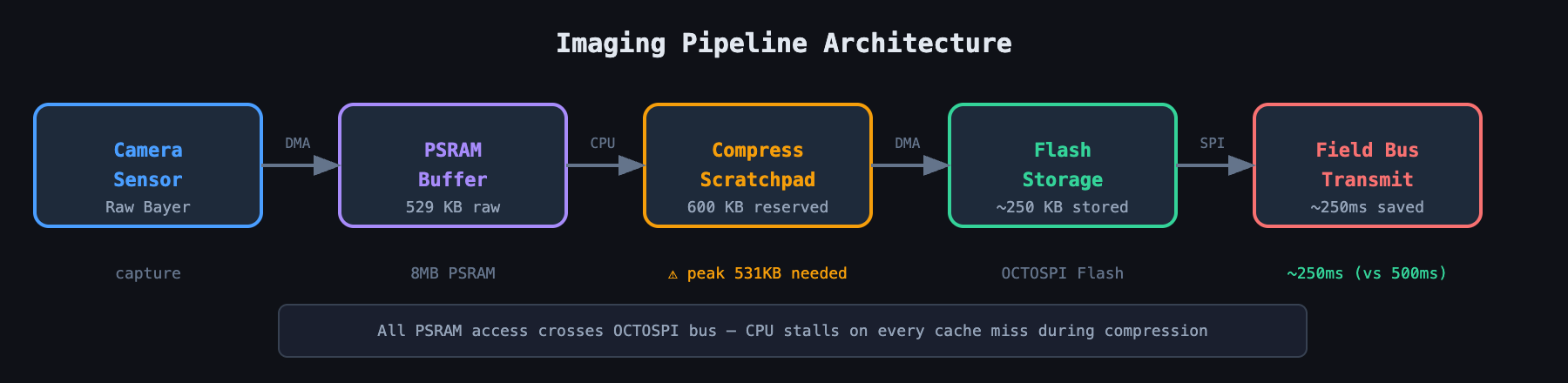
The bottleneck, predictably, was the bus. Even at high speed, sending 529 KB of raw data took 500 to 800 milliseconds per image. During that window the bus was saturated and the user was waiting.
The obvious fix was compressing the image before storage or transmission. A modest 2:1 ratio would cut transmission time in half. We picked a well-known generic block-compression algorithm, chosen for its fast decompression and respectable compression ratio, industry-standard, lightweight, open-source, and theoretically well-suited to real-time systems.
The trap of the "worst case" calculation
We integrated the library, wrote a wrapper, and prepared to test. The logic seemed sound: take the 529 KB source buffer in PSRAM, allocate a destination buffer for the compressed output, run the compression function, and enjoy the smaller file.
We decided to be optimistic about memory allocation. Since we expected the images, mostly dark environments with some thermal noise, to compress well, we figured a 300 KB destination buffer would be plenty. That's nearly 60 percent of the original size. Surely the algorithm wouldn't need more than that.
The first time we ran the code, the system didn't crash and didn't hang. The compression function just returned failure immediately. It didn't even try to compress a single byte.
We dug into the logs. The error wasn't "compression failed due to bad data." It was a check we'd implemented ourselves, a safeguard the library documentation recommended:
if (dst_capacity < CompressionBound(src_size)) {
LOG_ERROR("Dest buffer too small!");    return -1;
}
That single line is where our assumptions met reality. CompressionBound(inputSize) calculates the maximum possible size the output could become. Lossless compression has to handle every possible input pattern. Feed it a string of repeating characters and it compresses to almost nothing. Feed it truly random noise, maximum entropy, and it can't compress at all. In fact, thanks to headers, token flags, and structural metadata, compressing random noise actually produces something larger than the input.
For a 529 KB input, the bound calculation returned roughly 531 KB.
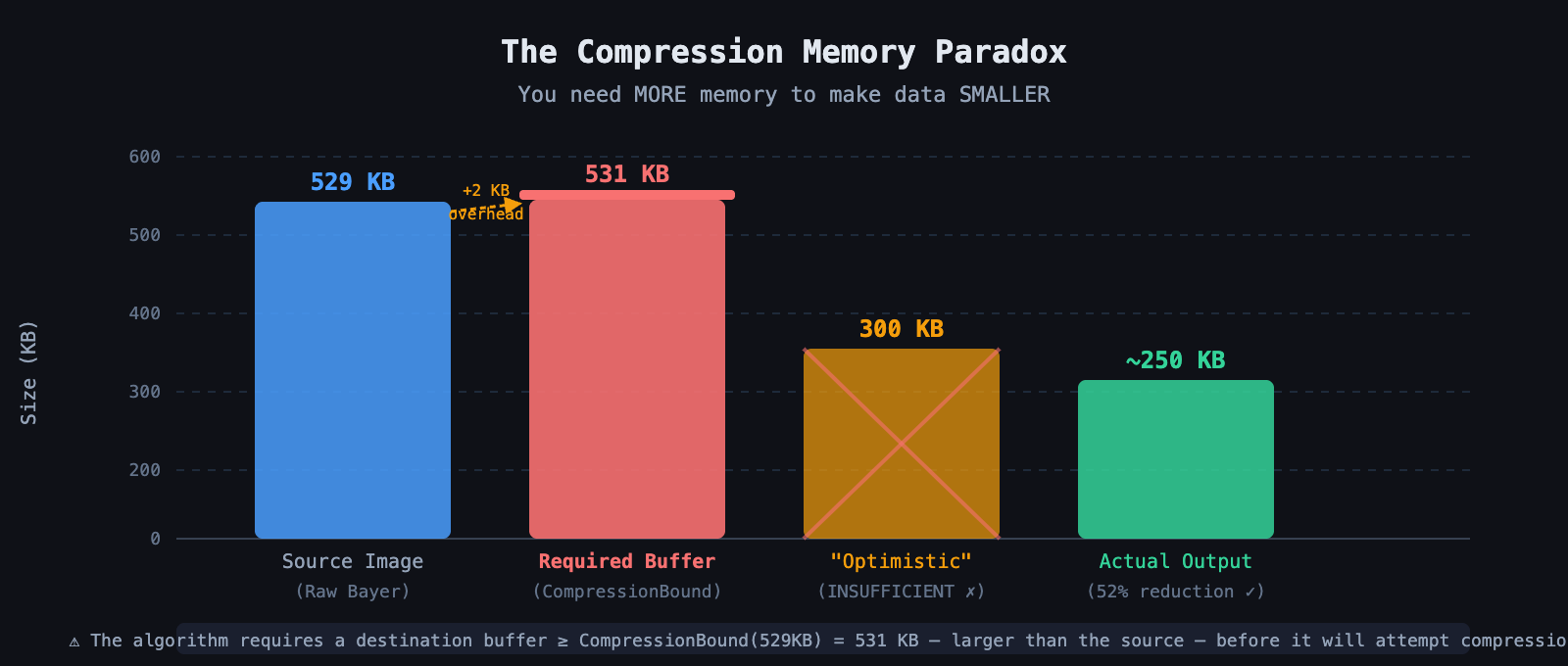
The library was effectively telling us: I can't guarantee I won't write past the end of your buffer unless you give me 531 KB of space. That was the paradox. To eventually save 200 KB of storage, we first had to allocate a contiguous block of RAM larger than the original file just to run the compressor.
The memory Tetris challenge
This requirement triggered a cascade of problems that exposed how fragile our memory architecture already was.
On Linux or Windows, you'd just allocate 531 KB dynamically and let the OS handle physical mapping, swapping pages to disk if needed. A page fault, a slight stutter, life goes on. In embedded firmware running an RTOS on bare metal, allocating 531 KB dynamically is often a death sentence for the heap.
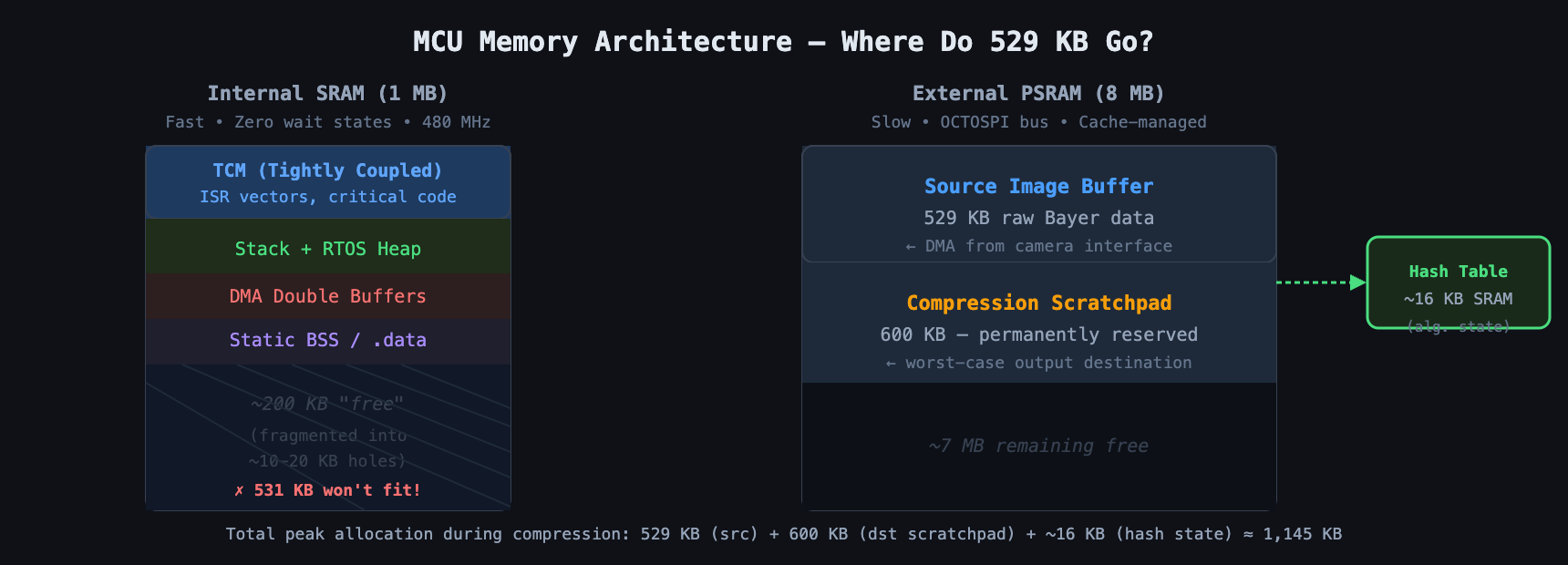
Our internal SRAM was roughly 1 MB but heavily fragmented: the RTOS heap, the main stack, process stacks, the static BSS section, and various DMA double-buffers scattered across the memory map. Finding a contiguous, linear 531 KB hole in internal SRAM was impossible. It simply wasn't there. Trying to allocate it would return a NULL pointer, or worse, a hard fault.
So we turned to the external PSRAM, reasoning that 8 MB should be plenty. But we already used PSRAM for the source image. The captured image arrived from the camera interface straight into a dedicated PSRAM buffer. To compress it, we now needed a 529 KB source buffer, a 531 KB destination buffer also in PSRAM since SRAM couldn't hold it, and roughly 16 KB of algorithm internal state for the sliding-window hash tables. Two massive buffers now lived in external memory, and the CPU had to shuttle data between them.
The performance penalty and the bus war
We allocated the second buffer in PSRAM and ran the test case. It worked, technically. The image compressed down to roughly 250 KB. Success, except the compression time was abysmal.
The algorithm is fast because it looks for repeating patterns within a sliding window, reading the input and writing the output aggressively. When both source and destination live in PSRAM, every single read and write crosses the external memory bus. The CPU runs at 480 MHz. The external memory interface, even at 100 MHz in double data rate mode, carries meaningfully more latency than the L1 cache or internal SRAM. Forcing the CPU to fetch from external RAM, process, and write back to external RAM stalled the pipeline. We were thrashing the external bus.
We saw compression times of 400 to 500 ms. That might sound fast to a human, but in a real-time system capturing bursts of images at 10 Hz, half a second is an eternity. It blocked the main communication task, and the watchdog timer, set to bark every 100 ms for strict responsiveness, began threatening resets.
The cache coherency nightmare
To make things worse, heavy CPU processing on PSRAM contents dragged the Data Cache into play. The Cortex-M7's cache pulls in a 32-byte line whenever the algorithm reads from PSRAM. The CPU modifies or reads it, and writes to the destination buffer sit in the cache in a dirty state until they're evicted back to physical PSRAM.
That's fine for pure CPU operations. But our system used DMA to move the final compressed data to the SPI Flash controller, and DMA doesn't see the cache. DMA sees physical RAM.
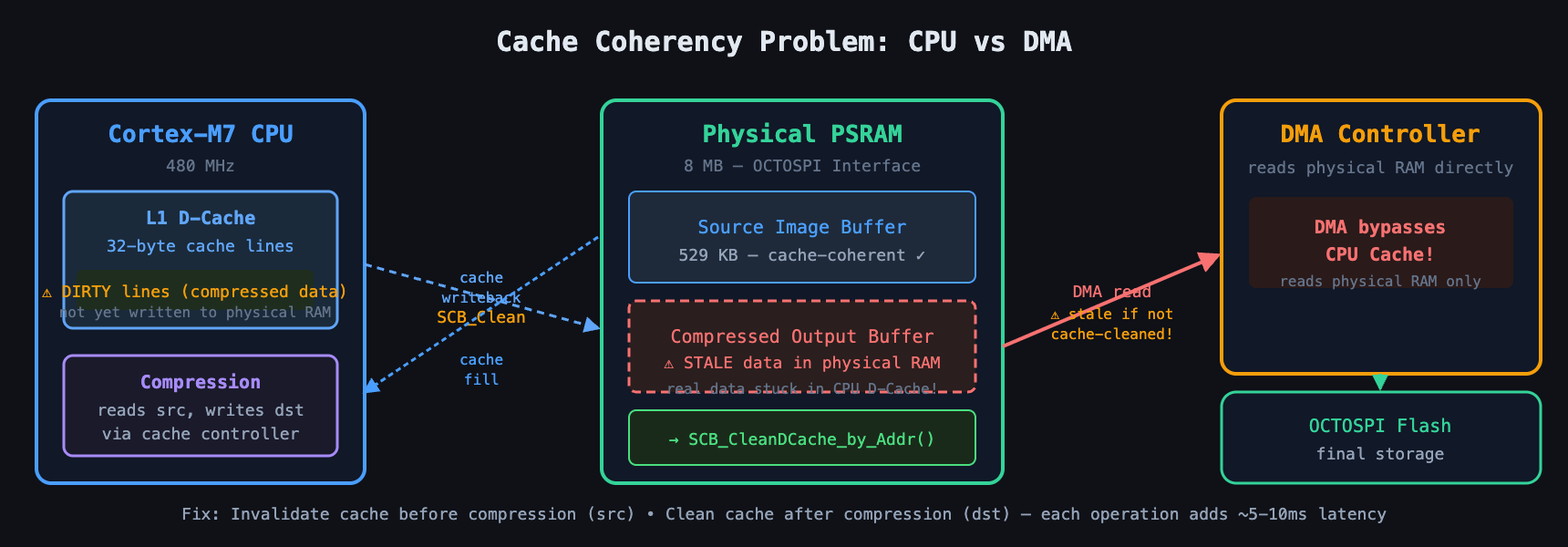
If the compression function finished writing compressed data, that data might still be sitting in the CPU's cache rather than in the physical PSRAM chips. Trigger a DMA transfer to write that buffer to Flash, and the DMA reads the old, stale data from physical RAM, writing garbage or zeros to Flash.
To fix this we had to implement rigorous cache maintenance. Before compression, invalidate cache by address, to make sure the CPU isn't reading stale values if DMA just placed the image there. After compression, clean cache by address, to force the CPU to flush all the calculated compressed bytes out to physical RAM so DMA can see them later. These operations are blocking and expensive. They added another 5 to 10 ms of overhead, eating further into an already tight timing budget.
The "optimistic" approach vs. the "safe" approach
At this point, facing slow performance and high memory usage, we considered cheating. We know our images, we reasoned. They'll never be random noise. They'll always compress to under 300 KB. Why not just give the library a 300 KB buffer and hope for the best?
We could technically do that. The compression function takes a destination capacity argument, and if it detects it's about to exceed that capacity, it stops and returns an error code. But that introduces a non-deterministic failure mode.
Imagine the device deployed in the field, working fine for months. Then on a particularly hot day, the sensor noise floor rises from thermal effects. Or the camera points at a scene with unusually high-frequency detail, gravel, static on a screen. Entropy spikes. Suddenly the image doesn't compress to 300 KB, it compresses to 310 KB.
If we'd allocated only 300 KB, compression fails. Then what? Discarding the data is unacceptable, the user asked for a picture and we can't delete it for being "too detailed." Sending uncompressed raises its own questions: can the downstream receiver handle an uncompressed packet when it expects a compressed one, and does our transmission ring buffer even have room for the full 529 KB blob? Crashing is the worst option, but a likely one if the error code isn't handled correctly.
In embedded engineering, correctness comes first. We can't design around "probably won't happen." We have to design for "even if the worst thing happens, the system survives."
The pivot: architecture over algorithms
We realized we couldn't optimize the algorithm to solve the memory constraint without sacrificing safety. We had to optimize the architecture instead. We couldn't fit the worst-case destination buffer in fast internal SRAM, and we couldn't tolerate the uncertainty of an undersized buffer.
The solution was a dedicated compression scratchpad in PSRAM, managed with strict ownership rules, effectively a dedicated memory lane for this one operation.
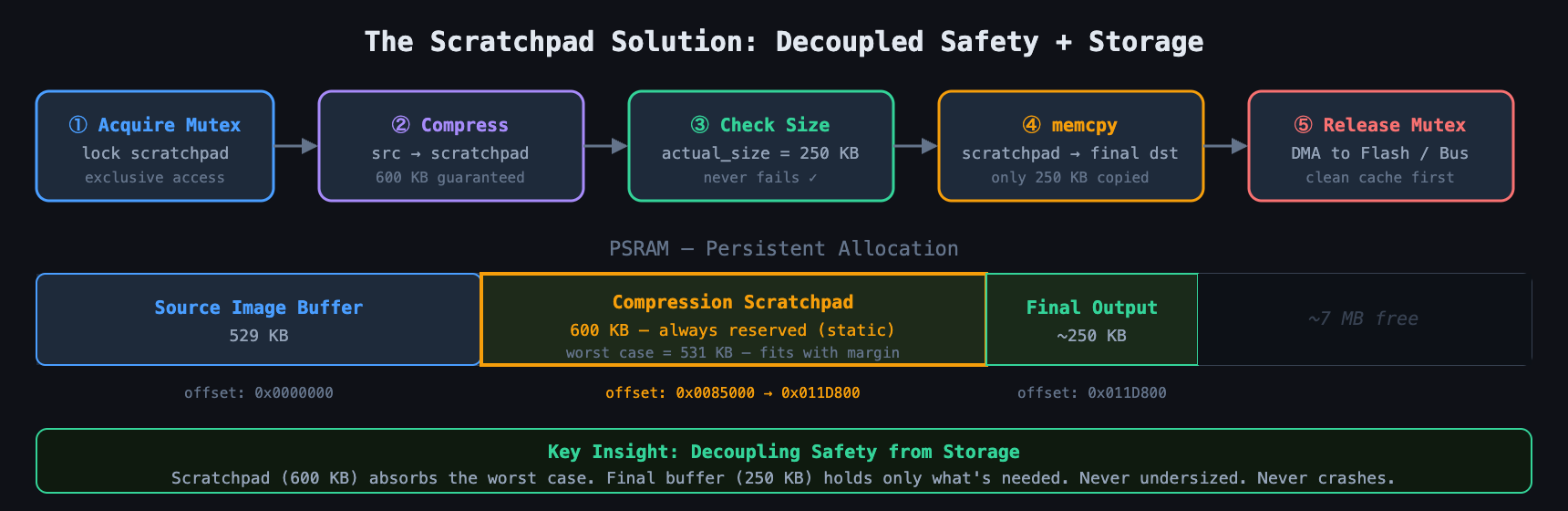
We allocated a persistent, static 600 KB buffer in PSRAM at system startup, reserved memory that was effectively "dead" space to the rest of the system but served as our safety net. When a compression request came in, we claimed a mutex on the scratchpad so no other task could touch it, ran the compression function reading from the verified source and writing into the scratchpad, and since the scratchpad was guaranteed larger than the theoretical bound, the operation could never fail on size. It was mathematically impossible. Once compression finished, we checked the actual size, say 250 KB, and performed a memcpy from the scratchpad to the final destination buffer, or queued it directly for DMA.
Yes, that's an extra memory copy. In a desktop application that would be heresy. In embedded firmware it was the price of deterministic reliability. Using the scratchpad decoupled the safety requirement, needing 531 KB max, from the storage requirement, needing only about 250 KB eventually.
To handle the latency and watchdog issue, we retuned task priorities. Since the default compression call is blocking, we couldn't yield partway through it, so we lowered the compression task's priority to let the watchdog task preempt it, while making sure we fed the watchdog both before and after the heavy call. We explored splitting compression into chunks, but the complexity of maintaining state across chunks for the streaming API outweighed the benefit over the scratchpad approach.
The streaming alternative, and why we skipped it
A reasonable question: why not chunked compression? Break the 529 KB file into 8 KB chunks, compress each into a small internal SRAM buffer, send it out, repeat. That solves the buffer size problem cleanly, you never need more than about 16 KB of RAM.
We looked at it seriously. The catch is frame overhead: each compressed chunk carries its own header, and too many small chunks worsen the compression ratio. More importantly it adds system complexity. Our pipeline verification relied on having the whole image ready to checksum and verify before committing it to storage. Streaming means the image exists in a transient state, and if a transmission error occurs halfway through, or the flash write fails on the tenth chunk, you can't easily retry without recompressing the first half, which might already be overwritten in the sensor buffer.
Weighing the code complexity of a streaming implementation against the brute-force PSRAM scratchpad, the scratchpad won. Memory exists to be used. Leaving 8 MB of PSRAM empty to save "clean code points" while struggling to squeeze things into 512 KB of SRAM is false economy.
Challenges faced and lessons learned
Getting to stable compression forced us to confront the physical reality of our hardware in a few specific ways.
The fragmentation lie: we initially thought we had free RAM because the heap manager reported 200 KB free, but it was fragmented into tiny 10 KB holes. You can't fit a 50 KB output buffer into five 10 KB holes without a complex scattering scheme. Lesson: total free RAM is not the same as the max allocatable block.
The debugger's blind spot: when the library failed silently with return codes, it was tempting to blame the code. It wasn't buggy, it was protecting us. We had to trace the execution into the assembly of the bounds check to understand why it rejected our buffer. Lesson: read the docs on worst-case bounds specifically, not just the happy path.
The latency surprise: moving data to PSRAM fixed the crash but broke the timing. We had to re-evaluate task priorities, making sure the compression task ran at lower priority than camera capture to avoid frame drops, and had to tune bus priorities in the bus matrix so the camera always won contention against the massive memory transactions the compressor generated.
Where this leaves us
Compression isn't magic. It's a trade. We usually think of it as trading CPU cycles for storage, but in the embedded world there's a hidden third currency: peak memory allocation. To make a file smaller, you have to momentarily hold the capacity to hold something larger.
For us, the fix wasn't fighting that requirement or gambling on average-case scenarios. It was accepting valid worst-case inputs as a fundamental system constraint, allocating the large buffer, accepting the memory bus latency, and optimizing everything around it, caches, DMA, task priorities, to absorb that latency.
The result is a system that runs continuously without a single memory fault, whether the camera sees a pitch-black room or a field of chaotic static. In firmware, boring stability is the only metric that actually matters.



