When “Newest” Doesn’t Mean Newest: The Hidden Cost of Key Ordering
A daily recap job that ran every night, never threw an error, and almost never wrote anything. The cause was a query flag that promised "newest first" and delivered something else.
One of our features writes a short daily recap for each pet, built from that day's activity. It's the kind of feature people come to rely on: a running record they can scroll back through, or show a vet.
The job ran on schedule. It never failed. Nothing appeared in the error logs, and no alert fired. When we finally counted what it had produced, it had written almost nothing.
The cause was one query that asked for "the most recent records" and got back a completely different set. This isn't a quirk of one system. The same trap exists in any datastore that keeps rows sorted by key: key-value stores, wide-column databases, and SQL tables read through a composite index. This post explains the trap with a neutral example, why tests almost never catch it, and the patterns we now follow.
THE PROBLEM: A JOB THAT ALWAYS FOUND NOTHING
The recap job had a simple shape:
- Read the most recent N activity records.
- Group them by subject (the pet) and by day.
- Write a recap for each group.
For nearly every pet, step 2 produced an empty group. The job did what it was designed to do on a quiet day: there was nothing to summarise, so it returned. From the outside, a quiet day and a broken job looked identical.
HOW "NEWEST" STOPS MEANING NEWEST
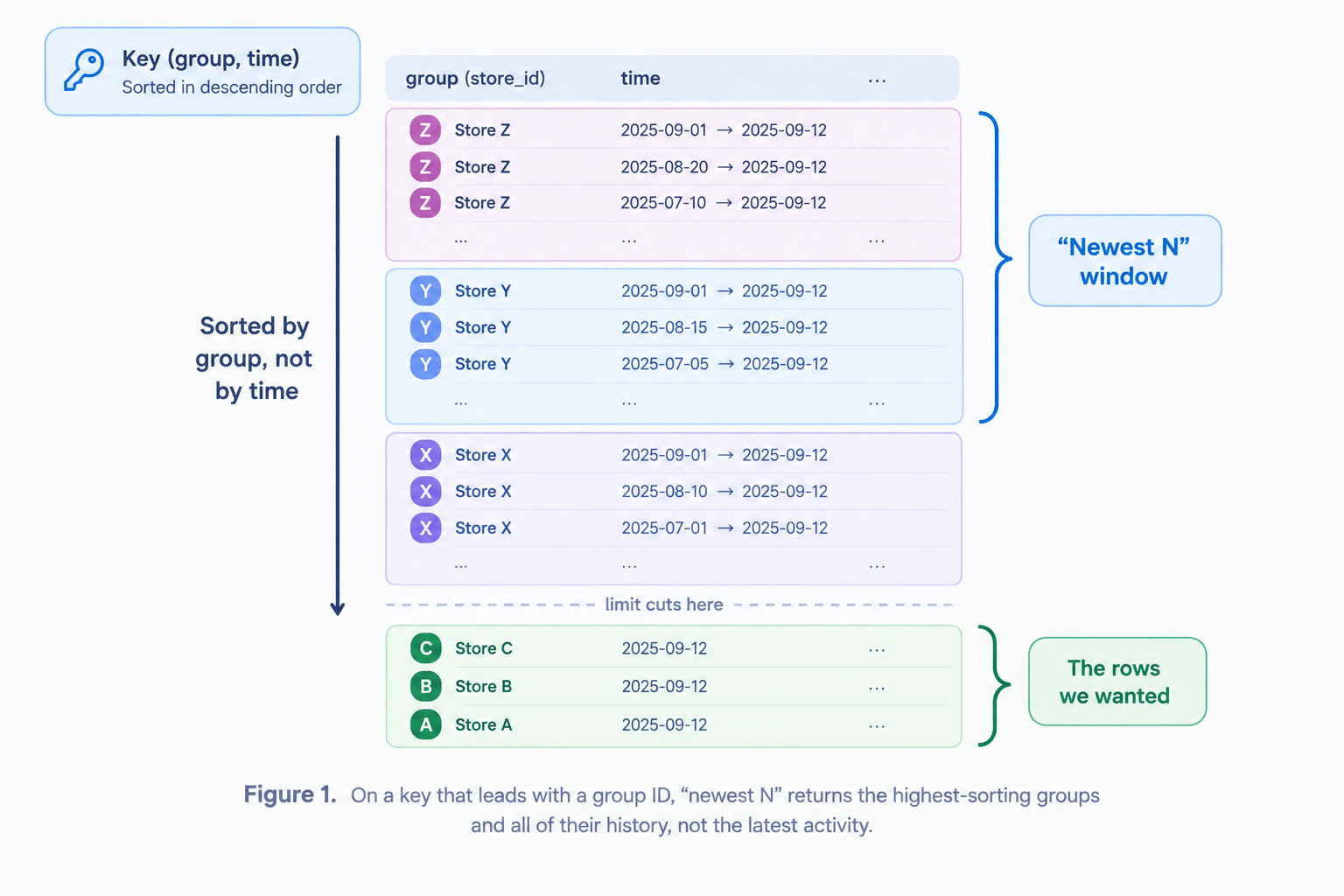
Sorted stores order rows by key, not by time. "Descending order" means descending by key. That is recency only when time is the first part of the key.
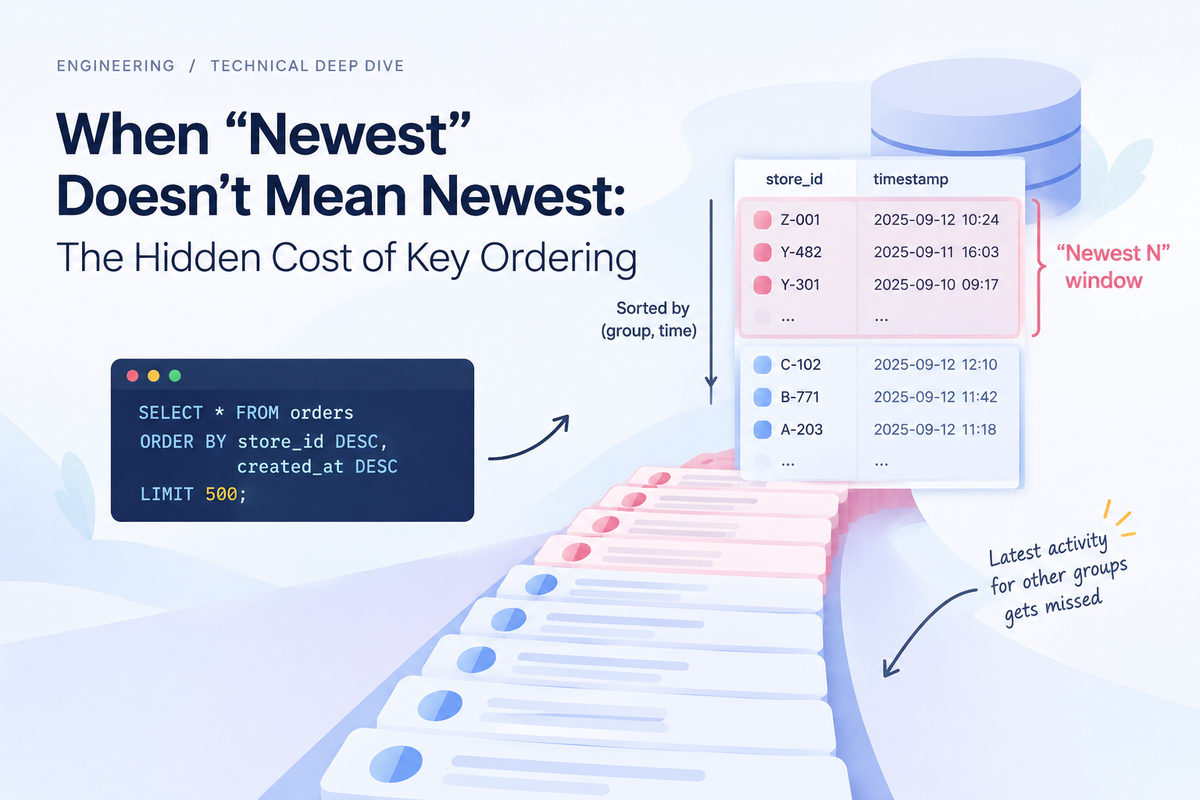
Here's a neutral example. Picture an orders table whose key is store_id followed by a timestamp. That's a sensible design, because "all orders for this store, in order" becomes one fast range read. Now ask it for the newest orders:
# Looks like:  "the 500 most recent orders"
# Actually is: "the 500 orders with the largest (store_id, timestamp)"
recent = orders.query(order="desc", limit=500)
Written as SQL, the problem is obvious:
SELECT * FROM orders ORDER BY store_id DESC, created_at DESC LIMIT 500;
That query returns the stores whose IDs sort last, with their entire history, old and new. Today's orders for every other store sit below the cut. Many data-access APIs hide the key order behind a friendly flag like "newest" or "reverse," which makes this easy to miss.
Our code had a comment above that read that said, roughly, "today is the most recent day, so it's inside the window." The helper's own documentation said the flag returned "the most recent items." Both were true when the helper was first written for data keyed by time alone. They stopped being true once a group ID went in front. A wrong assumption gets through code review easily when it's already written down as the justification.
WHEN A RANDOM BUG BECOMES PERMANENT
If IDs are spread evenly, the window lands on an arbitrary handful of groups. Some are served and most aren't, and the pattern shifts as data grows. That's bad, but it's the kind of bad someone eventually notices.
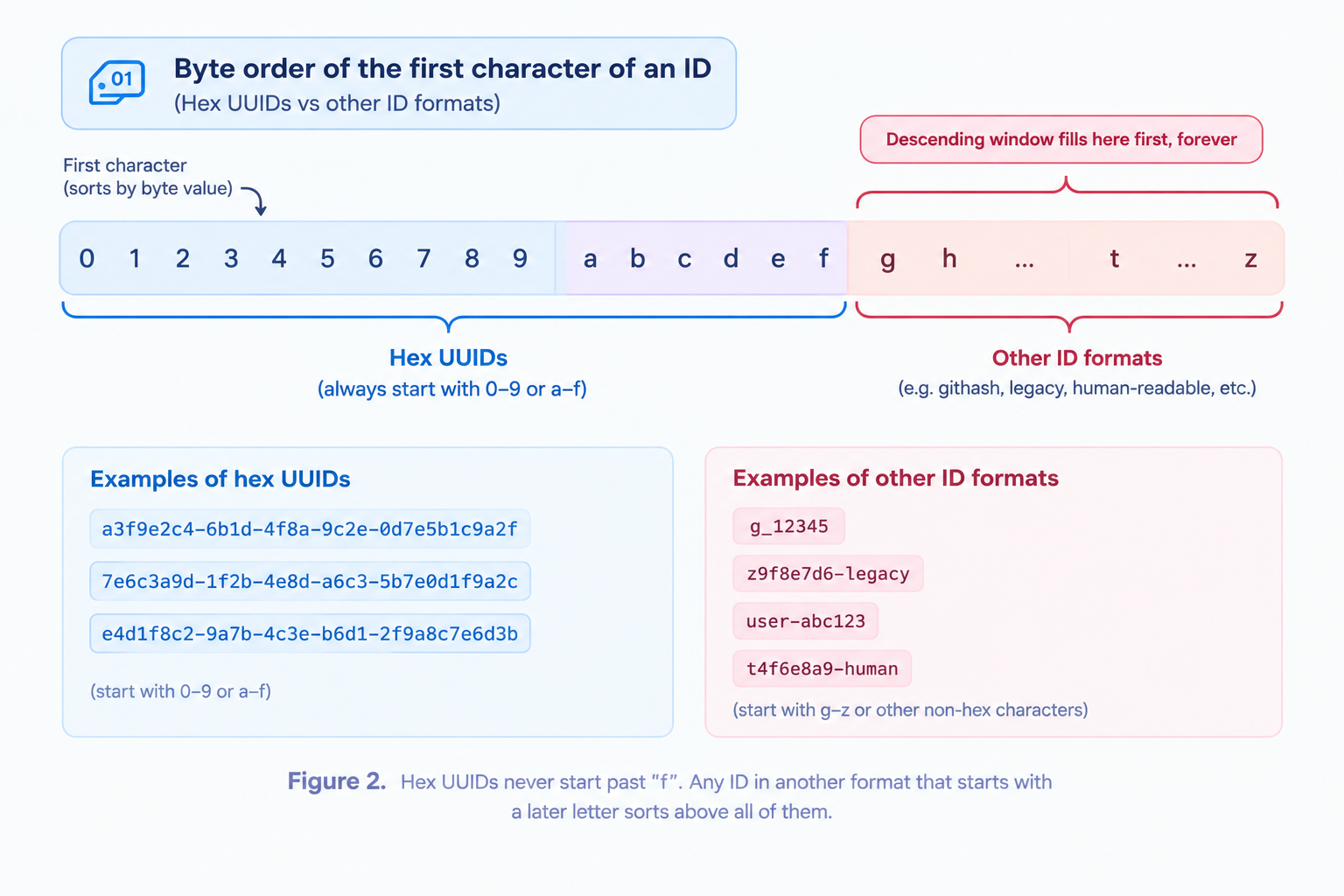
IDs are often not spread evenly, though. UUIDs written in hexadecimal always start with 0-9 or a-f. Any ID in a different format, such as seeded demo data, a legacy import or a human-readable test ID, can start with a letter from g to z. Stores compare keys byte by byte, so those IDs sort above every UUID that will ever exist.
Once rows like that fill the window, no real record can get into it again, however much traffic arrives. The bug stops being random and becomes permanent. That's what happened to us: a small amount of non-UUID data sat at the top of the key range and held the window.
WHY TESTS AND MONITORING MISSED IT
- Small fixtures hide caps. Our tests seeded a handful of records into an empty store. A limit of 500 covers everything at that size, so the test passes whether the read is right or wrong. The bug only exists between test-sized data and production-sized data.
- Empty input looked like no work. An early return on "nothing to do" is correct on a quiet day and completely silent on a broken one.
- Success was defined as "didn't crash." We monitored whether the job ran and whether it errored, not how much it produced. We found the problem by counting what the job had written and comparing it with the activity it should have summarised.
THE FIX: ASK ONLY WHAT THE KEY CAN ANSWER
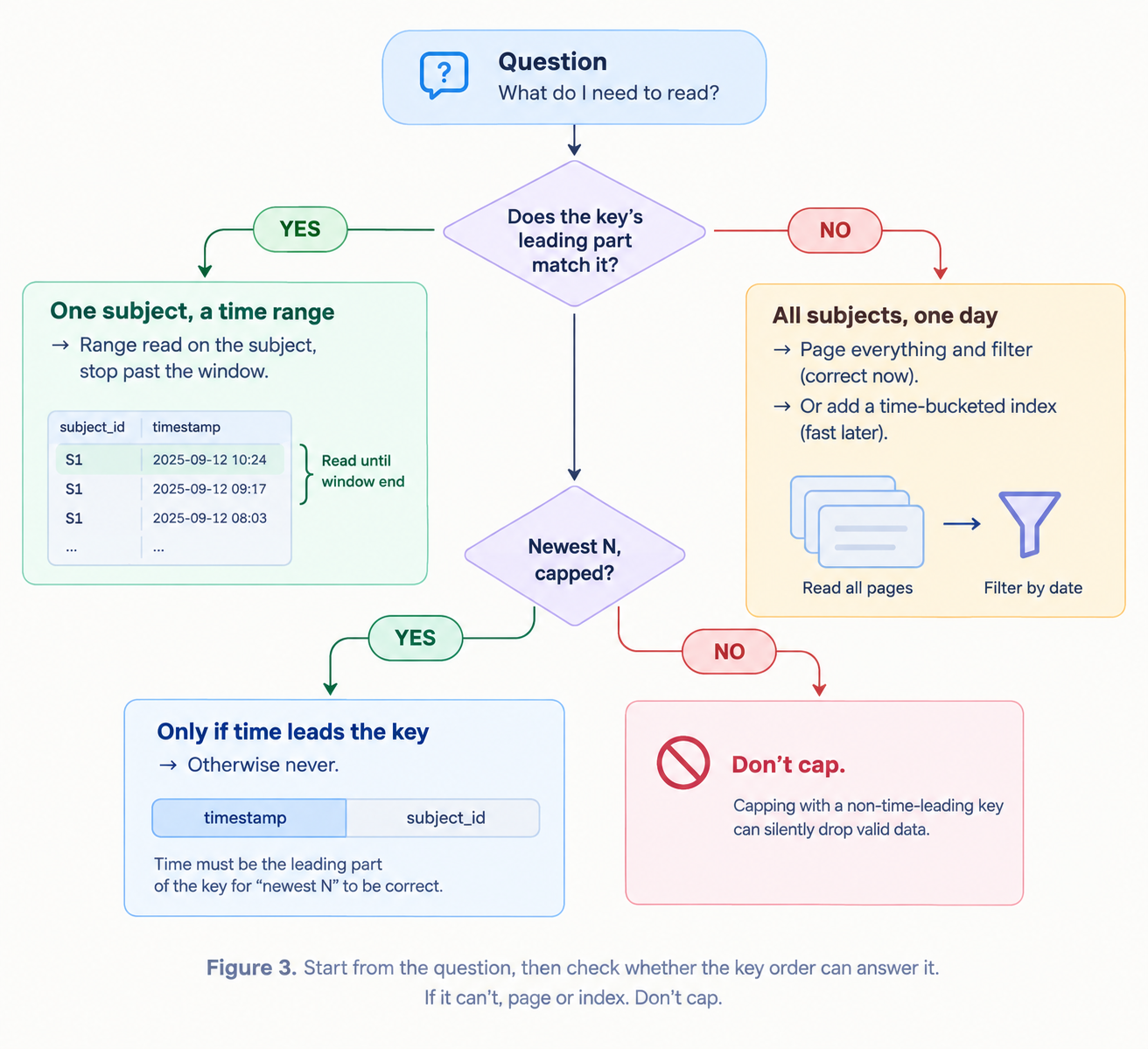
The original read tried to answer two different questions with one query. We split them and shaped each read around what the key can actually do.
"What happened for this one subject today?"
The key leads with the subject, so this is its best case. Read that subject's range, which comes back in time order, and stop as soon as you pass the target day:
for page in orders.range(prefix=store_id, order="asc"):
    rows.extend(r for r in page if r.day == target_day)
    if page and page[-1].day > target_day:
        break
"What happened across all subjects today?"
The key can't answer this, because no single range isolates a day. There are two honest options:
- Page through everything and filter each page. It's correct, it's simple, and it costs more to read.
- Add a secondary index keyed by time bucket, so "today" becomes a range read.
We chose option 1 now and scheduled option 2. A job that's correct and a bit slower beats one that's fast and wrong. The one thing that's never acceptable is a capped read that silently drops groups.
We also fixed the helper's documentation. It now says plainly that descending order only means recency when time leads the key, and it points to the right read for grouped data.
TESTING THE CAP, NOT THE FEATURE
The regression test's job is to fill the window. It seeds more rows than the limit for a subject that sorts high, then checks that a subject sorting low still gets its recap:
def test_recap_reaches_low_sorting_subject():
    seed(subject="zzz-high", rows=LIMIT + 1)       # fill the window
    seed(subject="0001-low", rows=3, day=today)
    run_recap(day=today)
    assert recap_exists("0001-low", today)
We checked that this test fails against the old read and passes against the new one. Until a regression test has failed against the bug, you don't know it can catch the bug.
RESULTS
- Every pet with activity on a given day now gets its recap, wherever its ID happens to sort.
- The tests put production-scale pressure on the cap, so a later "optimisation" back to a capped read fails CI.
- The corrected helper documentation protects every other place that reads grouped data, not just this one.
- An audit turned up an earlier instance of the same shape: a feature read the newest N rows and then filtered them in application code. It worked while data was small and quietly returned fewer results as data grew. When a filter runs after a limit, the limit has to account for the filter.
KEY TAKEAWAYS
- "Newest" is only as true as your key order. Descending means recent only when time leads the key.
- A limit before a filter is a bug waiting for scale. Filter in the key, or page to the end.
- Test the cap, not just the feature. Any code with a limit needs a test that fills the limit.
- Give "nothing to do" a signal. For every early return, ask: if this skipped everything forever, what would tell us?
- Watch for IDs that don't match your format. They can take over a key range your real IDs can never reach.
- Count the output. For any job that generates records, "how many did we write today?" is the cheapest monitor there is.
ABOUT HOOMANELY
Hoomanely builds technology that helps pet parents give their pets longer, healthier lives, through smart devices, health insights and an AI assistant that knows each pet. Daily recaps are part of that: a running record of a pet's wellbeing, written from the everyday moments a pet parent already shares with us. A record that silently skips days is worse than no record, because people trust it. Work like this makes sure every pet's story gets written, and it strengthens the data foundation that proactive pet care depends on.
Author's note: the query was one line and looked obviously right. The lesson I keep coming back to is to read what a flag actually does, not what its name promises.