Why Your Bluetooth Device Is Invisible To Your App
The device is on the table. Its LED is breathing. Your phone's system Bluetooth settings can see it. Your app scans, and finds nothing.
This is the single most common way a Bluetooth Low Energy integration fails, and it is almost never a bug in your code. It's a mismatch between what you believe scanning does and what the operating system actually does and the two platforms disagree with each other about the details.
We recently built BLE connectivity for a connected pet product, and the useful part of that work wasn't the code. It was discovering that four assumptions we'd written into the plan assumptions that any experienced mobile engineer would have made, and that the design brief took for granted were each wrong at the platform level. Some of them were wrong in ways that would have produced a shipping app that simply never worked on iPhone.
Here's what we found, and why each one bites.
Assumption 1: "Filter the scan by service UUID"
This is the textbook advice, and it's in every BLE tutorial. Your device exposes a service with a known 128-bit UUID; you scan for that UUID; you get your device and nothing else. Clean.
It fails because scanning filters match the advertisement, not the device.
A BLE peripheral broadcasts a tiny packet the legacy advertising payload is 31 bytes total. A 128-bit service UUID costs 16 of those bytes, plus 2 for its header. That's well over half your entire budget spent announcing one identifier, before you've said anything else about yourself. So a very large number of real devices don't advertise their service UUID at all. They advertise a name, which is cheap, and they expose the service only after you connect and enumerate it.
Now the platform split. On Android, an over-specific filter gets you nothing useful. On iOS, it is worse and quieter: CoreBluetooth will never report a peripheral whose advertisement doesn't contain the UUID you filtered on even though the device genuinely has that service, and will happily expose it the moment you connect. Your scan doesn't error. It doesn't warn. It returns an empty stream forever, next to a device that is broadcasting continuously.
We had shipped a scanning contract that required a service filter, on the strength of the textbook advice. It could not have found our hardware. We caught it by reading the device's actual protocol rather than trusting our own API a day before anyone would have plugged in a real unit and concluded the radio was broken.
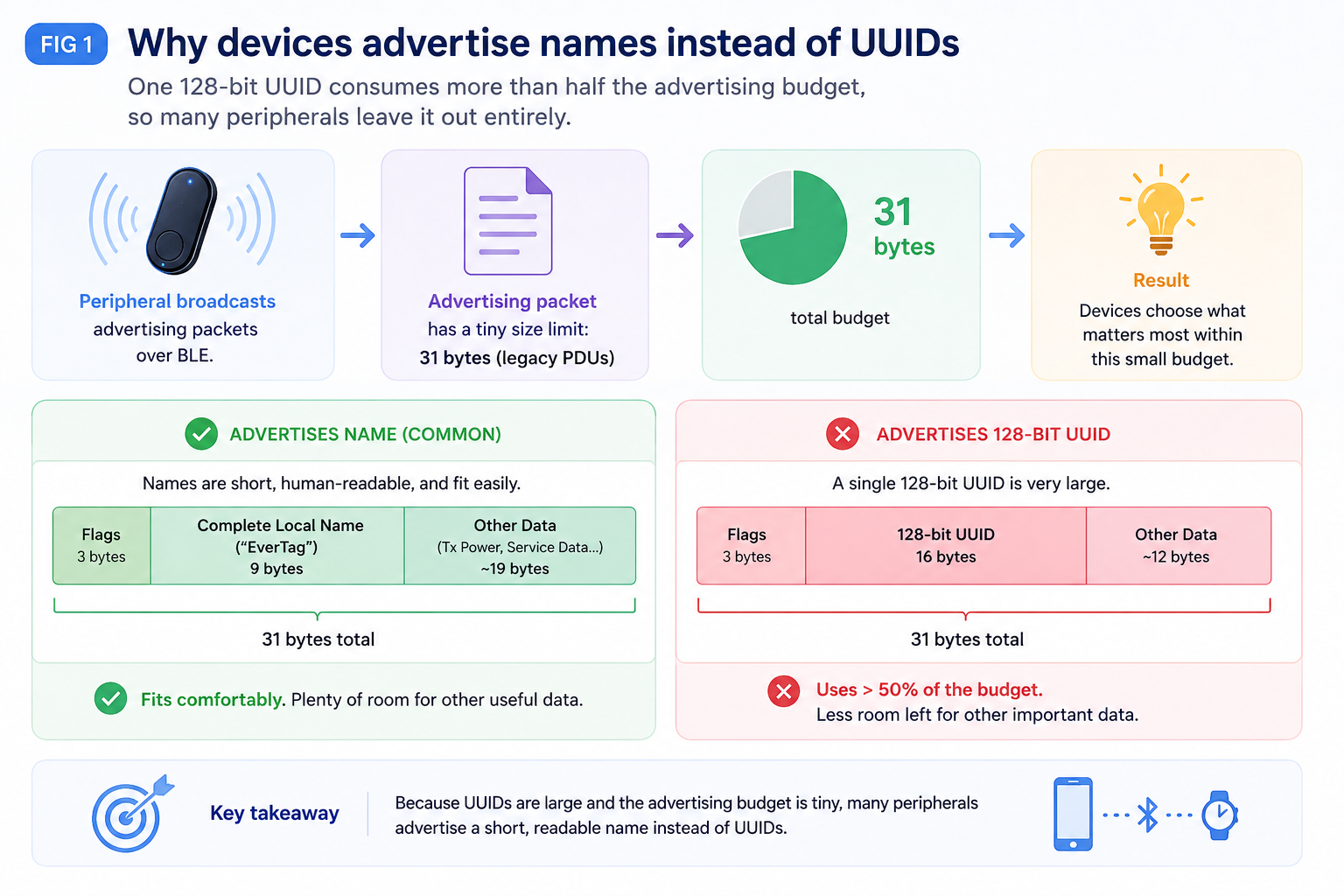
What to do instead: scan unfiltered in the foreground and match on the advertised name, then use the service UUID after connecting, for discovery. Those are two different operations that happen to take the same argument, and conflating them is the trap. (One caveat worth knowing: iOS requires a service filter for background scanning. If you need background discovery, your hardware has no choice but to spend those 18 bytes.)
Assumption 2: "Check whether Bluetooth is on, then scan"
Reasonable order of operations. Also backwards on modern Android.
Since Android 12, BLUETOOTH_SCAN and BLUETOOTH_CONNECT are runtime permissions, not manifest declarations you get for free. Declaring them in the manifest is necessary and nowhere near sufficient. And critically: until scanning is permitted, the adapter state you read back is not trustworthy the radio reports as unusable, so a "is Bluetooth on?" pre-check answers no on a phone where Bluetooth is plainly on.
So the sequence has to be permission first, radio second. Get that backwards and you show the user the wrong instruction.
That's the part that actually matters, and it's a UX bug disguised as a plumbing bug. "Bluetooth is turned off switch it on" sends someone to a toggle that is already enabled. They flip it off and on, nothing changes, and they conclude your product is broken. A denied permission and a disabled radio need to be different states with different copy and different destinations one opens app settings, the other opens the Bluetooth pane. We treat them as distinct failure kinds all the way up the stack for exactly this reason.
Assumption 3: "Store the device ID so we can reconnect later"
Every connected-hardware flow wants this. Pair once, remember the device, resume silently next time. It's the difference between a product and a chore.
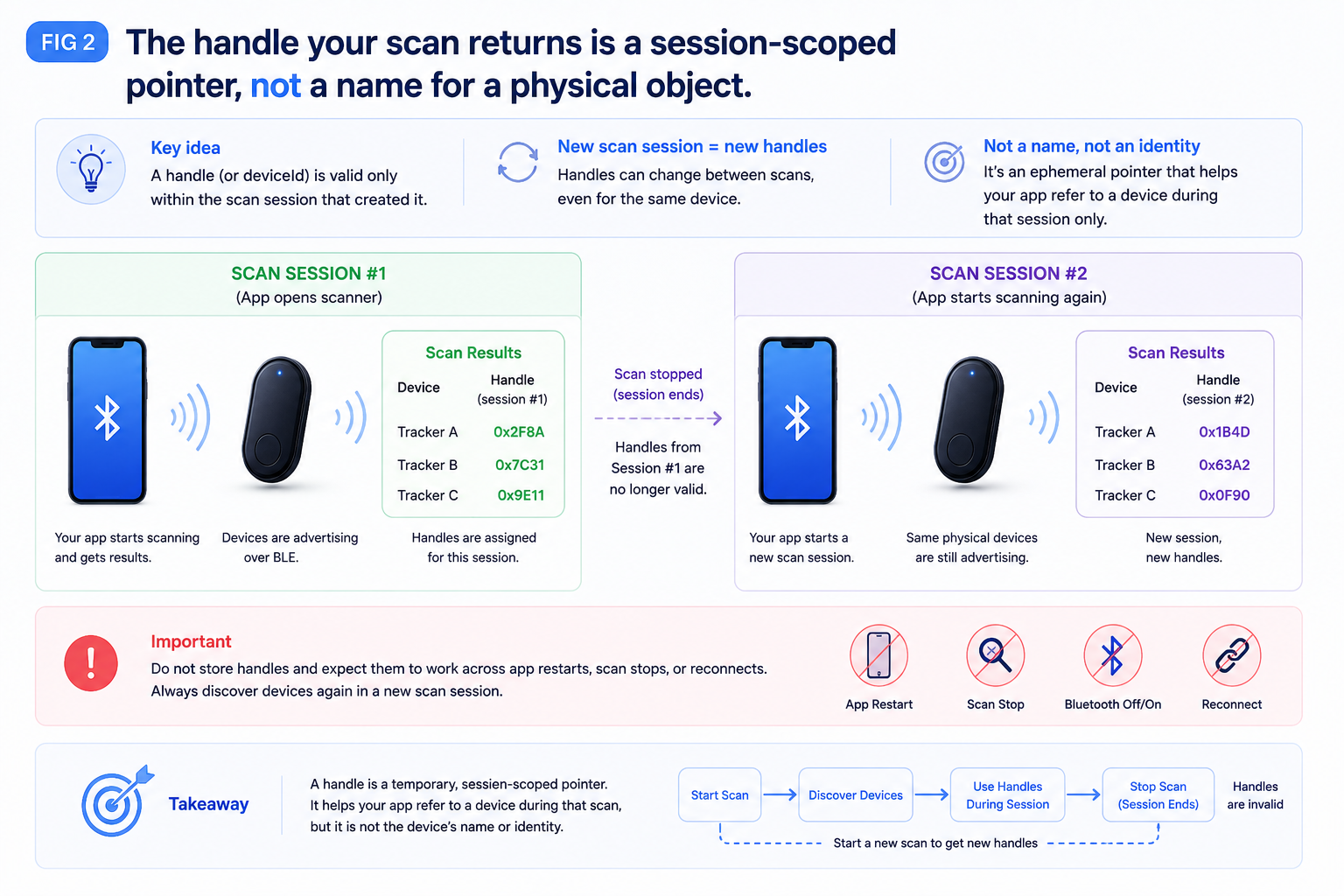
You cannot do it with the identifier the scan hands you.
- On Android, what you get is a MAC address that is very likely randomised. It rotates. The value you stored last week identifies nothing today.
- On iOS, you never see a MAC at all. You get a CoreBluetooth UUID that the system generates — scoped to that phone and that app, and not something you can hand to a backend, a second device, or your firmware team.
The consequence is structural, not cosmetic: a resume flow must re-scan and re-identify the device from scratch every time. If you want a durable identity for a physical unit, it has to come from the device itself — a serial number or hardware ID you read over the connection after you've attached — never from the transport layer's handle.
This is worth catching at design time, because "reconnect to the saved device" is the kind of line that sits innocently in a spec and quietly implies an architecture that can't exist.
Assumption 4: "Autofill the Wi-Fi password from the phone"
This one didn't come from engineering. It came from the design, and it read beautifully: "Saved from your phone nothing to type." The user's phone is already on the network the device needs to join. Obviously the app can pass the credentials along.
It cannot. No public API on either platform returns a saved Wi-Fi password. Android's privileged network-configuration call is system-only. Apple's answer to this exact problem is accessory configuration through its MFi hardware programme, which requires certification and firmware support a hardware decision, not something an app can reach for.
So the screen as designed could never have been built. Not "hard," not "needs a workaround" not implementable. The user types the password, into a masked field, and it goes to the device over a single write. It's never held in view-model state and never logged, and we have a test that fails if it ever appears in either.
The wider lesson is about when this was caught. A flow diagram doesn't tell you which of its steps are backed by a real platform capability. Somebody has to check each one against actual API documentation before the screens get built, or you discover it during integration after the visual design, the copy, and the animation for a step that has to be deleted.
The pattern underneath all four
Every one of these is the same shape: a reasonable abstraction that hides a platform reality it cannot actually hide.
"Scan for my device" hides the advertising budget. "Is Bluetooth available" hides the permission model. "The device ID" hides address randomisation. "Autofill the password" hides the entire OS security boundary around network credentials.
That shape suggests a working rule for hardware integration: treat every capability in the design as unproven until someone has read the platform's own documentation for it. Not a blog post, not a plugin's README we found a case where a widely-used library's README asserted behaviour that its own source contradicted, in a way that would have broken discovery on iOS specifically.
It also changes how the failure surface should be modelled. BLE fails constantly and unremarkably someone walks out of range, a connection is refused, a write times out. Those aren't exceptional conditions, so they shouldn't be exceptions. We made every operation return a value describing what happened, with a small closed set of failure kinds. Nothing on the interface throws and no stream emits an error, because the calling code should be forced to answer the question "what do I show the user when this doesn't work" at every single call site.
Takeaways
Scanning filters match advertisements, not devices. If your peripheral doesn't spend the bytes to advertise its service UUID, filtering on that UUID makes it permanently invisible on iOS. Scan wide, match on name, discover after connecting.
Ask for permission before you read the radio. On Android 12+ the adapter lies about its own state until scanning is allowed and "permission denied" and "Bluetooth off" must never share a message.
The transport's device ID is not an identity. Randomised on one platform, app-scoped on the other. Durable identity comes from the device, read after connecting.
Verify capabilities against platform docs before designing screens around them. The Wi-Fi autofill step had visual design, copy, and a place in the flow before anyone established that no API returns that value.
Model routine failure as data, not as exceptions. Range, refusal, and timeout are the normal weather of BLE. An interface that throws on them invites callers to ignore them.
About Hoomanely
Hoomanely builds connected products and software for pet care — hardware that observes what's actually happening with an animal, and an app that turns it into something an owner can act on.
Setup is where that promise is won or lost. Someone has just unboxed a device; they have not yet received a single benefit from it, and their patience is finite. A discovery screen that spins forever because of an advertising-byte budget, or an instruction that sends them to the wrong settings pane, doesn't read as a technical limitation — it reads as a product that doesn't work. Getting the unglamorous first ninety seconds right is what earns us the chance to be useful for the years afterwards.