
Multi-Pet Identification: Rethinking How We Build the Dog Identity Gallery
In our previous post we hit around 92% identification accuracy on detected frames. That result came with a catch we had quietly set aside: the gallery was built from bowl camera images, evaluated against bowl camera images. What happens when that changes?
The Problem With the Current Setup
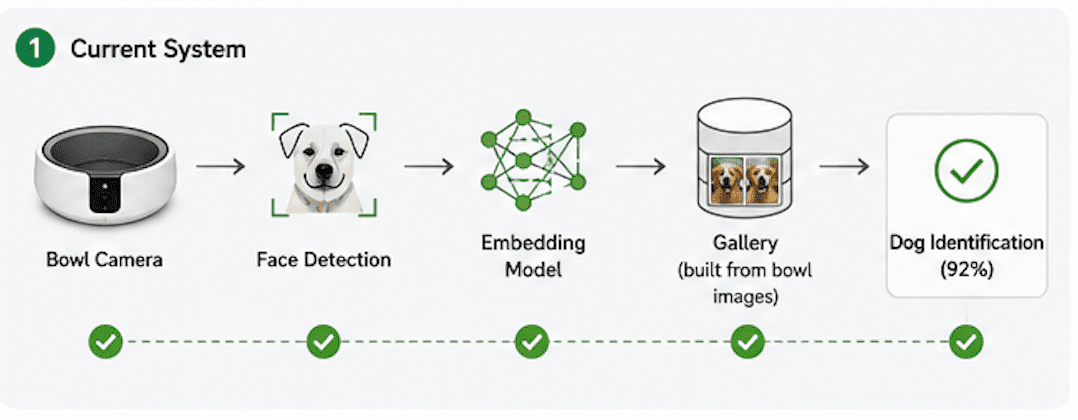
A quick recap of how the system works: the embedding model is trained on labeled face crops, a gallery stores each pet as a mean embedding vector, and inference at the bowl runs the incoming frame through the same preprocessing pipeline and finds the nearest neighbour in the gallery. When all three steps use images from the same camera in the same conditions, the accuracy is solid.
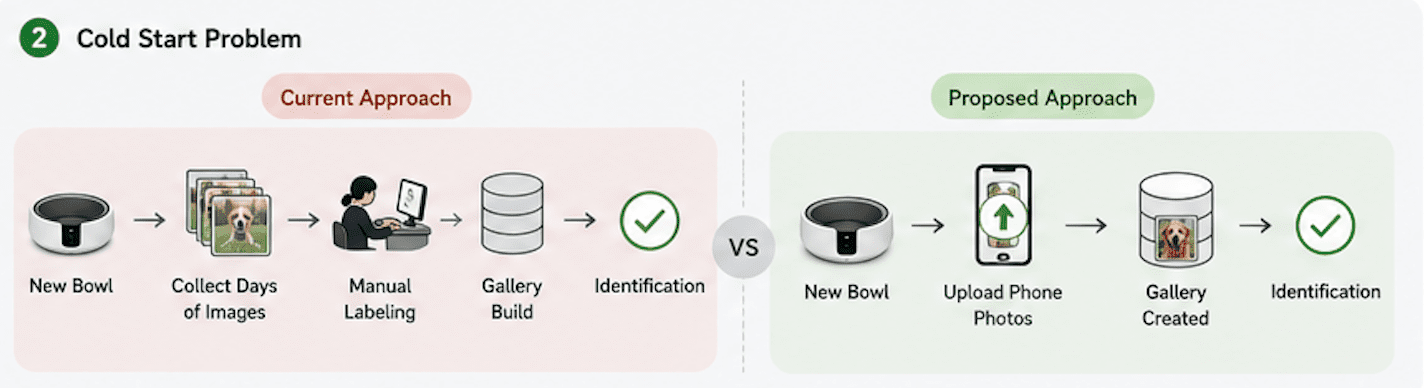
The bootstrapping problem is that the gallery has to come from somewhere. In our current setup, it comes from EverBowl footage: a new household needs days of camera frames, manual labeling, and a gallery rebuild before the system can identify anyone. For a family who just bought a bowl, that is real friction before the product does anything useful.
A More Practical Idea
Almost every pet owner already has photos of their dogs on their phone. Candid shots, close-up portraits, pictures from the park. These tend to be frontal, well-lit, and taken at close range with the dog looking at the camera, which is close to what a face recognition system actually wants for enrollment.
If the gallery could be built from a handful of owner-provided phone photos per pet, the onboarding problem nearly disappears. Upload a few pictures at setup, the gallery gets built immediately, and the system identifies dogs from the first visit. That is the version we wanted to build.
The Domain Gap
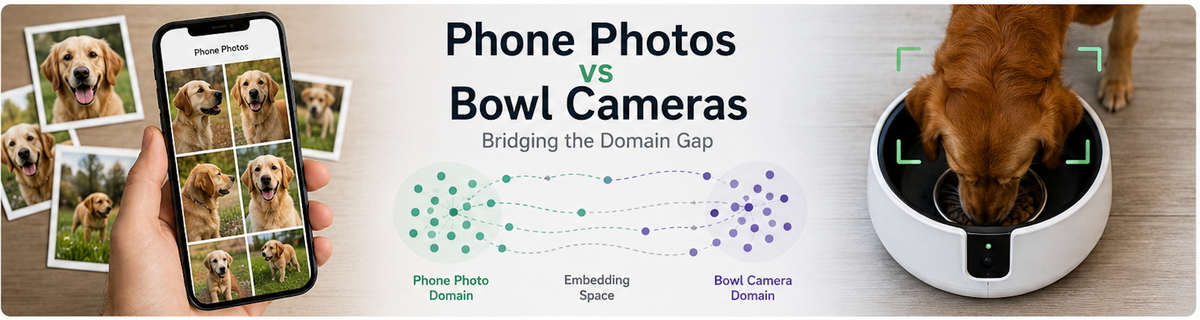
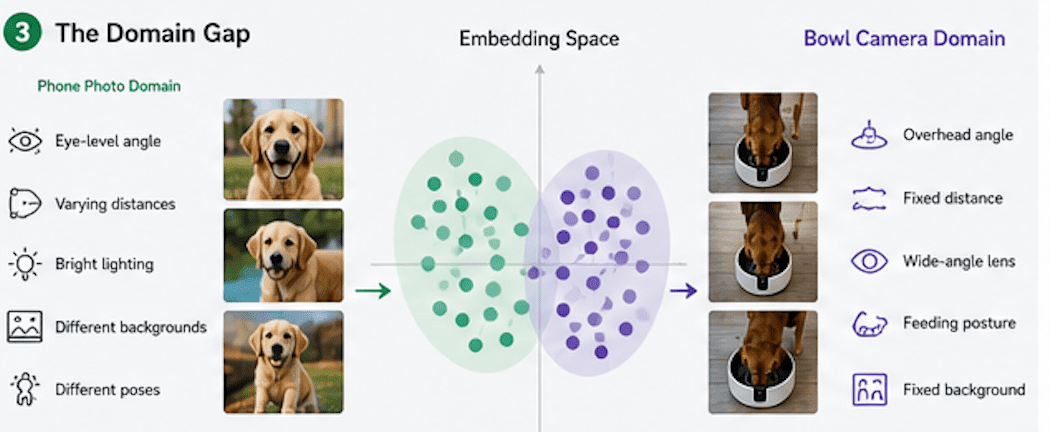
Phone photos and bowl camera images are not the same visual domain. EverBowl's camera sits overhead, angled down, close to the dog. Phone photos are taken from human height or below, at varying distances and backgrounds. The embedding model was trained on bowl camera crops and the Zenodo DogFaceNet dataset. A gallery built from phone photos is asking the model to match a bowl camera query against a phone photo reference across a real visual shift. The preprocessing pipeline should normalize the geometry through face alignment, but texture, lighting, and depth-of-field characteristics are not normalized. We expected this to make things harder. We did not have a good sense of by how much.
Step One: Adapting the Preprocessing Pipeline
The original preprocessing pipeline had a step specifically designed for bowl camera images: an eye detection gate that validated a geometrically plausible pair of eyes before running landmark detection. This gate was calibrated around the overhead, close-range geometry of our bowl camera — angles and distances that phone photos simply do not match.
Phone photos were failing this gate at a high rate. A valid frontal photo taken at eye level does not present the same eye geometry that an overhead bowl camera produces. We removed the eye gate from the phone-photo path and simplified the pipeline to go directly from dog detection to facial landmark detection and alignment. This produced usable crops from phone inputs where the original pipeline had been rejecting most frames.
Step Two: Changing the Embedding Model
After running the gallery experiments below, it became clear that the model itself was also part of the problem. The original embedding model had been trained on a mix of Zenodo images and our own bowl camera crops. Bowl camera crops look very different from phone photos — overhead angle, fisheye distortion, close range. A model trained partly on that data produces embeddings calibrated to that visual domain, which works against matching them to phone photo gallery embeddings.
We retrained on Zenodo only. Zenodo images are phone and consumer camera photographs, which is the same domain as owner-provided enrollment photos. This improved results, though not enough on its own to close the gap to the accuracy we saw when gallery and query images came from the same camera.
Experiment One: One Photo Per Pet
We started with the simplest possible version of phone-photo enrollment: one image per pet. The owner selects a clear, frontal photo, the pipeline extracts an aligned crop, and that single crop becomes the gallery embedding.
One-image enrollment is attractive from a product standpoint. It is the lowest-friction onboarding you can ask for.
But the accuracy was nowhere near the 92% we had seen when gallery and query images came from the same camera, particularly for dogs with similar coat color or face shape. A single embedding from a single image is fragile. It is sensitive to whatever pose and lighting happened to be in that one photo. When the bowl camera captures a slightly different angle on the same dog, the cosine similarity drops. There is not enough margin to absorb normal variation.
Experiment Two: More Photos
The natural response was to add more images. Five phone photos per pet, averaged into a mean embedding, should give more coverage of the dog's appearance and produce a centroid less tied to any single shot. This is essentially how the gallery was built from bowl footage, and it worked well in that context.
We rebuilt the gallery with five phone photos per pet. Accuracy got worse.
This took some time to make sense of. Five bowl camera images of the same dog at the same feeding station are geometrically consistent: same distance, same angle, roughly the same framing. Five phone photos of the same dog are not. One might be a side profile that passed the frontal gate by a narrow margin. One might have the dog partially in shadow. One might be a slightly blurry action shot that survived the sharpness filter. After preprocessing, the crops that pass are more varied than in the bowl camera case, and averaging five dissimilar embeddings does not produce a better centroid. It produces a blurrier one.
We tried one more version: instead of averaging all crops from all images, we took only the top-k most mutually similar crops, reasoning that the most self-consistent subset would form a cleaner centroid. It also performed worse than a single image. The inconsistency in phone photos is enough that even filtering for internal similarity does not recover much.
Where Things Stand
The phone-photo gallery idea has not been abandoned, but the simple version does not work. Adding more enrollment images from an uncontrolled source hurts rather than helps, which is the opposite of what we expected going in.
What the experiments have shown so far: retraining on Zenodo improves detection on phone inputs. One clean phone photo per pet is a better enrollment strategy than multiple inconsistent ones, at least with the current approach. And naive averaging of phone photo crops degrades gallery quality rather than improving it.
The product motivation is still there. Owner-provided phone photos as enrollment data would make the system immediately useful, without the cold-start period the current bowl-footage approach requires. But the path to making it work reliably is less clear than it looked at the start, and we are still working through it.
The next thing we want to understand is whether there is a way to select or weight enrollment crops that makes averaging useful again, and whether the domain gap can be addressed more directly in the model rather than in the gallery construction step. More on that once we have something worth reporting.
This is the third post in our dog identification series. The first covered pipeline design, the second covered real-world results on bowl camera footage.



