One Clip, Many Audios: Why We Label Segments, Not Whole Files
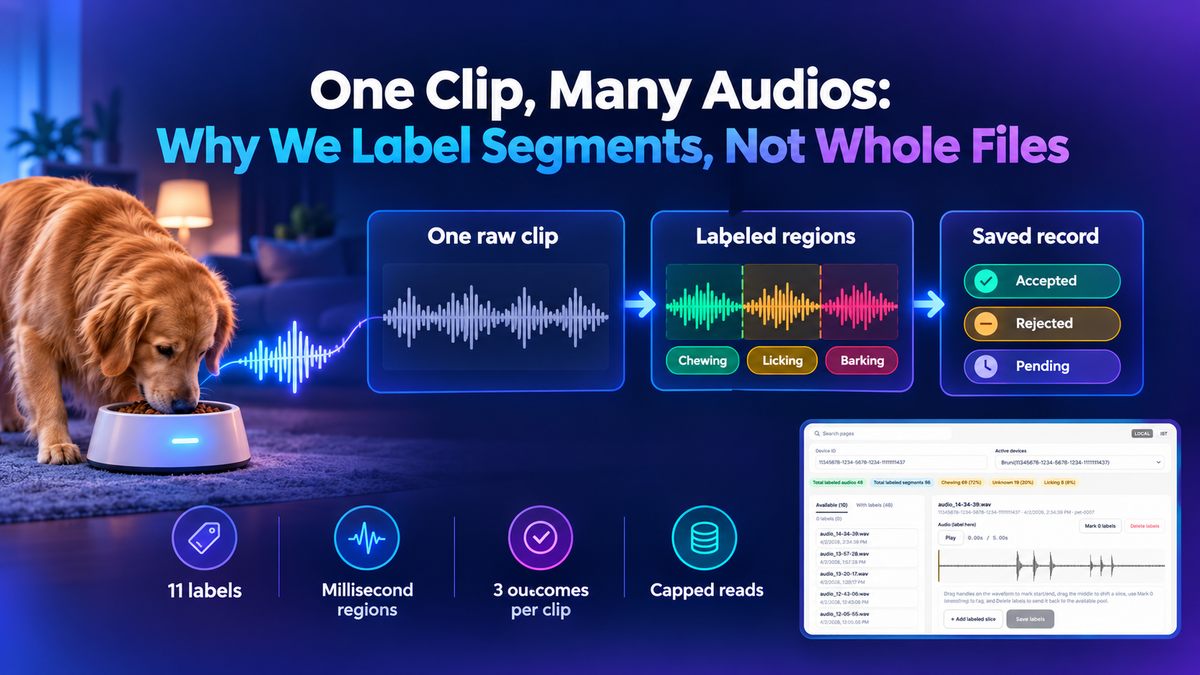
Segment labeling means marking each stretch of a recording with its own start time, end time and sound, instead of giving the whole clip one tag. In our labeling tool, a reviewer picks from 11 labels (10 sounds plus Unknown), drags a region on the waveform, and the server saves each region rounded to the millisecond. A clip with nothing to label is saved as exactly that, so it never comes back for another pass. This post covers why one tag per clip loses information, how clips and saved labels are matched, how the console plays audio without opening the storage bucket, and the limits that keep one busy bowl from slowing a screen. It is written for engineers building annotation tools, or any review screen that sits on top of messy historical data.
The short version
- Each saved region carries a start, an end and one of 11 labels, and any region shorter than 1 millisecond is dropped.
- Clips and labels are matched on the parsed instant, because the same timestamp showed up in 3 different spellings.
- One request reads at most 4,800 events (12 pages of 400), and saved labels are read up to 10,000 rows (20 pages of 500).
- A save has 3 outcomes (accepted, rejected, pending), and who labeled and when is stamped by the server, never taken from the browser.
Why one tag per clip loses information
Our bowls record short audio clips and upload them to cloud storage, a path we describe in Record Now, Send Later: Audio Capture That Yields the Bus. A single clip can hold chewing, then a bark from another room, then a spoon on the dish. Tag the whole file "chewing" and you lose when the chewing happened, and the bark disappears. Segment labels keep the time. The editor shows the waveform, and the reviewer drags a region over each sound and picks a label for it. Fixing a mistake means editing one region, not re-judging the whole clip.
Whole-clip tag | Segment label | |
|---|---|---|
| What is saved | One label per file | Start, end and label per region |
| Chewing followed by a bark | Forced to pick one | Two regions |
| When the sound happened | Lost | Kept to the millisecond |
| Cost of a mistake | The whole clip is wrong | One region to fix |
| Effort per clip | Low | Higher, with a richer result |
The extra effort per clip is the real cost of this design. We accept it because a region with a time range is a far better example of a sound than a file with a guess.
How a save is tidied
The browser sends regions, and the server cleans them before anything is written. Start times are clamped to zero, end times to the clip's duration, and any region shorter than 1 millisecond is discarded. Times are rounded to the millisecond, and regions are sorted by start time. The label set has 11 entries: Chewing, Swallowing, Lip smacking, Retching, Coughing, Sneezing, Heavy breathing, Barking, Slurping, Licking and Unknown. A label outside that set is saved as Unknown instead of being rejected. We chose that after seeing that older rows carried labels the current set no longer has. Rejecting them would have hidden finished work, while mapping them keeps the clip visible and fixable.
Three outcomes for every clip
A save is decided per clip, from its regions. If regions are present, the clip is saved as accepted. If the reviewer marks it rejected with no regions, it is saved as "nothing to label", which keeps it out of the queue. If it is pending with no regions, the saved row is deleted, which sends the clip back to the pool. Rejected with regions is refused, because a clip cannot both have sounds and have nothing to label. Who labeled and when are stamped on the server from what it already knows, so the browser cannot forge the record. This is the same idea we describe in Beyond Tenant Isolation: Designing Privacy-First Admin Consoles: the server decides what is true, and the screen only asks.
What failed: the same instant, 3 spellings
Our first match between a clip and its labels compared timestamp text. It failed quietly. The clip rows and the label rows were written by different code over time, so one instant appeared as 2026-01-04T14:29:46+00:00, as 2026-01-04 14:29:46.000000+0000, and with a trailing Z. A clip that had been labeled showed as unlabeled because the strings differed.
The fix is to match on the parsed instant instead of the text. We replace the space with a T, repair an offset written without a colon, parse it, convert to UTC and write it back with a trailing Z. A timestamp that cannot be parsed returns nothing, and a save for a clip whose time cannot be read is refused. That refusal matters: a label saved under a wrong key is worse than no label, because nobody looks for it.
What failed: playing a clip from a bucket link
The obvious way to play a clip is to hand the browser a link to the storage bucket. That does not work in our console. Its security policy allows no other origin and no blob: media, so a bucket link cannot play. This policy is part of why every screen reaches the server through one path, as in One Door to the Backend.
So the backend reads the object and returns it as base64, and the screen decodes it. The cost is size: base64 adds about 33 percent to the payload, so there is a configured size limit and a clip over it is refused with a clear message. The route also takes an object key, never an address. It reads only under the asking bowl's own prefix, in the one configured bucket, and it rejects keys containing .. or a backslash. Only 5 audio formats are served: wav, mp3, flac, ogg and m4a. The route cannot be pointed at anything else the credentials could read.
Bounding every read
Each bowl logs events of every type, and audio is a small share of them. Reading a bowl's whole history to find its clips would make a quiet bowl as slow as a busy one. So the reader works newest first in pages of 400 events, filters to audio, and stops after 12 pages, which is at most 4,800 events per request. Older clips are reached by paging on from a cursor.
Saved labels follow the same rule. They are read 500 rows at a time and never past 20 pages, so at most 10,000 rows. A runaway partition slows one screen, not the process. The honest tradeoff is that a bowl with a very deep history needs more than one request to see everything. We prefer that to an unbounded read. The wider pattern of keeping time-ordered bowl data cheap to read is covered in Time-Series at Mealtime: Why Our Sensor Data Lives in Cassandra.
What this means for EverBowl™
EverBowl™ learns how a dog eats and drinks over weeks and months, and the sounds around a meal are part of that record. Careful segment labels give that learning clean, time-stamped examples of chewing, swallowing and licking, instead of guesses about a whole file. The honest limit is that this tool only records what a person heard. EverBowl does not diagnose anything; the value is the record.
Conclusion
If you are building an annotation screen, label segments instead of whole files, match records on parsed instants instead of text, and put every read under a cap. Keep the browser's trust boundary at the backend, so the server decides who labeled what and which files can be read. Then add a second review pass before the labels are used. Start with the match between clips and labels, because that is where silent errors hide.
FAQs
What is audio segment labeling?
It is marking each stretch of a recording with a start time, an end time and a sound label. A clip can carry several regions, each with its own label. This keeps the timing that a single tag for the whole file would lose.
Why not tag the whole clip?
A clip often holds more than one sound, and one tag cannot say which part is which. A mistake in a whole-clip tag makes the entire clip wrong. With segments, you fix one region.
What happens to a label that is not in the allowed list?
It is saved as Unknown instead of being rejected. Older rows that used labels the current set no longer has still load, and the clip stays visible so someone can fix it.
How can the console play audio when the browser cannot reach the bucket?
The backend reads the object and returns it as base64, and the screen decodes it. The route takes a key, reads only under the asking bowl's prefix in one configured bucket, and serves 5 audio formats up to a size limit.
Why cap the number of pages read per request?
Each bowl logs many more events than clips, and a full scan would make a quiet bowl as slow as a busy one. Capping at 12 pages of 400 events keeps each request bounded. Older clips are reached by paging on.