Audio codec power down on a wearable: recording only on demand
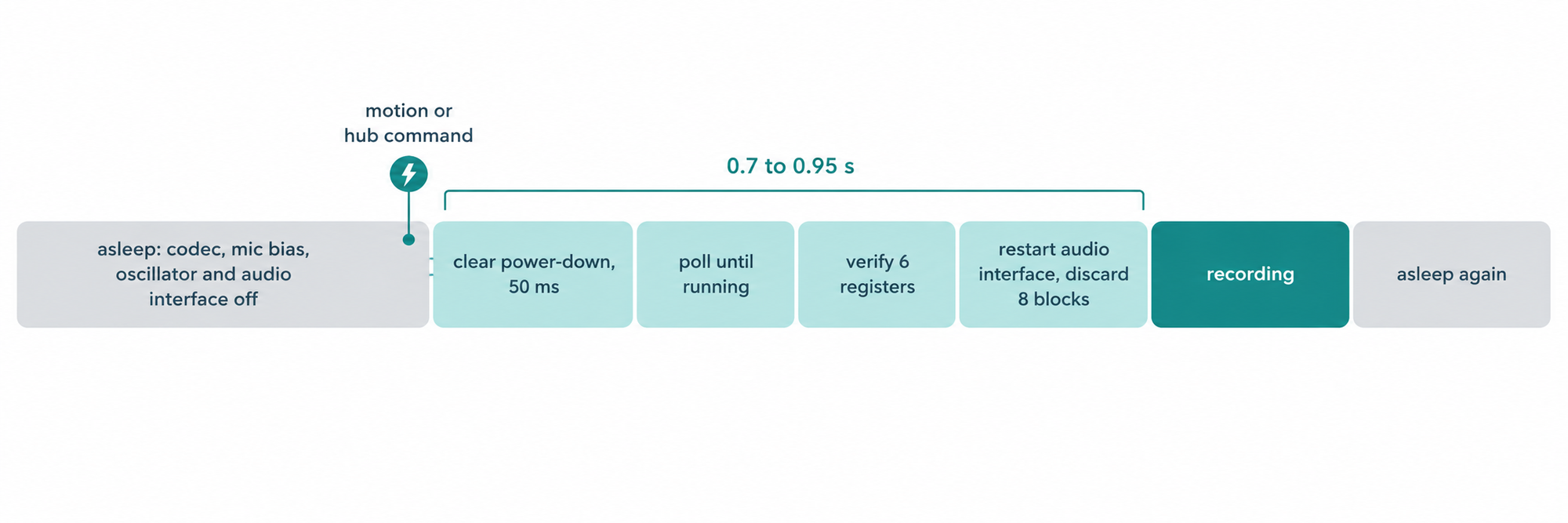
An audio codec on a battery wearable should be fully powered down whenever nothing is recording, and woken only when there is something worth hearing. On our dog collar, the codec, its microphone bias supply, its crystal oscillator and the MCU's audio interface are all off between recordings. A motion event or a command from the hub wakes the front end from power-down to running in 0.7 to 0.95 seconds, and 9 of 9 bench wake cycles came up clean with 0 full re-initializations.
This post explains what powers down, how a wake is sequenced and verified, and how capture stays lossless once the microphone is running. It closes with a comparison of the always-on and duty-cycled designs, the bench results, and the limit this design accepts.
The short version
- Between recordings, the codec, microphone bias, crystal oscillator and audio interface are all powered down, which removes a CPU wake every 38 ms audio block while the dog is at rest.
- A wake takes 0.7 to 0.95 seconds from power-down to running, and 9 of 9 bench wake cycles came up clean with 0 full re-initializations.
- The capture loop never writes to flash, because a separate writer task drains a 32-block queue that holds about 1 second of audio.
- On 10-second and 20-second clips the path recorded 0 DMA overflows and 0 queue drops, with the stream measuring 16,015 Hz.
Why an always-on audio front end costs power
The design we started from kept the microphone path running continuously. The codec sampled, the audio interface moved every block into memory by DMA, and the capture task woke every 38 ms to encode a block and check the motion gate. That kept a short pre-roll buffer ready, so a clip could include the instant before a trigger.
On a collar, that trade is poor. A dog spends most of its day resting, and during that time every one of those wakes, plus the codec's analog front end and clock, draws current for audio nobody will keep. The first step in our automatic light sleep work made the CPU sleep between tasks, and the audio path was the next large consumer to address.
What powers down between recordings
When the collar is not recording, four things are off. The codec enters its power-down mode, which turns off its ADC, its digital filter, the microphone bias supply and its own crystal oscillator. The MCU stops its audio interface, so no DMA runs and no interrupts fire. The audio path also releases its stay-awake lock, so the CPU is free to enter light sleep.
The order of those steps is deliberate. The audio interface stops first, so no DMA transfer is reading from a codec that is shutting down, and only then does the codec receive its power-down command. The codec shares its control bus with the motion sensor, so if that bus is busy with a sensor burst, the driver waits 20 ms and sends the command once more.
The capture task itself does no work while asleep. It blocks on a task notification and polls the motion gate on a slow timer, with the policy fixed by four constants:
301	#define MIC_IDLE_POLL_MS          100
302	#define MIC_WAKE_TIMEOUT_MS       1500   /* RUN poll before falling back to full re-init */
303	#define MIC_WAKE_DISCARD_BLOCKS   8      /* ~300 ms: stale DMA + the slow first blocks after RUN (measured ~10 at 47 ms) */
304	#define MIC_WAKE_FAIL_BACKOFF_MS  10000  /* don't hammer a codec that won't wake */
A 100 ms poll is safe because the motion sensor latches a wake-on-motion event for 500 ms, so a poll can never miss one. How that motion gate is built is covered in our post on fusing IMU and audio on a collar.
How the microphone wakes
A wake has four steps, and each one has a clear exit if it does not complete. The whole sequence runs inside the capture task, so nothing else in the firmware needs to know whether the microphone is awake.
Step 1: wait for a reason to record
The task wakes for one of two reasons. Either the hub sends a record command, which arrives as a task notification and wakes it at once, or the 100 ms poll sees the motion gate latched. No other event turns the microphone on.
The hub's request carries the clip length and an optional clip ID, and the firmware consumes it exactly once. Because the request notifies the capture task directly, a microphone that is asleep starts waking as soon as the command arrives instead of on the next poll. Hub-initiated recordings are what operators use to capture a clip on demand during testing.
Step 2: resume the codec and verify its configuration
The firmware clears the codec's power-down bit, waits 50 ms for its oscillator to restart, then polls the codec's status register every 25 ms until it reports that it is running. The poll gives up after 1,500 ms.
Reaching the running state is not enough on its own. The driver then reads back six registers that must survive a power cycle, covering the audio data format, the two clock dividers, the clock mode, the input selection and the gain. If any value differs from what was written, the driver performs a full initialization instead of trusting a partly configured chip.
Step 3: restart the audio interface and discard the fade-in
Once the codec is running, the MCU takes its stay-awake lock, clears the DMA buffers and restarts the audio interface. The first blocks after a wake arrive slowly while the codec settles, so they are read and dropped:
1389	    audio_pm_hold(true);                       /* I2S slave needs APB + no light sleep while recording */
1390	    i2s_zero_dma_buffer(I2S_NUM_0);
1391	    i2s_start(I2S_NUM_0);
1392	    /* Discard the first blocks and time them: the codec declares RUN before
1393	     * its I2S output is at full rate, so the first ~second of blocks arrives
1394	     * slowly. The per-block times tell us exactly how long that lasts. */
1395	    int64_t td0 = esp_timer_get_time();
1396	    for (int i = 0; i < MIC_WAKE_DISCARD_BLOCKS; ++i) {
1397	        if (read_one_block_mono(scratch) != 0) break;
1398	    }
1399	    uint32_t discard_ms = (uint32_t)((esp_timer_get_time() - td0) / 1000);
Timing the discarded blocks turns every wake into a measurement. The section on measuring every wake explains how those numbers are kept.
Step 4: arm the clip, then sleep again
With clean audio flowing, the clip is armed and recorded. When it closes and no new trigger is pending, the task stops the audio interface, powers the codec down and releases its lock. The collar is back to drawing no audio power at all.
Measuring every wake
Each wake reports how long the codec took to reach running and how long the discarded blocks took to arrive. The firmware also keeps four running counters: total wakes, wakes that did not complete, wakes that needed a full initialization, and the slowest wake seen. Every time the microphone goes back to sleep, it logs all four in one line.
Those counters are what turned the bench gate into numbers rather than impressions. Reading one log line after a test run shows immediately whether every wake was clean and how much headroom remains under the 1,500 ms polling limit. The counters are part of the firmware itself, so the behavior can be checked on any collar running it without extra instrumentation.
Keeping flash writes off the capture path
A microphone that wakes on demand also has to record losslessly once it is awake. Flash writes on a filesystem take variable time, so the capture loop never performs them. It posts open, block and close commands to a queue, and a low-priority writer task does all the file work:
501	static void clip_writer_task(void *arg)
502	{
503	    (void)arg;
504	    static clipw_item_t it;
505	    for (;;) {
506	        if (xQueueReceive(s_clipw_q, &it, portMAX_DELAY) != pdTRUE) continue;
507	        switch (it.op) {
508	        case CLIPW_OPEN:
509	            s_clipw_open_failed = (clip_open(it.cid, it.ts_ms) != 0);
510	            file_operations_sidecar_service();   /* IMU sidecar open, off the capture loop */
511	            break;
512	        case CLIPW_BLOCK:
513	            clip_write_block(it.d);
514	            break;
515	        case CLIPW_CLOSE:
516	            clip_close();
517	            file_operations_sidecar_service();   /* IMU sidecar close/rename even if IMU frames stopped */
518	            s_clipw_busy = false;
519	            break;
520	        }
521	    }
522	}
The queue holds 32 blocks, about 9 KB or 1 second of audio. An average block costs about 20 ms of flash time against a 38 ms block period, so the queue always drains between slower writes. The memory was paid for by halving the audio DMA ring from 8 buffers to 4, and free heap rose from 9.8 KB to 19.9 KB at the same time.
Block posts never wait. If the queue were ever full, the block would be dropped and counted, which makes the queue the single, visible place where audio could be lost. Clips then leave the collar over the link described in two streams, one link.
Always-on versus duty-cycled
| Always-on front end | Duty-cycled front end | |
|---|---|---|
| Codec at rest | Running | Powered down |
| Microphone bias and codec oscillator at rest | On | Off |
| Audio interface and DMA at rest | Running | Stopped |
| CPU wakes for audio at rest | One per 38 ms block | None |
| Audio before a trigger | Pre-roll available | Not captured |
| Time to first usable audio | Immediate | 0.7 to 0.95 s |
| Where audio can be lost while recording | Not isolated | Only a full writer queue, counted |
The table shows the one real cost of this design. Without a running front end there is no pre-roll, so the clip starts after the wake rather than slightly before the trigger.
Bench results
We gated the change on the bench before moving on. Across 9 wake cycles, every wake reached running with its configuration intact, and none needed a full initialization. Wake time from power-down to running was 0.7 to 0.95 seconds.
Capture was measured on 10-second and 20-second clips with 0 DMA overflows and 0 writer-queue drops. The stream measured 16,015 Hz over an 8.23-second window and 15,934 Hz over a 16.51-second window, matching the codec's own 16 kHz report. Those clips fed our audio classifier on the hub, which classified every test clip.
What this lets EverBowl do
The collar works alongside EverBowl™ in the Hoomanely ecosystem. Because the microphone wakes only for motion or a request from the hub, the clips that reach the audio models are moments that carry information, and the collar spends no battery on audio while the dog rests. That lets the ecosystem recognize a dog's sounds from the moments that matter while the collar's battery goes to the work that needs it.
The honest limit is the wake time. A sound that starts and ends within the first second after a trigger is not captured, and there is no pre-roll from before the trigger. EverBowl does not diagnose; the value is the record.
Conclusion
Powering the audio front end down between recordings removes the largest idle audio cost on a collar, at the price of about one second of wake time. Verifying the codec's configuration on every wake keeps that saving from costing correctness. If you are building a battery wearable with a codec, measure its wake time first, then decide whether your use case can accept losing the pre-roll. For more of our work in this area, see the firmware category.