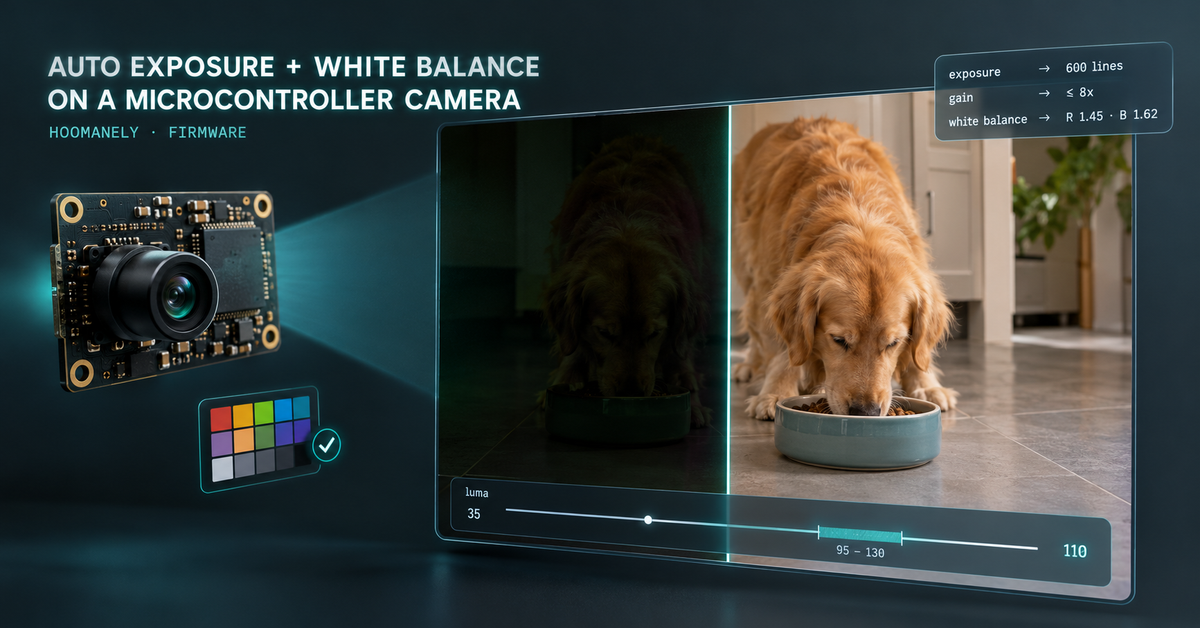
Auto exposure and white balance on a microcontroller camera
Auto exposure and auto white balance on a microcontroller camera can run as a small firmware loop on top of the chip's hardware image signal processor (ISP), with no host and no image library. On our new camera module, a once-per-second loop meters the processed image, steers sensor exposure and analog gain toward a target luma of 110, and nudges white-balance gains a quarter step at a time. On the bench, mean JPEG brightness went from 35 on the untuned pipeline to about 110, exposure converged in 2 steps, greys came out neutral, and the primaries of a 12-patch color chart landed within a few percent.
This post covers the order of the ISP stages, how the exposure controller decides between exposure time and gain, how white balance chooses which pixels to trust, and how a fixed color matrix was fitted. It ends with a stage-by-stage comparison and what this work lets EverBowl do.
The short version
- A firmware loop running once per second meters the processed luma and steers it into a 95 to 130 band around a target of 110.
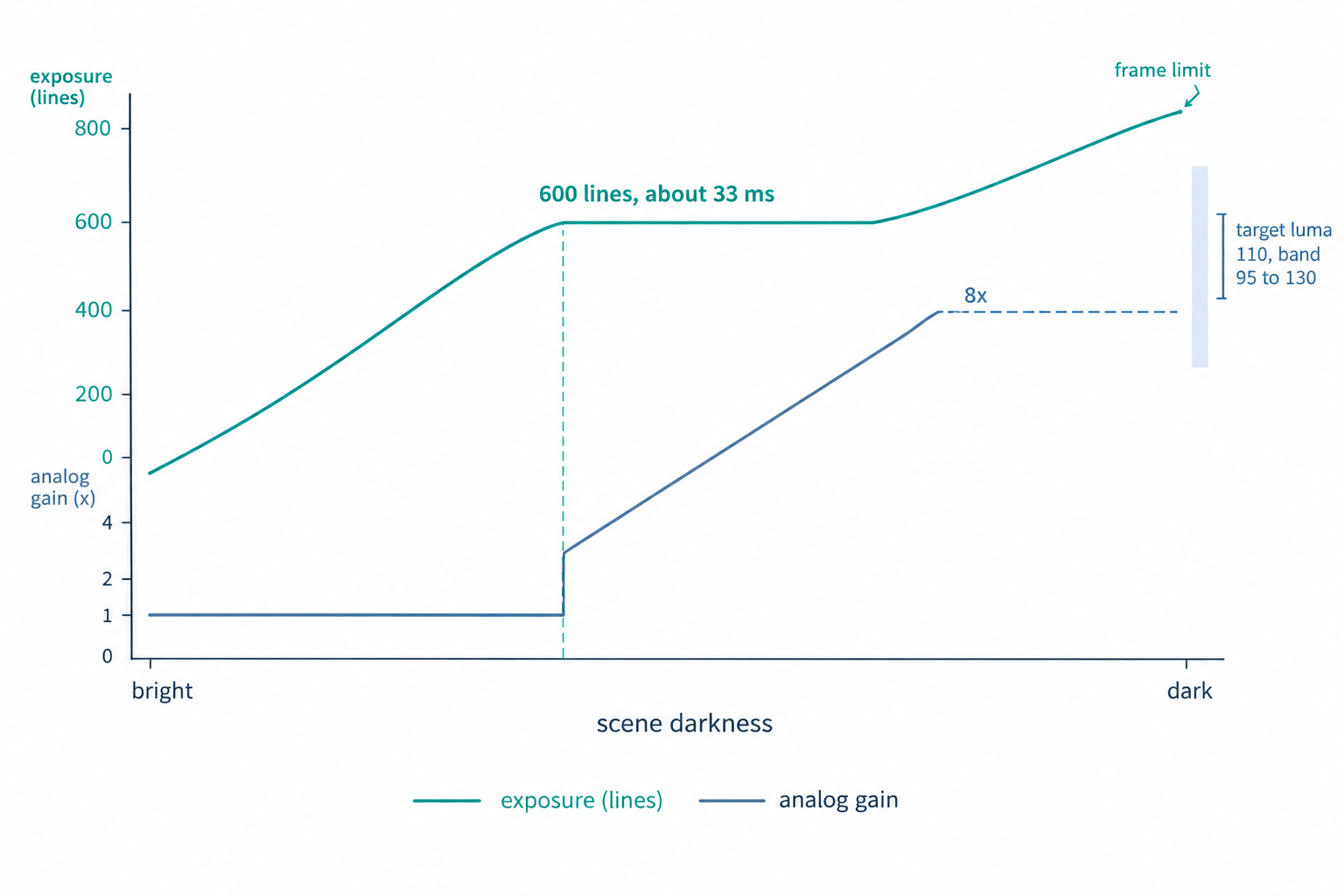
- Exposure time rises first up to 600 lines, about 33 ms, then analog gain up to 8x, and each step changes total exposure by no more than x0.5 to x2.
- White balance votes only with near-neutral, mid-tone pixels, moves a quarter of the way per update, and stays within 0.94 to 1.96 for red and 1.05 to 2.19 for blue.
- On the bench, mean JPEG brightness rose from 35 to about 110 and exposure converged in 2 steps.
Where each stage runs in the image pipeline
The camera module's hardware pipeline already demosaics the sensor's raw Bayer data, converts it to YUV, and feeds both the JPEG encoder and a small tile for the neural accelerator, as described in our post on the all-hardware image pipeline. The ISP inside that pipeline has blocks for black level, per-channel gain, a 3x3 color conversion matrix and gamma. Image quality work is mostly a matter of configuring those blocks in the right order and then closing two control loops around them.
The order matters because each stage assumes the previous one is done. Black level is subtracted first, so that zero light reads as zero. White-balance gains and the color matrix then act in linear light, and gamma is applied last so the output looks right to people and to models. Exposure and gain sit outside the ISP entirely, in the sensor, and are written over its control bus.
Black level and gamma
The sensor adds a fixed pedestal of 64 counts out of 1,023 to every pixel, which is 16 in the 8-bit domain the ISP blocks use. The firmware programs a black level of 16 on all three channels, so a dark scene reads as black instead of dark grey. That single setting widens the usable range of every later stage.
Gamma is enabled on both the full-resolution image path and the neural accelerator's tile path. A scene with a 25 percent linear mean then displays as mid-grey rather than dark. Applying gamma to the tile as well matters because the models we run, such as the one in our first on-module neural network post, were trained on gamma-encoded photographs.
How the exposure controller works
The controller meters what the product actually encodes. Once per second, firmware samples the luma plane of the processed frame on a sparse grid, every 12th row and every 16th column, and takes the mean. Because that plane is after black level, gamma and color conversion, the number it steers is the brightness a viewer and a model will see.
Step 1: compute the exposure the scene needs
If the mean is already inside the 95 to 130 band, nothing changes. Otherwise the controller computes a new total exposure, the product of exposure lines and gain. Luma is gamma-encoded at roughly 1/2.2, so a factor in luma needs about the square of that factor in linear exposure:
905	    /* Y is gamma-encoded (~1/2.2): a factor f in Y needs ~f^2 in linear exposure */
906	    uint64_t E = (uint64_t)cur_l * cur_g;                       /* lines x milli-gain */
907	    uint64_t want = E * AE_Y_TARGET * AE_Y_TARGET / ((uint64_t)meanY * meanY);
908	    if (want > E * 2U) { want = E * 2U; }                       /* step limit x0.5..x2 */
909	    if (want < E / 2U) { want = E / 2U; }
The step limit keeps a single bright or dark frame from swinging the image. Combined with the square-law estimate, it is why the loop converges in 2 steps from a dark start instead of creeping.
Step 2: split exposure between time and gain
Longer exposure collects more light, while gain amplifies noise along with the signal, so the controller spends exposure first. Only when exposure reaches its cap does it raise analog gain, and only when gain reaches 8x does it lengthen exposure further:
912	    if (want / gmin <= AE_EXP_CAP_LINES) {                      /* exposure alone */
913	        lines = (uint32_t)(want / gmin); gain = gmin;
914	    } else if (want / AE_EXP_CAP_LINES <= AE_GAIN_MILLI_MAX) {  /* then analog gain */
915	        lines = AE_EXP_CAP_LINES; gain = (uint32_t)(want / AE_EXP_CAP_LINES);
916	    } else {                                                    /* then longer exposure */
917	        gain = AE_GAIN_MILLI_MAX; lines = (uint32_t)(want / AE_GAIN_MILLI_MAX);
918	    }
The cap of 600 lines is about 33 ms, half of a 66 ms frame at 15 frames per second. That keeps motion blur in check for a moving dog while leaving the full frame time available for very dim scenes.
Step 3: write gain atomically
Gain is a register code on the sensor, and the firmware converts between that code and a gain value in thousandths. Writes are wrapped in the sensor's group-hold so exposure and gain change on the same frame. Each step prints a one-line log with the luma, old and new exposure, and old and new gain.
How auto white balance chooses its pixels
White balance runs only after exposure is in band, because a dark or clipped frame gives unreliable color. It uses the neural accelerator's tile, which has already passed through gamma, and asks a simple question: if the neutral parts of this scene were truly grey, what gains would make red and blue equal green?
A plain gray-world average lets a red bowl or a bright window pull the whole image off. So only pixels that are close to neutral and in the mid-tones get a vote:
681	                    /* Build BE: robust grey-world: only pixels that are already near neutral
682	                     * (max-min < 48) and mid-toned (40..230) vote, so saturated patches and
683	                     * clipped areas cannot drag the gains. Falls back to all pixels if < 5 %% qualify. */
684	                    uint32_t ar = 0, ag = 0, ab = 0, an = 0;
685	                    for (uint32_t i = 0; i < APP_CAM_TILE_W * APP_CAM_TILE_H; i += 37U) {
686	                        uint8_t r8 = tp[3U * i], g8 = tp[3U * i + 1U], b8 = tp[3U * i + 2U];
687	                        ar += r8; ag += g8; ab += b8; an++;
688	                        uint8_t mx = r8 > g8 ? r8 : g8; if (b8 > mx) { mx = b8; }
689	                        uint8_t mn = r8 < g8 ? r8 : g8; if (b8 < mn) { mn = b8; }
690	                        if ((mx - mn) < 48U && mx < 230U && mn > 40U) { sr += r8; sg += g8; sb += b8; tn++; }
691	                    }
692	                    if (tn * 20U < an) { sr = ar; sg = ag; sb = ab; tn = an; }
The gains themselves move only a quarter of the way toward the new estimate on each update. Updates smaller than 3 percent are skipped, so the image does not shimmer. Red gain is bounded to 0.94 to 1.96 and blue to 1.05 to 2.19, within 35 percent of the starting point measured on a grey ramp, which was red 1.45, green 1.00 and blue 1.62.
Writing gains into the hardware
The ISP does not take a gain as a decimal number. Each channel's gain is a multiplier out of 128 combined with a power-of-two shift, so the firmware converts a gain in thousandths into that pair before writing it. A gain of 1.0 is a multiplier of 128 with no shift, and larger gains halve the multiplier and add a shift until it fits in 8 bits.
Keeping gains in thousandths everywhere else in the firmware makes the control math plain integer arithmetic. The conversion happens once, at the point where the value reaches the hardware, and the current gains can always be read back for logging.
The color correction matrix
White balance makes greys neutral, but it cannot make a red look like the right red. For that, the ISP applies a 3x3 color matrix in linear light, after white balance and before gamma. Ours was fitted by least squares on a capture of a 12-patch chart shown on screen.
Each row of the matrix is normalized to sum to 1.0, so a grey input stays grey and the matrix never fights white balance. The coefficients are stored multiplied by 256, with negative values encoded as 11-bit two's complement to match the ISP's register fields. The output is kept at full range rather than clamped to video range, which keeps true blacks black after gamma.
Stage by stage
| Stage | What it does | Value on this module |
|---|---|---|
| Black level | Removes the sensor pedestal | 16 on each channel |
| White balance gains | Equalize channels in linear light | Start R 1.45, G 1.00, B 1.62 |
| Color matrix | Maps sensor color to true color | 3x3, fitted on a 12-patch chart |
| Gamma | Encodes for display and models | On, both image and model tile |
| Auto exposure | Steers luma to target | 110, band 95 to 130, once per second |
| Auto white balance | Refines gains on neutral pixels | Quarter step, 3 percent dead band |
Bench results
We verified the chain on the bench on October 28, 2026. Mean JPEG brightness rose from 35 on the untuned pipeline to about 110, and exposure converged in 2 steps. Greys rendered neutral, and the chart primaries came within a few percent of their reference values.
Both loops share one timer and run in a fixed order each second: exposure first, and white balance only when exposure reports that it is in band. That ordering means white balance never measures a frame that exposure is about to change, and the two controllers never chase each other. The images then feed the same checks described in our post on building a reliable dog image check.
Because both loops log a single line per update, a run can be audited afterwards from the console alone. A small host tool extracts every captured JPEG and model tile from that log for side-by-side review, which is how the color matrix was fitted and checked.
What this lets EverBowl do
The camera inside EverBowl™ is how it recognizes which dog is at the bowl, and recognition starts with pixels. With exposure and color handled on the module, the frames that reach the face models are bright enough and color-true across kitchens with very different light, which is the condition our pet facial recognition post depends on.
The honest limit is that this work is on the new camera module's evaluation board, not yet in shipping bowls. The white balance also assumes the scene contains something close to neutral, and its bounds keep it from correcting a strongly tinted scene fully. EverBowl does not diagnose; the value is the record.
Conclusion
A microcontroller's hardware ISP can produce well-exposed, color-correct images when firmware configures its stages in the right order and closes two small loops around them. Meter what you encode, spend exposure before gain, and let only neutral pixels vote on white balance. The next step is moving this chain from the evaluation board into the product build. More of our camera and firmware work is in the firmware category.